Understand Producers, Consumers, Topics, Partitions, and Consumer Groups with Simple Examples and C# Code
Introduction
Imagine you're building an e-commerce application using ASP.NET Core Web API.
A customer places an order.
Immediately, several things need to happen:
Save the order.
Process the payment.
Update inventory.
Send an order confirmation.
Update sales analytics.
How should these services communicate?
One option is to call each service directly using HTTP APIs.
But what happens if the notification service is temporarily unavailable?
What happens if thousands of orders arrive within a few seconds?
What if you want to add another service later without changing the order service?
This is where Apache Kafka becomes useful.
Kafka helps applications communicate through events without requiring every service to call every other service directly.
Let's understand Kafka from scratch.
1. What Is Apache Kafka?
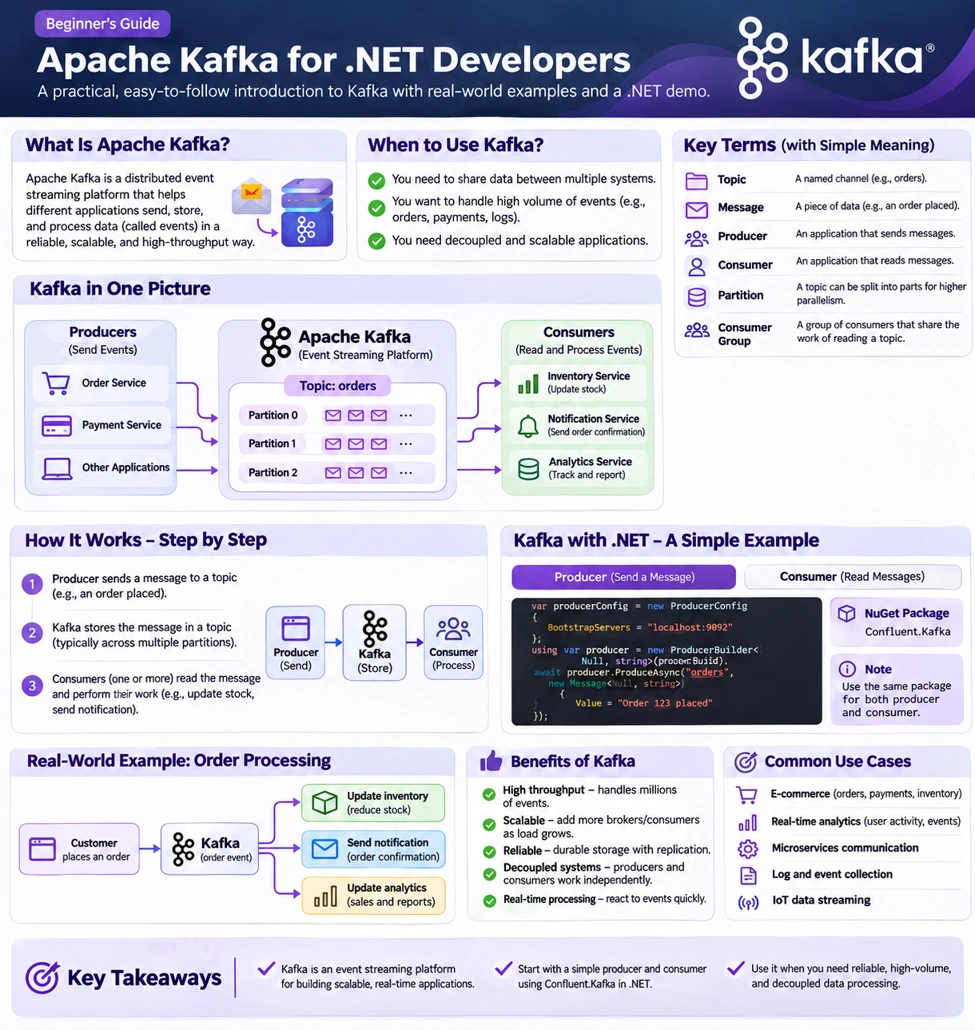
Figure 1 — Kafka concepts and a beginner-friendly overview
Apache Kafka is a distributed event-streaming platform used to publish, store, and process streams of events.
In simple terms:
Kafka allows one application to send an event and other applications to consume that event independently.
For example, when a customer places an order, the Order Service can publish:
{
"eventType": "OrderPlaced",
"orderId": 101,
"customerId": 501,
"totalAmount": 2500
}
Other services can process this event according to their responsibilities.
The Order Service doesn't need to wait for every downstream service to complete its work.
Real-Life Analogy: A Newspaper
Think of Kafka like a newspaper distribution system.
A newspaper publisher produces information.
The distribution system makes the newspaper available.
Different readers consume the information according to their interests.
Similarly:
Producer: Publishes an event.
Kafka: Stores the event.
Consumer: Reads and processes the event.
Unlike a traditional one-time delivery analogy, Kafka retains events according to configured retention policies, so consumers can read them later or replay them when appropriate.
2. Why Do We Need Kafka?
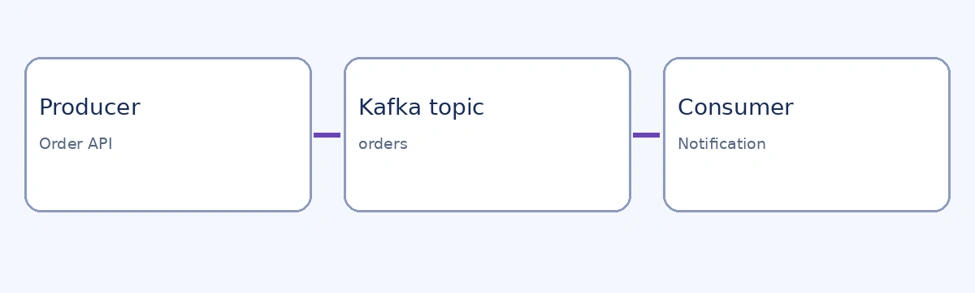
Figure 2 — Producer → Kafka → downstream consumers
Let's first understand the problem without Kafka.
Without Kafka — Direct Service Communication
Customer
|
v
Order Service
|
+----> Payment Service
|
+----> Inventory Service
|
+----> Notification Service
|
+----> Analytics Service
The Order Service communicates directly with several downstream services.
This creates challenges.
Tight coupling: The Order Service needs to know how to communicate with each dependency.
Failure handling: A downstream service failure may complicate the order workflow.
Traffic spikes: Sudden increases in requests can overload dependent services.
Adding new functionality: New integrations may require changes to the Order Service.
Direct HTTP communication isn't inherently wrong. It's useful when an immediate response is required.
But for asynchronous event-driven workflows, Kafka can provide a better separation of responsibilities.
With Kafka — Event-Driven Communication
Customer
|
v
Order Service
|
| Publish OrderPlaced
v
Apache Kafka
|
+----> Inventory Service
|
+----> Notification Service
|
+----> Analytics Service
The Order Service publishes an event.
Other services subscribe to and process that event independently.
Payment processing still requires an explicit business workflow. Publishing an order event doesn't automatically guarantee that payment, inventory reservation, and order confirmation occur atomically.
3. Important Kafka Concepts
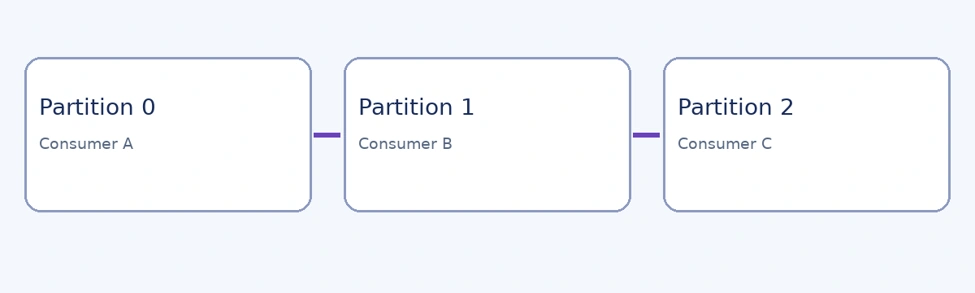
Figure 3 — Topic partitions and consumer-group distribution
Before writing code, understand these six fundamental concepts.
1. Producer
A producer is an application that sends messages to Kafka.
Example:
Order Service
|
| OrderPlaced Event
v
Kafka
In ASP.NET Core, your Web API or background service can act as a Kafka producer.
2. Consumer
A consumer is an application that reads messages from Kafka.
Example:
Kafka
|
| OrderPlaced Event
v
Notification Service
The Notification Service receives the event and sends an email.
3. Topic
A topic is a named logical stream of events.
Examples:
orders
payments
notifications
inventory
The Order Service might publish events to a topic named orders.
Multiple consumers can read events from the same topic.
4. Partition
Kafka divides topics into partitions.
Partitions allow Kafka to distribute data and support parallel processing.
Topic: orders
Partition 0: [E1] [E4] [E7]
Partition 1: [E2] [E5] [E8]
Partition 2: [E3] [E6] [E9]
Kafka preserves event order within a partition, not across an entire multi-partition topic.
If related events must maintain order, producers can use a consistent message key, such as OrderId, so those events are assigned to the same partition under a stable partitioning configuration.
5. Offset
An offset identifies a record's position within a partition.
Partition 0
Offset: 0 1 2 3
Message: E1 E2 E3 E4
Consumers use offsets to track their progress.
A consumer group can commit offsets so processing can resume from the appropriate position.
6. Consumer Group
A consumer group is a collection of consumers that cooperate to process a topic's partitions.
For example:
Topic: orders
Partition 0 ---> Consumer A
Partition 1 ---> Consumer B
Partition 2 ---> Consumer C
Same Consumer Group
Within a consumer group, a partition is normally assigned to one consumer at a time.
If there are more consumers than partitions, some consumers may remain idle.
Different consumer groups can independently consume the same topic.
This is how inventory, notifications, and analytics can all process order events without competing for the same group assignment.
4. Kafka Broker and Cluster
A Kafka broker is a server that stores event data and serves producer and consumer requests.
A Kafka cluster contains one or more brokers.
Kafka Cluster
+-------------------+
| Broker 1 |
| Broker 2 |
| Broker 3 |
+-------------------+
Topic partitions can be distributed across brokers.
Kafka also supports replication, which helps protect against broker failures when configured appropriately.
For production reliability, teams must consider replication factor, acknowledgment settings, minimum in-sync replicas, and failure recovery.
5. Kafka in ASP.NET Core: A Simple Example
Let's create a basic producer and consumer using C#.
We'll use the Confluent.Kafka client library.
Step 1: Install the NuGet Package
dotnet add package Confluent.Kafka
For this example, assume a Kafka broker is available at localhost:9092 and the orders topic has already been created.
Step 2: Create a Kafka Producer
using Confluent.Kafka;
public class OrderProducer
{
private readonly IProducer<string, string> producer;
public OrderProducer()
{
var config = new ProducerConfig
{
BootstrapServers = "localhost:9092",
Acks = Acks.All
};
producer = new ProducerBuilder<string, string>(
config).Build();
}
public async Task PublishAsync(
int orderId,
string message)
{
await _producer.ProduceAsync(
"orders",
new Message<string, string>
{
Key = orderId.ToString(),
Value = message
});
}
}
What Happens Here?
BootstrapServers tells the producer how to discover the Kafka cluster.
ProducerBuilder creates the Kafka producer.
ProduceAsync() publishes a message to the topic.
Key helps determine which partition receives the message.
Value contains the event data.
Acks.All requests acknowledgment from the partition's required in-sync replicas. Durability still depends on the broker and topic configuration.
For production applications, register and reuse the producer rather than creating a new one for every request, and dispose it during application shutdown.
Step 3: Publish an Order Event
var orderEvent = new
{
OrderId = 101,
CustomerId = 501,
Amount = 2500,
EventType = "OrderPlaced"
};
string json = JsonSerializer.Serialize(orderEvent);
await producer.PublishAsync(101, json);
Kafka now receives the event.
The producer doesn't need to know which downstream services will consume it.
6. Create a Kafka Consumer in .NET
Now let's create a consumer that reads order events.
using Confluent.Kafka;
var config = new ConsumerConfig
{
BootstrapServers = "localhost:9092",
GroupId = "notification-service",
AutoOffsetReset = AutoOffsetReset.Earliest,
EnableAutoCommit = false
};
using var consumer =
new ConsumerBuilder<string, string>(config)
.Build();
consumer.Subscribe("orders");
try
{
while (true)
{
var result = consumer.Consume();
Console.WriteLine(
$"Order event received: {result.Message.Value}");
// Process the event successfully before committing.
// For example, persist a notification job.
consumer.Commit(result);
}
}
finally
{
consumer.Close();
}
How Does This Work?
The consumer subscribes to the orders topic.
Kafka assigns partitions to the consumer group.
The consumer reads events and processes them.
After successful processing, it commits its progress.
This example uses manual offset commits for clarity.
Important: Committing an offset doesn't make an external side effect, such as sending an email, exactly once. A crash between the side effect and the commit can cause an event to be processed again.
Production consumers should use cancellation, error handling, retry strategies, dead-letter handling where appropriate, and idempotent processing.
For ASP.NET Core, consumers are commonly hosted in BackgroundService rather than inside ordinary request controllers.
7. What Happens When a Consumer Is Down?
Suppose the Notification Service stops working for 10 minutes.
The Order Service continues publishing events.
Kafka retains those events according to the topic's retention configuration.
When the Notification Service restarts, it can resume consuming from its committed position, provided the required records are still retained.
This is an important benefit of Kafka.
However, Kafka is not an unlimited permanent store by default.
Retention and storage policies must be configured based on business requirements.
8. Kafka vs. RabbitMQ vs. Redis
These technologies are often compared, but they aren't identical.
| Feature | Kafka | RabbitMQ | Redis |
|---|---|---|---|
| Primary role | Event streaming | Messaging broker | In-memory data platform |
| Typical use | Event pipelines, streaming, integration | Task queues, routing, messaging | Caching, fast data access, messaging |
| Event replay | Core capability | Depends on queue/stream design | Depends on Pub/Sub vs Streams |
| Data retention | Configurable event-log retention | Depends on queue/stream configuration | Depends on data structure and configuration |
| Consumer groups | Yes | Different consumer coordination models | Supported by Redis Streams |
Simple Explanation
Redis: Often used to retrieve frequently accessed data quickly.
RabbitMQ: Often used to distribute messages and background tasks with flexible routing.
Kafka: Often used to retain and process streams of events across independent services.
Redis Streams and RabbitMQ Streams also support stream-oriented use cases, so these distinctions are guidelines rather than absolute limitations.
9. Kafka and Microservices: Real-World Example
Consider a school management application.
When a student enrolls, several services may need to respond.
Enrollment Service
|
| StudentEnrolled Event
v
Kafka
|
+----> Notification Service
| |
| v
| Send Welcome Email
|
+----> Analytics Service
| |
| v
| Update Enrollment Metrics
|
+----> Document Service
|
v
Prepare Document Workflow
The Enrollment Service doesn't need to synchronously call all three services.
Each service processes the event independently.
This can improve decoupling and fault isolation.
However, events can be delayed, duplicated, or processed out of order across partitions. The business workflow must account for those possibilities.
10. What Is the Outbox Pattern, and Why Is It Important?
Imagine this sequence:
The API saves an order to SQL Server.
The API attempts to publish OrderPlaced to Kafka.
Kafka is temporarily unavailable.
The order exists in the database, but the event was never published.
Now other services may not know about the order.
This is a dual-write problem.
Transactional Outbox Pattern
Instead of directly relying on two separate writes, save the business change and an outgoing event record in the same database transaction.
ASP.NET Core API
|
v
SQL Server Transaction
|
+-- Save Order
|
+-- Save Outbox Event
|
v
Commit Transaction
|
v
Outbox Background Worker
|
v
Publish Event to Kafka
If the database transaction commits, the outbox event is persisted with the order.
A background worker later publishes it to Kafka.
This improves reliability, but duplicate publication remains possible. Consumers should still support idempotent processing.
11. Common Kafka Interview Questions
Q1. What is Apache Kafka?
Kafka is a distributed event-streaming platform that allows applications to publish, store, and consume streams of events.
Q2. What is the difference between a producer and a consumer?
A producer publishes events to Kafka. A consumer reads and processes events.
Q3. What is a topic?
A topic is a named stream of events, divided into one or more partitions.
Q4. What is a partition?
A partition is an ordered sequence of records within a topic. Partitions support storage distribution and parallel consumption.
Q5. What is an offset?
An offset identifies a record's position within a particular partition.
Q6. What is a consumer group?
A consumer group contains consumers that cooperate to process partitions. Different groups can independently read the same topic.
Q7. Does Kafka guarantee message ordering?
Kafka guarantees ordering within a partition. It doesn't guarantee one global order across multiple partitions.
Q8. Can Kafka deliver duplicate messages?
Yes. Depending on the configuration and processing workflow, consumers may receive or process messages more than once.
Q9. Is Kafka a replacement for REST APIs?
No. REST APIs are useful for synchronous request-response communication, while Kafka is useful for asynchronous event-driven communication. Many systems use both.
Q10. When should we avoid Kafka?
Kafka may be unnecessary for small applications with simple communication needs, low event volumes, or workflows requiring only straightforward synchronous calls.
It adds operational complexity and should solve a real requirement.
12. Kafka Best Practices for Beginners
Start with a single producer, a single topic, and a single consumer.
Once you understand that flow, learn:
Topic partitions and ordering
Consumer groups and rebalancing
Offset commits
Error handling and retries
Idempotent consumers
Event schemas and versioning
Transactional Outbox
Monitoring consumer lag
Security and access controls
Avoid introducing Kafka into every microservice simply because it's popular.
Choose Kafka when event streaming, replay, independent consumers, or asynchronous integration provides meaningful value.
Conclusion
Apache Kafka helps applications communicate through events rather than requiring every service to call every other service directly.
The fundamental concepts are straightforward:
Producer → Topic → Partition → Consumer
Once you understand this flow, more advanced topics such as consumer groups, replication, offset management, retries, and event-driven microservices become easier to learn.
Kafka is powerful, but it also introduces infrastructure and distributed-systems responsibilities.
Start with a small working example, understand the delivery behavior, and introduce more complexity only when needed.
Key Takeaway
Kafka allows services to publish events independently and lets other services process those events at their own pace, within the system's retention and capacity limits.
Official References
Apache Kafka — Introduction
https://kafka.apache.org/intro
Apache Kafka — Documentation
https://kafka.apache.org/documentation/
Confluent — .NET Kafka Client
https://docs.confluent.io/kafka-clients/dotnet/current/overview.html
Confluent.Kafka — GitHub
https://github.com/confluentinc/confluent-kafka-dotnet
Microsoft — Transactional Outbox Pattern
https://learn.microsoft.com/en-us/azure/architecture/databases/guide/transactional-outbox-cosmos
#ApacheKafka #Kafka #DotNet #CSharp #ASPNETCore #Microservices #EventDrivenArchitecture #DistributedSystems #BackendDevelopment #SoftwareEngineering


Arun PottiPosted Nov 15, 2026, 5:55 AM
Great Article.