The App bar is designed to expose application commands to the user. There are two types of app bar you can use.
You can put any control that you like into the app bar.
Let’s see the steps.
Create new Windows 10 universal application using JavaScript. For creating a new Windows 10 universal project, refer to the following:
Now go to your default.html page and write the following code.
- <divid="appBar" data-win-control="WinJS.UI.AppBar">
- <buttondata-win-control="WinJS.UI.AppBarCommand" data-win-options="{id: 'save', section: 'global', label: 'save', icon: 'save', tooltip:'save'}">
- </button>
- <buttondata-win-control="WinJS.UI.AppBarCommand" data-win-options="{id: 'play', section: 'global', label: 'Play', icon: 'play', tooltip:'play'}">
- </button>
- <buttondata-win-control="WinJS.UI.AppBarCommand" data-win-options="{id: 'pause', section: 'global', label: 'Pause', icon: 'pause', tooltip:'pause'}">
- </button>
- </div>
- <divid="appBarClick">
- </div>
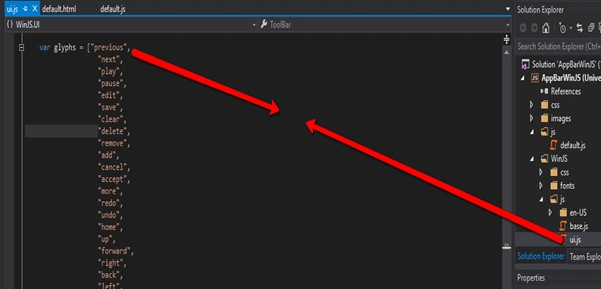
Here, I create three appbar buttons, save, play and pause. Set the button id, icon and label for your appbar. You can see the available appbar icons in ui.js file like the following screen.
Now go to your default.js file present underjs folder in the solution files and write the following code in the end of the file to perform the appbar button click event.
- (function()
- {
- "use strict";
- var page = WinJS.UI.Pages.define("default.html",
- {
- ready: function(element, options)
- {
- document.getElementById("save").addEventListener("click", clickSave, false);
- document.getElementById("play").addEventListener("click", clickPlay, false);
- document.getElementById("pause").addEventListener("click", clickPause, false);
- },
- });
- functionclickSave()
- {
- document.getElementById("appBarClick").innerText = "Save button clicked";
- }
- functionclickPlay()
- {
- document.getElementById("appBarClick").innerText = "Play button clicked";
- }
- functionclickPause()
- {
- document.getElementById("appBarClick").innerText = "Pause button clicked";
- }
- })();

Now run the application and see the output looks like the following screen.
For more information on Windows 10 UWP, refer to my e-book:
Source Code
Read more articles on Universal Windows Platform:


Gowtham RajamanickamPosted Apr 20, 2016, 8:36 AM
good share
Kirtan ParmarPosted Apr 9, 2016, 3:03 AM
thanks
Kirtan ParmarPosted Apr 9, 2016, 3:03 AM
great share
Debasis SahaPosted Apr 9, 2016, 2:06 AM
Good share..
DhanasekarPosted Apr 8, 2016, 10:03 AM
Thanks for sharing
Rahul Kumar SaxenaPosted Apr 8, 2016, 7:38 AM
Nice One
Karthikeyan KPosted Apr 8, 2016, 3:45 AM
Good one
Gowtham RajamanickamPosted Apr 7, 2016, 3:04 AM
good one..
Vignesh ManiPosted Apr 6, 2016, 12:34 PM
Good
Mohammed IbrahimPosted Apr 6, 2016, 12:11 PM
nice