

Introduction
In my previous articles I told you about:
- How to Determine Age Using Ajax Calendar in ASP.NET Application
- How to Calculate Age by Inserting DOB Manually.
- How to Apply Client-side Validation on DOB Selected by User.
This article will explain how to apply server-side validation on a DOB selected by the user. Earlier articles clearly described how to calculate the age of the user but what if the user selects a date from the future! Or selects a date from 1800 or even earlier than that! We should create an application that should stop the user from selecting invalid dates. This can be done both by client-side validations or through server-side validations. This article will cover only server-side validation, if you want to have client-side validation then you should follow my previous article.
Step 1
I am working on my previous application so most of the code is the same. If you are a new viewer then you must add two Textboxes and a Button to your application. First the TextBox for getting the DOB from the user and the other for showing the age.
- <asp:TextBox ID="txtDATE_OF_BIRTH" runat="server" Font-Size="12px" ></asp:TextBox>
- <label id="Label34" runat="server" style="color:Gray; font-size:9px">Focus on Textbox to see Calender</label>
- </td>
- </tr>
- <tr>
- <td >
- <asp:Label ID="Label35" runat="server" CssClass="lbl1" Text="Age"></asp:Label>
- </td>
- <td >
- <asp:TextBox ID="txtCONSULTANT_AGE" runat="server" Font-Size="12px" ></asp:TextBox>
- </td>
- ;/tr>
- <tr>
- <td>
- <asp:Button runat="server" Text="Submit"></asp:Button>
- </td>
- </tr>
Here txtDATE_OF_BIRTH will be used to show the calendar and txtCONSULTANT_AGE will be used for showing the age of the user.
Step 2
Now you should call an Ajax Calendar Extender.
- <cc1:CalendarExtender runat="server" TargetControlID="txtDATE_OF_BIRTH" Format="yyyy-MM-dd" OnClientDateSelectionChanged="SelectDate" ID="CalendarExtender1"></cc1:CalendarExtender>
Here in OnClientDateSelectionChanged the name of the function is passed to be called for calculating the age.
Write this code in the Script Tag just below the Calendar Extender:
- <script type="text/javascript">
- function SelectDate(e) {
- var PresentDay = new Date();
- var dateOfBirth = e.get_selectedDate();
- var months = (PresentDay.getMonth() - dateOfBirth.getMonth() +
- (12 * (PresentDay.getFullYear() - dateOfBirth.getFullYear())));
- document.getElementById("txtCONSULTANT_AGE").value = Math.round(months / 12);
- document.getElementById("txtCONSULTANT_AGE").readOnly = true;
- }
- </script>
Now if you run your application then you will see that the calendar is working properly and the age is also shown:
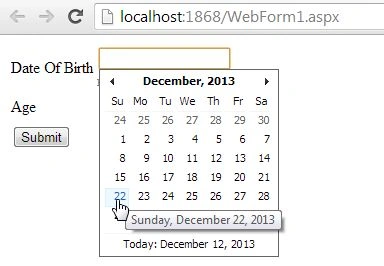
But I had selected a date from the future and it will not show any type of error or anything else that can prevent me from doing that.

Step 3
Now we will work on the validation part, for validation you need to add a Range Validator to your application.
- <asp:RangeValidator Display="Dynamic" ID="RangeValidator1" ForeColor="Red"
- ControlToValidate="txtDATE_OF_BIRTH" runat="server"
- ErrorMessage="Wrong Date Selected" MinimumValue="1950-01-01">
- </asp:RangeValidator>
In this Range Validator, I provided the ForeColor, ControlToValidate, and MinimumValue. The minimum value is the earliest date the user can select.
The maximum date is not provided because in the Maximum Date I will pass a date on which the user is filling in the form, this can be done through the .aspx.cs page of our application, so just go to the .aspx.cs page and write this code in the Page Load:
- protected void Page_Load(object sender, EventArgs e)
- {
- RangeValidator1.MaximumValue = System.DateTime.Today.ToString("yyyy-MM-dd");
- }
Now it will use today's date as the Maximum Date.
Now your application is ready to be executed.
Output
Now I will select a date greater than today's date.
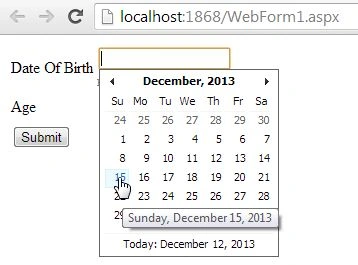
As I click on the button our validation acts to show the error message.

Join the conversation! Your thoughts help the community grow.