

Introduction
In my previous article l told you about:
- Required Field and Email Validation Using AngularJS.
- Min Length and Max Length Validation Using AngularJS.
- Custom Validation Using AngularJS.
In this article I will explain how to apply validation for checking for a valid URL using AngularJS.
Your project might include something where the user needs to provide his website a name or the name of the website that he wants to access, in these cases you require a valid URL of the website from the user, for this to happen you must apply some validation on your form that can stop the user from providing an invalid format of URL, this article will help you apply this validation using AngularJS.
Now I will show you an example of how you can apply this validation.
Step 1
First of all you need to download an AngularJS external file. That can be done either using the jQuery official website or you can also download the source code that I provided at the top of this article.
After downloading the file you need to add it in the Head Section of your application.
<head runat="server">
<title></title>
<script src="angular.min.js"></script>
</head>
Step 2
First we will create a function in which one initial Web Site URL will be passed that will be shown by default whenever the user visits the page.
This function can be created in the following manner:
<head runat="server">
<title></title>
<script src="angular.min.js"></script>
<script>
function x($scope) {
$scope.initialwebsite = "http://Gmail.com";
}
</script>
</head>
Here x is the Controller and $scope provides the connection between the function and the view of the application.
In this function I had passed an initial value to the scope as "initialwebsite".
Step 3
Now we will work on the design part where the validation will be applied.
Write this code in the body section of your web page:
<body>
<div ng-app>
<form name="form1" ng-controller="x">
<label>Enter Site Name:</label>
<input type="url" ng-model="initialwebsite" name="name" required />
<span style="color:red" ng-show="form1.name.$error.required">
You Can't Leave This Field Empty</span>
<span style="color:red" ng-show="form1.name.$error.url">
Sorry Not a Valid URL, Don't Forget to Use http://</span>
<br />
<br />
<input type="submit" value="Submit"/>
</form>
</div>
</body>
Here I first took a TextBox whose type is set to "url", the initial value is applied to this TextBox using ng-model. One name is also provided to this TextBox that will be used while applying the Validation Error Message.
Then I took two Span, in the first Span is an error message for the required field validation that is to be applied so that the user can't leave the TextBox empty.
In the second Span is an error message for the correct format of the URL must be applied. It's applied in the following format:
First the name of the Form is provided, after the name of the TextBox is provided, after this $error is used that shows that it will be activated on getting an error and the final word is written as an URL that shows that it will check whether the user has provided a valid URL or not, if the URL is not valid or the User has forgotten to use http:// than an error will be shown.
At the end I used a button.
The complete code of this application is as follows:
<html ng-app xmlns="http://www.w3.org/1999/xhtml">
<head runat="server">
<title></title>
<script src="angular.min.js"></script>
<script>
function x($scope) {
$scope.initialwebsite = "http://Gmail.com";
}
</script>
</head>
<body>
<div ng-app>
<form name="form1" ng-controller="x">
<label>Enter Site Name:</label>
<input type="url" ng-model="initialwebsite" name="name" required />
<span style="color:red" ng-show="form1.name.$error.required">
You Can't Leave This Field Empty</span>
<span style="color:red" ng-show="form1.name.$error.url">
Sorry Not a Valid URL, Don't Forget to Use http://</span>
<br />
<br />
<input type="submit" value="Submit"/>
</form>
</div>
</body>
</html>
Now our application is created and is ready for execution.
Output
On running the application you will see that the initial value is shown in the TextBox.
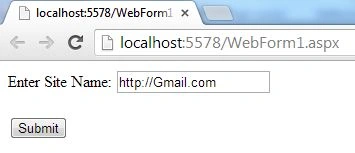
Now if I try to leave the TextBox empty then the required field validator will be activated and will show the error message.
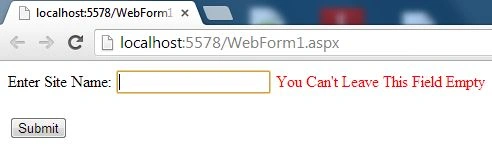
Also if I try to provide the URL without using http:// or try to provide the URL in any other inappropriate format then an error message will also be shown to enter the URL in the correct format.
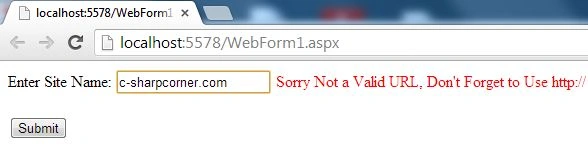
Now I am providing the URL in the correct format and you can see that all the validation error messages are gone.
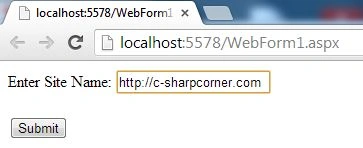
David CondreyPosted Aug 3, 2015, 2:29 AM
Your RAR download crashed my computer and contained nothing but dll and other unusual fileformats. I don't suggest downloading this file.