

When deploying AI agents in an enterprise environment, full autonomy is a double-edged sword. An agent that can autonomously read data, make decisions, and execute actions is incredibly powerful. But if that agent hallucinates or misinterprets a data point, it can execute a catastrophic action in milliseconds.
To solve this, we don't restrict the agent's intelligence; instead, we design an Approval Layer (often called Human-in-the-Loop or HITL). This layer acts as a circuit breaker for high-risk actions.
Let’s explore how to build this using LangGraph, the industry-standard framework for stateful multi-agent workflows.
The Analogy: The Bank Teller and the Vault Manager
Imagine a bank. A customer walks in and asks to withdraw $50,000 in cash.
The Bank Teller (the AI Agent) verifies the customer's identity, checks the account balance, and prints the withdrawal slip. Everything is correct.
However, the teller cannot just hand over the cash. Because the amount exceeds $10,000, the teller must freeze the transaction, place the slip in a pneumatic tube, and send it to the Branch Manager (the Approval Layer).
The manager reviews the slip, checks for fraud, and physically turns a key to authorize the vault. Only then does the teller hand over the money. If the manager spots an issue, they reject it, and the transaction dies.
In LangGraph, we replicate this exact "freeze, review, and resume" mechanism.
The Real-Time Use Case: The Rogue Flash Sale
Imagine a large electronics retail chain using a LangGraph agent to manage Dynamic Pricing and Promotions.
The Scenario: Black Friday Prep
The Promotion Strategist Agent is monitoring competitor websites. Suddenly, a competitor lists a premium 65" OLED TV for $499 (the actual retail price is $1,499).
Here is how the cascading risk happens:
Step 1 (Data Ingestion): The agent reads the competitor's price: $499. (Context missed: The $499 was actually a typo on the competitor's site, or it was a monthly financing price, not the total price).
Step 2 (Strategy Generation): The agent decides to beat the competitor. It generates a promotion: "Apply a 50% discount site-wide, and drop our 65" OLED TV price to $450."
Step 3 (Execution): The agent pushes the promo code to the live e-commerce checkout.
The Result: Customers buy $1,499 TVs for $450, and apply a 50% discount to laptops and refrigerators. The company loses millions of dollars in minutes.
Why Standard Agents Fail Here
A standard linear AI pipeline just executes Step 3 immediately. It lacks the ability to say, "Wait, this action has a financial impact greater than $10,000. I need to pause and ask a human."
How to Design the Approval Layer in LangGraph
To build an enterprise-grade approval layer, we need three core components:
The
interruptFunction: LangGraph provides a built-in way to pause the graph execution at a specific node.State Persistence (Checkpointer): Because a human might take 3 hours to approve the action, the graph's state must be saved to a database so it can be resumed later without losing context.
The
Command(resume=...)Pattern: The mechanism to pass the human's decision (Approve/Reject/Modify) back into the paused graph to continue execution.
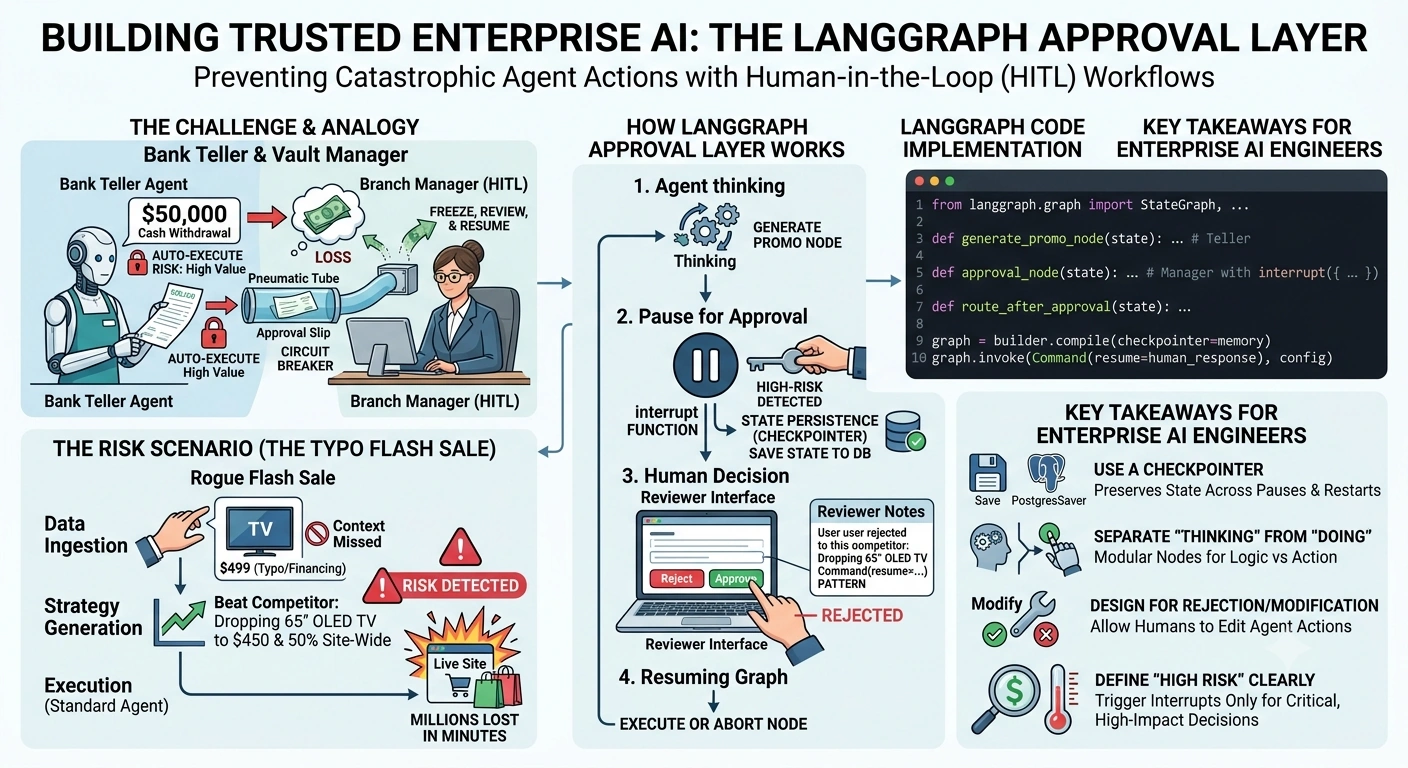
Code Implementation: The LangGraph Approval Layer
Let’s build this using Python, LangGraph, and Pydantic. We will create a graph that generates a promo, pauses for approval, and only executes if approved.
from pydantic import BaseModel, Field
from typing import Literal, Optional
from langgraph.graph import StateGraph, START, END
from langgraph.checkpoint.memory import MemorySaver
from langgraph.types import interrupt, Command

# 1. Define the State using Pydantic for strict typing
class PromotionState(BaseModel):
    product_name: str
    competitor_price: float
    proposed_discount: float
    proposed_final_price: float
    approval_status: Optional[Literal["PENDING", "APPROVED", "REJECTED"]] = "PENDING"
    reviewer_notes: Optional[str] = None

# 2. Node 1: Generate the Promotion (The "Teller")
def generate_promo_node(state: PromotionState) -> dict:
    print(f"\n[Agent] Analyzing competitor price: ${state.competitor_price}")

    # Agent logic: Let's beat them by $50 and apply a 50% site-wide discount
    final_price = state.competitor_price - 50.0

    return {
        "proposed_discount": 0.50,
        "proposed_final_price": final_price
    }

# 3. Node 2: The Approval Layer (The "Manager")
def approval_node(state: PromotionState) -> Command:
    print("\n[Approval Layer] PAUSING GRAPH. Waiting for human review...")

    # The `interrupt` function pauses the graph and sends this data to the UI/Reviewer
    human_decision = interrupt({
        "message": "High-risk action detected. Please review the proposed promotion.",
        "product": state.product_name,
        "proposed_final_price": state.proposed_final_price,
        "site_wide_discount": f"{state.proposed_discount * 100}%"
    })

    # When the human responds, their input is captured in `human_decision`
    print(f"[Approval Layer] Resuming with human decision: {human_decision}")

    # Update state based on human input
    return {
        "approval_status": human_decision.get("status"),
        "reviewer_notes": human_decision.get("notes")
    }

# 4. Node 3: Execute or Reject (The Action)
def execute_promo_node(state: PromotionState) -> dict:
    if state.approval_status == "APPROVED":
        print(f"\n[Execution] SUCCESS: Pushing {state.product_name} promo to live site at ${state.proposed_final_price}.")
        return {}
    else:
        print(f"\n[Execution] ABORTED: Promotion rejected by reviewer. Notes: {state.reviewer_notes}")
        return {}

# 5. Routing Logic
def route_after_approval(state: PromotionState) -> str:
    if state.approval_status == "APPROVED":
        return "execute"
    return "end"

# --- Building the LangGraph ---
builder = StateGraph(PromotionState)

builder.add_node("generate_promo", generate_promo_node)
builder.add_node("approval", approval_node)
builder.add_node("execute", execute_promo_node)

builder.add_edge(START, "generate_promo")
builder.add_edge("generate_promo", "approval")
builder.add_conditional_edges("approval", route_after_approval, {"execute": "execute", "end": END})
builder.add_edge("execute", END)

# CRITICAL: Add a Checkpointer to save state during the pause
memory = MemorySaver()
graph = builder.compile(checkpointer=memory)

# --- Running the Workflow ---
if __name__ == "__main__":
    # We use a thread_id to track this specific workflow instance
    config = {"configurable": {"thread_id": "promo-session-001"}}

    initial_state = {
        "product_name": "65 inch OLED TV",
        "competitor_price": 499.00 # The typo price!
    }

    print("--- STEP 1: Running graph until interrupt ---")
    # The graph will run, hit the `interrupt`, and pause.
    result = graph.invoke(initial_state, config)

    print("\n--- STEP 2: Human Reviewer takes action ---")
    # The human (via a UI or API) reviews the interrupted state and sends a decision.
    # Notice the competitor price is $499. The human catches the typo!
    human_response = {
        "status": "REJECTED",
        "notes": "Competitor price is a typo (it's a financing monthly payment). Do not match. Keep price at $1499."
    }

    print("--- STEP 3: Resuming graph with human decision ---")
    # We use Command(resume=...) to pass the human's decision back into the paused node
    final_result = graph.invoke(Command(resume=human_response), config)

    print("\n--- WORKFLOW COMPLETE ---")
Output of the Code
--- STEP 1: Running graph until interrupt ---
[Agent] Analyzing competitor price: $499.0

[Approval Layer] PAUSING GRAPH. Waiting for human review...

--- STEP 2: Human Reviewer takes action ---
--- STEP 3: Resuming graph with human decision ---
[Approval Layer] Resuming with human decision: {'status': 'REJECTED', 'notes': "Competitor price is a typo..."}

[Execution] ABORTED: Promotion rejected by reviewer. Notes: Competitor price is a typo (it's a financing monthly payment). Do not match. Keep price at $1499.

--- WORKFLOW COMPLETE ---
Key Takeaways for Enterprise AI Engineers
Always Use a Checkpointer: In LangGraph, an approval layer is useless without a
Checkpointer(likeSqliteSaver,PostgresSaver, orRedisSaver). If your server restarts while waiting for human approval, the checkpointer ensures the graph state is perfectly preserved and can be resumed days later.Separate "Thinking" from "Doing": Notice how the
approval_nodedoesn't execute the promo. It just updates the state. Theexecute_nodehandles the actual API calls. This separation of concerns makes debugging much easier.Design for Rejection and Modification: Don't just build for the "Approve" path. In the real world, humans will frequently reject or modify agent actions (e.g., "Approve, but change the discount to 10%"). Your
interruptpayload should allow the human to return modified parameters.Define "High Risk" Clearly: Not every action needs an approval layer. Use deterministic code (like checking if
proposed_final_price < cost_price) to dynamically decide whether to trigger theinterrupt. Only pause for high-risk, high-financial-impact actions to avoid alert fatigue for your human reviewers.
By implementing a robust Approval Layer, you transition your AI agents from "dangerous black boxes" to "trusted enterprise copilots" that respect business guardrails.
Join the conversation! Your thoughts help the community grow.