

In modern enterprise machine learning, the bottleneck is rarely the algorithm; it is the data. Building and maintaining a centralized customer feature store is the cornerstone of scalable ML, but it introduces profound engineering challenges—most notably Point-in-Time Correctness (PITC) and Backfilling. To manage this complexity at an enterprise scale, we can no longer rely on static SQL scripts and manual pipelines. Instead, we must build an Intelligent Control Plane using a Multi-Agent LangGraph RAG system equipped with persistent memory and state management. This end-to-end article explores how to build a centralized feature store, solve the PITC and backfilling challenges, and implement a real-time Fraud Detection use case orchestrated by an enterprise-grade LangGraph multi-agent architecture.
Part 1: Building and Maintaining a Centralized Feature Store
A centralized feature store decouples feature engineering from model training and serving. It acts as the single source of truth for all ML features.
The Architecture
An enterprise feature store typically consists of three layers:
Offline Store (Data Lake/Warehouse): e.g., Snowflake, Delta Lake, or BigQuery. Used for historical data storage, large-scale batch feature computation, and model training.
Online Store (Low-Latency KV Store): e.g., Redis, DynamoDB, or Cassandra. Used for real-time inference, serving the latest feature values in milliseconds.
Feature Registry & Metadata: A centralized catalog (e.g., Feast, Hopsworks) that tracks feature definitions, lineage, and ownership.
Maintenance
Maintenance involves continuous monitoring of data drift, feature freshness, and pipeline SLAs. When a feature definition changes (e.g., changing a rolling window from 7 days to 30 days), the registry must be updated, and the new logic must be propagated to both the offline and online stores.
Part 2: The Core Challenges
1. Point-in-Time Correctness (PITC)
The Problem: When training a model, you must ensure that the features used for a specific event only contain data that was available at the exact time of that event. If you accidentally include future data, you introduce data leakage, resulting in models that perform brilliantly in testing but fail in production.
The Solution: PITC is achieved using "As-Of" joins. If a customer changes their address on 2026-07-05, and we are evaluating a transaction that occurred on 2026-07-03, the PITC join ensures the model uses the old address, not the new one. In SQL, this is handled via AS OF joins; in Python, via pandas.merge_asof.
2. Backfilling
The Problem: When you update a feature's transformation logic, you must recompute that feature for historical data to retrain your models. Backfilling terabytes of data without breaking the online store, while maintaining strict PITC for every historical timestamp, is computationally massive and prone to errors.
The Solution: Backfilling requires a decoupled batch-processing architecture. You compute the new features in the offline store using distributed computing (Spark/Ray), validate the data quality, and then use a "materialization" process to push the latest snapshot to the online store, ensuring no partial writes corrupt the live inference path.
Part 3: Real-Time Use Case - Dynamic Fraud Detection
Scenario: A global bank needs to detect fraudulent credit card transactions in real-time (<50ms latency).
Features:
txn_velocity_1h(Number of transactions in the last hour)avg_ticket_size_30d(Average transaction amount over the last 30 days)device_reputation_score(Historical risk score of the device ID)
The Challenge:
Inference: The online store must serve
txn_velocity_1hinstantly.Training: The offline store must compute
avg_ticket_size_30dwith strict PITC for millions of historical transactions to train the XGBoost fraud model.Backfilling: The data science team decides to change
avg_ticket_size_30dtoavg_ticket_size_90d. They must backfill 3 years of historical data with strict PITC.
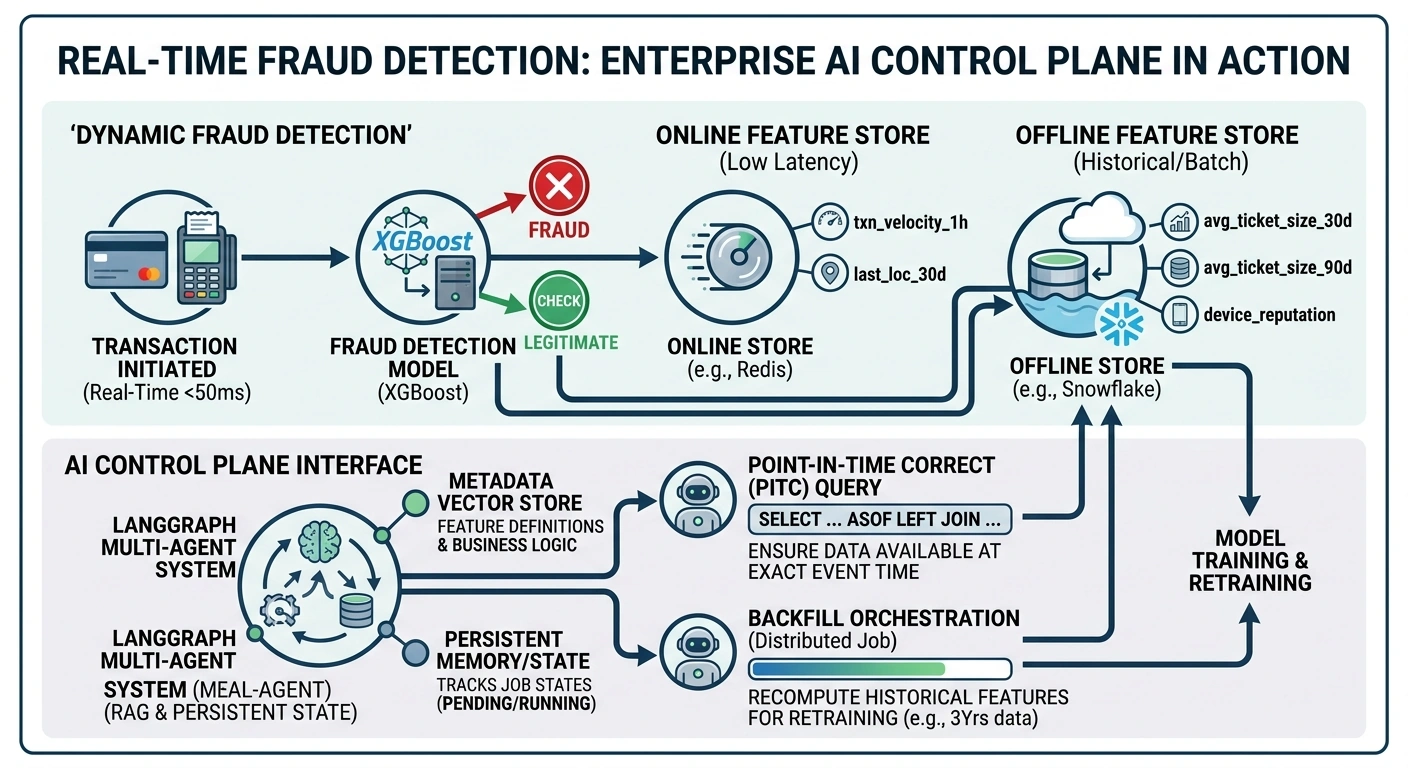
Part 4: The AI Control Plane (Multi-Agent LangGraph RAG)
Managing PITC queries and backfill jobs via manual code is error-prone. We will build an Enterprise Multi-Agent LangGraph System to act as the intelligent interface for the feature store.
Why LangGraph + RAG + Memory?
RAG (Retrieval-Augmented Generation): The feature store has thousands of features. Agents use RAG to retrieve the exact SQL/Python definitions and business logic from the metadata vector store.
Multi-Agent Orchestration: A Supervisor routes tasks to specialized agents (Metadata Agent, PITC Query Agent, Backfill Orchestrator).
State: The graph tracks the state of backfill jobs (e.g.,
PENDING,RUNNING,COMPLETED).Memory: Using LangGraph's checkpointer, the system remembers past queries, user preferences, and iterative context.
Part 5: End-to-End Code Implementation
Below is the complete implementation using langgraph, langchain, faiss (for RAG), and duckdb (to simulate the offline feature store).
Prerequisites
pip install langgraph langchain langchain-openai faiss-cpu duckdb pandas1. Setup and State Definition
We define the state that will flow through our LangGraph, including conversational memory, RAG context, and backfill job state.
import os
import json
import duckdb
import pandas as pd
from typing import TypedDict, Annotated, List, Dict, Any
from langchain_core.messages import BaseMessage, HumanMessage, AIMessage
from langchain_core.tools import tool
from langchain_openai import ChatOpenAI, OpenAIEmbeddings
from langchain_community.vectorstores import FAISS
from langgraph.graph import StateGraph, END
from langgraph.checkpoint.memory import MemorySaver
from langgraph.prebuilt import ToolNode

# Set your OpenAI API key
os.environ["OPENAI_API_KEY"] = "your-api-key-here"

# --- 1. Define the Graph State ---
class AgentState(TypedDict):
    messages: Annotated[List[BaseMessage], "Conversational memory"]
    feature_context: Annotated[str, "Retrieved RAG context about features"]
    job_state: Annotated[Dict[str, Any], "State of backfill/pitc jobs"]
    next_agent: Annotated[str, "Routing decision"]
2. Mock Feature Store & RAG Metadata Setup
We simulate the offline store with DuckDB and create a Vector Store for feature metadata.
# --- 2. Mock Data & RAG Setup ---
def setup_mock_environment():
    # Mock Offline Feature Store (DuckDB)
    conn = duckdb.connect(':memory:')

    # Historical Transactions
    conn.execute("""
        CREATE TABLE transactions AS
        SELECT * FROM (VALUES
            ('C1', '2026-07-01 10:00:00', 100.0, 'D1'),
            ('C1', '2026-07-02 11:00:00', 150.0, 'D1'),
            ('C1', '2026-07-05 12:00:00', 200.0, 'D2') -- Address changed on 07-04
        ) AS t(customer_id, txn_time, amount, device_id)
    """)

    # Customer Profiles (with temporal changes for PITC testing)
    conn.execute("""
        CREATE TABLE customer_profiles AS
        SELECT * FROM (VALUES
            ('C1', '2026-01-01', '123 Old Street'),
            ('C1', '2026-07-04', '456 New Street') -- Address change
        ) AS t(customer_id, effective_date, address)
    """)

    # Mock Feature Metadata for RAG
    feature_docs = [
        {"name": "avg_ticket_size_30d", "logic": "AVG(amount) OVER (PARTITION BY customer_id ORDER BY txn_time RANGE BETWEEN INTERVAL 30 DAYS PRECEDING AND CURRENT ROW)", "description": "Average transaction amount over the last 30 days. Requires strict PITC."},
        {"name": "current_address", "logic": "AS OF JOIN on effective_date", "description": "The customer's address at the exact time of the transaction. Crucial for PITC to prevent data leakage."}
    ]

    embeddings = OpenAIEmbeddings()
    texts = [f"Feature: {d['name']}\nLogic: {d['logic']}\nDescription: {d['description']}" for d in feature_docs]
    vectorstore = FAISS.from_texts(texts, embeddings)

    return conn, vectorstore

conn, vectorstore = setup_mock_environment()
3. Define the Tools (Agents' Capabilities)
The agents need tools to query the RAG metadata and execute PITC/Backfill operations.
# --- 3. Define Tools ---
@tool
def search_feature_metadata(query: str) -> str:
    """Searches the feature registry for feature definitions, logic, and business rules."""
    docs = vectorstore.similarity_search(query, k=2)
    return "\n\n".join([doc.page_content for doc in docs])

@tool
def execute_pitc_query(customer_id: str, event_time: str) -> str:
    """Executes a Point-in-Time Correct (PITC) query against the offline store using AS OF joins."""
    # In a real enterprise system, this generates dynamic SQL based on RAG context.
    # Here we simulate a DuckDB AS OF join.
    query = f"""
        SELECT t.txn_time, t.amount, p.address
        FROM transactions t
        ASOF LEFT JOIN customer_profiles p
        ON t.customer_id = p.customer_id AND t.txn_time >= p.effective_date
        WHERE t.customer_id = '{customer_id}' AND t.txn_time = '{event_time}'
    """
    try:
        df = conn.execute(query).df()
        if df.empty:
            return "No data found for the specified point in time."
        return df.to_markdown(index=False)
    except Exception as e:
        return f"Error executing PITC query: {str(e)}"

@tool
def trigger_backfill_job(feature_name: str, start_date: str, end_date: str) -> str:
    """Triggers a distributed backfill job for a specific feature over a date range."""
    # Simulate job submission
    job_id = f"job_{feature_name}_{start_date.replace('-','')}"
    return json.dumps({"job_id": job_id, "status": "SUBMITTED", "message": f"Backfill for {feature_name} from {start_date} to {end_date} initiated in Spark cluster."})

tools = [search_feature_metadata, execute_pitc_query, trigger_backfill_job]
4. Build the Multi-Agent LangGraph
We create a Supervisor agent to route tasks, and specialized worker nodes.
# --- 4. Define Nodes and Graph ---
llm = ChatOpenAI(model="gpt-4o", temperature=0).bind_tools(tools)

def supervisor_node(state: AgentState):
    """Routes the request to the appropriate agent or tool."""
    system_msg = (
        "You are the Supervisor of an Enterprise Feature Store Control Plane. "
        "You have access to tools: search_feature_metadata, execute_pitc_query, trigger_backfill_job. "
        "If the user asks about feature definitions, use search_feature_metadata. "
        "If they ask for historical data at a specific time, use execute_pitc_query to ensure Point-in-Time Correctness. "
        "If they ask to recompute historical features, use trigger_backfill_job. "
        "Always update the job_state if a backfill is triggered."
    )
    messages = [{"role": "system", "content": system_msg}] + state["messages"]
    response = llm.invoke(messages)
    return {"messages": [response], "next_agent": "tools" if response.tool_calls else "end"}

def update_job_state_node(state: AgentState):
    """Updates the graph state with backfill job information."""
    last_message = state["messages"][-1]
    job_state = state.get("job_state", {})

    # Parse tool calls to update state
    if hasattr(last_message, "tool_calls") and last_message.tool_calls:
        for call in last_message.tool_calls:
            if call["name"] == "trigger_backfill_job":
                job_id = f"job_{call['args']['feature_name']}"
                job_state[job_id] = {"status": "RUNNING", "feature": call["args"]["feature_name"]}

    return {"job_state": job_state}

def route_supervisor(state: AgentState):
    if state["next_agent"] == "tools":
        return "tools"
    return "end"

# Build the Graph
workflow = StateGraph(AgentState)

workflow.add_node("supervisor", supervisor_node)
workflow.add_node("tools", ToolNode(tools))
workflow.add_node("update_state", update_job_state_node)

workflow.set_entry_point("supervisor")
workflow.add_conditional_edges("supervisor", route_supervisor, {"tools": "tools", "end": END})
workflow.add_edge("tools", "update_state")
workflow.add_edge("update_state", "supervisor") # Loop back to supervisor to process tool results

# Compile with MemorySaver for conversational memory
memory = MemorySaver()
app = workflow.compile(checkpointer=memory)
5. Execution: Real-Time Use Case Simulation
Let's run the system through a realistic enterprise scenario.
# --- 5. Run the Simulation ---
config = {"configurable": {"thread_id": "fraud-data-scientist-01"}}

print("--- Turn 1: Data Scientist asks about feature logic ---")
inputs1 = {"messages": [HumanMessage(content="How is the avg_ticket_size_30d feature calculated, and does it require strict PITC?")]}
result1 = app.invoke(inputs1, config)
print(result1["messages"][-1].content)

print("\n--- Turn 2: Data Scientist requests a PITC query for a specific past transaction ---")
inputs2 = {"messages": [HumanMessage(content="Great. Now, pull the features for Customer C1 exactly at '2026-07-02 11:00:00'. Ensure we use the address they had at that exact time, not their current address.")]}
result2 = app.invoke(inputs2, config)
print(result2["messages"][-1].content)

print("\n--- Turn 3: Data Scientist requests a backfill for a new feature window ---")
inputs3 = {"messages": [HumanMessage(content="We are changing the window to 90 days. Trigger a backfill job for avg_ticket_size_90d from 2025-01-01 to 2026-07-01.")]}
result3 = app.invoke(inputs3, config)
print(result3["messages"][-1].content)

# Check the internal state of the graph
final_state = app.get_state(config)
print("\n--- Internal Graph State (Job Tracking) ---")
print(json.dumps(final_state.values.get("job_state", {}), indent=2))
Part 6: Why this Architecture Wins for the Enterprise
Elimination of Data Leakage: By forcing the LLM to use the
execute_pitc_querytool via the Supervisor's system prompt, we guarantee that historical queries always useAS OFjoins. The AI cannot "guess" the SQL; it must use the validated tool.Contextual RAG: The
search_feature_metadatatool ensures the agents don't hallucinate feature logic. They retrieve the exact mathematical definitions from the enterprise registry before writing queries.Stateful Orchestration: The
update_job_statenode ensures that when a backfill is triggered, the LangGraph state is updated. In a real enterprise deployment, this state would be synced with Airflow or Dagster to monitor the actual Spark jobs.Persistent Memory: Because we used
MemorySaverwith athread_id, if the data scientist comes back the next day and says, "What was the status of that backfill job I started?", the agent remembers the context and can query thejob_state.
Building a centralized feature store is a data engineering triumph, but maintaining it requires intelligent orchestration. By wrapping your feature store in a Multi-Agent LangGraph RAG system, you transform a static data repository into a dynamic, self-correcting, and highly observable AI control plane. This ensures Point-in-Time Correctness, automates complex backfills, and ultimately accelerates the time-to-production for your enterprise ML models.
Join the conversation! Your thoughts help the community grow.