Today, we will explain the Oracle 11g architecture. It is basically divided into the following three major parts:
- Memory Structure
- Logical Database Structure
- Physical Structure
The memory structure of the 11g architecture means segregation of logical memory for various processes of Oracle. Whenever the Oracle instance is started it acquires the memory set for it via the MEMORY_TARGET and MEMORY_MAX_TARGET parameters (Automatic Memory Management must be enabled for this during installation) through the Oracle Universal Installer (OUI), a Java API for Oracle DB installs. With no further ado, let's focus on the memory structure.
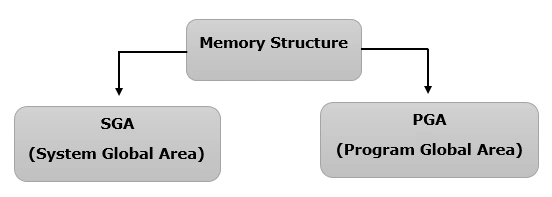
The Oracle Memory Structure is primarily allocated into the two parts:
- System Global Area (SGA)
- Program Global Area (PGA)
Let's explain the SGA first.
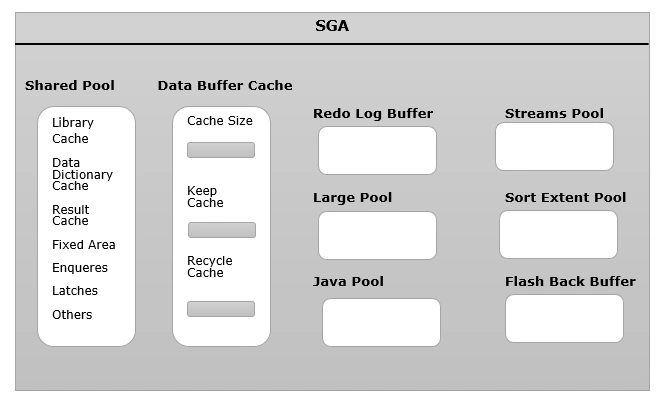
The SGA or System Global Area is the most vital of them. It is manually managed by "SGA_TARGET" parameters. The SGA itself is further sectioned into the following:
- Shared Pool: SHARED_POOL_SIZE
- Data Buffer Cache: DB_CACHE_SIZE
- Redo Log Buffer: LOG_BUFFER
- Large Pool: LARGE_POOL_SIZE
- Java Pool: JAVA_POOL_SIZE
- Streams Pool: STREAMS_POOL_SIZE
- Sort Extent Pool
- Flash Back Buffer
The following explains the preceding topics in detail.
1. SHARED POOL
A Shared Pool is a very vital part of SGA and its configuration is what makes the response on the Oracle DB quick, prevents unnecessary I/O Hits and CPU utilization. The Shared Pool itself consists of the following:
- Library Cache
It's the heart and soul of SQL and PL/SQL statement execution. It does what is known as "Hard Parsing" and "Soft Parsing".
Hard Parsing occurs only if the execution plan of the SQL query does not already exist in the library cache. It takes time for such queries to execute and if the size of the Shared Pool is not configured appropriately then it affects the DB performance. When the same query is repeatedly fired by the same or various users, the Least Recently Used algorithm is used to create space in the library cache for continuously hitting new and existing queries.
Soft Parsing is the best option for the fastest execution of the query since it takes the already present execution plan from the library cache and the processing time is drastically improved. Thus an appropriate size of the library cache will help not an early phase out of the SQL, PL/SQL statement.
- Data Dictionary Cache
Data Dictionary is the collection of data about the data, in other words it is the meta data for the DB objects like tables, views, indexes, table spaces and so on.
Other than that it is used to cache the user names, their roles privileges and so. It also acts as an authenticator for the privileges if the specific user querying the table actually has the rights to do so. If any information is not present in the Data Dictionary cache then it is read from the Data Dictionary and that is a costlier miss than the library caches miss.
- Result cache
This area is newly introduces into the 11g version. This cache is used to store the result set returned from the SQL query. Thus the next time the same query is executed the result is directly displayed with a hit on the DB for data. To use this feature the RESULT_CACHE_MODE parameter must be initialized via the PL/SQL package DBMS_RESULT_CACHE or through the Enterprise Manager.
2. DATA BUFFER CACHE
The Data Buffer Cache, as the name suggests, holds the data read by the server process from the data files. If the data is not present in the Data Buffer Cache and the response time is increased for it then it will first read the data into buffer cache then display it. Thus, the larger the buffer cache, the fewer the disk reads and writes are needed and the better the performance of the database. There can be a free buffer area and dirty buffer area that is the data under manipulation and the pinned data that is currently in use by the active buffer. Further this buffer cache uses a complex combination of algorithms like LRU and Touch count. Also we can create multiple Data Buffer Caches and use the ALTER TABLE or ALTER INDEX command to modify the type of buffer pool that a table or an index should use. DB_CACHE_SIZE is the parameter to set the Data Buffer size. The keep and the recycle buffer pools are purely optional, while the default buffer pool is mandatory. DB_KEEP_CACHE_SIZE helps to maintain the data blocks in memory. We may have small tables that are frequently accessed, so we can assign the tables to the keep buffer cache when they are created.
DB_RECYCLE_CACHE_SIZE: It helps to remove the data from the cache immediately after use. It will cycle out the object from the cache as soon as the transaction is over. This is ideal for large tables where transactions are not constant.
3. REDO LOG BUFFER
It is set by the LOG_BUFFER initialization parameter and it's a circular buffer in SGA. The size of the Redo log buffer is just a couple of MBs and if it's once fixed then it cannot be dynamically resized like other parameters. The Log writer flushes the redo log to the disk for the following circumstances:
- The user commits a transaction.
- The redo log buffer is 1/3rd full.
- The database buffer cache is running low on space and thus the DB writer instruct the log writer process to flush the log buffer contents to disk to make space for the new data.
4. LARGE POOL
It is an optional memory pool, it's useful only:
- When parallel quires are fired on the database.
- As session memory on shared servers environment.
- For backup and restore using the RMAN facility of Oracle.
The size of the Large pool is set by the LARGE_POOL_SIZE parameter.
5. Java POOL
This memory space is configured for the database using Java code. This segregation helps to provide a definitive space for a Java app to run without affecting other functionality. It has reserved memory for the Java Virtual Machine (JVM).
6. THE STREAMS POOL
The STREAMS_POOL_SIZE initialization parameter helps set the stream pool component. It is useful for data sharing among various databases and various applications. If the automatic shared memory management option is enabled then the space allocated is almost 10 percent of the shared pool size.
7. SORT EXTEND POOL
In a shared server scenario the sort extent pool is used to direct the extent of Sort segments within the temporary tables pace as may be requested by the user process. In a dedicated server scenario the sort extent pool resides in the PGA. V$SORT_SEGMENT contains the information about the sort extent pool that may help us decide to size our extent properly.
8. FLASH BACK POOL
A Flash Back Buffer is used for the following purposes:
- Flash Back Query: It includes flashback query to retrieve data from previously fired queries.
- Flash Back version queries: It displays the various version of data rows along with the first and last execution time of a specific transaction leading to the creation of that row.
- Flash Back Transaction Query: It helps to retrieve historical data for any transaction so that we can undo them.
- Flash Back Table: This feature can be used to reinstate any table to its earlier version.
- Flash Back Database: As the name states. It is used for the recovery of the entire database to a specific time in the past.
- Flash Back Drop: This feature is quite handy if we accidentally drop a table and thus simply want to recover it. The DBMS_FLASHBACK parameter initializes it.
PGAjava poolmemory structureoracle architectureredo log bufferSGAshared buffer


Join the conversation! Your thoughts help the community grow.