

Introduction
In my previous article I explained How to Create a To Do List using AngularJS.
In this article I will tell you how to archive a completed work from the To Do List using AngularJS.
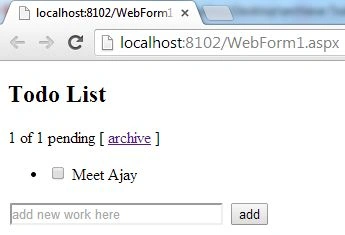
In my previous article a To Do List was created, but the work that was completed was not removed from the list, in this article I will modify that application and will add an Archive Property by which only that work will be removed that is completed.
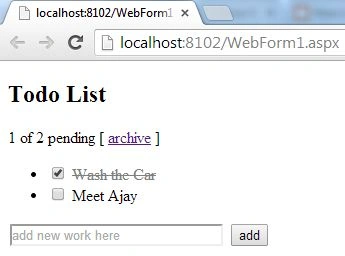
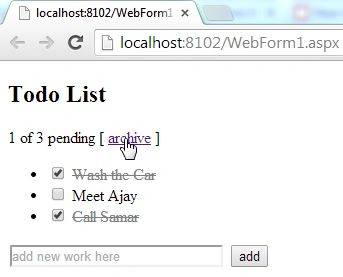
Using this application you can create a list of work that needs to be completed and can Archive those works that are completed. This application will also show you how much work is still to be done.
Step 1
First of all you need to add an external Angular.js file to your application, in other words "angular.min.js".
For this you can go to the AngularJS official site or can download my source code and then fetch it or you can click on this link to download it: ANGULARJS.
After downloading the external file you need to add this file to the Head section of your application.
<head runat="server">
<title></title>
<script src="angular.min.js"></script>
</head>
Step 2
Now after adding the external JS file the first thing you need to do is to add ng-app to the <HTML> Tag otherwise your application will not run.
<html ng-app xmlns="http://www.w3.org/1999/xhtml">
Now I will work on the View/JavaScript of this application.
Add this code to the head section:
<script>
function x($scope) {
$scope.schedule = [
{ work: 'Wash the Car', completed: true },
{ work: 'Meet Ajay', completed: false }];
$scope.addNew = function () {
$scope.schedule.push({ work: $scope.todoWork, completed: false });
$scope.todoWork = '';
};
$scope.pending = function () {
var count = 0;
angular.forEach($scope.schedule, function (todo) {
count += todo.completed ? 0 : 1;
});
return count;
};
$scope.archive = function () {
var oldTodos = $scope.schedule;
$scope.schedule = [];
angular.forEach(oldTodos, function (todo) {
if (!todo.completed) $scope.schedule.push(todo);
});
};
}
</script>
I first created a function named "x", in this function some initial values are declared under a variable "schedule", among which one is tagged as completed.
After this a new function is created and named "addNew", this function will help to enter new work in the list.
The next function is named "pending()", this function will count the number of pending and the total work and will show how much work is still pending out of all the total work.
In the end our main function is created, in other words to archive the completed work, it is named archived.
In this function default values are first passed into a variable "oldTodos", after this it is checking whether or not any work is completed, if it is then it will be removed them from the list.
Now our work on the View is completed and we can proceed to the ViewModel.
Step 3
Write this code in the body section:
<div ng-app>
<h2>Todo List</h2>
<div ng-controller="x">
<span>{{pending()}} of {{schedule.length}} pending</span>
[ <a href="" ng-click="archive()">archive</a> ]
<ul>
<li ng-repeat="todo in schedule">
<input type="checkbox" ng-model="todo.completed">
<span class="completed-{{todo.completed}}">{{todo.work}}</span>
</li>
</ul>
<input type="text" ng-model="todoWork" size="30" placeholder="add new work here">
<input class="btn-primary" type="button" ng-click="addNew()" value="add">
</div>
</div>

Join the conversation! Your thoughts help the community grow.