
Introduction :
Asynchronous JavaScript and XML. Ajax is a technique for creating
fast and dynamic web page. AJAX allows web pages to be updated asynchronously by
exchanging small amounts of data with the server behind the scenes. This means
that it is possible to update parts of a web page, without reloading the whole
page. The UpdatePanel
control is one of the most
important controls in the ASP.NET AJAX
package. It enables you to create web pages with complex client behavior and a
high level of interactivity and responsiveness. The UpdatePanel control can be
used to perform partial updates of a web page.
Ajax include some technology :
- JavaScript.
- XML.
- Asynchronous call to the server.
Step 1 : Open Visual Studio 2010.
- Go to File->New->Website.
- Select ASP.NET WebSite.
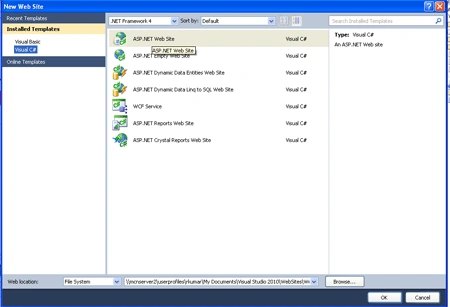
Step 2 : Go to Solution Explorer and right-click on WebSite.
- Go to Add-> New Item.
- Select Web Form.
- Default.aspx page open.

Step 3 : Now drag and drop controls from Toolbox.
- Drag Button, Label, TextBox, ScriptManager.
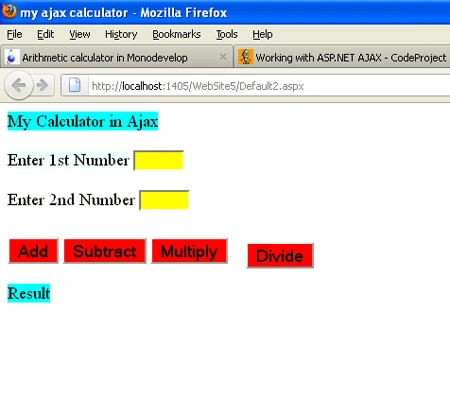
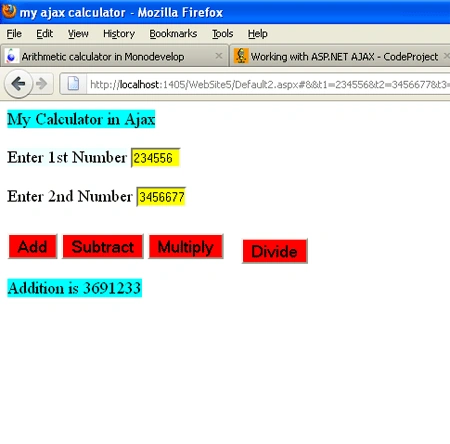
Step 4 : Go to Source option on the page and define the all properties for the calculator application and write the code.
Code :
<title>
my ajax calculator</title>
</head>
<body
style="position:
relative">
<form
id="form1"
runat="server">
<asp:ScriptManager
ID="ScriptManager1"
runat="server"
EnableHistory =
"true"
EnableSecureHistoryState =
"false">
</asp:ScriptManager>
<div>
<asp:UpdatePanel
ID="UpdatePanel1"
runat="server">
<ContentTemplate>
<asp:Label
ID="lblHeading"
runat="server"
Text=" My Calculator in
Ajax" Font-Size =
"Large" BackColor
= "Aqua"></asp:Label><br/><br
/>
<asp:Label
ID="lblN1"
runat="server"
Text="Enter 1st Number"
Font-Size =
"Large" BackColor
= "Azure"></asp:Label>
<asp:TextBox
ID="TxtN1"
runat="server"
Font-Size =
"Smaller" Width
= "50px"
BackColor =
"Yellow"></asp:TextBox><br
/><br
/>
<asp:Label
ID="lblN2"
runat="server"
Text="Enter 2nd Number"
Font-Size =
"Large"></asp:Label>
<asp:TextBox
ID="TxtN2"
runat="server"
Font-Size =
"Smaller" Width
= "50px"
BackColor =
"Yellow"></asp:TextBox><br
/>
<asp:Button
ID="btnDivide"
runat="server"
Text="Divide"
Font-Size =
"Large"
BackColor
= "Red"
onclick="btnDivide_Click"
style="z-index:
1; left: 252px;
top: 33px;
position: relative"
/><br
/>
<asp:Button
ID="btnadd"
runat="server"
Text="Add"
Font-Size =
"Large"
BackColor
= "Red"
onclick="btnadd_Click"/>
<asp:Button
ID =
"btnSubtract" runat
= "server"
Text =
"Subtract"
Font-Size
= "Large"
BackColor =
"Red" onclick="btnSubtract_Click"
/>
<asp:Button
ID="btnMultiply"
runat="server"
Text="Multiply"
Font-Size
= "Large"
BackColor =
"Red" onclick="btnMultiply_Click"/>
<br
/><br
/>
<asp:Label
ID="lblResult"
runat="server"
Text="Result"
Font-Size =
"Large" BackColor
= "Aqua"></asp:Label>
</ContentTemplate>
</asp:UpdatePanel>
</div
</form>
Join the conversation! Your thoughts help the community grow.