
In this article I explain about Armstrong Numbers. So first of all let us understand what an Armstrong Number is.
An N-digit number that is the sum of the nth Power of its digits is called an Armstrong Number. In other words Armstrong Numbers are the sum of their own digits to the power of the number of digits.
For example: 153; the total number of digits in this number = 3.
Armstrong = 1^3+5^3+3^3=153
Second example: 9474; the total number of digits in this number = 4
Armstrong= 9^4+4^4+7^4+4^4=9474
Now after understanding Armstrong Numbers implement their logic in a Window Store App.
Use the following procedure to create an Armstrong Number app.
Step 1
First of all you have to create a New Windows Store Application, as in:
- Open Visual Studio 2012
- "File" -> "New" -> "Project..."
- Choose Template the "Visual C#" -> "Window Store app"
- "Blank App (XAML)" then rename the application
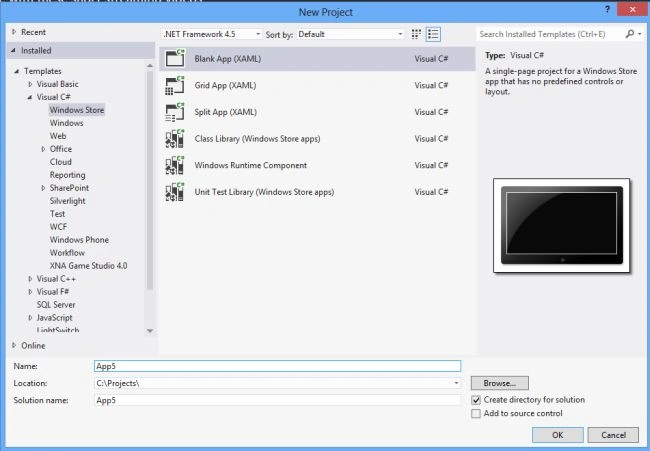
Step 2
Write the following XAML code in "Mainpage.Xaml" that is available in Solution Explorer:
<Page
x:Class="armstrong_app.MainPage"
xmlns="http://schemas.microsoft.com/winfx/2006/xaml/presentation"
xmlns:x="http://schemas.microsoft.com/winfx/2006/xaml"
xmlns:local="using:armstrong_app"
xmlns:d="http://schemas.microsoft.com/expression/blend/2008"
xmlns:mc="http://schemas.openxmlformats.org/markup-compatibility/2006"
mc:Ignorable="d">
<Grid Background="Blue">
<Grid.RowDefinitions>
<RowDefinition Height="38*"/>
<RowDefinition Height="23*"/>
<RowDefinition Height="31*"/>
<RowDefinition Height="32*"/>
<RowDefinition Height="35*"/>
<RowDefinition Height="609*"/>
</Grid.RowDefinitions>
<Grid.ColumnDefinitions>
<ColumnDefinition Width="161*"/>
<ColumnDefinition Width="298*"/>
<ColumnDefinition Width="907*"/>
</Grid.ColumnDefinitions>
<TextBlock Text="Check Number is Armstrong or not" FontFamily="Arial" FontSize="15" FontWeight="ExtraBold" Foreground="Red" Grid.Column="1" Grid.Row="1" Grid.ColumnSpan="2"></TextBlock>
<TextBlock Text="Enter Number:" FontFamily="Arial" FontSize="15" FontWeight="ExtraBold" Foreground="Red" Grid.Column="1" Grid.Row="2"></TextBlock>
<TextBox x:Name="Textbox1" Width="150" Height="32" VerticalAlignment="Top" Grid.Column="2" Grid.Row="2" HorizontalAlignment="Left" Grid.RowSpan="2" />


Join the conversation! Your thoughts help the community grow.