

An array is a collection of similar types of values. Each value in the array is to be called an element. The total number of array elements is called the array size. In this article, we will learn how to implement single dimensional array, a 2-dim array, and a multi-dim array.
Code Example of a Single Dimension Array
- namespace ArrayDemo
- {
- //Demo on Single-Dim Array. class Program
- static void Main(string[] args)
- {
- //read the number of students int n;
- Console.Write("Enter number of students: "); n = Convert.ToInt32(Console.ReadLine());
- //check n value whether it is greater than 0 or not.
- if (n > 0)
- {
- //declare the arrays
- string[] Names = new string[n]; int[] Marks = new int[n]; string[] Result = new string[n];
- //read student names
- Console.WriteLine("\nEnter " + n + " students names:");
- for (int i = 0; i < n; i++)
- {
- Console.Write((i + 1) + ": "); Names[i] = Console.ReadLine();
- }
- //read student marks
- Console.WriteLine("\nEnter " + n + " students marks:");
- for (int i = 0; i < n; i++)
- {
- Console.Write((i + 1) + ": ");
- Marks[i] = Convert.ToInt32(Console.ReadLine());
- }
- //calculate results
- for (int i = 0; i < n; i++)
- {
- if (Marks[i] >= 0 && Marks[i] <= 100)
- {
- if (Marks[i] >= 80) Result[i] = "Distinction";
- else if (Marks[i] >= 60) Result[i] = "First Class";
- else if (Marks[i] >= 50) Result[i] = "Second Class";
- else if (Marks[i] >= 35) Result[i] = "Third Class";
- else
- Result[i] = "Fail";
- }
- else
- Result[i] = "Invalid";
- }
- //display the student names and marks
- Console.WriteLine("\n\nStudent Details:");
- for (int i = 0; i < n; i++)
- {
- Console.WriteLine((i + 1) + ". " + Names[i] + " - " + Marks[i] + " - " + Result[i]);
- }
- }
- else
- Console.WriteLine("N value can't be zero."); Console.Read();
- }
- }
- namespace MultiDimArrays
- //Demo on Multi-Dimensional Arrays class Program
- {
- static void Main(string[] args)
- {
- //Single dimensional arrays int[] x = { 10, 20, 30, 40};
- Console.WriteLine("Single dimensional array:");
- for (int i = 0; i < x.Length; i++)
- Console.Write(x[i] + ", "); //Double dimensional arrays
- int[,] y = { { 10, 20 }, { 30, 40 }, { 50, 60 } };
- Console.WriteLine("\n\nDouble dimensional array:");
- for (int i = 0; i < 3; i++)
- {
- for (int j = 0; j < 2; j++) Console.Write(y[i, j] + " ");
- Console.WriteLine();
- }
- //Multi dimensional arrays
- int[,,] z = { { { 5, 10 }, { 15, 20 } }, { { 25, 30 }, { 35, 40 } }, { { 45, 50 }, { 55, 60 } } };
- Console.WriteLine("\nMulti dimensional array:");
- for (int i = 0; i < 3; i++)
- {
- for (int j = 0; j < 2; j++)
- {
- for (int k = 0; k < 2; k++) Console.Write(z[i, j, k] + " ");
- Console.WriteLine();
- }
- Console.WriteLine();
- }
- Console.Read();
- }
- }
foreach Loop
One of the most common usages of the for loop is to iterate through a collection of values (an array). C# offers a simple and easier syntax of for loop called a foreach loop, designed only for such kind of array iterations.
foreach (datatype variable in arrayname)
{ -----------;
-----------;
}
In the preceding syntax, the loop will be executed once for each value in the array. For every iteration, the values of the array will be assigned to the variable.
For example, the following is a for loop:
- int[] nums = { 10, 20, 30};
- for (int i = 0;i < nums.Length; i++)
- {
- Console.WriteLine(nums[i]));
- }
- int[] nums = { 10, 20, 30};
- foreach (int n in nums)
- {
- Console.WriteLine(n);
- }
Note: The arrayname.Length property gets the size of the array. We explain about the "Array" class in the future.
Jagged Arrays
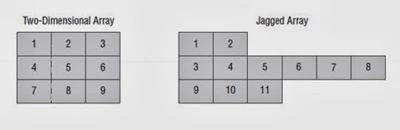
Code Example of a Jagged Array
- using System;
- using System.Collections.Generic;
- using System.Linq;
- using System.Text;
- namespace JaggedArraysDemo
- {
- class Program
- {
- static void Main(string[] args)
- {
- int[][] a = new int[3][]; a[0] = new int[] { 1, 2 };
- a[1] = new int[] { 3, 4, 5, 6, 7, 8 }; a[2] = new int[] { 9, 10, 11 };
- for (int i = 0; i < a.Length; i++)
- {
- for (int j = 0; j < a[i].Length; j++)
- {
- Console.Write(a[i][j] + " ");
- }
- Console.WriteLine();
- }
- Console.Read();
- }
- }
- }
Giovanni SiccardiPosted Mar 17, 2018, 8:08 AM
Hello, As absolute beginner I hope you want excuse my (may be very stupid) question. The address of base elements ( in your printed example 103934088) has any reference with the absolute address of the physical memory (ram) of the PC ?
Rupesh KahanePosted Oct 25, 2015, 1:40 PM
Santhakumar Munuswamy sir thanks
Santhakumar MunuswamyPosted Oct 25, 2015, 11:27 AM
Good one
Rupesh KahanePosted Oct 24, 2015, 4:17 AM
Thanks a lot Sibeesh Venu sir :)
Sibeesh VenuPosted Oct 24, 2015, 3:32 AM
Nice Share
Rupesh KahanePosted Oct 24, 2015, 1:11 AM
Thanks Nitin Tyagi
NitinPosted Oct 24, 2015, 1:01 AM
Good one
Rupesh KahanePosted Oct 23, 2015, 10:56 PM
Array using MVC 5 & its types upto 4 dimensional array will be coming soon.... waiting for approval of this article from c#corner community.... thanks to all community & readers
Rupesh KahanePosted Oct 23, 2015, 10:54 PM
Gowtham K thanks a lot...
Gowtham KPosted Oct 23, 2015, 10:23 PM
Good One
Rupesh KahanePosted Oct 23, 2015, 9:14 PM
Thanks Sujeet Suman sir
Sujeet SumanPosted Oct 23, 2015, 3:06 PM
Nice article...........
Rupesh KahanePosted Oct 23, 2015, 1:24 PM
Thanks a lot Mukesh Kumar
Mukesh KumarPosted Oct 23, 2015, 1:14 PM
Great one!
Rupesh KahanePosted Oct 23, 2015, 1:09 PM
Thanks Mohammed Ibrahim
Rupesh KahanePosted Oct 23, 2015, 1:07 PM
Thanks Harshad Pansuriya
Rupesh KahanePosted Oct 23, 2015, 12:48 PM
Thanks Debasis Saha
Rupesh KahanePosted Oct 23, 2015, 12:46 PM
Thx Nilesh Jadav sir
Mohammed IbrahimPosted Oct 23, 2015, 12:29 PM
nice
Harshad PansuriyaPosted Oct 23, 2015, 8:35 AM
nice one
Debasis SahaPosted Oct 23, 2015, 8:30 AM
Nice article..
Nilesh JadavPosted Oct 23, 2015, 8:11 AM
Nice one sir !!