
Problem
How to use Distributed Cache Tag Helper in ASP.NET Core MVC.
Solution
In an empty project, update Startup class to add services and middleware for MVC and Distributed Cache.
- public void ConfigureServices(
- IServiceCollection services)
- {
- services.AddDistributedRedisCache(options =>
- {
- options.Configuration = "...";
- });
- services.AddMvc();
- }
- public void Configure(
- IApplicationBuilder app,
- IHostingEnvironment env)
- {
- app.UseMvcWithDefaultRoute();
- }
Add a Controller.
- public class HomeController : Controller
- {
- public IActionResult Index()
- {
- return View();
- }
- }
Add a _ViewImports.cshtml page in Views folder. Add the directive to import tag helpers.
- @addTagHelper *, Microsoft.AspNetCore.Mvc.TagHelpers
Add a Razor page (Index.cshtml).
- <p>
- Current Time: @DateTime.Now.ToString("hh:mm:ss")
- </p>
- <p>
- <distributed-cache name="fiver-one"
- expires-after="@TimeSpan.FromMinutes(1)">
- Cached Time: @DateTime.Now.ToString("hh:mm:ss")
- </distributed-cache>
- </p>
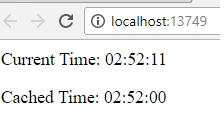
Run the sample, keep refreshing. You’ll notice that the cached time doesn’t refresh (until cache expires).
Cache and Distributed Cache Tag Helper helps improve the performance of your application by caching view’s content, either in-memory or in a distributed cache (e.g. Redis).
Distributed Cache Tag Helper uses IDistributedCache to store the content in a distributed cache. To learn more about distributed caching, please refer to an earlier post here.
AttributesCache Tag Helper has the following attributes,
- Expires-…
Expiry related attributes control length of time cache is valid for. You could specify an absolute or sliding date/time.
- Vary-by-…
You could invalidate the cache if HTTP header, query string, routing data, cookie value or custom values.
Source Code
Tridip BhattacharjeePosted Nov 14, 2017, 4:06 AM
Thanks for reply. i visit this one https://tahirnaushad.com/2017/08/18/asp-net-core-caching/ but article was very small so do not understand what we need to download for redis and how to work with redis server and client etc. not very good one you wrote. it should be much details.
Tridip BhattacharjeePosted Nov 10, 2017, 3:32 AM
HI, nice tips. i have seen you wrote article for .net core. i have one request that can you please write a article on redis for caching. i like to see how we can cache data by redis and read data from redis cache. more important if data change then how could we update those data in cache or how to invalidate cache and reload all data again in cache. this type of article not present here or codeproject. if you ever work with redis then would you mind to share a knowledge through your article. thanks