

In this walkthrough, you will learn how to work with Dapper and get answers to the following questions.
What is Dapper?
Dapper is an open-source ORM (object-relational mapping) library. Dapper is supported in all versions of .NET Framework, .NET Core, and .NET standards. It helps to minimize the code for all types of database transactions. You can install the Dapper using NuGet.
How do you do CRUD (Create, Retrieve, Update, Delete) activity using the Asp.Net Core MVC .NET 8 version using Dapper?
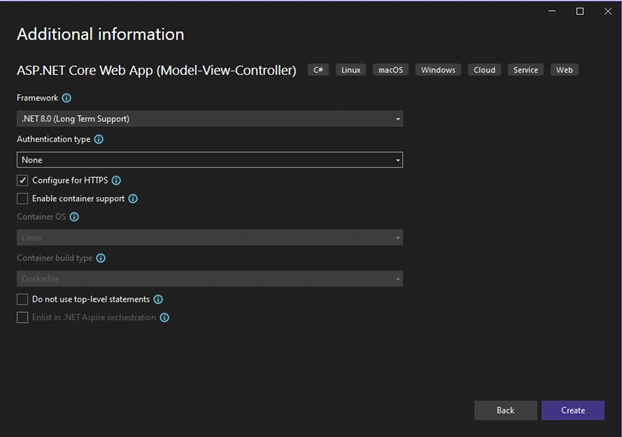
- How do you create an Asp.Net Core MVC project using .NET 8 in Visual Studio 2022?
- Place the Solution and project in the same directory.
- How do I add a connection string to appsetting.json?
- Create Repository file for Friend CRUD – Create Retrieve Update Delete.
Start Visual Studio 2022
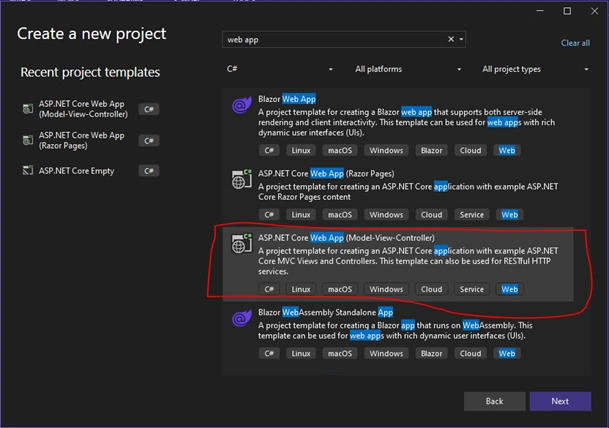
By using the above project template, you can create a Model View Controller (MVC) application and Web API (RESTful HTTP).
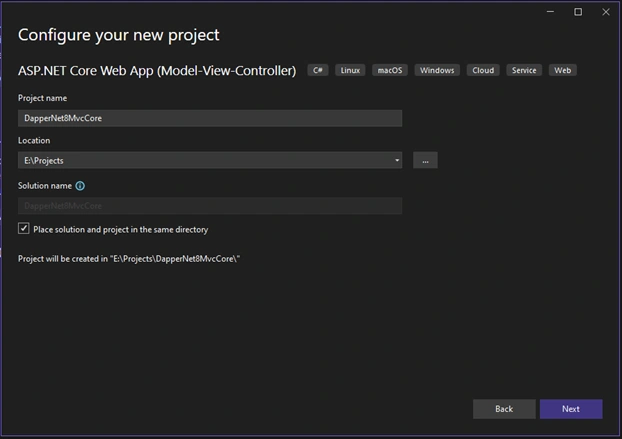
Place the Solution and project in the same directory.
If you have multiple projects, then don’t keep the solution file in the project's same directory.
If you have one project, then check this option.
Create a database table called tblFriends.
SET ANSI_NULLS ON
GO
SET QUOTED_IDENTIFIER ON
GO
CREATE TABLE [dbo].[tblFriends](
    [FriendID] [int] IDENTITY(1,1) NOT NULL,
         NULL,
blFriends] PR
        [FriendID] ASC
    ) WITH (
        PAD_INDEX = OFF,
        STATISTICS_NORECOMPUTE = OFF,
        IGNORE_DUP_KEY = OFF,
        ALLOW_ROW_LOCKS = ON,
        ALLOW_PAGE_LOCKS = ON,
        OPTIMIZE_FOR_SEQUENTIAL_KEY = OFF
    ) ON [PRIMARY]
) ON [PRIMARY]
GO
Sample Records
INSERT INTO tblFriends (Fullname, City, Phone)
VALUES ('Rajesh', 'Pune', '66464');

INSERT INTO tblFriends (Fullname, City, Phone)
VALUES ('Mahesh', 'Surat', '888464');

INSERT INTO tblFriends (Fullname, City, Phone)
VALUES ('Suresh', 'Akola', '22221264');

INSERT INTO tblFriends (Fullname, City, Phone)
VALUES ('Jayesh', 'Mumbai', '99971264');

INSERT INTO tblFriends (Fullname, City, Phone)
VALUES ('Pritesh', 'Thane', '77264');
Now create a class called “Friend. cs” by clicking on the project select ADDàCLASS.
Friend.cs file code
namespace DapperNet8MvcCore
{
    public class Friend
    {
        public int FriendID { get; set; }
        public string Fullname { get; set; } = string.Empty;
        public string City { get; set; } = string.Empty;
        public string Phone { get; set; } = string.Empty;
    }
}
Before creating a repository for a friend using Dapper, first install Dapper Nuget.
Right-click on the project and select “Manage NuGet Packages”.
We required the following tools.
- Dapper
- System.Data.SqlClient
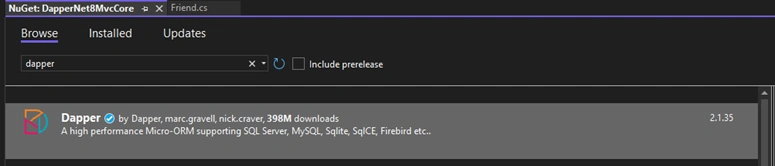

After the successful installation of the DAPPER, System.Data.SqlClient NuGet tool, now we add connection string and create file IFriendRepository.cs interface, create file FriendRepository.cs right click on project select ADDàCLASS/INTERFACE.
Open the appsetting.json file, update the following code, or Add the Connection String.
{
  "Logging": {
    "LogLevel": {
      "Default": "Information",
      "Microsoft.AspNetCore": "Warning"
    }
  },
  "ConnectionStrings": {
    "MyConnectionString": "Server=xx.xx.0.xxx;Database=abc;User=bc;Password=abc123;TrustServerCertificate=True"
  },
  "AllowedHosts": "*"
}
Update the IFriendRepository.cs file with the following code.
namespace DapperNet8MvcCore
{
    public interface IFriendRepository
    {
        IEnumerable<Friend> GetAllFriends();
        Friend GetFriendByID(int id);
        int NewFriend(Friend _friend);
        bool UpdateFriend(Friend _friend);
        bool DeleteFriend(int id);
    }
}
Update the FriendRepository.cs file with the following code.
using Dapper;
using Microsoft.Data.SqlClient;
using Microsoft.Extensions.Configuration;
using System.Collections.Generic;
using System.Threading.Tasks;
using System.Data;
using System.Runtime.CompilerServices;

namespace DapperNet8MvcCore
{
    public class FriendRepository : IFriendRepository
    {
        private readonly IConfiguration Configuration;
        //Connection String inject
        public FriendRepository(IConfiguration configuration)
        {
            this.Configuration = configuration;
        }
        //Get All Friends Details.
        public IEnumerable<Friend> GetAllFriends()
        {
            var sql = "SELECT * FROM tblFriends";
            using (var con = new SqlConnection(Configuration.GetConnectionString("MyConnectionString")))
            {
                con.Open();
                var result = con.Query<Friend>(sql).ToList();
                return result.ToList();
            }
        }
        //Get particular ID base friend detail.
        public Friend GetFriendByID(int id)
        {
            using (var con = new SqlConnection(Configuration.GetConnectionString("MyConnectionString")))
            {
                con.Open();
                string query = "SELECT * FROM tblFriends WHERE FriendID = @Id";
                return con.QueryFirst<Friend>(query, new { Id = id });
            }
        }
        //Insert a new friend in the table.
        public int NewFriend(Friend _friend)
        {
            using (var con = new SqlConnection(Configuration.GetConnectionString("MyConnectionString")))
            {
                con.Open();
                string query = "INSERT INTO tblFriends (Fullname, City, Phone) VALUES ('" + _friend.Fullname + "','" + _friend.City + "','" + _friend.Phone + "'); SELECT CAST(SCOPE_IDENTITY() as int)";
                return con.ExecuteScalar<int>(query, _friend);
            }
        }
        //Update friend in the table.
        public bool UpdateFriend(Friend _friend)
        {
            using (var con = new SqlConnection(Configuration.GetConnectionString("MyConnectionString")))
            {
                con.Open();
                string query = "UPDATE tblFriends SET Fullname ='" + _friend.Fullname + "', City = '" + _friend.City + "' , Phone = '" + _friend.Phone + "' where FriendID =" + Convert.ToString(_friend.FriendID);
                int rowsAffected = con.ExecuteScalar<int>(query, _friend);
                return rowsAffected > 0;
            }
        }
        //Delete a friend as per particular ID.
        public bool DeleteFriend(int Id)
        {
            using (var con = new SqlConnection(Configuration.GetConnectionString("MyConnectionString")))
            {
                con.Open();
                string query = "DELETE FROM tblFriends WHERE FriendID = @Id";
                int rowsAffected = con.ExecuteScalar<int>(query, new { Id = Id });
                return rowsAffected > 0;
            }
        }
    }
}
Create a new controller called FriendController.cs file by right-clicking on the CONTROLLERS folder. ADD CONTROLLER MVC Controller with Read/Write actions.
FriendController.cs file code
using Microsoft.AspNetCore.Http;
using Microsoft.AspNetCore.Mvc;
namespace DapperNet8MvcCore.Controllers
{
    public class FriendController : Controller
    {
        private readonly IFriendRepository _friendRepository;
        public FriendController(IFriendRepository friendRepository)
        {
            _friendRepository = friendRepository;
        }
        // GET: FriendController
        public ActionResult Index()
        {
            var lst = _friendRepository.GetAllFriends();
            return View(lst);
        }
        // GET: FriendController/Details/5
        public ActionResult Details(int id)
        {
            var det = _friendRepository.GetFriendByID(id);
            return View(det);
        }
        // GET: FriendController/Create
        public ActionResult Create()
        {
            return View();
        }
        // POST: FriendController/Create
        [HttpPost]
        [ValidateAntiForgeryToken]
        public ActionResult Create(Friend friend)
        {
            try
            {
                var newFrnd = _friendRepository.NewFriend(friend);
                return RedirectToAction("Index");
            }
            catch
            {
                return View();
            }
        }
        // GET: FriendController/Edit/5
        public ActionResult Edit(int id)
        {
            var det = _friendRepository.GetFriendByID(id);
            return View(det);
        }
        // POST: FriendController/Edit/5
        [HttpPost]
        [ValidateAntiForgeryToken]
        public ActionResult Edit(Friend friend)
        {
            try
            {
                var edtFrnd = _friendRepository.UpdateFriend(friend);
                return RedirectToAction("Index");
            }
            catch
            {
                return View();
            }
        }
        // GET: FriendController/Delete/5
        [HttpGet]
        public ActionResult Delete(int id)
        {
            var det = _friendRepository.GetFriendByID(id);
            return View(det);
        }
        // POST: FriendController/Delete/5
        [HttpPost]
        [ActionName("Delete")]
        [ValidateAntiForgeryToken]
        public ActionResult DeleteFriend(int id)
        {
            try
            {
                var edtFrnd = _friendRepository.DeleteFriend(id);
                return RedirectToAction("Index");
            }
            catch
            {
                return View();
            }
        }
    }
}
Now, we are going to create view files of the following action methods.
- Index
- Create
- Edit
- Delete
- Details
Use the following method to create all view files for the above action method.
Right-click the INDEX Action method and select ADD VIEW RAZOR VIEW.
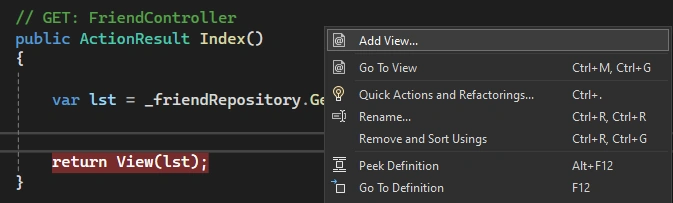
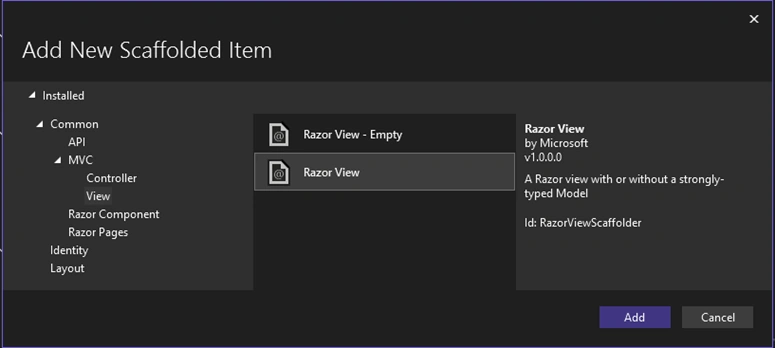
In the above screen, we selected Razor View and clicked on the ADD button after the following screen will appear.
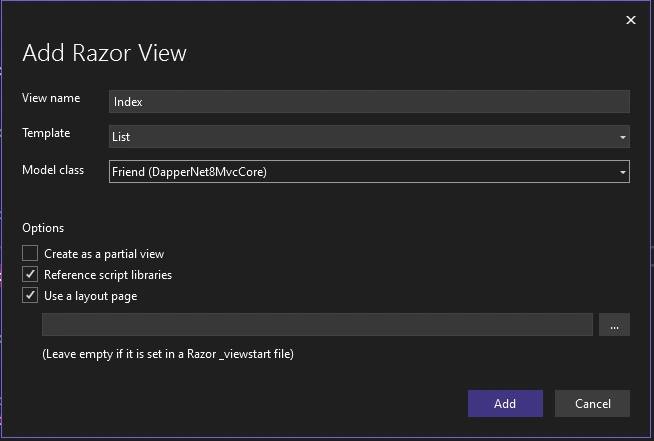
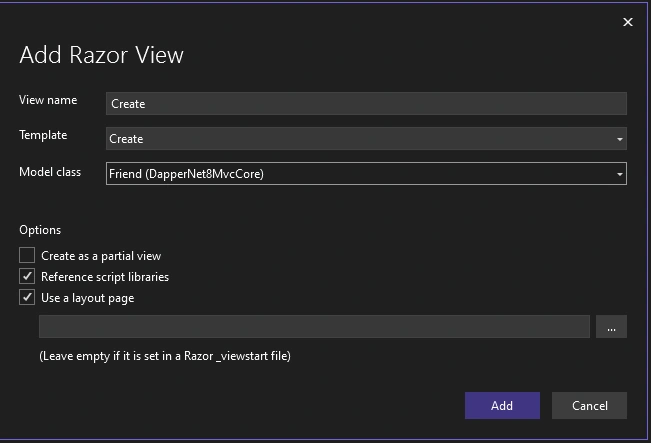
Select Template as per your requirement and proper Model Class, then click on the ADD button.
Default Template List.
- Create
- Delete
- Details
- Edit
- Empty(Without Model)
- List
Index. The c shtml file should be updated with the following code.
@model IEnumerable<Friend>
@{
}
<style>
    table tr td {
        border: 1px solid black;
        padding: 10px;
    }
</style>
<a asp-action="create">New Friend</a>
<hr />
<table>
    <tr>
        <td>FULLNAME</td>
        <td>CITY</td>
        <td>PHONE</td>
        <td>ACTIONS</td>
    </tr>
    @foreach (var item in Model)
    {
        <tr>
            <td>@item.Fullname</td>
            <td>@item.City</td>
            <td>@item.Phone</td>
            <td>
                <a asp-action="Details" asp-route-id="@item.FriendID">Details</a> |
                <a asp-action="Edit" asp-route-id="@item.FriendID">Edit</a> |
                <a asp-action="Delete" asp-route-id="@item.FriendID">Delete</a>
            </td>
        </tr>
    }
</table>
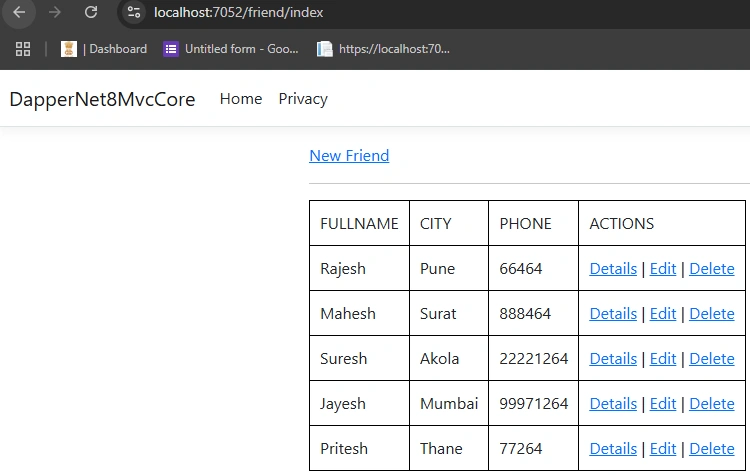
INDEX PAGE VIEW
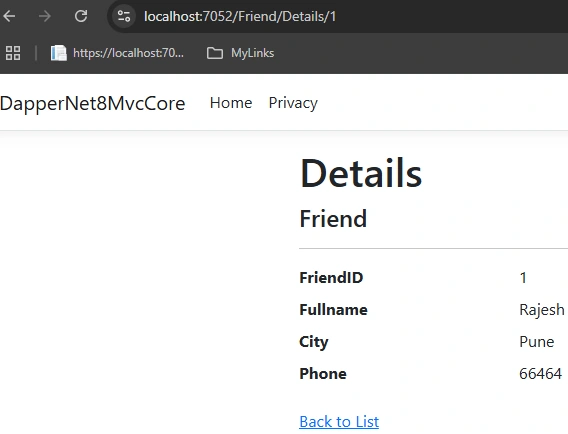
Now right-click on the DETAILS action method, select ADD VIEW RAZOR VIEW, select DETAILS template, and select Friend as Model class.
DETAILS.CSHTML file code
@model DapperNet8MvcCore.Friend

@{
    ViewData["Title"] = "Details";
}
<h1>Details</h1>
<div>
    <h4>Friend</h4>
    <hr />

    <dl class="row">
        <dt class="col-sm-2">
            @Html.DisplayNameFor(model => model.FriendID)
        </dt>
        <dd class="col-sm-10">
            @Html.DisplayFor(model => model.FriendID)
        </dd>

        <dt class="col-sm-2">
            @Html.DisplayNameFor(model => model.Fullname)
        </dt>
        <dd class="col-sm-10">
            @Html.DisplayFor(model => model.Fullname)
        </dd>

        <dt class="col-sm-2">
            @Html.DisplayNameFor(model => model.City)
        </dt>
        <dd class="col-sm-10">
            @Html.DisplayFor(model => model.City)
        </dd>

        <dt class="col-sm-2">
            @Html.DisplayNameFor(model => model.Phone)
        </dt>
        <dd class="col-sm-10">
            @Html.DisplayFor(model => model.Phone)
        </dd>
    </dl>
</div>
<div>
    <a asp-action="Index">Back to List</a>
</div>
DETAILS PAGE VIEW
Now right-click on the CREATE action method, select ADD VIEW RAZOR VIEW, select Create a template, and select Friend as Model class.
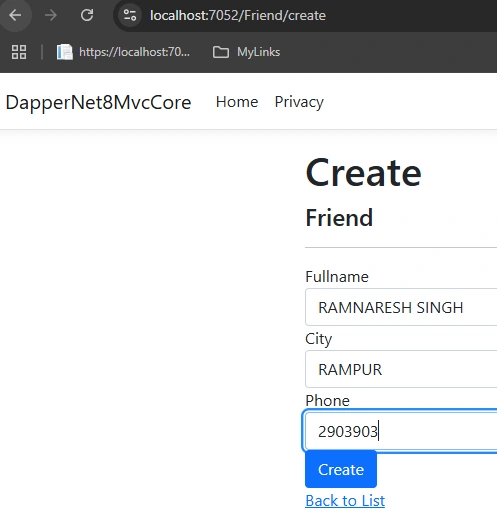
CREATE.CSHTML file code
@model DapperNet8MvcCore.Friend
@{
    ViewData["Title"] = "Create";
}
<h1>Create</h1>
<h4>Friend</h4>
<hr />
<div class="row">
    <div class="col-md-4">
        <form asp-action="Create">
            <div asp-validation-summary="ModelOnly" class="text-danger"></div>

            @* Commented the FRIEND ID code because FRIEND ID is auto generated at database end. *@
            @*
            <div class="form-group">
                <label asp-for="FriendID" class="control-label"></label>
                <input asp-for="FriendID" class="form-control" />
                <span asp-validation-for="FriendID" class="text-danger"></span>
            </div>
            *@

            <div class="form-group">
                <label asp-for="Fullname" class="control-label"></label>
                <input asp-for="Fullname" class="form-control" />
                <span asp-validation-for="Fullname" class="text-danger"></span>
            </div>

            <div class="form-group">
                <label asp-for="City" class="control-label"></label>
                <input asp-for="City" class="form-control" />
                <span asp-validation-for="City" class="text-danger"></span>
            </div>

            <div class="form-group">
                <label asp-for="Phone" class="control-label"></label>
                <input asp-for="Phone" class="form-control" />
                <span asp-validation-for="Phone" class="text-danger"></span>
            </div>

            <div class="form-group">
                <input type="submit" value="Create" class="btn btn-primary" />
            </div>
        </form>
    </div>
</div>
<div>
    <a asp-action="Index">Back to List</a>
</div>
@section Scripts {
    @{await Html.RenderPartialAsync("_ValidationScriptsPartial");}
}
CREATE PAGE VIEW
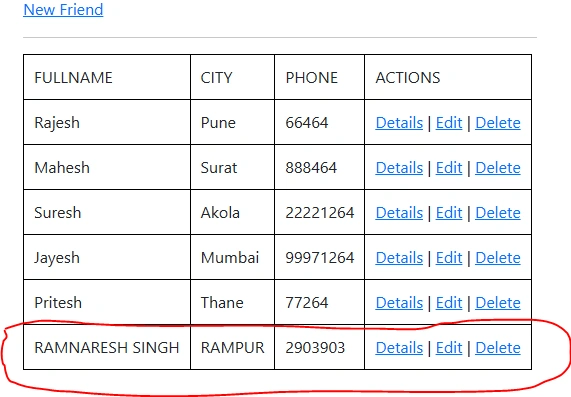
Now right-click on the EDIT action method, select ADD VIEW RAZOR VIEW, select Edit template, and select Friend as Model class.
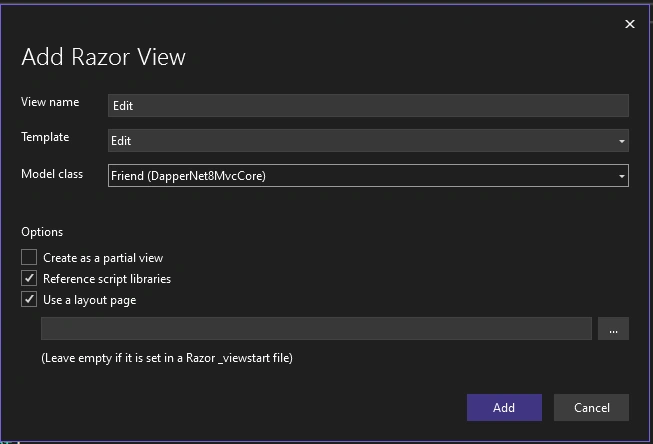
EDIT.CSHTML file code
@model DapperNet8MvcCore.Friend
@{
    ViewData["Title"] = "Edit";
}
<h1>Edit</h1>
<h4>Friend</h4>
<hr />
<div class="row">
    <div class="col-md-4">
        <form asp-action="Edit">
            <div asp-validation-summary="ModelOnly" class="text-danger"></div>
            @Html.HiddenFor(Model => Model.FriendID)

            @* <div class="form-group">
                <label asp-for="FriendID" class="control-label"></label>
                <input asp-for="FriendID" class="form-control" />
                <span asp-validation-for="FriendID" class="text-danger"></span>
            </div> *@

            <div class="form-group">
                <label asp-for="Fullname" class="control-label"></label>
                <input asp-for="Fullname" class="form-control" />
                <span asp-validation-for="Fullname" class="text-danger"></span>
            </div>

            <div class="form-group">
                <label asp-for="City" class="control-label"></label>
                <input asp-for="City" class="form-control" />
                <span asp-validation-for="City" class="text-danger"></span>
            </div>

            <div class="form-group">
                <label asp-for="Phone" class="control-label"></label>
                <input asp-for="Phone" class="form-control" />
                <span asp-validation-for="Phone" class="text-danger"></span>
            </div>

            <div class="form-group">
                <input type="submit" value="Save" class="btn btn-primary" />
            </div>
        </form>
    </div>
</div>
<div>
    <a asp-action="Index">Back to List</a>
</div>
@section Scripts {
    @{ await Html.RenderPartialAsync("_ValidationScriptsPartial"); }
}
EDIT PAGE VIEW
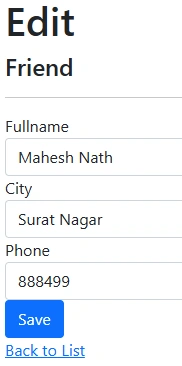
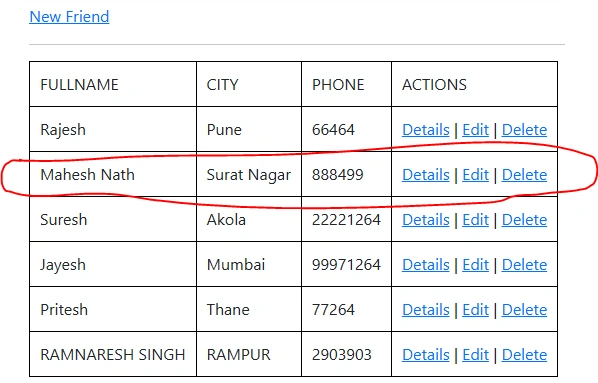
Check the Index page. The edited record has been updated successfully.
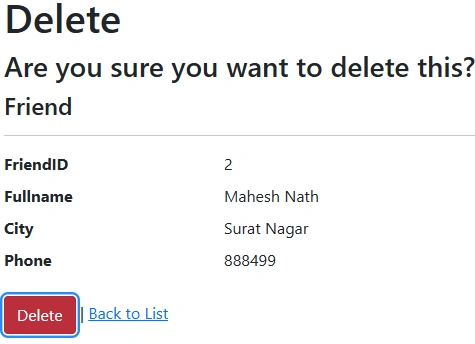
Now right-click on the DELETE action method, select ADD VIEW RAZOR VIEW, select Delete template, and select Friend as Model class.
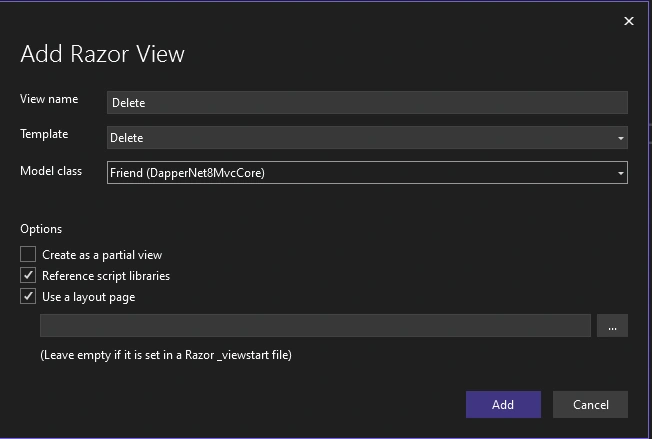
DELETE.CSHTML file code
@model DapperNet8MvcCore.Friend
@{
    ViewData["Title"] = "Delete";
}
<h1>Delete</h1>
<h3>Are you sure you want to delete this?</h3>
<div>
    <h4>Friend</h4>
    <hr />
    <dl class="row">
        <dt class="col-sm-2">
            @Html.DisplayNameFor(model => model.FriendID)
        </dt>
        <dd class="col-sm-10">
            @Html.DisplayFor(model => model.FriendID)
        </dd>

        <dt class="col-sm-2">
            @Html.DisplayNameFor(model => model.Fullname)
        </dt>
        <dd class="col-sm-10">
            @Html.DisplayFor(model => model.Fullname)
        </dd>

        <dt class="col-sm-2">
            @Html.DisplayNameFor(model => model.City)
        </dt>
        <dd class="col-sm-10">
            @Html.DisplayFor(model => model.City)
        </dd>

        <dt class="col-sm-2">
            @Html.DisplayNameFor(model => model.Phone)
        </dt>
        <dd class="col-sm-10">
            @Html.DisplayFor(model => model.Phone)
        </dd>
    </dl>
    <form asp-action="Delete">
        <input type="submit" value="Delete" class="btn btn-danger" /> |
        <a asp-action="Index">Back to List</a>
    </form>
</div>
DELETE PAGE VIEW
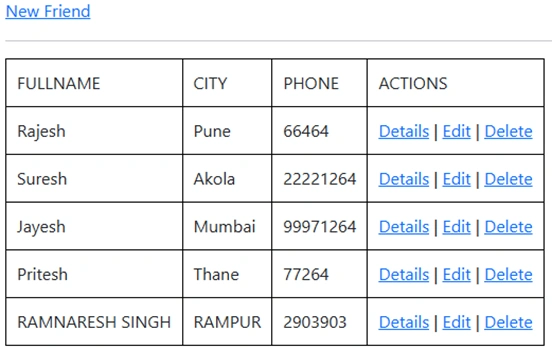
Check the Index page; The Deleted record was successfully removed.
Happy Coding!
Join the conversation! Your thoughts help the community grow.