Introduction
This article describes how to search your internal site pages in ASP.Net.
Description
Here I use an example to search a Help file in a site.
To create this application you need a third-party DLL file to be referenced by the application:
You can download it from the source code attached to this page.
Design
Create a page Search.aspx. Add a TextBox, a button and a GridView.
Now design your screen as in the following screen.
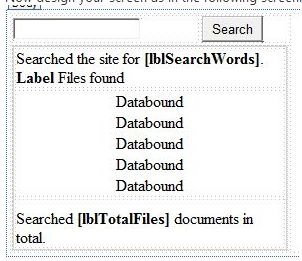
Or you can copy the following source code:
- <form id="form1" runat="server">
- <div>
- <table>
- <tr>
- <td>
- <asp:TextBox ID="txtSearch" runat="server"></asp:TextBox>
- </td>
- <td>
- <asp:Button ID="Button1" runat="server" Text="Search" OnClick="Button1_Click" />
- </td>
- </tr>
- <tr>
- <td colspan="2">
- <asp:Panel ID="pnlSearchResults" runat="server" Visible="False" Width="99%">
- <table class="SearchStatus" width="100%" align="center">
- <tr>
- <td>
- Searched the site for <asp:Label ID="lblSearchWords" runat="server" Font-Bold="True"></asp:Label>.
- <br />
- <asp:Label ID="lblFilesFound" runat="server" Font-Bold="True">Label</asp:Label> Files
- found
- </td>
- </tr>
- <tr>
- <td>
- <asp:GridView ID="gvSearch" runat="server" AutoGenerateColumns="false" ShowHeader="False"
- GridLines="None">
- <Columns>
- <asp:TemplateField>
- <ItemTemplate>
- <%# DisplayTitle(((System.Data.DataRowView)Container.DataItem)["Title"].ToString(), ((System.Data.DataRowView)Container.DataItem)["Path"].ToString())%>
- </ItemTemplate>
- </asp:TemplateField>
- </Columns>
- </asp:GridView>
- </td>
- </tr>
- <tr>
- <td height="18" style="padding-top: 10px;">
- Searched <asp:Label ID="lblTotalFiles" runat="server" Font-Bold="True"></asp:Label> documents
- in total.
- </td>
- </tr>
- </table>
- </asp:Panel>
- </td>
- </tr>
- </table>
- </div>
- </form>
Now go to the code view.
Next add a reference of the following DLL to your website:
And write the following code in the .cs file:
- using System;
- using System.Configuration;
- using System.Collections.Generic;
- using System.Data;
- using System.Linq;
- using System.Web.UI;
- using System.Web.UI.WebControls;
- using SearchDotNetC;
- using System.IO;
- public partial class Search : System.Web.UI.Page
- {
- private Searchs.UserSearch searchSite;
- private void DisplayContent()
- {
- if ((searchSite.PageDataset != null))
- {
- pnlSearchResults.Visible = true;
- lblSearchWords.Text = searchSite.SearchWords;
- if (ViewState["SortExpression"] == null)
- ViewState["SortExpression"] = "MatchCount Desc";
- BindDataGrid(ViewState["SortExpression"].ToString());
- lblTotalFiles.Text = searchSite.TotalFilesSearched.ToString();
- lblFilesFound.Text = searchSite.TotalFilesFound.ToString();
- }
- }
- private void BindDataGrid(string strSortField)
- {
- DataView dvwPages = default(DataView);
- dvwPages = searchSite.PageDataset.Tables["Pages"].DefaultView;
- dvwPages.Sort = strSortField;
- gvSearch.DataSource = dvwPages;
- gvSearch.DataBind();
- }
-
- protected string DisplayTitle(string Title, string Path)
- {
- return string.Format("<A href='{1}' style='color: #017fbc' target='FrameMain'>{0}</a>", Title, Path);
- }
- private string DisplayPath(string Path)
- {
- return string.Format("{0}", Request.ServerVariables["HTTP_HOST"]);
- }
- private Searchs.UserSearch SearchSite(string strSearch)
- {
- Searchs.UserSearch srchSite = new Searchs.UserSearch();
-
- srchSite.SearchWords = strSearch;
- srchSite.Search(Server.MapPath("~/Help/files"));
- return srchSite;
- }
- protected void Page_Load(object sender, EventArgs e)
- {
- if ((searchSite == null))
- searchSite = (Searchs.UserSearch)Session["Site"];
- }
- protected void Button1_Click(object sender, EventArgs e)
- {
- string strSearchWords = null;
-
- strSearchWords = txtSearch.Text;
- pnlSearchResults.Visible = false;
- if (!strSearchWords.Equals(""))
- {
- Searchs.Site.ApplicationPath = string.Format("http://{0}{1}", Request.ServerVariables["HTTP_HOST"], Request.ApplicationPath);
- searchSite = SearchSite(strSearchWords);
- Session["Site"] = searchSite;
- DisplayContent();
- }
- }
- }
Now go to Solution Explorer and add another page Default.aspx.
On this page, I added a Frameset to show search.aspx in one side and the page you want to see in the other side.
For design copy the following code:
- <head id="Head1" runat="server">
- <title></title>
- <script type="text/javascript">
- <!--
- var sTopic = "";
- if (top.location.href.lastIndexOf("?") > 0)
- sTopic = top.location.href.substring(top.location.href.lastIndexOf("?") + 1, top.location.href.length);
- if (sTopic == "") sTopic = "1stpage.aspx";
- document.write('<frameset cols="300,*">');
- document.write('<frame src="Search.aspx" name="Frameleft">');
- document.write('<frame src="' + sTopic + '" name="FrameMain">');
- document.write('</frameset>');
-
- </script>
- </head>
- <body>
- <form id="form1" runat="server">
- <div>
- </div>
- </form>
- </body>
- </html>
Now for searching purposes create a folder Help and within that folder create some HTML pages like in the following screen:
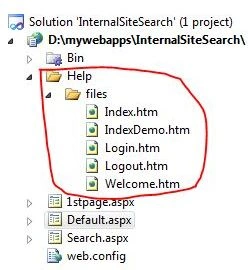
The important thing is to open web.config and add the following line within <appSetting>:
- <appSettings>
- <add key="FilesTypesToSearch" value=".htm,.html,.asp,.shtml,.aspx"/>
- <add key="DynamicFilesTypesToSearch" value=".asp,.shtml,.aspx" =""/>
- <add key="BarredFolders"value="aspnet_client,_private,_vti_cnf,_vti_log,_vti_pvt,_vti_script,_vti_txt,cgi_bin,_bin,bin,_notes,images,scripts"/>
- <add key="BarredFiles" value="localstart.asp,iisstart.asp,AssemblyInfo.vb,Global.asax,Global.asax.vb,SiteSearch.aspx" =""/>
- <add key="EnglishLanguage" value="True" =""/>
- <add key="Encoding" value="utf-8" =""/>
- </appSettings>
Set Default.aspx as the Start Up page and build your application.
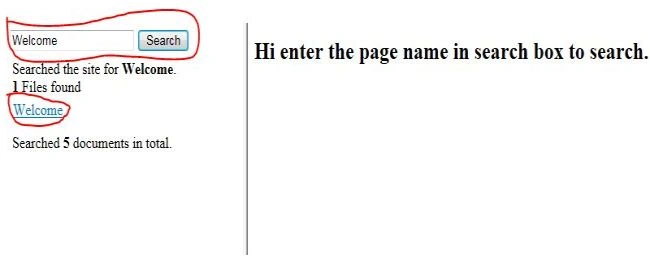
Now enter the title of the page you want to search in the TextBox and click on the search Button. If the page is present then it will show the page in the grid.
Now click on the Hyperlink in the grid will show the page in the right frame.
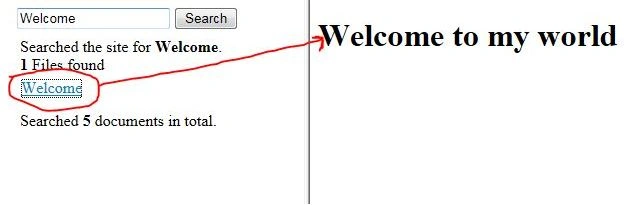
You can search any page within the Help folder by typing its name.


NADEEM RAJAPosted Jun 24, 2020, 4:02 AM
How to Barred master page navigation from internal search
mazhar khanPosted Aug 29, 2016, 10:17 AM
.aspx page is not finding? only html pages is finding.
Yashwanth MuthineniPosted Aug 31, 2015, 2:02 AM
Nice Share
Manas MohapatraPosted Aug 31, 2015, 1:57 AM
Very Helpful. Thanks for Sharing..
gobardhan naikPosted Apr 14, 2015, 2:15 PM
I am able to find .html page but unable to find .aspx page. Is there anything i am missing?
Sharad GuptaPosted Jun 17, 2013, 11:28 AM
good one, it helpful when find out a page from lot of pages