

In the first part of this series, we discussed the basics of MVC, features of MVC, and folder structure of MVC. Check the first part of this series to brush up your basics.
Controllers in MVC
In MVC, C stands for Controller. Controller is the most important component of MVC which handles the execution of every request. An MVC Controller acts as a mediator between Model and View. Model communicates with the View through Controller and the application execution process always starts from the Controller.
In an MVC application, every Controller is created as a class. A project can have more than one controllers according to our requirement.
Important points to create the Controller
- Controller class should be declared with Public Access Modifier.
- Controller class name should end with the Controller prefix.
- All the Controllers should be inherited from the Controller base class which provides the build in Objects, Methods etc.
In Controller, at the time of processing a request, it will execute the corresponding method which is called Action Method.
Action Method in MVC
Action method is a Controller method which returns some values as a result. Every request that comes in MVC will be handled by action methods in the Controller. Action method contains the application execution logic to process the request.
Important points about Action Methods
- Action method must be Public.
- It can’t be static, it must be a non-static method.
- Action method returns the View() method. View() is used to process the Views. The View() method is a built-in method in the controller class, at execution time view() execute and result will return from the action method. View() method return type is View Result.
- Action method can be parameterized or parameterless.
- It can overload but can’t be overridden.
An action method can be defined with various return types
Type of Action Method
- Action method with view result: These methods return View Page as a result
- Action method with the non-view result: Action method that returns data instead of an HTML Page.
- No action Method
Action Methods
- ViewResult
- Partialviewrestult
- FileResult
- JsonResult
- ContentResult
- JavascriptResult
- RedirectResult
- EmptyResult
ViewResult
It represents a class that is used to render a view whenever the controller action is invoked the view engine dynamically rendered HTML to client
PartialviewResult
It represents a base class that is used to send a partial view to the response. Partial view is a reusable view that is accessible from any view.
JsonResult
It represents a base class that is used to send data in JSON format as a response.
RedirectResult
It controls the processing of application’s action by redirecting to specified URL .
RedirectToRouteResult
It represents a result that performs a redirection by using the specified route values. It can be used to redirect to any controller action within the application.
ContentResult
It represents a user-defined content type that is sent as a response to the client.
JavascriptResult
It represents a base class that sent JavaScript content to response. We can call any Javascript method to sent as a response.
EmptyResult
It represents a result that returns nothing, so it will not have any return value.
Data Sharing between controller to view
MVC provides different dynamic expression and properties that allow the UI to store values and transport them across multiple tiers. To share data from controller to view, MVC provides different techniques
- ViewBag
- ViewData
- TempData
- Strongly Typed View
ViewData
It is a collection object. It stores the data in key-value format.
Syntax - Viewdata["key"]=value;
- Key-string
- Value-object
We need to perform typecasting in order to read values from view data because it stores all the values in object format. It is an object of ViewDataDictonary class.
ViewBag
Viewbag is introduced in MVC 3.0. In ViewBag, keys are used as properties. The ViewBag concept is developed in dynamic typing. If we use ViewBag, then there is no need to perform type casting.
Syntax
- ViewBag.key=value
- var a =viewBag.key
ViewBag is also a object of ViewDataDictonary class.
TempData
TempData is the same as viewdata, it stores data in object format, but TempData is available in the current action and redirected action. ViewBag and ViewData scope are available in only one action and view.
Syntax
- TempData["Key"]=value;
- var a =(type)TempData["Key"];
TempData is an object of TempDatadictionary class.
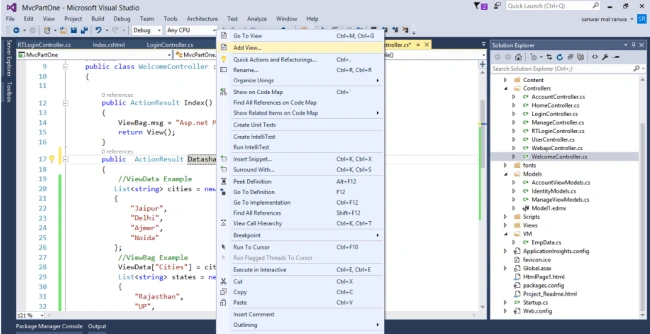
Now, we create an MVC application to use ViewData, ViewBag, and TempData. Let's add an action method into the Welcome controller and add the following lines of code.
- public ActionResult DatashaingExample()
- {
- //ViewData Example
- List<string> cities = new List<string>()
- {
- "Jaipur",
- "Delhi",
- "Ajmer",
- "Noida"
- };
- //ViewBag Example
- ViewData["Cities"] = cities;
- List<string> states = new List<string>()
- {
- "Rajasthan",
- "UP",
- "Mp",
- "Punjab"
- };
- ViewBag.state = states;
- //TempData Example
- List<string> countries = new List<string>()
- {
- "India",
- "USA",
- "UK",
- };
- TempData["Counties"] = countries;
- return View();
- }
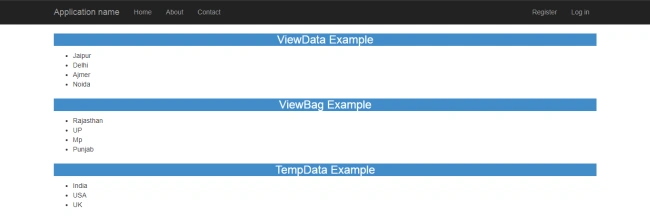
In the View, add the following lines of code to display data from Controller.

Abhishek MishraPosted Apr 16, 2019, 1:32 AM
Good quick refresher on ASP.NET MVC