

Introduction
This article introduces how to improve ASP.NET MVC Application performance with the help of bundling and minification. Both bundling and minification are the two separate techniques to reduce the load time. The bundling reduces the number of requests to the Server, while the minification reduces the size of the requested assets.
Most browsers process six requests simultaneously to each Website, which is why additional requests will be queued by the Browsers. If we reduce these requests, the queued time for the other requests will be reduced as well. Thus, bundling is used to reduce these requests from the Browser to Server.
The minification is the removal of all unnecessary characters from a text-based resource (JS and CSS) in a way that doesn’t alter the expected functionality. This means shortening identifiers, aliasing functions and removing the comments, white-space characters and new lines.
Both bundling and minification can be applied together but both have a separate process. As the minified and bundling version is hard to read and step through, we should not bundle and minify all CSS and JS files at a time of production or debug, while we must do bundling and minification of all the files, when we go live.
The ASP.NETMVC offers bundling and minification technique by System.Web.Optimization class, which exists under the System.Web.Optimization dll.
Bundling
The bundle is a logical group of physical files, which loads in a single HTTP request. We have separate CSS files, which can be loaded in a single request with the help of bundling. The bundling also can create for JavaScript files separately. A bundle can’t contain both CSS and JavaScript files. We need to create a separate bundle for CSS and JavaScript files. We create a bundle, based on the use of CSS or JS files in the Application. For example, an Application uses both the bootstrap and site CSS for UI design, due to which we create a common bundle for them, such as a core bundle. The following figure shows a logical grouping of a file to create a bundle.
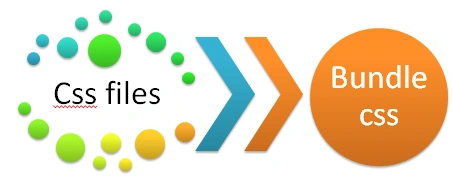
Figure 1: Logical grouping of files-Bundle
We have an MVC Application and run it. After that we see HTTP requests which creates for individual files.

Figure2: HTTP Requests
The figure, shown above, shows that both bootstrap.css and site.css have individual HTTP requests, whose total load time is 281 ms. Now, we introduce the bundling for both CSS files. We create style bundle for those files. The BundleConfig class’s RegisterBundles is used to create both Script and Style bundle. The code snippet, given below, shows style bundle for both bootstrap and site CSS files.
- using System.Web;
- using System.Web.Optimization;
- namespace BundlingSample
- {
- public class BundleConfig
- {
- public static void RegisterBundles(BundleCollection bundles) {
- bundles.Add(new StyleBundle("~/Content/css").Include(
- "~/Content/bootstrap.css",
- "~/Content/site.css",
- "~/Content/bootstrap-responsive.css"));
- }
- }
- }
Afterwards, we need to register this bundle in the Application. We call this method in the Application_Start method of the global.asax.cs file and register this bundle module to bundle config. We don’t need to register individual bundles in the Application. We need to just register bundle module in the Application for all style and script bundles.The code snippet, given below, shows global.asax.cs file.
- using System.Web.Mvc;
- using System.Web.Optimization;
- using System.Web.Routing;
- namespace BundlingSample
- {
- public class MvcApplication: System.Web.HttpApplication
- {
- protected void Application_Start() {
- AreaRegistration.RegisterAllAreas();
- FilterConfig.RegisterGlobalFilters(GlobalFilters.Filters);
- RouteConfig.RegisterRoutes(RouteTable.Routes);
- BundleConfig.RegisterBundles(BundleTable.Bundles);
- }
- }
- }
- @Styles.Render("~/Content/css")
- <system.web>
- <compilation debug="false" targetFramework="4.5.1" />
- <httpRuntime targetFramework="4.5.1" />
- </system.web>
- <link href="/Content/css?v=Bz3KZjU_pdOm2wAVr7z_ylCuQzQDs1O8N6pV4cvXc_Q1" rel="stylesheet"/>
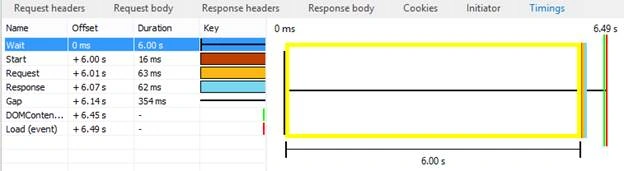
Figure 3: Load time for bundle
In the same way, we can also create a bundle for the script, which is called Script bundle. For example, we create a bundle for bootstrap JS file as per the code snippet, given below, which defined in RegisterBundles method of BundleConfig class. We can add multiple files path in a bundle, which will be separated by a comma.
- bundles.Add(new ScriptBundle("~/bundles/bootstrap").Include(
- "~/Scripts/bootstrap.js"));
- bundles.Add(new ScriptBundle("~/bundles/jquery").Include(
- "~/Scripts/jquery-{version}.js"));
- bundles.Add(new ScriptBundle("~/bundles/jqueryval").Include( "~/Scripts/jquery.validate*"));
- @Scripts.Render("~/bundles/jquery")
- <script src="/bundles/jquery?v=FVs3ACwOLIVInrAl5sdzR2jrCDmVOWFbZMY6g6Q0ulE1"></script>

Figure 4: Bundling result
To improve the performance, we can also load the resources from CDN. The code, given below, replaces the local jQuery bundle with a CDN jQuery bundle.
- bundles.UseCdn = true;
- bundles.Add(new ScriptBundle("~/bundles/jquery","https://cdnjs.cloudflare.com/ajax/libs/jquery/3.1.0/jquery.js"));
The CDN resource request, shown above, fails in the debug mode as the bundling works in the release mode only. Thus, we retrieve jQuery resource locally, as per the code snippet, given below:
- @Scripts.Render("~/bundles/jquery") <
- script type = "text/javascript" >
- if (typeof jQuery == 'undefined')
- {
- var script = document.createElement('script');
- script.src = '@Url.Content("~/Scripts/jquery-1.10.2.js")';
- script.type = 'text/javascript';
- document.getElementsByTagName("head")[0].appendChild(script);
- } <
- /script>
The Minification is a technique for removing unnecessary characters (white space, newline, tab), comments and short variable names from the text based files such as JavaScript and CSS files without expecting alter functionality to reduce the size, which causes improved load times of a Webpage. There are some tools available to minify JS and CSS files. We can download Visual Studio extension from link for minifying JS and CSS files.
Busting Browser's Cache by Bundling
As we upload the changes in the static resources such as CSS and JS files on the live server, the resources changes but it does not update on the Browser, because the Browser's cache resources are based on URLs automatically. Thus, when a Web page requests a resource, it checks in cache first. If the resource is found in cache, use cached copy rather than retrieving the resources from the Server. Hence, whenever you change the content of CSS and JS, files will not reflect on the Browser. For this, you need to force the Browser for refreshing/reloading.
The bundles set the HTTP expires header, one year from when the bundle is created. As we have a CSS bundle resource, which loads on the Browser with the following link.
- <link href="/Content/css?v=Bz3KZjU_pdOm2wAVr7z_ylCuQzQDs1O8N6pV4cvXc_Q1" rel="stylesheet"/>
We create bundling to improve an Application's performance, while it works in the release mode only but we develop an Application in the debug mode on our machine. Thus, we create a unique token for the resource path. We add a version key in the web.config, which will be used as a unique token in the development.
- <appSettings>
- <add key="Version" value="sa291988" />
- </appSettings>
- using System.Configuration;
- namespace BundlingSample
- {
- public class SiteKeys {
- public static string StyleVersion {
- get {
- return "<link href=\"{0}?v=" + ConfigurationManager.AppSettings["version"] + "\" rel=\"stylesheet\"/>";
- }
- }
- public static string ScriptVersion {
- get {
- return "<script src=\"{0}?v=" + ConfigurationManager.AppSettings["version"] + "\"></script>";
- }
- }
- }
- }
- @Styles.RenderFormat(SiteKeys.StyleVersion,"~/Content/css")
- @Scripts.RenderFormat(SiteKeys.ScriptVersion,"~/bundles/jquery")
Other resources to improve ASP.NET MVC Application performance will be:
Ganapathi RamanPosted Dec 2, 2024, 7:09 AM
Excellent Article. Thanks
Khiêm NguyễnPosted Dec 22, 2019, 10:50 PM
Could I remove the v param?
Mukesh RajpootPosted Nov 2, 2018, 4:35 AM
Where to add the class : public class SiteKeys { public static string StyleVersion { get { return "<link href=\"{0}?v=" + ConfigurationManager.AppSettings["version"] + "\" rel=\"stylesheet\"/>"; } } public static string ScriptVersion { get { return "<script src=\"{0}?v=" + ConfigurationManager.AppSettings["version"] + "\"></script>"; } } }
ajeesh cPosted Mar 22, 2018, 3:31 PM
Since this bundling happening run time will it cause the page to load slower. what if i bundled using gulp or web pack and refer in layout as static. this will avoid the run time code execution. But i dont know how much will be the gain.
Ranjeet PatilPosted Jan 8, 2017, 12:42 PM
I have a question on bundling and minifications. the link which bundling generates(http://localhost/spr/bundles/jquery?v=wv6Z3UU4PCrnxoAhnWTvy_WPfeAoK7bx2k5Q3jzbRTY1). the browser is downloading this file all the time..it is not taking from the cache..As the link is not physical file.
Cao FangshengPosted Jul 29, 2016, 4:35 AM
Very Good,@Sandeep Singh Shekhawat
kalu singh raoPosted Jul 22, 2016, 1:25 AM
Nice share
Sandeep Singh ShekhawatPosted Jul 22, 2016, 12:04 AM
Thanks all :)
Bhavik PatelPosted Jul 22, 2016, 12:02 AM
Browser caching part is awesome.
Debendra DashPosted Jul 21, 2016, 11:21 PM
Nice one..
Vignesh ManiPosted Jul 21, 2016, 4:44 PM
Good One