

Overview - In this article, we will see how to Retrieve data from SQL server using Web API and Entity Framework.
So, let’s start.
Introduction
First, create a Blank Web API project as,
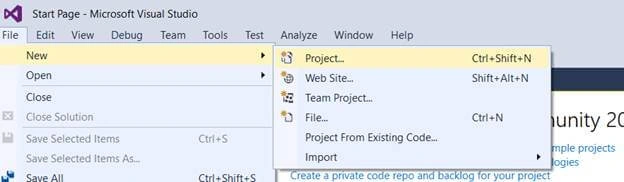
File->New->Project.
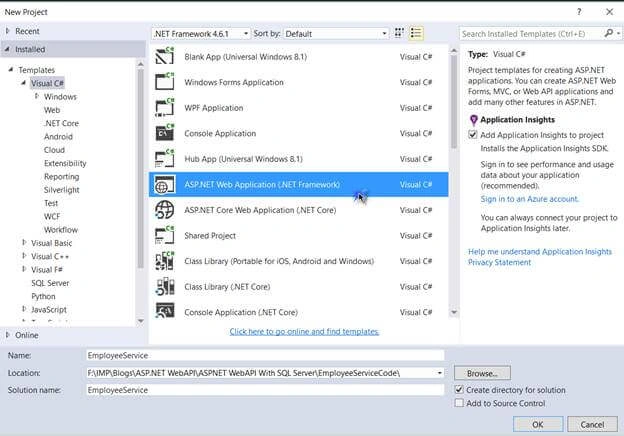
Select ASP.NET web application Project and give a Desirable name and click Ok as
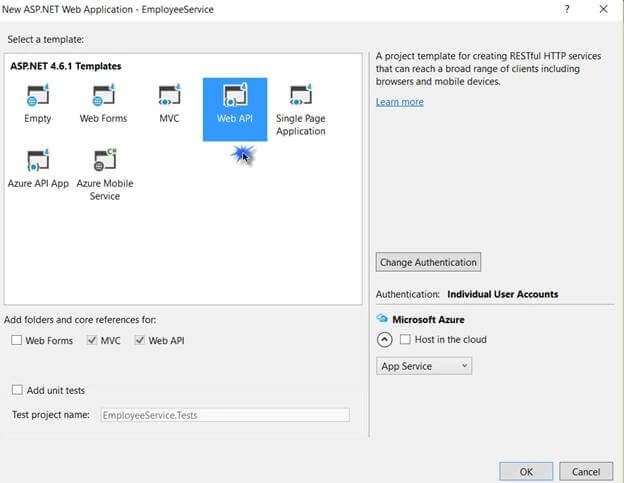
Click on Web API in template selection window.
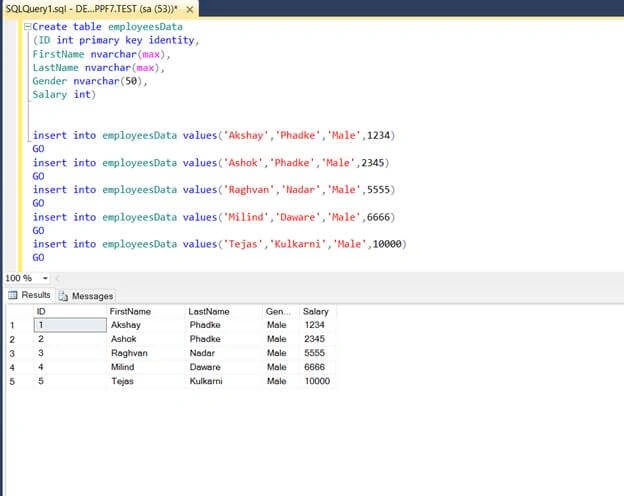
It will create a blank Web API project. Now, in SQL Server, I have a table called Employee Data which has 5 fields as Id, FirstName, LastName, Gender, and Salary.
Now, what we want - If the request is http://localhost:portnumber/api/employees, it should display the list of employees, and if we type any Id in a particular URL, it should display those details.
Let’s see how.
Now, flip to Visual Studio. You can see, we have successfully created our empty Web API project.
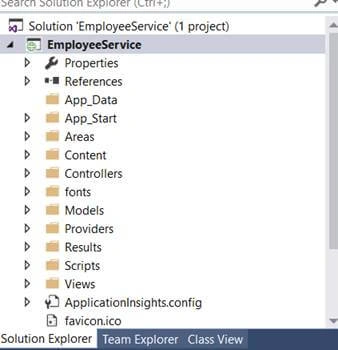
In this solution, we will add web service for employees which will contain our ADO.NET Entity Data Model that retrieves the data from SQL Server.
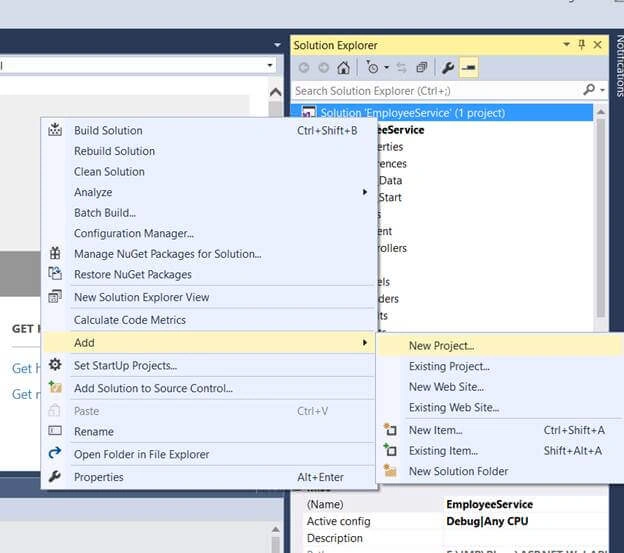
So, right click on the Solution ->Add->New Project.
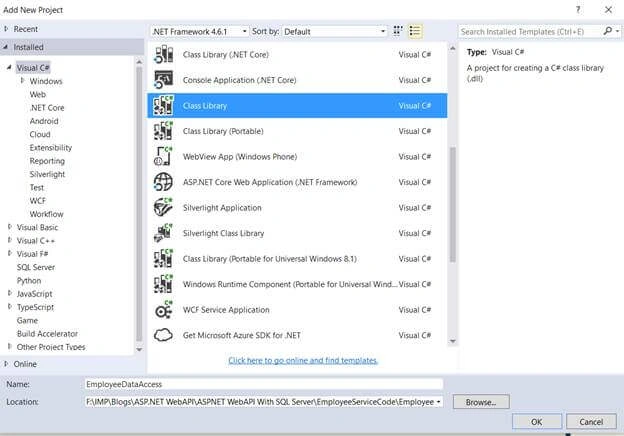
Next, click on Class Library (the type of project we want to access).
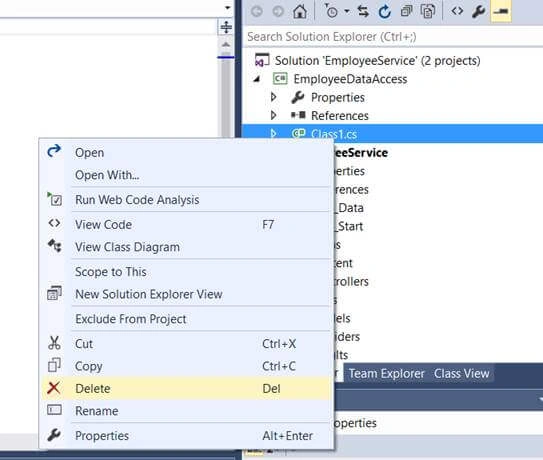
We don’t need the auto generated class file which is class1.cs. So, kindly delete that file.
And to this EmployeeDataAccess project, add a ADO.NET Entity Data Model.
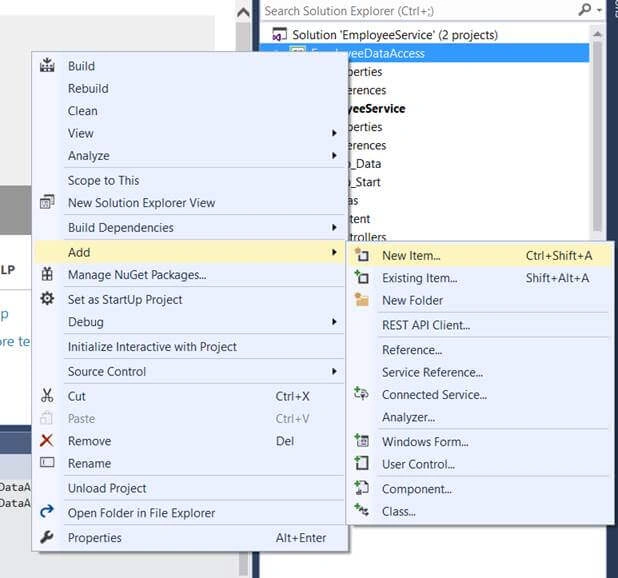
Right click on the Project ->Add->New Item.
Now, go to Data tab, click on ADO.NeT Entity Data Model, and name it as EmployeeDataModel.
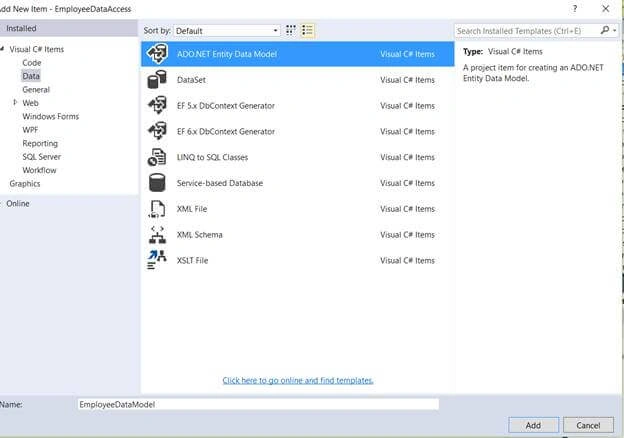
Now, click on Add. The subsequent screen will be the following.
Now, flip to Visual Studio. You can see, we have successfully created our empty Web API project.
In this solution, we will add web service for employees which will contain our ADO.NET Entity Data Model that retrieves the data from SQL Server.
So, right click on the Solution ->Add->New Project.
Next, click on Class Library (the type of project we want to access).
We don’t need the auto generated class file which is class1.cs. So, kindly delete that file.
And to this EmployeeDataAccess project, add a ADO.NET Entity Data Model.
Right click on the Project ->Add->New Item.
Now, go to Data tab, click on ADO.NeT Entity Data Model, and name it as EmployeeDataModel.
Now, click on Add. The subsequent screen will be the following.
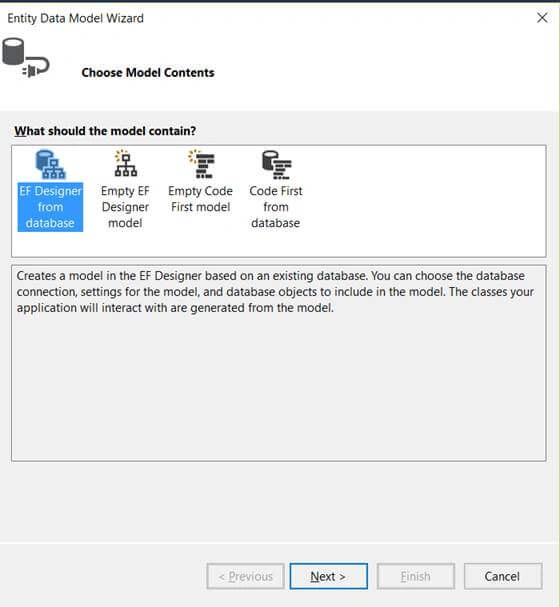
Since we want to generate entities from Database, we will select the first option. Click next
Now, we will create a new connection with SQL server, and refer it to our Database as well.
Now, we will create a new connection with SQL server, and refer it to our Database as well.
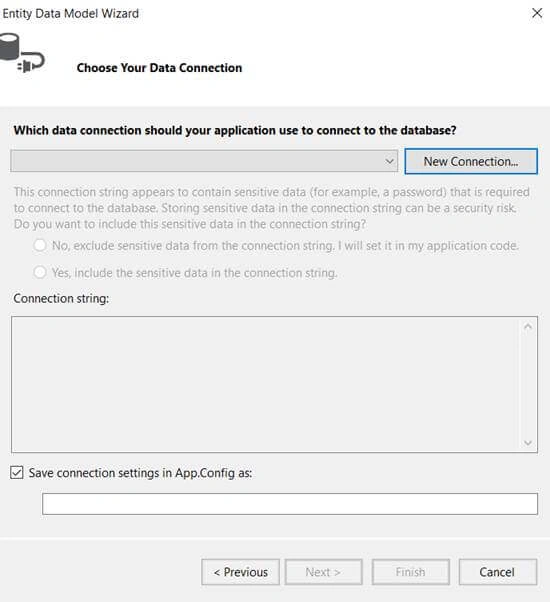
As you can see, the necessary connections are made. Now, test the connection.
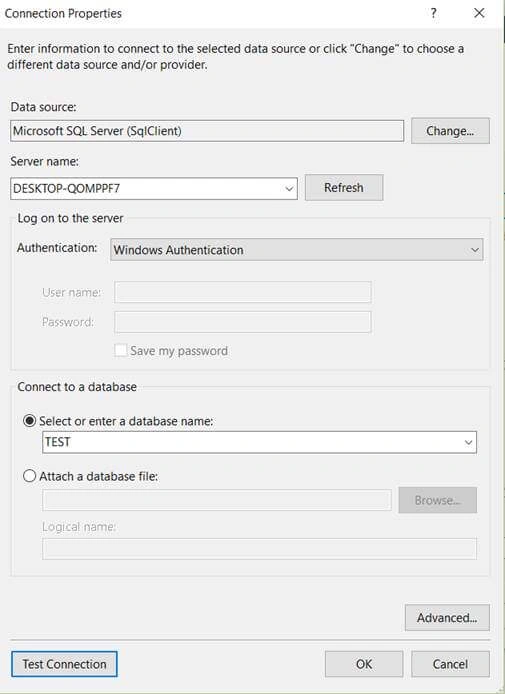
Here, Entity Framework is going to see a connection string with the name TESTEntities within App.config file, in our EmployeeDataAccess Class library project. So, click Next now.
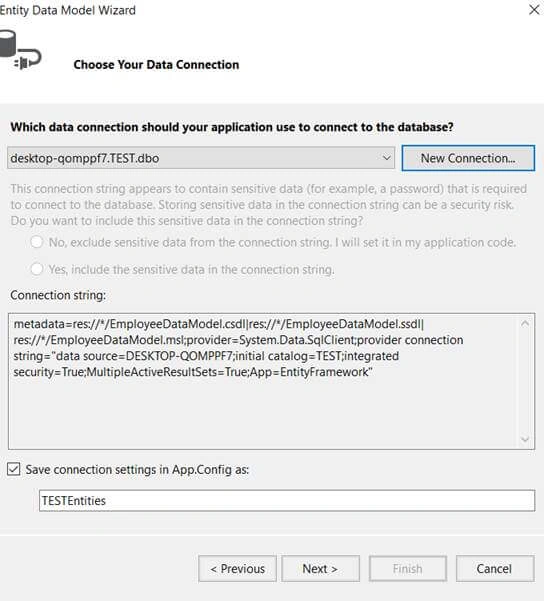
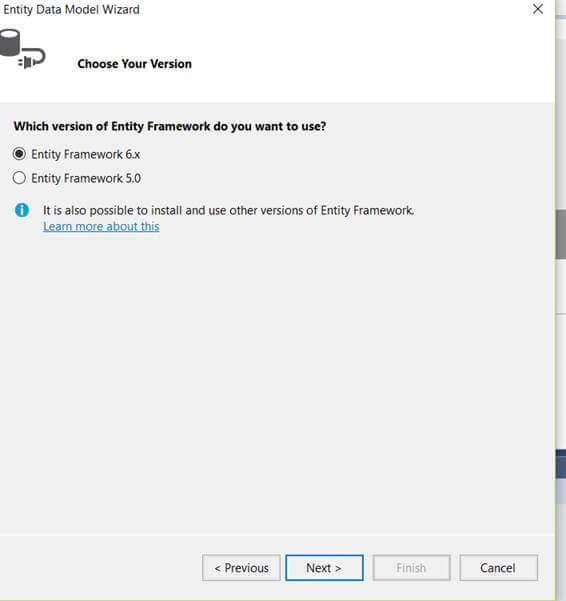
Its asks for the EF version we want to use. Let's select EF 6, and click Next.
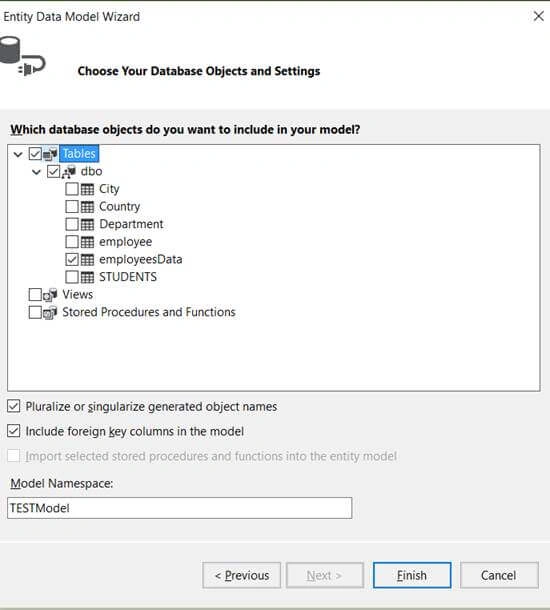
Select the Table from tables list and click on Finish.
You can see that the EmployeeDataModel is created successfully.
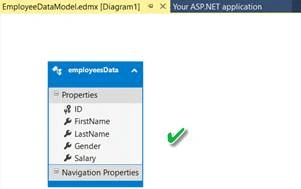
Now in that project, click on App.Config file. You will get the following screen.
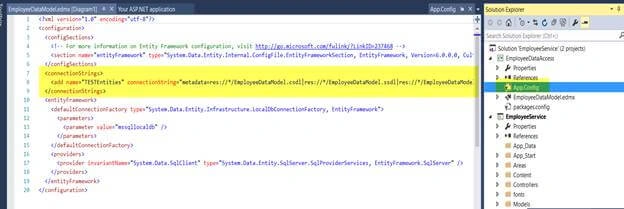
I have highlighted the Connection String section. Our connection string here is TESTEntities which contains the EmployeeData Table.
We want to use this Class Library in our Web API Project.
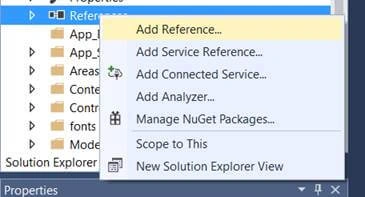
Right Click on the References folder - > Add Reference
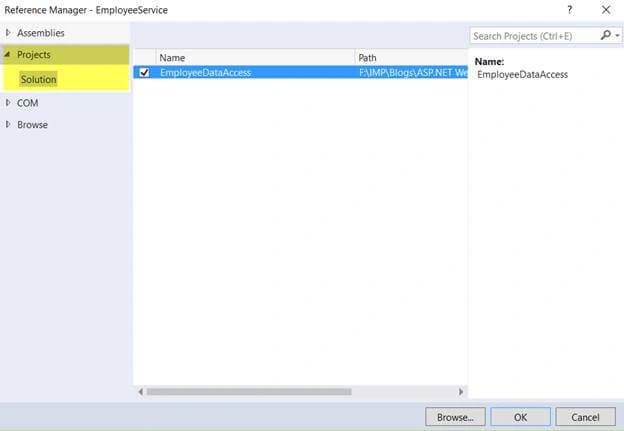
We want to add a project reference, so select the project tab and in that, select EmployeeDataAccess Class Library project. Then, click OK.
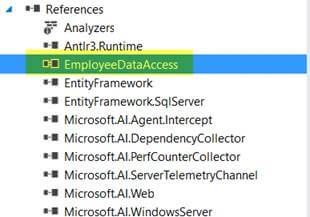
We have successfully added a reference to our main Employee Project. The next step is to add a Controller to our Web API Project. So, right click on the Controller folder and click on Add Controller.
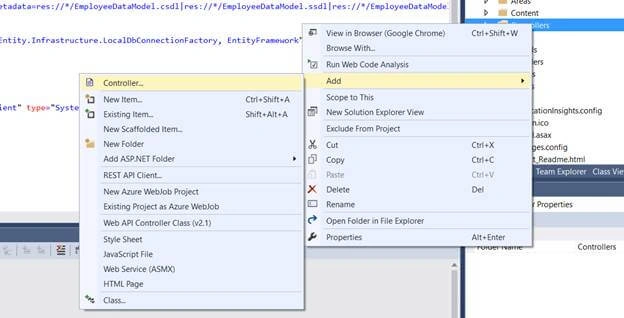
When you click on Controllers, it will give options for adding templates for MVC and Web API Controllers. We will select "Web API 2 Controller – Empty".
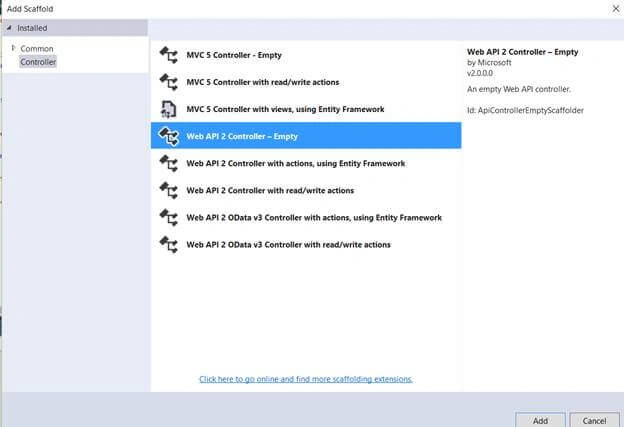
Click on Add and give desired name as EmployeesController. It will create a Controller.
Right Click on the References folder - > Add Reference
We want to add a project reference, so select the project tab and in that, select EmployeeDataAccess Class Library project. Then, click OK.
We have successfully added a reference to our main Employee Project. The next step is to add a Controller to our Web API Project. So, right click on the Controller folder and click on Add Controller.
When you click on Controllers, it will give options for adding templates for MVC and Web API Controllers. We will select "Web API 2 Controller – Empty".
Click on Add and give desired name as EmployeesController. It will create a Controller.
Now, we will add a namespace EmployeeDataAccess as our class library name is “EmployeeDataAccess”. Now, in our Controller class, we will add a GET method which will respond to GET HTTP verb. This will return IEnumerable Object.
Now, the question is - "Where is this Employee Data that has come from this Employee.?". In our SQL server, our table name is employeeData. So, right click on that and go to definition, You will see the following.
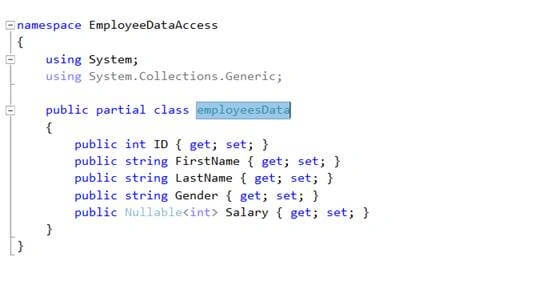
We have these properties that correspond to these columns in our employeeData table. Now, we will write a GET method which will respond to the HTTP GET verb.
- public class EmployeesController : ApiController
- {
- public IEnumerable<employeesData>
- }
We have these properties that correspond to these columns in our employeeData table. Now, we will write a GET method which will respond to the HTTP GET verb.
The next step is to create an instance of our DBContext class. So, we have EmployeeDatamodel.edmx file in which we have EmployeeDataModel.Context.cs file, and we have TESTEntities which inherits from DbContext class.
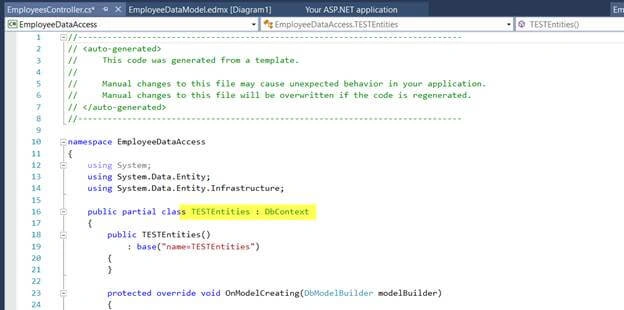
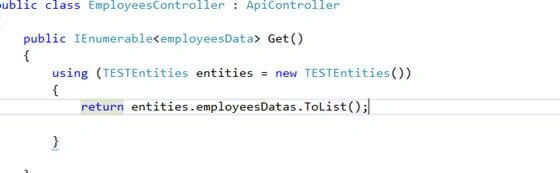
So, this is the class TESTEntities that manages the database and retrieves entities for us. So, in our Controller class, let’s use TESTEntities. It will return the list of employees as,
Now, this is going to respond to the HTTP GET Verb with an ID Parameter. When we request for specific employee, we want to return that employee.
So, this is the class TESTEntities that manages the database and retrieves entities for us. So, in our Controller class, let’s use TESTEntities. It will return the list of employees as,
Now, this is going to respond to the HTTP GET Verb with an ID Parameter. When we request for specific employee, we want to return that employee.
Let’s add another GET method which will return that employee details only.
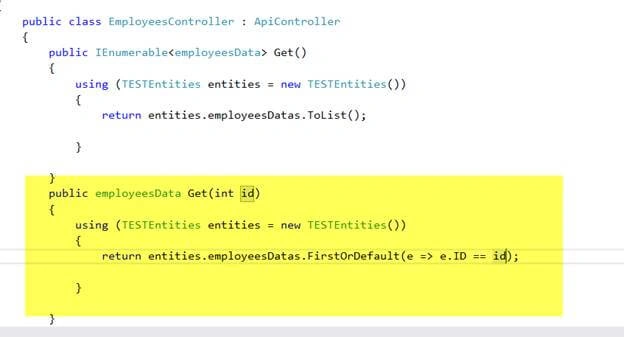
First, we changed the return type as we want to return a single employee and pass id in the GET method parameter. And, we want to return the first or the default value . We used lambda expression here in each employee ID, which will be equal to the id which we had used in our GET parameter.
First, we changed the return type as we want to return a single employee and pass id in the GET method parameter. And, we want to return the first or the default value . We used lambda expression here in each employee ID, which will be equal to the id which we had used in our GET parameter.
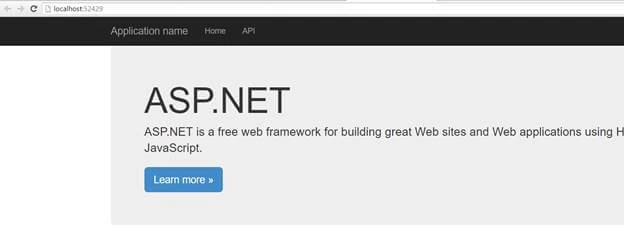
Now, build the solution and run the app . You will get this output.
Now, navigate to api/employees. You will get the following.
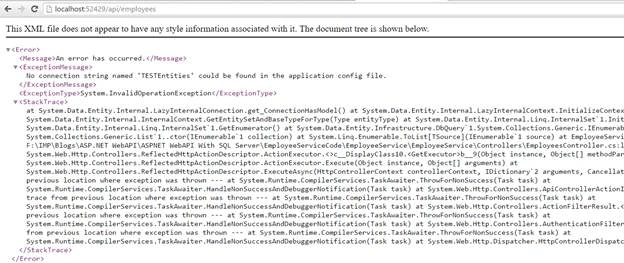
As the error says, "No connection string named TESTEntities found in config file".
Now, navigate to api/employees. You will get the following.
As the error says, "No connection string named TESTEntities found in config file".
Notice that we have a connection string in our App.config as TESTEnties but the name TESTEntities is not present in our web.config file as Entity Framework looks for web.config file.
Now, in our web.config file, we don’t have a connection string with TESTEntities and that’s the reason why we are getting this error. To fix this copy that connection string from app.config file and paste in our web.config file. Save it and reload the app,
Now type /api/employees
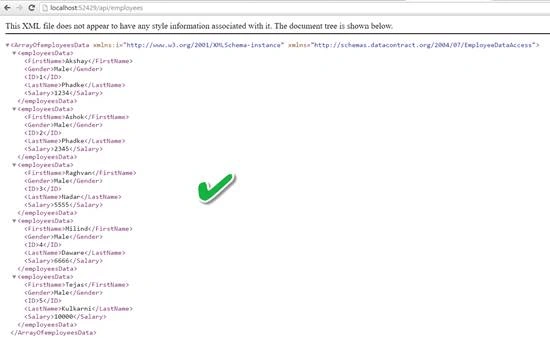
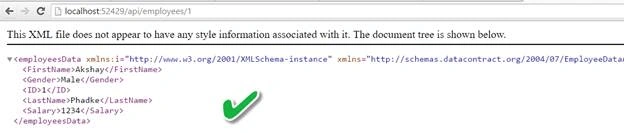
We have gotten all the employeeDetails from the Database. Now, when request for specific employee, we get -
Conclusion
So, this was all about ASP.NET Web API with SQL Server. Hope this article was helpful!!
Now type /api/employees
We have gotten all the employeeDetails from the Database. Now, when request for specific employee, we get -
Conclusion
So, this was all about ASP.NET Web API with SQL Server. Hope this article was helpful!!
Vennila BPosted Nov 30, 2022, 3:21 AM
Hi,I have two tables Patient and Lineup. In Patient table I have more than 20 columns. The fields that I want to use in WebAPI are PatientID, Mobile1, Mobile2 and ReferenceID. from Patient table. My requirement is.. I have mobile number, I want to return only ReferenceID. I have a Mobile Number.. First case, I want to serach for the ReferenceID of the Mobile Number(search in Mobile1 and Mobile2 columns). If the ReferenceID is not Null then return ReferenceID. Second Case, If the ReferenceID is Null and the mobile number is existing, then UPDATE ReferenceID (sequence is created for this column, so we have to update using sequence). and return the ReferenceID. Third Case, If the mobile num is not available, then INSERT new record in Patient table and a row in LineUp tables (Stored Procedure is created for this and I have to use this also) and return ReferenceID. Can u help me out of this? Thanks in advance!
曾東旭 曾東旭Posted Jan 9, 2019, 1:18 AM
How to get specific content value? ex. get the first name
曾東旭 曾東旭Posted Jan 9, 2019, 1:16 AM
Good tutorial!
Vinamra MaheshwariPosted Sep 6, 2018, 11:50 PM
Everytime it calls the default function and display the complete result. Couldnt call it for specific id. also returning the result in json format not in XML. Please tell the solution
Kuma HomesPosted Aug 28, 2018, 11:55 PM
Great walkthrough ... how do you return all the recode matched the ID ? FirstOrDefault only returns 1 recode !
詩婷 黃Posted Jul 4, 2018, 5:44 AM
Good tutorial thanks
Ronaldo PeresPosted Jun 25, 2018, 8:32 AM
Good tutorial,
ian benedict mabalotPosted Jun 8, 2018, 3:53 AM
This tutorial is in complete at the middle, I dont know where he did the employeeData class
Trevor WallisPosted Mar 6, 2018, 12:24 PM
I'm trying to follow these instructions using Visual Studio 2017 Community Edition, but at the step which says, "So, right click on the Solution ->Add->;New Project." but there is no "New Project" option on the pop-out menu at that point. It's significantly larger than the one shown here, and starts with "Area...", then "New Item", then "Existing Item," etc. In the list of approximately 24 choices, there is no "New Project". Can someone tell me (or perhaps provide a link) how to do this on Visual Studio 2017, Community Edition?
Prasanth sPosted Feb 17, 2018, 4:01 AM
How to get values from db and assign to textbox using web api
Hải QuânPosted Nov 14, 2017, 12:45 PM
Anyone can zip that project ?
sanika rautPosted Nov 5, 2017, 11:58 AM
Great tutorial! Very helpful, thank you for sharing!
Bhavesh JadavPosted Oct 25, 2017, 9:56 AM
Very help full article, thank to share.
Ravindra PCPosted Oct 9, 2017, 8:17 AM
Nice article.. Working perfectly as it's.. :)
Hugh HousePosted Jun 18, 2017, 12:26 AM
Great tutorial. Got it working with ease. However, one thing I couldn't get working was to enable SQL that is generated by the Enity Framework to be displayed in the Debug Output window. How do you set it up so that SQL is generated to the debug output window?
fakiha mumtazPosted Apr 29, 2017, 1:48 PM
I am getting error "EmployeeDataAccess.EmployeeDBEntities" type used in a using statement must be implicitly Convertible to System.IDisposable