

Introduction
If you are learning ASP.NET Core, one of the first concepts you should understand is CRUD operations. CRUD is the foundation of almost every web application because it allows users to create, read, update, and delete data.
In this article , you will learn how to build a CRUD Web API in ASP.NET Core using Entity Framework Core (EF Core) with PostgreSQL following the Code First approach. By the end of this article, you'll be able to create your own REST API and connect it to a PostgreSQL database.
What is CRUD?
CRUD stands for:
Create – Add new data.
Read – Retrieve existing data.
Update – Modify existing data.
Delete – Remove data.
These four operations are the building blocks of most database-driven applications.
What is ASP.NET Core Web API?
ASP.NET Core Web API is a framework for building RESTful APIs. A Web API allows different applications, such as web apps, mobile apps, and desktop applications, to communicate with each other using HTTP requests. The commonly used HTTP methods are:
HTTP Method CRUD Operation Description
GET : Retrieves data from the database
POST: Adds new data
PUT : Updates existing data
DELETE: Removes data
Why Use Entity Framework Core?
Entity Framework Core (EF Core) is Microsoft's Object-Relational Mapper (ORM).Instead of writing SQL queries manually, EF Core lets you work with C# classes and objects. It automatically converts your C# code into SQL queries.
Why PostgreSQL?
PostgreSQL is a powerful, open-source Relational Database Management System (RDBMS) used to store, organize, and manage data efficiently.
It supports SQL, provides high security and reliability, and is widely used for web, enterprise, and business applications.
Prerequisites
Before starting, install the following NuGet packages:
Microsoft.EntityFrameworkCore
 Microsoft.EntityFrameworkCore.Tools
 Npgsql.EntityFrameworkCore.PostgreSQL
After installing the packages, create a new ASP.NET Core Web API project.
Step 1: Configure the PostgreSQL Connection
Open pgAdmin 4 and make sure the PostgreSQL server is running.
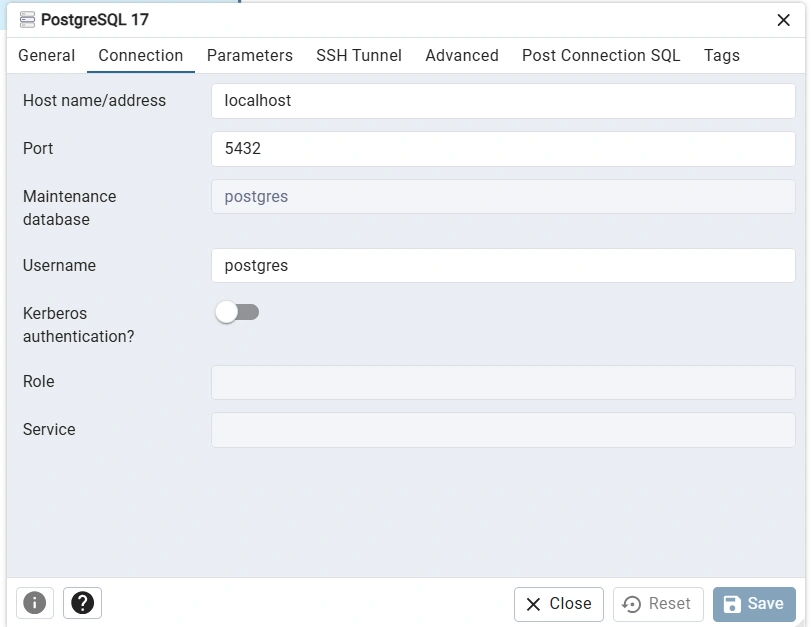
Open appsettings.json and add the following connection string.
{  "ConnectionStrings": {
    "myConn": "Host=localhost;Port=5432;Database=cruddb;Username=postgres;Password=admin"
  }}
Step 2: Create the Model Class
Create a Product model inside the Models folder.
using System.ComponentModel.DataAnnotations;

namespace CrudApp.Model
{
    public class Product{
        public int Id { get; set; }
        [Required]
        public string Name { get; set; }
        public decimal Price { get; set; }
        public int Quantity { get; set; }
    }}
Step 3: Create the DbContext Class
Create an AppDbContext class that inherits from DbContext.
The DbContext acts as a bridge between your application and the PostgreSQL database.
Inside the class:
Inherit from DbContext
Create a constructor
Add a DbSet<Product> property
using Microsoft.EntityFrameworkCore;

namespace CrudApp.Model
{
    public class AppDbContext : DbContext
    {
        public AppDbContext(DbContextOptions<AppDbContext> option) : base(option) {}
        public DbSet<Product> Products { get; set; }
    }}
Step 4: Register DbContext in Program.cs
builder.Services.AddDbContext<AppDbContext>(options =>
    options.UseNpgsql(builder.Configuration.GetConnectionString("myConn")));
Why do we register DbContext?
DbContext is registered in an ASP.NET Web API to allow Entity Framework Core to connect to the database and perform CRUD (Create, Read, Update, Delete) operations. It also enables Dependency Injection (DI),so the same database context can be shared safely throughout a request, making the application easier to manage and test.
Step 5: Create and Apply the Migration
Open the Package Manager Console or Terminal and execute

Step 6: Create the Product Controller
Implement the following CRUD endpoints:
GET – Retrieve all products
GET by ID – Retrieve a single product
POST – Add a new product
PUT – Update an existing product
DELETE – Delete a product
using CrudApp.Model;
using Microsoft.AspNetCore.Http;
using Microsoft.AspNetCore.Mvc;
using System.Data.Entity;

namespace CrudApp.Controllers
{
    [Route("api/[controller]")]
    [ApiController]
    public class ProductController : ControllerBase
    {
        public readonly AppDbContext _context;
        public ProductController(AppDbContext context)
        {
            _context = context;
        }

        [HttpGet]
        public IActionResult Get()
        {
            var getData = _context.Products.ToList();
            return Ok(getData);
        }

        [HttpGet("{id}")]
        public async Task<IActionResult> GetById(int id)
        {
            var data = await _context.Products.FirstOrDefaultAsync(x => x.Id == id);
            return Ok(data);
        }

        [HttpPost]
        public async Task<IActionResult> Create(Product product)
        {
            _context.Products.Add(product);
            await _context.SaveChangesAsync();
            return CreatedAtAction(nameof(Get), new
            {
                Name = product.Name,
                Price = product.Price,
                Quantity = product.Quantity
            }
            );
        }

        [HttpPut("{id}")]
        public async Task<IActionResult> Update(int id,Product product)
        {
            if (product.Id == 0 || id == 0|| product.Id!=id)
            {
                return BadRequest();
            }
            _context.Products.Update(product);
            await _context.SaveChangesAsync();
            return NoContent();
        }

        [HttpDelete("{id}")]
        public async Task<IActionResult> Delete(int Id)
        {
            var item = await _context.Products.FirstOrDefaultAsync(x => x.Id == Id);

                if(item == null)
                {
                    return NotFound();
                }
                _context.Products.Remove(item);
                await _context.SaveChangesAsync();
                return NoContent();
        }
    }
}
Step 7: Test the API
Run the application.
You can test your API using:
Swagger UI
Postman
Conclusion
In this article, you learned how to build a CRUD Web API in ASP.NET Core using Entity Framework Core and PostgreSQL
with the Code First approach.
You learned how to:
Configure PostgreSQL
Create model classes
Create a DbContext
Register EF Core services
Create and apply migrations
Build CRUD API endpoints
This project provides a strong foundation for building real-world ASP.NET Core applications.
I hope this helps you !
Join the conversation! Your thoughts help the community grow.