

Introduction
WEB API is the best fit to create a resource-oriented service using HTTP/Restful and it works well with MVC-based applications. For more details visit my link.
Description
In this session, I will show you how to insert records using AA Web API using HttpClient to post data in SQL Server. In this session, you can see get and post operations by Web API. In another way, I can say we'll insert and retrieve records using button click event.
Before going through this session, visit my previous session.
Steps to be followed,
Step 1
Add a new Action to the HomeController (in MVC Client application) for get view for Get data using HTTP Client.
Code Ref
- public ActionResult Part4()
- {
- List<Employee> list = new List<Employee>();
- HttpClient client = new HttpClient();
- var result = client.GetAsync("http://localhost:47250/api/satya").Result;
- if (result.IsSuccessStatusCode)
- {
- list = result.Content.ReadAsAsync<List<Employee>>().Result;
- ViewBag.userdetails = list;
- }
- return View();
- }
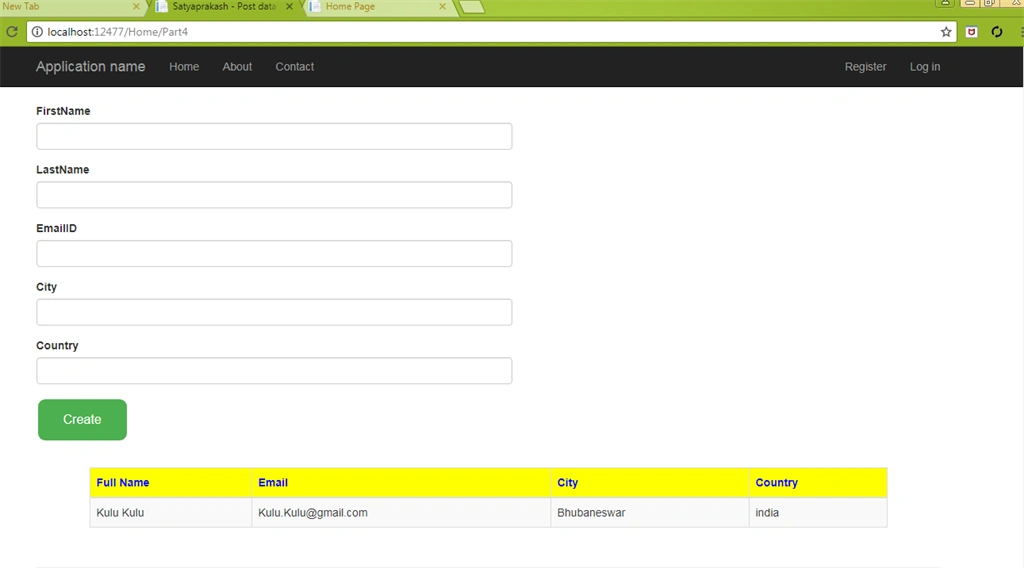
During page initial load table data will be shown that means the data will bind in table with input controls uisng HttpClient. This controller action method with [HttpGet].
Step 2
Using same Action to the HomeController (in MVC Client application) for Post data using HTTP Client.
Code Ref
- [HttpPost]
- public ActionResult Part4(Employee emp)
- {
- if (ModelState.IsValid)
- {
- HttpClient client = new HttpClient();
- var result = client.PostAsJsonAsync("http://localhost:47250/api/satya", emp).Result;
- if (result.IsSuccessStatusCode)
- {
- emp = result.Content.ReadAsAsync<Employee>().Result;
- ViewBag.Result = "Data Is Successfully Saved!";
- List<Employee> list = new List<Employee>();
- HttpClient client1 = new HttpClient();
- var result1 = client1.GetAsync("http://localhost:47250/api/satya").Result;
- if (result1.IsSuccessStatusCode)
- {
- list = result1.Content.ReadAsAsync<List<Employee>>().Result;
- ViewBag.userdetails = list;
- }
- ModelState.Clear();
- return View(new Employee());
- }
- else
- {
- ViewBag.Result = "Error! Please try with valid data.";
- }
- }
- return View(emp);
- }
In this part after form post method or button click event, data insert and tables data wil be shown. In side post section I added soemthing for data retrieval otherwise you'll get an error about Object reference not being set to an instance of an object. I will describe this issue in view section under Note.
- List<Employee> list = new List<Employee>();
- HttpClient client1 = new HttpClient();
- var result1 = client1.GetAsync("http://localhost:47250/api/satya").Result;
- if (result1.IsSuccessStatusCode)
- {
- list = result1.Content.ReadAsAsync<List<Employee>>().Result;
- ViewBag.userdetails = list;
- }
- ModelState.Clear();
Right Click on Action Method (here right click on form Part4()) > Add View... > Check "Create strongly typed view" > Select Model class >> Add. Here Model Class is "Employee (Entities)".
Code Ref
- @model Entities.Employee
- @{
- ViewBag.Title = "Satyaprakash - Post data to Web API using HTTPClient (in MVC client application) With Validation";
- }
- <link rel="stylesheet" href="https://maxcdn.bootstrapcdn.com/bootstrap/3.3.7/css/bootstrap.min.css">
- <script src="https://ajax.googleapis.com/ajax/libs/jquery/3.2.1/jquery.min.js"></script>
- <script src="https://maxcdn.bootstrapcdn.com/bootstrap/3.3.7/js/bootstrap.min.js"></script>
- <script src="https://cdnjs.cloudflare.com/ajax/libs/bootbox.js/4.4.0/bootbox.min.js">
- </script>
- <style>
- span.field-validation-error {
- color: red;
- }
- table {
- font-family: arial, sans-serif;
- border-collapse: collapse;
- width: 100%;
- }
- td, th {
- border: 1px solid #dddddd;
- text-align: left;
- padding: 8px;
- }
- tr:nth-child(even) {
- background-color: #dddddd;
- }
- .button {
- background-color: #4CAF50;
- border: none;
- color: white;
- padding: 15px 32px;
- text-align: center;
- text-decoration: none;
- display: inline-block;
- font-size: 16px;
- margin: 4px 2px;
- cursor: pointer;
- }
- .button4 {
- border-radius: 9px;
- }
- </style>
- <div style="padding:10px ; align-content:center">
- <fieldset>
- <legend style="font-family:Arial Black;color:blue">Post data to Web API using HTTPClient (in MVC client application) With Validation</legend>
- </fieldset>
- </div>
- <div style="max-width:600px;">
- @using (Html.BeginForm("Part4", "Home", FormMethod.Post, new { role = "form" }))
- {
- @Html.ValidationSummary(true)
- <div class="form-group">
- @Html.LabelFor(a => a.FirstName)
- @Html.TextBoxFor(a => a.FirstName, new { @class = "form-control" })
- @Html.ValidationMessageFor(a => a.FirstName)
- </div>
- <div class="form-group">
- @Html.LabelFor(a => a.LastName)
- @Html.TextBoxFor(a => a.LastName, new { @class = "form-control" })
- @Html.ValidationMessageFor(a => a.LastName)
- </div>
- <div class="form-group">
- @Html.LabelFor(a => a.EmailID)
- @Html.TextBoxFor(a => a.EmailID, new { @class = "form-control" })
- @Html.ValidationMessageFor(a => a.EmailID)
- </div>
- <div class="form-group">
- @Html.LabelFor(a => a.City)
- @Html.TextBoxFor(a => a.City, new { @class = "form-control" })
- @Html.ValidationMessageFor(a => a.City)
- </div>
- <div class="form-group">
- @Html.LabelFor(a => a.Country)
- @Html.TextBoxFor(a => a.Country, new { @class = "form-control" })
- @Html.ValidationMessageFor(a => a.Country)
- </div>
- <input id="btn" type="submit" value="Create" class="button button4" />
- <div style="width:90%; padding:10px; margin:0 auto;">
- @if (ViewBag.Result != null)
- {
- @*<div style="color:red">@ViewBag.Result</div>*@
- <script>
- $(document).ready(function () {
- $('#btn').click(function () {
- $('#tableshow').hide();
- });
- bootbox.alert('@ViewBag.Result');
- $('#tableshow').show();
- });
- </script>
- }
- </div>
- }
- </div>
- @*System.NullReferenceException , Object reference not set to an instance of an object. This error due to without added for data retrieve comment line code in Part4() in homecontroller in webapplication*@
- <div id="tableshow" style="width:90%; padding:10px; margin:0 auto;">
- <table class="table table-responsive table-striped table-bordered">
- <thead>
- <tr>
- <th style="background-color: Yellow;color: blue">Full Name</th>
- <th style="background-color: Yellow;color: blue">Email</th>
- <th style="background-color: Yellow;color: blue">City</th>
- <th style="background-color: Yellow;color: blue">Country</th>
- </tr>
- </thead>
- <tbody>
- @foreach (var i in ViewBag.userdetails)
- {
- <tr>
- <td>@i.FirstName @i.LastName</td>
- <td>@i.EmailID</td>
- <td>@i.City</td>
- <td>@i.Country</td>
- </tr>
- }
- </tbody>
- </table>
- </div>
- @*System.NullReferenceException , Object reference not set to an instance of an object.*@
- @section Scripts{
- @Scripts.Render("~/bundles/jqueryval")
- }
In this code section inside form post method added a script so that during button click event table data will be shown.
- <div style="width:90%; padding:10px; margin:0 auto;">
- @if (ViewBag.Result != null)
- {
- @*<div style="color:red">@ViewBag.Result</div>*@
- <script>
- $(document).ready(function () {
- $('#btn').click(function () {
- $('#tableshow').hide();
- });
- bootbox.alert('@ViewBag.Result');
- $('#tableshow').show();
- });
- </script>
- }
- </div>
- bootbox.alert('@ViewBag.Result');
During this session I was facing an issue about System.NullReferenceException, Object reference is not set to an instance of an object.
So, iIcreated a div id and put it inside script section as described in post method of Part4() controller action method. This error was due to lack of added data for data retrieval comment line code in Part4() in homecontroller in MVC client application.
- <div id="tableshow" style="width:90%; padding:10px; margin:0 auto;">
- <table class="table table-responsive table-striped table-bordered">
- <thead>
- <tr>
- <th style="background-color: Yellow;color: blue">Full Name</th>
- <th style="background-color: Yellow;color: blue">Email</th>
- <th style="background-color: Yellow;color: blue">City</th>
- <th style="background-color: Yellow;color: blue">Country</th>
- </tr>
- </thead>
- <tbody>
- @foreach (var i in ViewBag.userdetails)
- {
- <tr>
- <td>@i.FirstName @i.LastName</td>
- <td>@i.EmailID</td>
- <td>@i.City</td>
- <td>@i.Country</td>
- </tr>
- }
- </tbody>
- </table>
- </div>
During page load event.
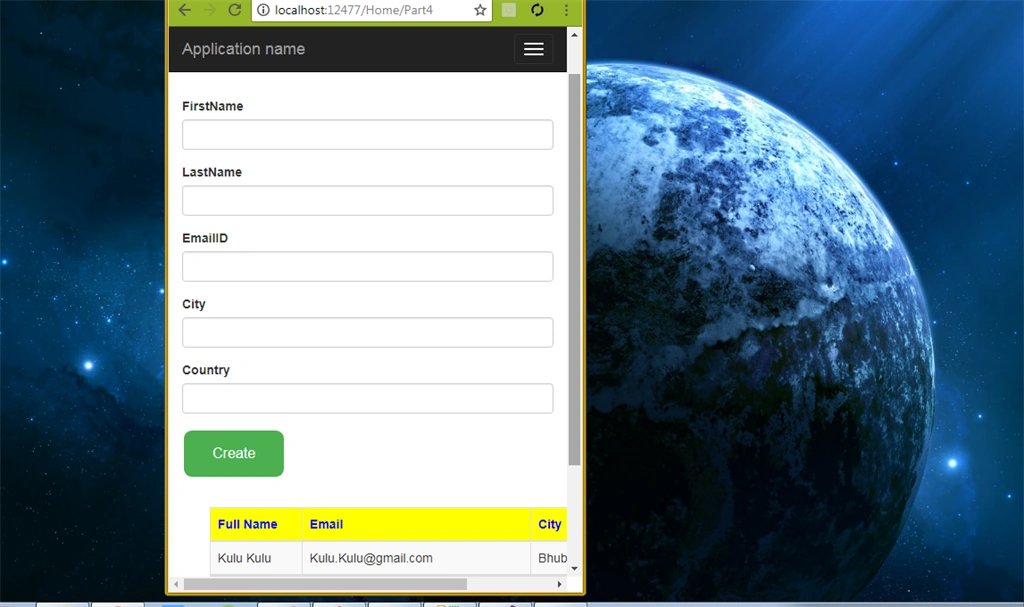
Mobile view support.

Gif image for better understanding about output.
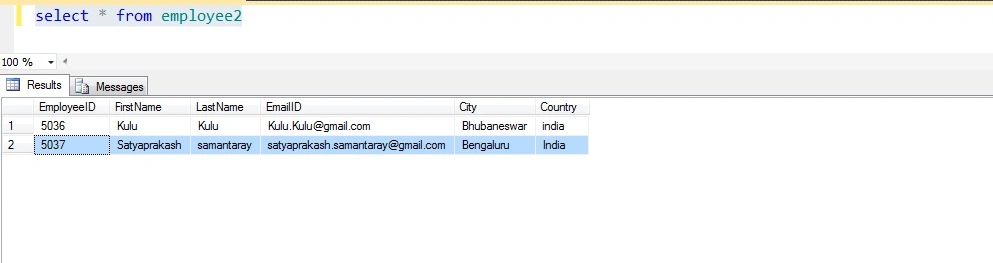
Check sql server for inserting records as shown in the above image.
Link To Source Code
SUMMARY
Bhavesh JadavPosted May 14, 2018, 8:36 AM
Very nice article Satyaprakash Sir.
Ravi MaheshwariPosted May 8, 2018, 11:13 AM
Can you provide link of all part at one place?