

Introduction
Let’s first establish what the purpose of this code is, in the first place.
For this article, the purpose of the code is to understand what async / await and asynchronous programming is, how to use asynchronous programming, benefits of using asynchronous programming. In this article, I will create a simple MVC application to elaborate the answers to all the above questions.
Async
Async keyword is used to call the function/method as asynchronously.
Await
Await keyword is used when we need to get result of any function/method without blocking that function/method.
Asynchronous Programming
Asynchronous Programming means parallel programming. By using Asynchronous Programming, the compiler can execute multiple functions/methods at same time without blocking any function/method.
We will create 3 methods here, and ensure that all these methods take specific time for execution.
STEP 01 Create new MVC Application project, named as "Async".
In the File menu, click New Project.
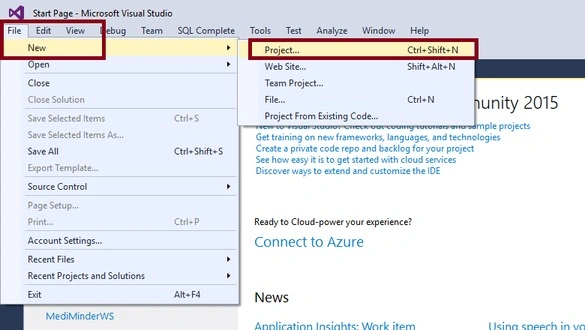
In the "New Project" dialog box, under Project types, expand Visual C#, and then click "Web". In the Name box, type "Async", then click on Ok.
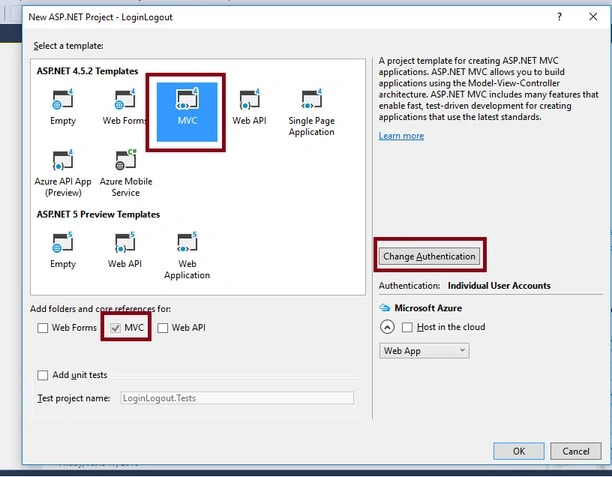
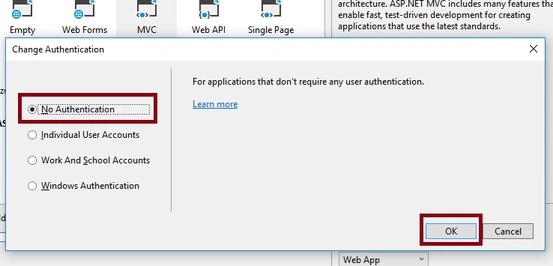
Now, in the dialog box, click on "MVC" under the ASP.NET 4.5.2 Templates. Then, click on "Change Authentication" at the center of the right side.
STEP 02 Add synchronize and asynchronize methods.
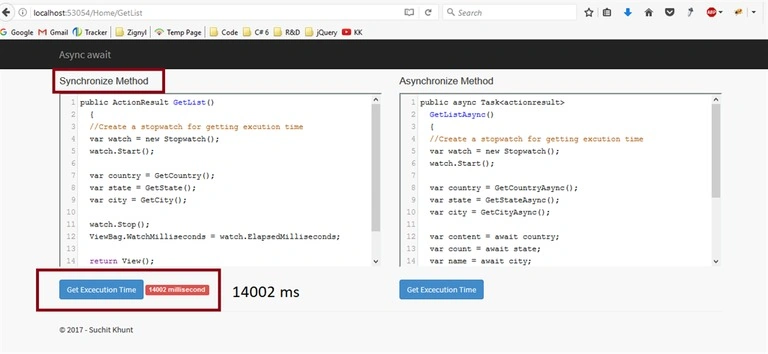
Add GetList() ActionResult in Home Controller.
- public ActionResult GetList() {
- //Create a stopwatch for getting excution time
- var watch = new Stopwatch();
- watch.Start();
- var country = GetCountry();
- var state = GetState();
- var city = GetCity();
- watch.Stop();
- ViewBag.WatchMilliseconds = watch.ElapsedMilliseconds;
- return View();
- }
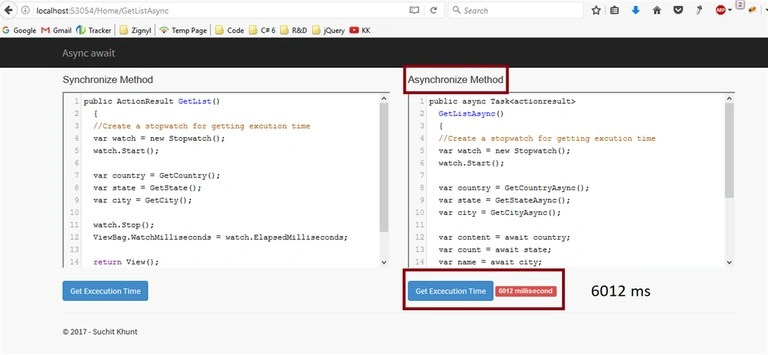
Add GetListAsync() ActionResult in Home Controller.
대용 이Posted Jun 15, 2020, 8:56 AM
If the await keyword is met, is a thread allocated from the thread pool??
Ankit KanojiaPosted Mar 12, 2020, 3:19 AM
Thank you so much Rushabh Patel
Ankit KanojiaPosted Mar 12, 2020, 3:18 AM
Thank you so much Saravanan V
Ankit KanojiaPosted Mar 12, 2020, 3:18 AM
Thank you so much Vishal Prajapati
Ankit KanojiaPosted Mar 12, 2020, 2:07 AM
Thank you so much pawan sharma
Ankit KanojiaPosted Mar 12, 2020, 2:07 AM
Thank you so much pat capozzi
Ankit KanojiaPosted Mar 12, 2020, 2:06 AM
Thank you so much Dharmendra Prajapati
Ankit KanojiaPosted Mar 12, 2020, 2:06 AM
Thank you so much Gadhiraju Phaneendrakumar
Ankit KanojiaPosted Mar 12, 2020, 2:06 AM
Thank you so much M j
Ankit KanojiaPosted Mar 12, 2020, 2:05 AM
Thank you so much Anchal Srivastava
Ankit KanojiaPosted Mar 12, 2020, 2:05 AM
Thank you so much Saied Khatibi
Saied KhatibiPosted Aug 3, 2019, 4:48 AM
Great. Thank you very much Mr Suchit
Anchal SrivastavaPosted Jul 31, 2019, 12:47 AM
Same thing we can achive by using Task, so what's the benefit of using aync-await over using Task?
M jPosted Jul 22, 2019, 2:21 AM
When its best condition to use? please explain
Gadhiraju PhaneendrakumarPosted Sep 25, 2018, 1:26 AM
Where I Have to write GetList() and GetListAsync().
Dharmendra PrajapatiPosted Jul 8, 2018, 11:30 AM
It really helped me to understand....Thanks Suchit..
pat capozziPosted Mar 13, 2018, 12:38 PM
Nice to see all your friends chime in but this is not a 'real world' example. I does not explain the why of using async in a typical controller method that needs some data and then operates on it and returns the result.
pawan sharmaPosted Nov 24, 2017, 2:15 AM
Great Work Mr Suchit.
Manas MohapatraPosted Jun 7, 2017, 3:20 AM
Nice article with well description. Carry on..
Abhay ShankerPosted Jun 6, 2017, 11:29 AM
Well explained............
Rushabh PatelPosted Jun 6, 2017, 10:18 AM
Great work Mr. Suchit As usual
Saravanan VPosted Jun 6, 2017, 10:07 AM
Nicely Explained...
Vishal PrajapatiPosted Jun 6, 2017, 1:20 AM
Awesome.............
Manav PandyaPosted Jun 6, 2017, 12:28 AM
Nice one sir .............
Thiruppathi RPosted Jun 5, 2017, 2:33 PM
Nice Article.......