

Introduction
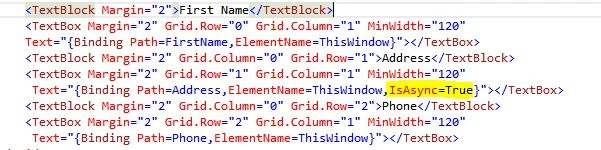
Normally data flows between a source and target will be fast enough when done in a synchronous manner on a UI thread by default, but in some cases you might have some resources, like fetching a large amount of data from a database or binding a large image and so on, that will be slow. Here is the purpose of asynchronous binding. In WPF, the source object can raise a PropertyChanged event on a separate thread. The binding can call a get/set block on a background thread by making IsAsync = true on binding.
Demo
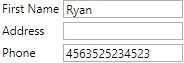
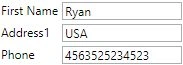
Let me demonstrate synchronous binding first.
Here is the cs file.
- public partial class AsyncBinding : UserControl, INotifyPropertyChanged
- {
- public AsyncBinding()
- {
- InitializeComponent();
- }
- #region INotifyPropertyChanged Members
- public event PropertyChangedEventHandler PropertyChanged;
- public void OnPropertyChanged(string txt)
- {
- PropertyChangedEventHandler handle = PropertyChanged;
- if (handle != null)
- {
- handle(this, new PropertyChangedEventArgs(txt));
- }
- }
- #endregion
- private string firstname;
- public string FirstName
- {
- get { return firstname; }
- set
- {
- firstname = value;
- OnPropertyChanged("FirstName");
- }
- }
- private string address;
- public string Address
- {
- get
- {
- Thread.Sleep(5000);
- return address;
- }
- set
- {
- Thread.Sleep(5000);
- address = value;
- OnPropertyChanged("Address");
- }
- }
- private string phone;
- public string Phone
- {
- get { return phone; }
- set
- {
- phone = value;
- OnPropertyChanged("Phone");
- }
- }
- private void ThisWindow_Loaded(object sender, RoutedEventArgs e)
- {
- FirstName = "Ryan";
- Address = "USA";
- Phone = "4563525234523";
- }
- }


Bharath YadavPosted Oct 12, 2015, 11:01 AM
Thanks for the article :) Nicely explained.
Akhil GargPosted Apr 9, 2015, 10:31 PM
nice article
Tom MohanPosted Mar 11, 2015, 4:52 AM
Thanks Rahul Saxena
Rahul Kumar SaxenaPosted Mar 11, 2015, 3:08 AM
Good Show Tom Mohan
Tom MohanPosted Mar 11, 2015, 2:20 AM
Thanks Vikram Chaudhary
Vikram ChaudharyPosted Mar 11, 2015, 1:22 AM
good one