
Introduction
This sample shows how to connect universal apps to Facebook, Google and Microsoft accounts using the MVVM pattern.
Building the Sample
You only need Visual Studio 2012 or Visual Studio 2013 and Windows 8 or Windows 8.1, both the RTM version.
Description
Recently published was Authentication using Facebook, Google and Microsoft account in WP8.0 App (MVVM) and this sample has the same goal, but now the target is Universal Apps. Both have the goal to use the MVVM pattern.
Before starting this sample, analize to see if the SDKs used in the first sample could be used in this new sample and in a first attempt didn´t find a package for all the targets (Windows 8.1 and Windows Phone 8.1 Runtime). Let's see that analysis.
The packages used was:
- Facebook SDK for Windows Phone (http://facebooksdk.net/docs/phone/ )
- Google APIs Auth Client and Google APIs OAuth2 Client (https://www.nuget.org/packages/Google.Apis.Auth/ and https://www.nuget.org/packages/Google.Apis.Authentication/1.6.0-beta )
- Live SDK (http://msdn.microsoft.com/en-US/onedrive/dn630256 )
The packages that were analized are:
- Facebook SDK for Windows Phone: there is a package for Windows 8.1 Store Apps but there isn't for Windows Phone 8.1 Runtime (we cannot use the version from Windows Phone 8.0 because it uses a namespace for controls that does not exist in the Windows Phone 8.1 Runtime)
- Google APIs Auth Client and Google APIs OAuth2 Client: there is a package compatible with Windows 8.1 Store Apps but it is a bit different from the sample created before, the API changed. And there isn't a package for the Windows Phone 8.1 Runtime.
- Live SDK: is compatible with the Windows Phone 8.1 Runtime and Windows 8.1.
The next step, was to try to port the package for Google from Windows 8.1 Store Apps to Windows Phone 8.1 Runtime, create the logic because there is a lot of code shared between them and then the hard work began.
After some attempts, the code started to throw the exception NotImplementedException because the WebAuthenticationBroker class does not work the same way for these targets. There is a sample that shows this difference, here is the source code and we will see this in this sample.
In conclusion of this analysis, I decided to use WebAuthenticationBroker for authentication using Facebook and Google accounts and Live SDK for Microsoft accounts.
Let's start the sample!
Note: This sample uses MVVM Light and Cimbalino Toolkit.
For each provider it is necessary to get the app id/client id/client secrect in their websites.
For Google go to https://console.developers.google.com/project and create a new project (APIs and auth > credentials).
For Facebook go to https://developers.facebook.com/ and create a new app.
For Live SDK go to https://account.live.com/developers/applications/index and create one or use an existing app.
Before you start you should change the Constant file to add client ids / client secret / app id, without it the app fails!!
- /// <summary>
- /// Defines the constants strings used in the app.
- /// </summary>
- public class Constants
- {
- /// <summary>
- /// The google callback url.
- /// </summary>
- #if !WINDOWS_PHONE_APP
- public const string GoogleCallbackUrl = "urn:ietf:wg:oauth:2.0:oob";
- #else
- public const string GoogleCallbackUrl = "http://localhost";
- #end
- /// <summary>
- /// The facebook app id.
- /// </summary>
- public const string FacebookAppId = "<app id>";
- /// <summary>
- /// The google client identifier.
- /// </summary>
- public const string GoogleClientId = "<client id>";
- /// <summary>
- /// The google client secret.
- /// </summary>
- public const string GoogleClientSecret = "<client secret";
- /// <summary>
- /// The login token.
- /// </summary>
- public const string LoginToken = "LoginToken";
- /// <summary>
- /// The facebook provider.
- /// </summary>
- public const string FacebookProvider = "facebook";
- /// <summary>
- /// The google provider.
- /// </summary>
- public const string GoogleProvider = "google";
- /// <summary>
- /// The microsoft provider.
- /// </summary>
- public const string MicrosoftProvider = "microsoft";
- }
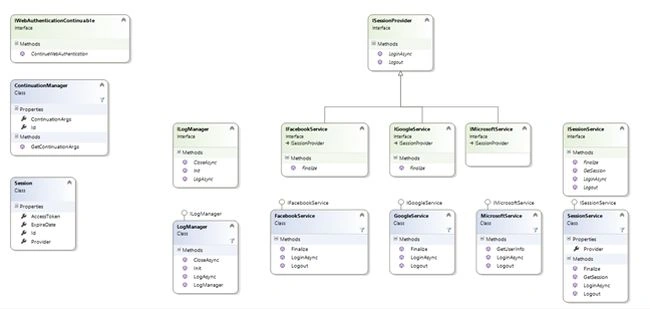
The following are the classes created:
- FacebookService has all code related with authentication with Facebook account;
- MicrosoftService has all code related with authentication with Microsoft account;
- GoogleService has all code related with authentication with Google account;
- SessionService call the methods login or logout for the provide requested;
The Flow
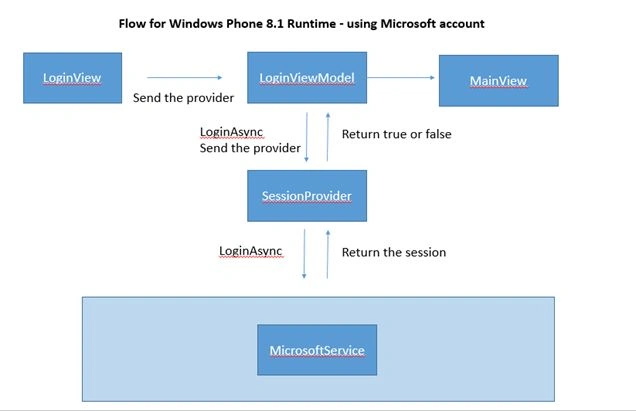
To help to understood the difference in the flow in each platform some diagrams were created.
The flow for the Windows 8.1 Store apps will be: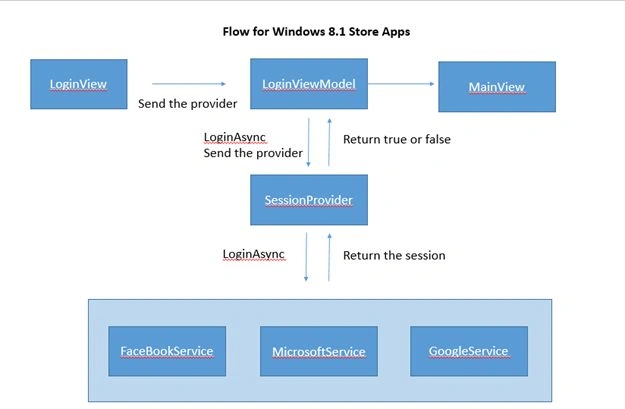
The flow for Windows Phone 8.1 Runtime will be:
- using Microsoft account
- using Facebook Account or Google account
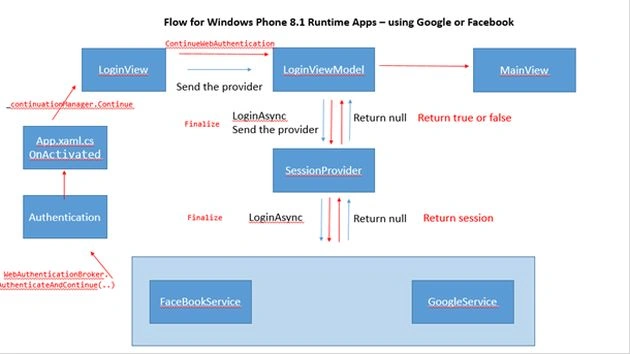
Note: Start in LoginView using the blue arrow and when the blue flow finnishes, go to FacebookService/GoogleService and follow the red flow.
Like we can see, the authentication for Windows Phone 8.1 is very complicated, it could be easier like in Windows 8.1 Store apps. And It breaks the MVVM Pattern!
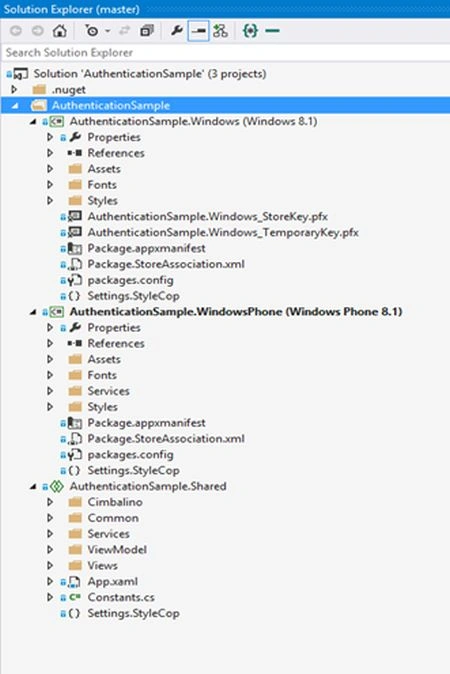
This sample is a Universal App, for this reason the code can be found in the Shared Project and to add specific features for each target directives (#if #else #endif) are used, it can cause some difficulties for understanding the code but is a good way to have only one code in one place. Partial methods and classes can be used here, because in most cases directives are added to add a method for Windows Phone.
The FacebookService
- /// <summary>
- /// Defines the Facebook Service.
- /// </summary>
- public class FacebookService : IFacebookService
- {
- private readonly ILogManager _logManager;
- /// <summary>
- /// Initializes a new instance of the <see cref="FacebookService"/> class.
- /// </summary>
- /// <param name="logManager">
- /// The log manager.
- /// </param>
- public FacebookService(ILogManager logManager)
- {
- _logManager = logManager;
- }
- /// <summary>
- /// The login sync.
- /// </summary>
- /// <returns>
- /// The <see cref="Task"/> object.
- /// </returns>
- public async Task<Session> LoginAsync()
- {
- const string FacebookCallbackUrl = "https://m.facebook.com/connect/login_success.html";
- var facebookUrl = "https://www.facebook.com/dialog/oauth?client_id=" + Uri.EscapeDataString(Constants.FacebookAppId) + "&redirect_uri=" + Uri.EscapeDataString(FacebookCallbackUrl) + "&scope=public_profile,email&display=popup&response_type=token";
- var startUri = new Uri(facebookUrl);
- var endUri = new Uri(FacebookCallbackUrl);
- #if WINDOWS_PHONE_APP
- WebAuthenticationBroker.AuthenticateAndContinue(startUri, endUri, null, WebAuthenticationOptions.None);
- return null;
- #else
- var webAuthenticationResult = await WebAuthenticationBroker.AuthenticateAsync(WebAuthenticationOptions.None, startUri, endUri);
- return GetSession(webAuthenticationResult);
- #endif
- }
- private void GetKeyValues(string webAuthResultResponseData, out string accessToken, out string expiresIn)
- {
- string responseData = webAuthResultResponseData.Substring(webAuthResultResponseData.IndexOf("access_token", StringComparison.Ordinal));
- string[] keyValPairs = responseData.Split('&');
- accessToken = null;
- expiresIn = null;
- for (int i = 0; i < keyValPairs.Length; i++)
- {
- string[] splits = keyValPairs[i].Split('=');
- switch (splits[0])
- {
- case "access_token":
- accessToken = splits[1];
- break;
- case "expires_in":
- expiresIn = splits[1];
- break;
- }
- }
- }
- /// <summary>
- /// This function extracts access_token from the response returned from web authentication broker
- /// and uses that token to get user information using facebook graph api.
- /// </summary>
- /// <param name="accessToken">
- /// The access Token.
- /// </param>
- /// <returns>
- /// The <see cref="Task"/>.
- /// </returns>
- private async Task<UserInfo> GetFacebookUserNameAsync(string accessToken)
- {
- var httpClient = new HttpClient();
- var response = await httpClient.GetStringAsync(new Uri("https://graph.facebook.com/me?access_token=" + accessToken));
- var value = JsonValue.Parse(response).GetObject();
- var facebookUserName = value.GetNamedString("name");
- return new UserInfo
- {
- Name = facebookUserName,
- };
- }
- /// <summary>
- /// Logouts this instance.
- /// </summary>
- public async void Logout()
- {
- Exception exception = null;
- try
- {
- }
- catch (Exception ex)
- {
- exception = ex;
- }
- if (exception != null)
- {
- await _logManager.LogAsync(exception);
- }
- }
- #if WINDOWS_PHONE_APP
- public async Task<Session> Finalize(WebAuthenticationBrokerContinuationEventArgs args)
- {
- Exception exception = null;
- try
- {
- var result = args.WebAuthenticationResult;
- return GetSession(result);
- }
- catch (Exception e)
- {
- exception = e;
- }
- await _logManager.LogAsync(exception);
- return null;
- }
- #endif
- private Session GetSession(WebAuthenticationResult result)
- {
- if (result.ResponseStatus == WebAuthenticationStatus.Success)
- {
- string accessToken;
- string expiresIn;
- GetKeyValues(result.ResponseData, out accessToken, out expiresIn);
- return new Session
- {
- AccessToken = accessToken,
- ExpireDate = new DateTime(long.Parse(expiresIn)),
- Provider = Constants.FacebookProvider
- };
- }
- if (result.ResponseStatus == WebAuthenticationStatus.ErrorHttp)
- {
- throw new Exception("Error http");
- }
- if (result.ResponseStatus == WebAuthenticationStatus.UserCancel)
- {
- throw new Exception("User Canceled.");
- }
- return null;
- }
- }
public class GoogleService : IGoogleService { private readonly ILogManager _logManager; /// <summary> /// Initializes a new instance of the <see cref="GoogleService"/> class. /// </summary> /// <param name="logManager"> /// The log manager. /// </param> public GoogleService(ILogManager logManager) { _logManager = logManager; } /// <summary> /// The login async. /// </summary> /// <returns> /// The <see cref="Task"/> object. /// </returns> public async Task<Session> LoginAsync() { var googleUrl = new StringBuilder();
googleUrl.Append(Uri.EscapeDataString(Constants.GoogleClientId)); googleUrl.Append("&scope=openid%20email%20profile"); googleUrl.Append("&redirect_uri="); googleUrl.Append(Uri.EscapeDataString(Constants.GoogleCallbackUrl)); googleUrl.Append("&state=foobar"); googleUrl.Append("&response_type=code"); var startUri = new Uri(googleUrl.ToString()); #if !WINDOWS_PHONE_APP var webAuthenticationResult = await WebAuthenticationBroker.AuthenticateAsync(WebAuthenticationOptions.UseTitle, startUri, endUri); return await GetSession(webAuthenticationResult);#else WebAuthenticationBroker.AuthenticateAndContinue(startUri, newUri(Constants.GoogleCallbackUrl), null, WebAuthenticationOptions.None); return null;#endif } private string GetCode(string webAuthResultResponseData) { // Success code=4/izytpEU6PjuO5KKPNWSB4LK3FU1c var split = webAuthResultResponseData.Split('&'); return split.FirstOrDefault(value => value.Contains("code")); } /// <summary> /// The logout. /// </summary> public void Logout() { } #if WINDOWS_PHONE_APP public async Task<Session> Finalize(WebAuthenticationBrokerContinuationEventArgs args) { Exception exception = null; try { return await GetSession(args.WebAuthenticationResult); } catch (Exception e) { exception = e; } await _logManager.LogAsync(exception); return null; }#endif private async Task<Session> GetSession(WebAuthenticationResult result) { if (result.ResponseStatus == WebAuthenticationStatus.Success) { var code = GetCode(result.ResponseData); var serviceRequest = await GetToken(code); return new Session { AccessToken = serviceRequest.access_token, ExpireDate = new DateTime(long.Parse(serviceRequest.expires_in)), Id = serviceRequest.id_token, Provider = Constants.GoogleProvider }; } if (result.ResponseStatus == WebAuthenticationStatus.ErrorHttp) { throw new Exception("Error http"); } if (result.ResponseStatus == WebAuthenticationStatus.UserCancel) { throw new Exception("User Canceled."); } return null; } private static async Task<ServiceResponse> GetToken(string code) { var body = new StringBuilder(); body.Append(code); body.Append("&client_id="); body.Append(Uri.EscapeDataString(Constants.GoogleClientId)); body.Append("&client_secret="); body.Append(Uri.EscapeDataString(Constants.GoogleClientSecret)); body.Append("&redirect_uri="); body.Append(Uri.EscapeDataString(Constants.GoogleCallbackUrl)); body.Append("&grant_type=authorization_code"); var client = new HttpClient(); var request = new HttpRequestMessage(HttpMethod.Post, new Uri(TokenUrl)) { Content = new StringContent(body.ToString(), Encoding.UTF8, "application/x-www-form-urlencoded") }; var response = await client.SendAsync(request); var content = await response.Content.ReadAsStringAsync(); var serviceTequest = JsonConvert.DeserializeObject<ServiceResponse>(content); return serviceTequest; } }Note: FacebookService and GoogleService are similar but the response and request are different for the reason that these classes are not joined.



SharadPosted Jul 17, 2015, 3:57 AM
good one...
Akash BhimaniPosted Aug 12, 2014, 5:34 AM
really helpful article for beginner
Rajeev KumarPosted Aug 2, 2014, 1:49 AM
One Of The Best Post Superb:>
Sara SilvaPosted Aug 1, 2014, 7:23 AM
I understood, for this reason I created the flow diagrams. The complicate is the use of WebAuthenticationBroker in WP... there is sample for WP8.0, maybe you should start with this sample...then see this.
bhargav batchuPosted Aug 1, 2014, 7:20 AM
little complicated to understand for learners
Chirag MakvanaPosted Jul 30, 2014, 12:12 PM
Very nice article..!!
Mohammad MirshahiPosted Jul 29, 2014, 3:27 PM
very very nice ... good!!!
Sara SilvaPosted Jul 29, 2014, 8:23 AM
Thanks :)
Ajay PatelPosted Jul 29, 2014, 8:03 AM
Really an awesome post !