

Introduction
This article will help beginner and developers who want to work with AngularJS and jQuery for People Picker columns.
Objective
Post a "Person" and "Group" column in SharePoint list with autocomplete input of HTML using Angular.js and jQuery with REST call.
Step 1
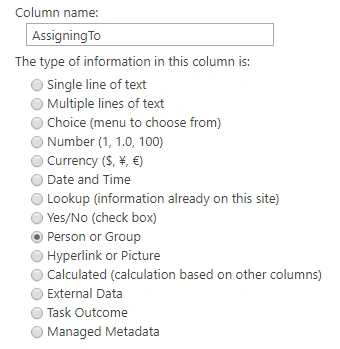
Create a SharePoint list with a single person and group column as shown below. Keep ‘Allow multiple selections:’ as ‘No’.
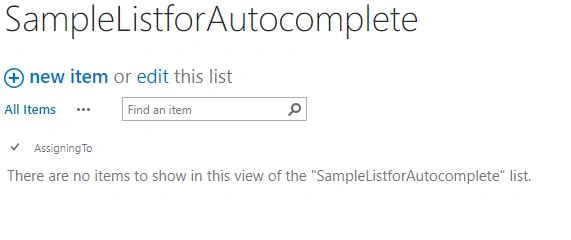
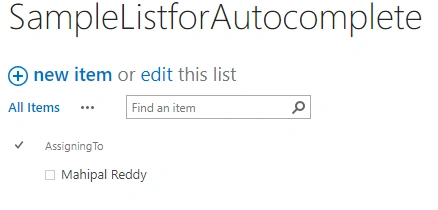
Then, the created list looks as below.
Step2
Create a page in SharePoint and include a content editor with the following HTML.
HTML code
- <body ng-app="myApp" ng-controller="MainCtrl">
- <label for="tags">Assigned To: </label>
- <input id="Persons" ng-model="SelectedPerson"/><br/><br/>
- <input type="button" ng-click="AddToList()" value="Submit"/>
- </body>
Result

Step 3
Build a script for autocomplete input.
We have mainly 3 steps to build the script as follows.
- Function for getting all the people from SharePoint site on page load.
Code
- $.ajax
- ({
- url: _spPageContextInfo.webAbsoluteUrl + "/_api/web/siteusers",/*Get all the peoples from the site*/
- type: "GET",
- headers:
- {
- "Accept": "application/json;odata=verbose"
- },
- success: function(data)
- {
- AllpeoplePickerUsers = data.d.results; /*set the all peoples with all their properties to a global variable*/
- for (var i = 0; i < AllpeoplePickerUsers.length; i++) {
- var property = AllpeoplePickerUsers[i].Title;
- peoplePickerUsers.push(property); /*splitting the all titles to another global variable to display names in auto-complete input*/
- }
- },
- error: function(error)
- {
- alert(JSON.stringify(error));
- }
- });
- Link the people to autocomplete-input on page load itself.
Code
- $( function() {
- $( "#Persons" ).autocomplete({/* setting the all names to the autocomplete input using Id*/
- source: peoplePickerUsers/* peoplePickerUsers contains the names of site peoples*/
- });
- } );
- Then, submit the selected person to the SharePoint list on button click.
Code
- $scope.AddToList=function(){ /*On-click function*/
- for(var i=0;i<AllpeoplePickerUsers.length;i++){/*Since we have name in input, so we are passing the respected user id here*/
- if ($scope.SelectedPerson=== AllpeoplePickerUsers[i].Title) /*$scope.SelectedPerson is selected name from html input*/
- {
- CurPersonId=AllpeoplePickerUsers[i].Id;/*Setting Id to a global variable*/
- }
- }
- var datavalue = "{__metadata:{'type':'SP.Data."+listName+"ListItem'},AssigningToId:'"+CurPersonId+"'}";/*Add Id to column name like AssigningTo+Id and Building the body of data to post to the SharePoint list*/
- $http({
- url: _spPageContextInfo.webAbsoluteUrl + "/_api/web/lists/GetByTitle('"+listName+"')/items",
- method: "POST",
- headers:
- {
- "Accept": "application/json;odata=verbose",
- "Content-Type": "application/json;odata=verbose",
- "X-RequestDigest": $("#__REQUESTDIGEST").val(),
- "X-HTTP-Method": "POST"
- },
- data: datavalue /* passing the body of data here*/
- })
- .then(function(response) {
- alert("success");
- },
- function(response) {
- alert("failed");
- });
- }
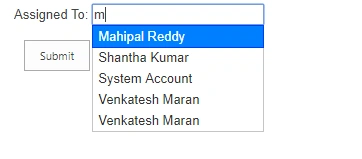
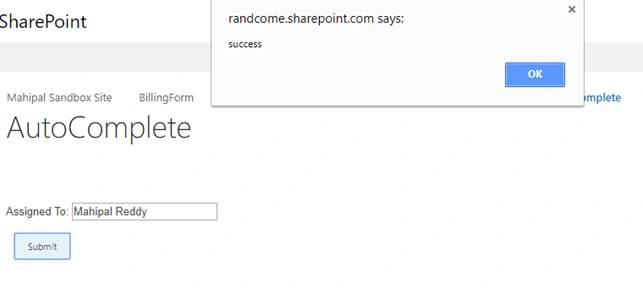
Shiv SharmaPosted Aug 14, 2018, 5:26 AM
Hi Mahipal, What about Groups? If we want to search SharePoint Groups?
Mahesh BabuPosted Oct 31, 2017, 7:32 PM
Thanks for posting....
Ragavendar SPosted Oct 6, 2017, 4:10 AM
Very nice thanks for the share
Vinodh NarayananPosted Oct 6, 2017, 1:51 AM
Good one keep going\