

Introduction
In this article you will see how to auto-populate the field values based on text change in SharePoint Online list forms. I have created a parent list that has the following columns and values. 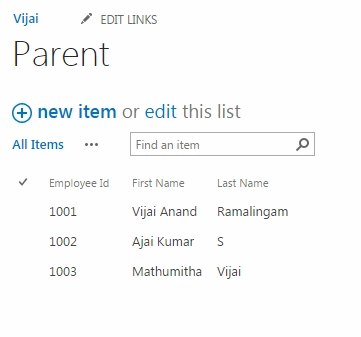
I have also created a child list that has the following columns.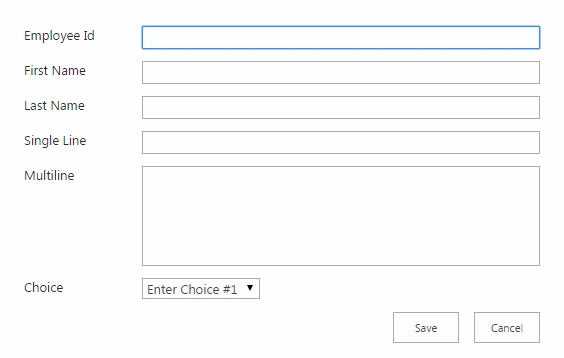
When the user enters the Employee Id value into the Child list form it should query the values from the Parent list and populate the “First Name” and “Last Name” as shown below.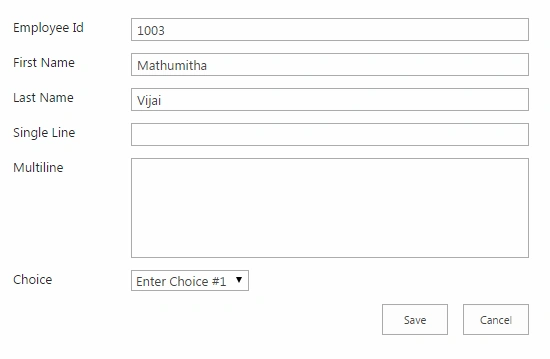
Procedure to add the client script on list New Form
- Navigate to the Child list.
- Click on the new item link.
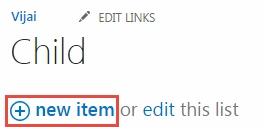
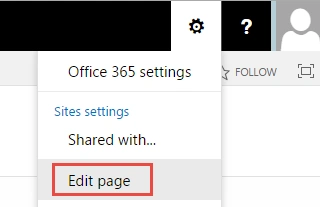
- In the top-right corner click on the settings button and then click on the Edit page link.
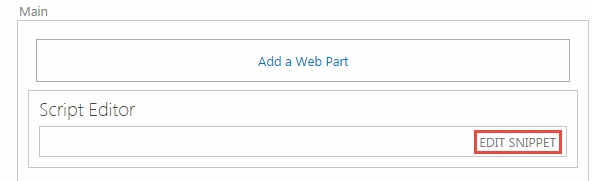
- Click on the Add a Web Part link.

- Click on the Media and Content link in the Categories section, click on the Script Editor web part and then click on the Add button.

- Click on the Edit Snippet link.
- Paste in the following code snippet and then click on the Insert button.
- <script language="javascript" type="text/javascript" src="https://c986.sharepoint.com/SiteAssets/jquery-1.8.3.min.js"></script>
- <script language="ecmascript" type="text/ecmascript">
- var collListItem;
- $(document).ready(function () {
- var empIDField = $("input[title='Employee Id']");
- empIDField.change(function () {
- getSetListItem()
- function getSetListItem() {
- var empID = $("input[title='Employee Id']").val();
- var clientContext = new SP.ClientContext.get_current();
- var oList = clientContext.get_web().get_lists().getByTitle('Parent');
- var camlQuery = new SP.CamlQuery();
- camlQuery.set_viewXml('
- <View>
- <Query>
- <Where>
- <Eq>
- <FieldRef Name=\'EmployeeId\' />
- <Value Type=\'Text\'>' + empID + '</Value>
- </Eq>
- </Where>
- </Query>
- <RowLimit>10</RowLimit>
- </View>');
- collListItem = oList.getItems(camlQuery);
- clientContext.load(collListItem);
- clientContext.executeQueryAsync(Function.createDelegate(this, OnLoadSuccess),
- Function.createDelegate(this, OnLoadFailed));
- }
- function OnLoadSuccess(sender, args) {
- var listItemEnumerator = collListItem.getEnumerator();
- while (listItemEnumerator.moveNext()) {
- var oListItem = listItemEnumerator.get_current();
- $("input[title='First Name']").val(oListItem.get_item("FirstName"))
- $("input[title='Last Name']").val(oListItem.get_item("LastName"))
- }
- }
- function OnLoadFailed(sender, args) {
- alert('Request failed. ' + args.get_message() + '\n' + args.get_stackTrace());
- }
- });
- });
- </script>
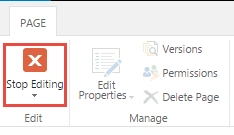
- Click on the Page tab in the ribbon interface and then click on the Stop Editing button.
Testing
- Navigate to the Child list.
- Click on the new item link.
- Enter the Employee Id value and you will to see the values automatically populated from the Parent list as shown below.
Summary
Thus in this article you saw how to auto-populate the field values based on text change in SharePoint 2013 list forms.
Daniel KPosted Oct 8, 2020, 6:58 PM
Can you any one please let me know if this solution will work between External SP List & SP List.
Richa ParwaniPosted Jun 15, 2020, 5:05 AM
Is this code working at your end..because at my end it is not doing anything
Prajakta PatilPosted Dec 11, 2018, 3:22 AM
Hi vijay how to use this script for modern list? I have similar requirement but with modern SP list
Azhani RamliPosted Dec 11, 2018, 3:21 AM
Hi Vijay, im using SP 2010 and tried your scripting above. however, it does not work properly. any advise?
Arvind ManbodhPosted Sep 28, 2018, 2:30 PM
Thanks for de script. I want to use this script. I have make de same list like you, but it don't work, ik have SharePoint 2013. can you help me. is the correct: <FieldRef Name=\'EmployeeId\' /> ??
Divya MPosted Aug 9, 2018, 4:24 AM
Hi Vijai..I have two fields named as country and region(Sharepoint 2010) ..When i fill country the region would result with autofill answer..Can you please help me to get the solution for this..Thanks
Jewell EllisPosted Oct 22, 2015, 1:34 PM
I would like to accomplish this with a people picker. I have a people picker column that I want to use the display name to compare to a column in another list(2) and update list(1) with values in list(2). Thanks!
SriramPosted Jul 3, 2015, 2:03 AM
Great...........
Santhakumar MunuswamyPosted Jun 6, 2015, 2:34 AM
Thanks for nice article
Karthik shanPosted Jun 5, 2015, 8:16 AM
1003 yarunga thala?
NitinPosted Jun 5, 2015, 4:23 AM
nice
Sibeesh VenuPosted Jun 5, 2015, 1:40 AM
Good one.