

Introduction
A straightforward package called AutoMapper enables us to convert one object type into another. It is a convention-based object-to-object mapper with minimal configuration requirements.
When we use Auto Mapper?
When developing apps, it's common to wish to map items to either comparable or different kinds. Why do you frequently require this? The database tables of the employed database are typically mapped with the models (also known as entities) in an application.
As a result, there is frequently a discrepancy between the model class properties and the data transfer object class properties. You may run into issues because of having to write a lot of boilerplate code to convert instances of disparate types. A large application, like an ERP, could require a lot of models and data transfer object classes. Writing code to perform the mapping manually would be time-consuming. Here, programs like AutoMapper can be useful.
Step 1. Install the NuGet package from NuGet Package Library

- AutoMapper
- Install-Package AutoMapper.Extensions.Microsoft.DependencyInjection
Step 2. Configure the automapping in the Program.cs Class

var builder = WebApplication.CreateBuilder(args);

// Add services to the container.
builder.Services.AddAutoMapper(typeof(Program));
Step 3. Let's Create the Model and Data Transfer Object.
public class Event: BaseEntity {
  public string EventType {
    get;
    set;
  }
  public string EventPriority {
    get;
    set;
  }
  [MaxLength(50)]
  public string EventName {
    get;
    set;
  }
  public string EventStatus {
    get;
    set;
  }
  [Required]
  public DateTime StartDate {
    get;
    set;
  }
  public DateTime EndDate {
    get;
    set;
  }
  [MaxLength(50)]
  public string EstimatedDuration {
    get;
    set;
  }
  [MaxLength(200)]
  public string Description {
    get;
    set;
  }
  [MaxLength(200)]
  public DateTime ? LastStatusChangeDate {
    get;
    set;
  }
  public long ? JobId {
    get;
    set;
  }

}
Let’ s create the Data Transfer Object.
public class DTOEvents {
  public string EventType {
    get;
    set;
  }
  public string EventPriority {
    get;
    set;
  }
  [MaxLength(50)]
  public string EventName {
    get;
    set;
  }
  public string EventStatus {
    get;
    set;
  }
  [Required]
  public DateTime StartDate {
    get;
    set;
  }
  public DateTime EndDate {
    get;
    set;
  }
  [MaxLength(50)]
  public string EstimatedDuration {
    get;
    set;
  }
  [MaxLength(200)]
  public string Description {
    get;
    set;
  }
  [MaxLength(200)]
  public string Tags {
    get;
    set;
  }
  public DateTime ? LastStatusChangeDate {
    get;
    set;
  }
  public long ? JobId {
    get;
    set;
  }
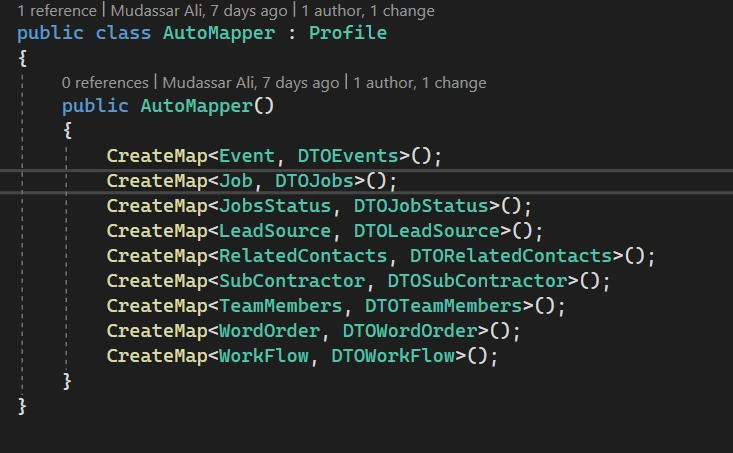
}
Aymen AmriPosted Jun 20, 2023, 10:23 AM
Very usefull, thanks a lot, it will certainly optimize the Poco => Model conversion