

Introduction
Amazon Bedrock Flows enables you to build and orchestrate AI workflows using a visual builder, seamlessly integrating with Amazon Bedrock services like foundational models, knowledge bases, and prompt management. It also connects with other AWS services, such as AWS Lambda and Amazon S3.
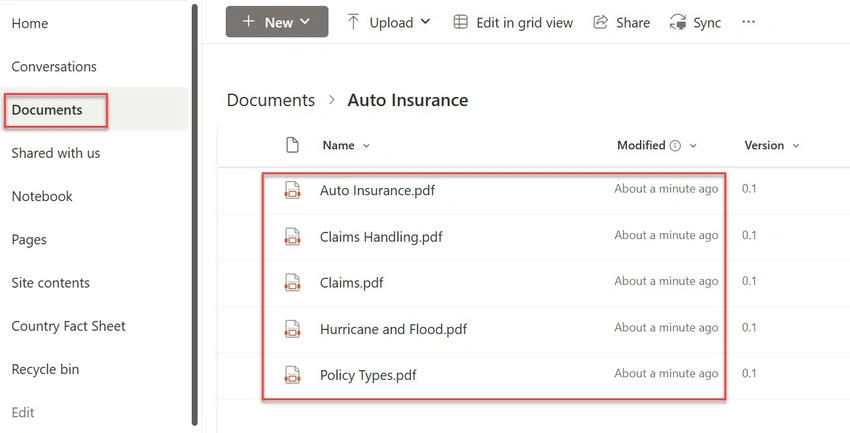
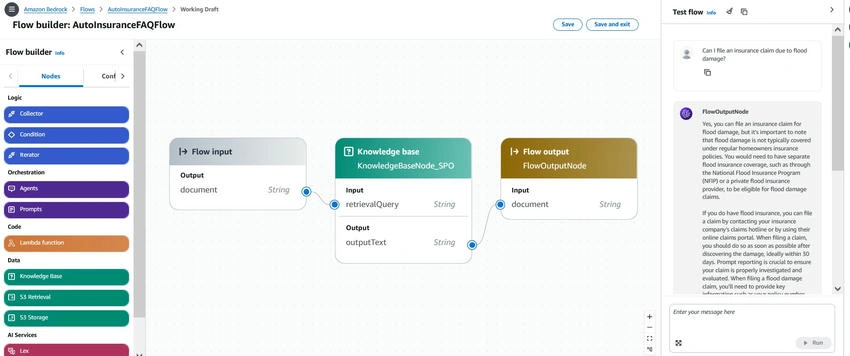
In this article, you will learn how to build an Amazon Bedrock Prompt Flow to automate the retrieval and summarization of content from SharePoint Online using the AWS CLI. I have set up a SharePoint site that contains sample documents related to auto insurance, and this site will serve as the data source for provisioning the Amazon Bedrock Knowledge Base. By connecting SharePoint Online to Amazon Bedrock, you will be able to use Prompt Flow to automatically retrieve relevant information or summarize key points related to auto insurance.
SharePoint Site
Flow design
Pre-requisites
- AWS account and the required permissions to access Amazon Bedrock.
- Access to Amazon Bedrock foundation model to validate the prompt flow.
- Install or update to the latest version of the AWS CLI.
- Get credentials to grant programmatic access.
- Create an Amazon Bedrock Knowledge Base with SharePoint Online. Note down the Knowledge Base ID, which will be used when defining the flow in Amazon Bedrock.
Create a service role to create and manage a flow in Amazon Bedrock
Perform the following steps to create a service role for Amazon Bedrock flows.
Create a service role
Create a JSON file with the following content and save it as trust-policy.json. Replace the <region> and <account-id> with the actual values.
{
    "Version": "2012-10-17",
    "Statement": [
        {
            "Effect": "Allow",
            "Principal": {
                "Service": "bedrock.amazonaws.com"
            },
            "Action": "sts:AssumeRole",
            "Condition": {
                "StringEquals": {
                    "aws:SourceAccount": "<account-id>"
                },
                "ArnLike": {
                    "aws:SourceArn": "arn:aws:bedrock:<region>:<account-id>:flow/*"
                }
            }
        }
    ]
}
Open Windows Prompt and execute the following command to create a service role.
aws iam create-role --role-name AmazonBedrockFlowServiceRole --assume-role-policy-document file://trust-policy.json
Create the permission policy
Create a JSON file with the following content and save it as flow-permission-policy.json. Replace the <region>, <account-id> and <knowledge-base-id> with the actual values.
{
    "Version": "2012-10-17",
    "Statement": [
        {
            "Sid": "InvokeModel",
            "Effect": "Allow",
            "Action": "bedrock:InvokeModel",
            "Resource": [
                "arn:aws:bedrock:<region>::foundation-model/anthropic.claude-3-5-sonnet-20240620-v1:0"
            ]
        },
        {
            "Sid": "InvokeProvisionedThroughput",
            "Effect": "Allow",
            "Action": [
                "bedrock:GetFlow"
            ],
            "Resource": [
                "arn:aws:bedrock:<region>:<account-id>:flow/*"
            ]
        },
        {
            "Sid": "AmazonBedrockFlowRetrieveAndGenerateKnowledgeBasePolicy",
            "Effect": "Allow",
            "Action": [
                "bedrock:Retrieve",
                "bedrock:RetrieveAndGenerate"
            ],
            "Resource": [
                "arn:aws:bedrock:<region>:<account-id>:knowledge-base/<knowledge-base-id>"
            ]
        }
    ]
}
Join the conversation! Your thoughts help the community grow.