

Introduction
In this article, we will learn how to automate SQL Server database backup and to schedule hourly/daily/monthly backups as per the requirement. We will use batch file to take backup and create windows task scheduler to run the batch file automatically.
Using batch file and windows task scheduler we can automate our many day-to-day tasks with basic knowledge.
Create a batch file with backup script
- Open a text file, such as a Notepad or Notepad ++.
- Paste below code in file.
- Save file with .bat extension for example, autobackup.bat.
For single database backup
If our requirement is to take backup of a single database then we can use this script.
@ECHO OFF
CLS
REM SET VARIABLES VALUES

SET SqlServer=[SERVER NAME]
SET InstanceName=[SERVER INSTANCE]
SET Username=[SQL SERVER USER NAME]
SET Password=[SQL SERVER PASSWORD]
SET Database=[DATABASE NAME]
SET BaseFolderPath=[BACKUP BASE PATH LIKE D:\Backups\ProjectName]
SET TodayDate=%DATE:/=%
SET CurrentTime=%TIME::=%
SET SubFolder=%TodayDate:~8,4%%TodayDate:~6,2%%TodayDate:~4,2%
SET LocalFolder=%BaseFolderPath%\%SubFolder%


IF NOT EXIST %LocalFolder% mkdir %LocalFolder%

:: *****************************************************************************
ECHO DB Backup started...
sqlcmd -S %SqlServer%%InstanceName% -U %Username% -P %Password% -d %Database% -Q "BACKUP DATABASE %Database% TO  DISK = '%LocalFolder%\%Database%_%CurrentTime%.bak' WITH NOFORMAT, INIT, SKIP, NOREWIND, NOUNLOAD,  STATS = 10;"
ECHO DB Backup finished...
For all databases backup
If our requirement is to take backup of all available databases on the server then we can use this script.
@echo off
cls

REM SET VARIABLES VALUES
SET SqlServer=[SERVER NAME]
SET InstanceName=[SERVER INSTANCE]
SET Username=[SQL SERVER USER NAME]
SET Password=[SQL SERVER PASSWORD]
SET BaseFolderPath=[BACKUP BASE PATH LIKE D:\Backups\]
SET TodayDate=%DATE:/=%
SET CurrentTime=%TIME::=%
SET SubFolder=%TodayDate:~8,4%%TodayDate:~6,2%%TodayDate:~4,2%
SET LocalFolder=%BaseFolderPath%\%SubFolder%
SET Databases=%LocalFolder%\Databases.txt

IF NOT EXIST %LocalFolder% mkdir %LocalFolder%

SETLOCAL

REM SAVE DATABASES LIST IN TEMP FILE
SqlCmd -S %SqlServer%%InstanceName% -U %Username% -P %Password% -Q "SET NoCount ON; SELECT Name FROM master.dbo.sysDatabases WHERE [Name] NOT IN ('master','model','msdb','tempdb')" > "%Databases%"

REM SAVE BACKUP OF EACH DATABASE
FOR /F "tokens=*" %%I IN (%Databases%) DO (
ECHO Backing up database: %%I
SqlCmd -S %SqlServer%%InstanceName% -U %Username% -P %Password% -Q "BACKUP DATABASE [%%I] TO Disk='%LocalFolder%\%%I_%CurrentTime%_%CurrentTime%.bak'"
ECHO.)
REM DELETE TEMP DATABASES LIST
IF EXIST "%Databases%" DEL /F /Q "%Databases%"

ENDLOCAL
Create a Task and Schedule for automatic backup
To create and automate task, please follow below steps.
Step 1
Search for "Task Scheduler" directly in windows search or open from control panel.
Step 2
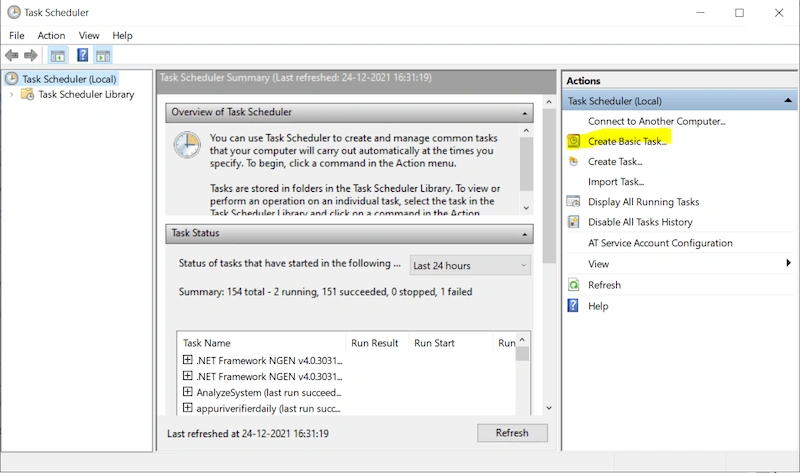
Click on Create Basic Task...
Step 3
Enter name & Description and click on Next.
Step 4
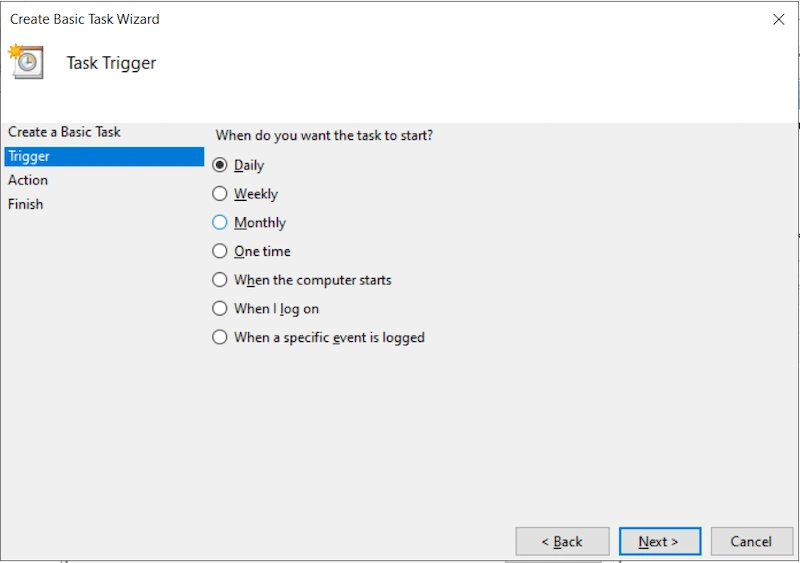
On this screen, we can specify the time when you want to start the task. As per your requirement we can schedule it daily/weekl/monthly and so on. Souppose we want to take backup on daily basis then select Daily and click on Next.
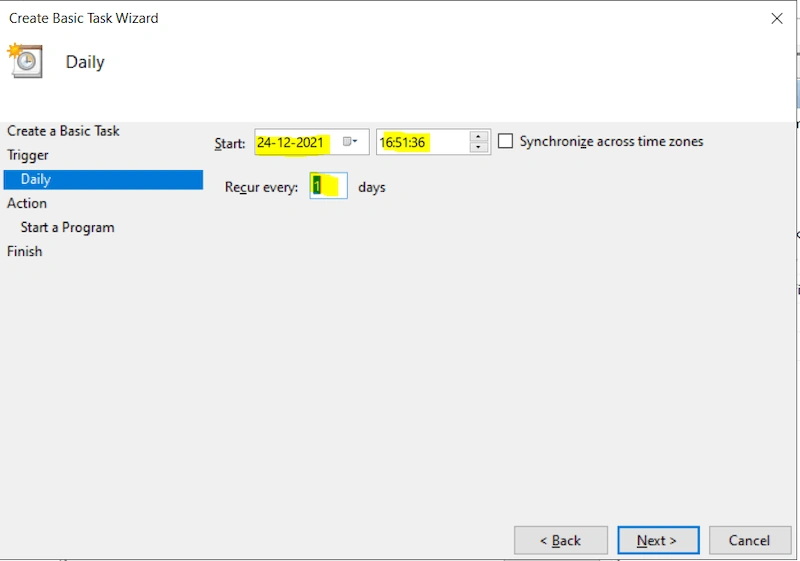
Here specify the time when we want to start it automatically
Step 5
Select Start a program and click on Next.
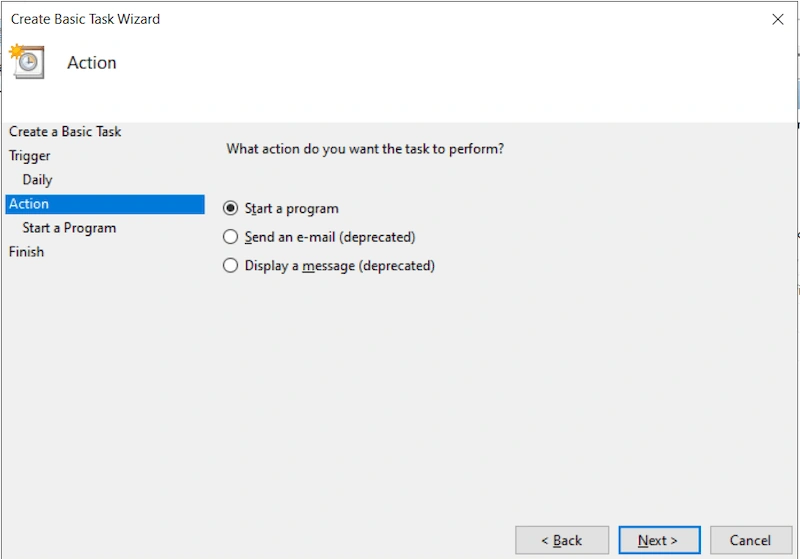
Browse the our created batch file and click on Next.
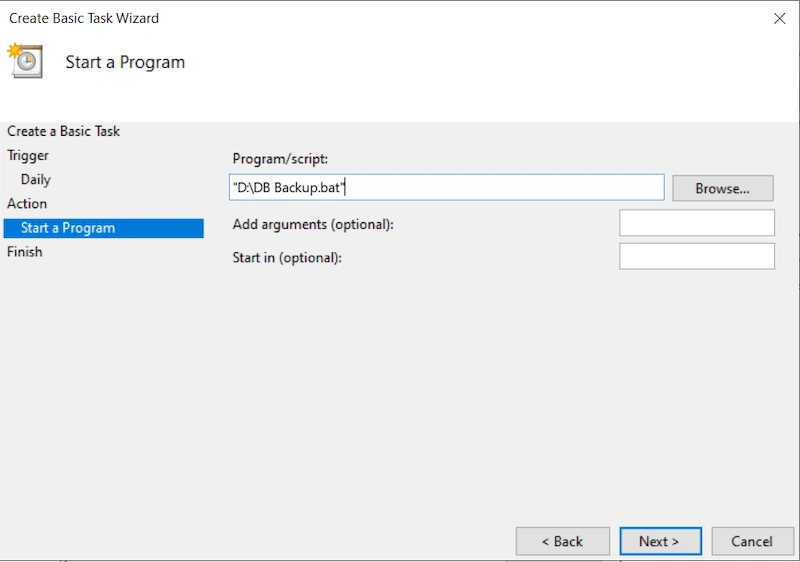
Step 6
Here we can review whole selected option and click on Finish.
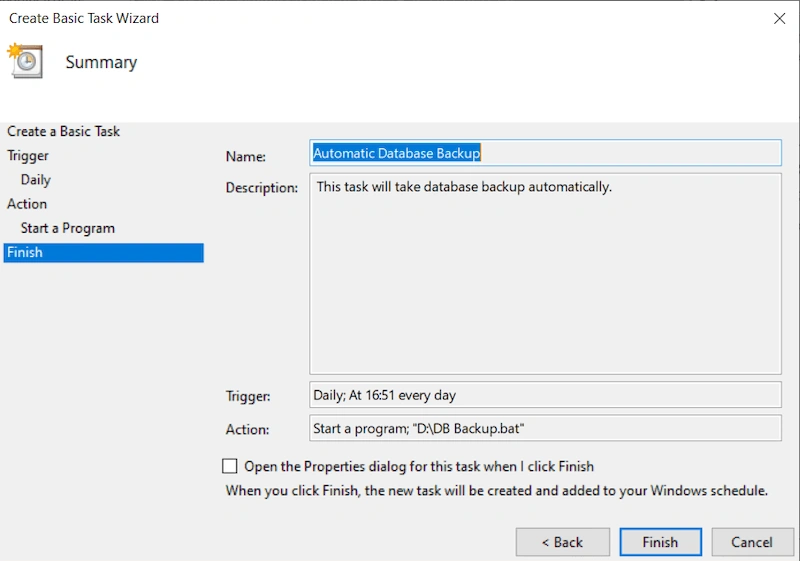
Step 7
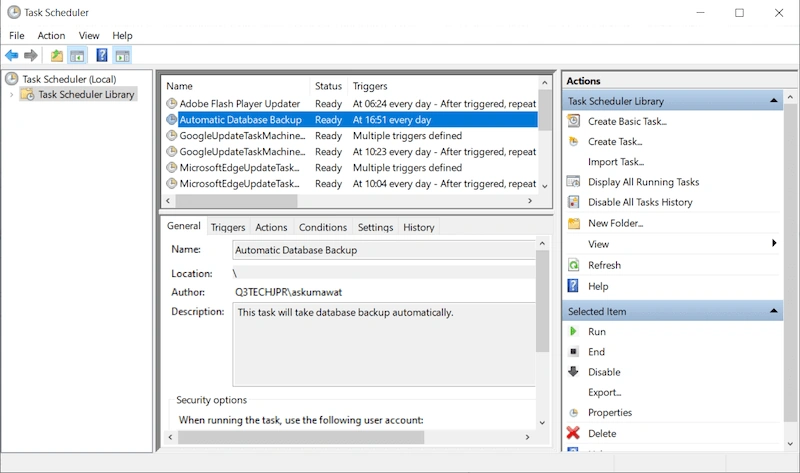
Here we can verify that task is created and also we can edit if required.
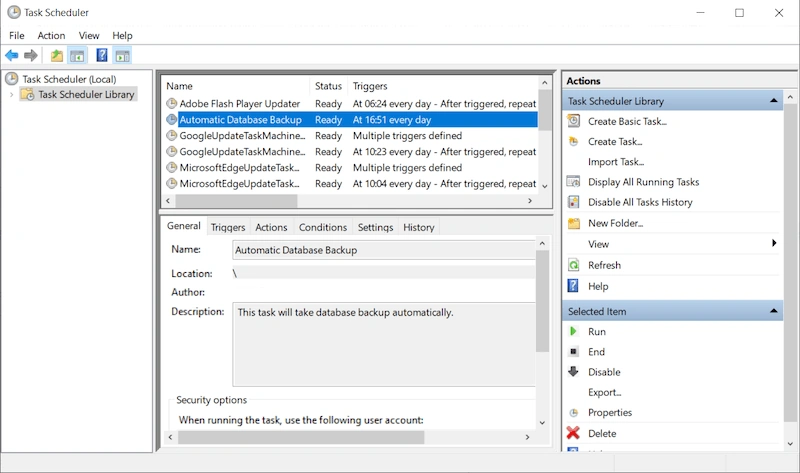
That's it. Hope now you are able to create & schedule your task to automatic database backup. In case of any issue feel free to comment.
Thanks for reading.
Dinesh KumarPosted Jan 13, 2022, 7:07 AM
Nice article.
Shoeb KhanPosted Jan 10, 2022, 4:18 PM
Good one, Keep it up sir
Shoeb KhanPosted Jan 10, 2022, 4:15 PM
Easy to understand,nice explanation.
Ashish TiwariPosted Dec 26, 2021, 4:32 AM
[email protected]