In Python, classes are objects too. Just as a class defines the behavior of its instances, a metaclass defines the behavior of its classes. While often dismissed as "black magic" or overly complex, metaclasses are a powerful tool for framework authors and enterprise architects. They allow you to intercept and modify class creation, enabling patterns like automatic registration, strict schema enforcement, and API governance. In the enterprise AI landscape of 2026, multi-agent Retrieval-Augmented Generation (RAG) systems are massive. They consist of dozens of specialized tools, retrievers, and sub-agents. Managing these components manually leads to brittle code. This article provides an end-to-end guide to using Python metaclasses to automatically register specialized RAG tools and enforce strict input schema validation. We will integrate this into a production-grade Multi-Agent LangGraph RAG system featuring persistent memory and state.
Part 1: The Enterprise Use Case
Scenario: "GlobalBank" has deployed a multi-agent LangGraph AI assistant for its employees. The system routes queries to specialized RAG tools (e.g., HR Policy, IT Support, Legal Compliance).
The Problems:
The Open/Closed Violation: Every time a developer creates a new RAG tool (e.g., PayrollTool), they must manually update the central Router Agent’s routing logic and tool registry. This is error-prone and violates the Open/Closed Principle (software entities should be open for extension, but closed for modification).
Schema Drift & Security: The Chief Information Security Officer (CISO) mandates that every RAG tool must have a strictly defined Pydantic input schema to prevent prompt injection and ensure data governance. Developers keep forgetting to add these schemas.
The Solution:
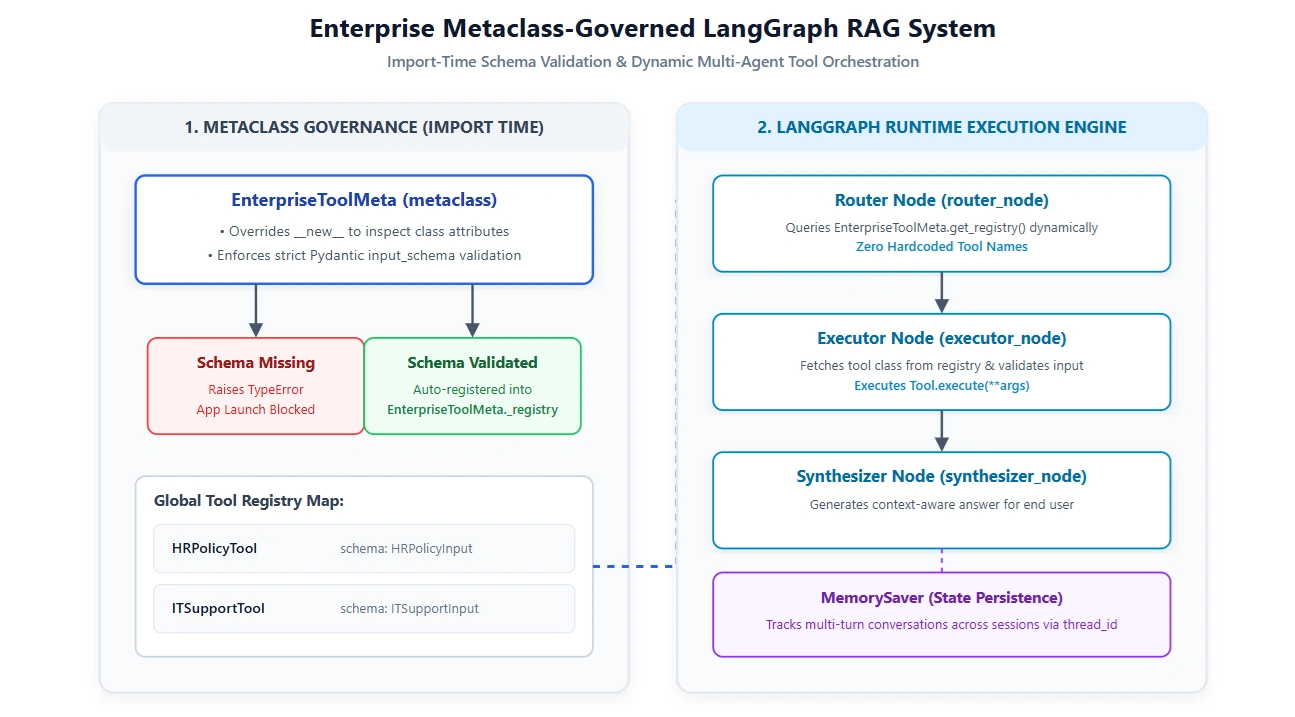
We will write a custom Python Metaclass (EnterpriseToolMeta) that intercepts the creation of every new Tool class.
It will automatically register the tool into a global registry at import time.
It will enforce schema validation at class creation time, throwing an error if the developer forgot to define a Pydantic schema.
Part 2: Demystifying Metaclasses
Before writing code, let's understand the mechanics.
When you write class MyClass:, Python executes this behind the scenes:
MyClass = type("MyClass", (object,), {"__module__": __name__, ...})
type is the default metaclass. By creating a custom metaclass that inherits from type, we can override the __new__ method. This method is called before the class is even created, giving us the power to inspect, modify, or reject the class definition.
Part 3: The Code Implementation
1. The Metaclass: Auto-Registration & Schema Enforcement
Here is the core of our framework. This metaclass ensures that no tool can be defined without a schema, and automatically adds it to our registry.
import logging
from typing import Dict, Type, Any
from pydantic import BaseModel

logging.basicConfig(level=logging.INFO, format='%(asctime)s - %(levelname)s - %(message)s')
logger = logging.getLogger(__name__)

class EnterpriseToolMeta(type):
    """
    Metaclass that enforces schema validation and auto-registers
    enterprise RAG tools upon class creation.
    """
    _registry: Dict[str, Type] = {}

    def __new__(mcs, name: str, bases: tuple, namespace: dict) -> Type:
        # 1. Skip the base class itself
        if name == "BaseEnterpriseTool":
            return super().__new__(mcs, name, bases, namespace)

        # 2. ENFORCE SCHEMA VALIDATION AT CLASS CREATION
        # The CISO requires every tool to have a Pydantic 'input_schema'
        if "input_schema" not in namespace:
            raise TypeError(
                f"Enterprise Governance Violation: Tool '{name}' must define "
                f"a Pydantic 'input_schema' class attribute."
            )

        schema_cls = namespace["input_schema"]
        if not (isinstance(schema_cls, type) and issubclass(schema_cls, BaseModel)):
            raise TypeError(
                f"Enterprise Governance Violation: '{name}.input_schema' must be a Pydantic BaseModel."
            )

        # 3. AUTO-REGISTRATION
        cls = super().__new__(mcs, name, bases, namespace)
        mcs._registry[name] = cls
        logger.info(f"Metaclass: Successfully registered and validated tool '{name}'")

        return cls

    @classmethod
    def get_registry(mcs) -> Dict[str, Type]:
        return mcs._registry
2. The Base Tool and Concrete Implementations
Now, developers just inherit from BaseEnterpriseTool. If they forget the schema, the code won't even compile/run. If they include it, it's automatically registered.
from langchain_core.tools import StructuredTool

class BaseEnterpriseTool(metaclass=EnterpriseToolMeta):
    """Base class for all enterprise RAG tools."""
    name: str
    description: str
    input_schema: Type[BaseModel] # Enforced by metaclass

    @classmethod
    def execute(cls, **kwargs) -> str:
        raise NotImplementedError

    @classmethod
    def to_langchain_tool(cls) -> StructuredTool:
        """Converts the registered class into a native LangChain Tool."""
        return StructuredTool.from_function(
            func=cls.execute,
            name=cls.name,
            description=cls.description,
            args_schema=cls.input_schema
        )

# ==========================================
# Developer defines new tools.
# NO manual registration code is needed!
# ==========================================

class HRPolicyInput(BaseModel):
    query: str
    employee_level: str = "standard"

class HRPolicyTool(BaseEnterpriseTool):
    name = "hr_policy_retriever"
    description = "Retrieves HR policies, PTO rules, and benefits info."
    input_schema = HRPolicyInput

    @classmethod
    def execute(cls, query: str, employee_level: str) -> str:
        # Mock Vector DB call
        return f"HR Context for {employee_level}: You have 20 days of PTO. Dental is covered."

class ITSupportInput(BaseModel):
    issue_type: str
    asset_id: str

class ITSupportTool(BaseEnterpriseTool):
    name = "it_support_retriever"
    description = "Retrieves IT troubleshooting steps and asset management info."
    input_schema = ITSupportInput

    @classmethod
    def execute(cls, issue_type: str, asset_id: str) -> str:
        return f"IT Context for {asset_id}: Try restarting the device. If {issue_type} persists, submit a Jira ticket."

# ==========================================
# What happens if a developer forgets the schema?
# ==========================================
# class RogueTool(BaseEnterpriseTool):
#     name = "rogue"
#     description = "I forgot the schema"
#     # TypeError: Enterprise Governance Violation: Tool 'RogueTool' must define a Pydantic 'input_schema'...
3. The Multi-Agent LangGraph RAG System
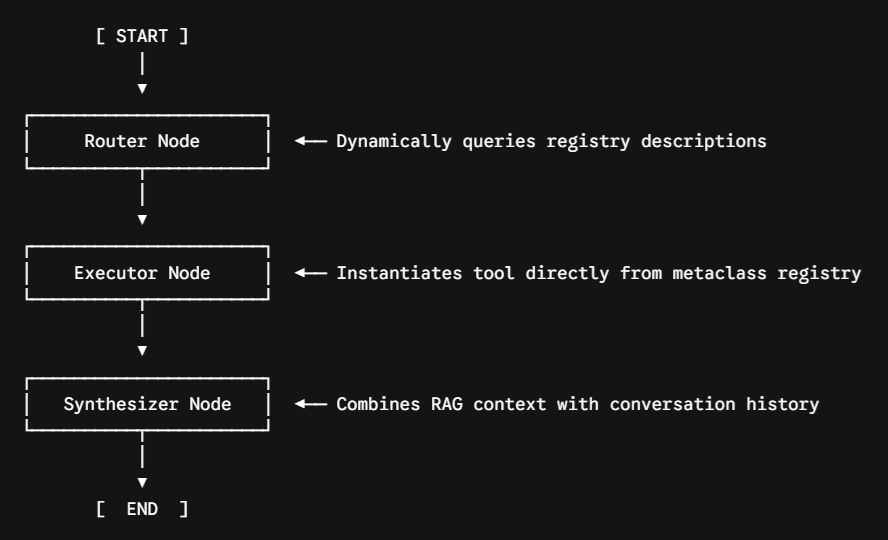
Now we build the LangGraph system. The Router Agent will dynamically query the metaclass registry to find the correct tool, and the Executor Agent will run it. We will use LangGraph's Checkpointer for memory.
from typing import TypedDict, Annotated, Sequence, Literal
from langchain_core.messages import BaseMessage, HumanMessage, AIMessage, SystemMessage
from langchain_openai import ChatOpenAI
from langgraph.graph import StateGraph, END
from langgraph.checkpoint.memory import MemorySaver
from langgraph.graph.message import add_messages

# --- 1. Define the Graph State ---
class AgentState(TypedDict):
    messages: Annotated[Sequence[BaseMessage], add_messages]
    selected_tool: str
    tool_result: str

# --- 2. Define the Agent Nodes ---
router_llm = ChatOpenAI(model="gpt-4o", temperature=0)

async def router_node(state: AgentState):
    """
    Dynamically routes the query by inspecting the Metaclass Registry.
    """
    registry = EnterpriseToolMeta.get_registry()
    tool_descriptions = "\n".join([f"- {name}: {cls.description}" for name, cls in registry.items()])

    prompt = [
        SystemMessage(content=f"You are a routing agent. Select the best tool from this list:\n{tool_descriptions}\nReply with ONLY the tool name."),
        state["messages"][-1]
    ]

    response = await router_llm.ainvoke(prompt)
    selected_tool = response.content.strip()

    # Fallback if LLM hallucinates a tool name
    if selected_tool not in registry:
        selected_tool = list(registry.keys())[0]

    return {"selected_tool": selected_tool}

async def executor_node(state: AgentState):
    """
    Dynamically instantiates and executes the selected tool from the registry.
    """
    registry = EnterpriseToolMeta.get_registry()
    tool_class = registry[state["selected_tool"]]

    # Extract arguments from the user message (simplified for demo;
    # in prod, an LLM would extract these based on the tool's input_schema)
    last_msg = state["messages"][-1].content

    # Mocking argument extraction for the sake of the example
    if state["selected_tool"] == "hr_policy_retriever":
        args = {"query": last_msg, "employee_level": "standard"}
    else:
        args = {"issue_type": "laptop slow", "asset_id": "MAC-992"}

    # Execute the tool
    result = tool_class.execute(**args)

    # Pass result to synthesizer
    return {"tool_result": result}

async def synthesizer_node(state: AgentState):
    """Synthesizes the final answer using the retrieved context."""
    context = state["tool_result"]
    messages = state["messages"]

    prompt = [
        SystemMessage(content=f"You are a helpful enterprise assistant. Answer the user based on this context:\n\n{context}"),
        *messages
    ]

    response = await router_llm.ainvoke(prompt)
    return {"messages": [response]}

# --- 3. Build and Compile the Graph ---
def route_to_executor(state: AgentState) -> Literal["executor"]:
    return "executor"

def route_to_synthesizer(state: AgentState) -> Literal["synthesizer"]:
    return "synthesizer"

workflow = StateGraph(AgentState)
workflow.add_node("router", router_node)
workflow.add_node("executor", executor_node)
workflow.add_node("synthesizer", synthesizer_node)

workflow.set_entry_point("router")
workflow.add_edge("router", "executor")
workflow.add_edge("executor", "synthesizer")
workflow.add_edge("synthesizer", END)

# Initialize Memory for multi-turn conversations
memory = MemorySaver()
rag_graph = workflow.compile(checkpointer=memory)
Part 4: Execution and Observability
Let's run the system. Notice how the LangGraph routing logic contains zero hardcoded references to HRPolicyTool or ITSupportTool. It relies entirely on the metaclass registry.
import asyncio

async def run_conversation():
    thread_id = "user_7788_session_1"
    config = {"configurable": {"thread_id": thread_id}}

    print("--- Turn 1: HR Query (Dynamic Routing via Metaclass) ---")
    inputs_turn1 = {
        "messages": [HumanMessage(content="How many PTO days do I get?")],
        "selected_tool": "",
        "tool_result": ""
    }

    # We use astream to see the nodes execute
    async for event in rag_graph.astream(inputs_turn1, config, stream_mode="updates"):
        for node, output in event.items():
            if "messages" in output and output["messages"]:
                msg = output["messages"][-1]
                if isinstance(msg, AIMessage):
                    print(f"[{node.upper()}]: {msg.content}")
            elif "selected_tool" in output:
                print(f"[ROUTER DECISION]: Selected tool -> {output['selected_tool']}")

    print("\n--- Turn 2: IT Query (Testing Memory & Dynamic Routing) ---")
    # Notice we don't pass previous messages; LangGraph Memory handles it
    inputs_turn2 = {
        "messages": [HumanMessage(content="My laptop is running slow. Asset ID is MAC-101.")],
        "selected_tool": "",
        "tool_result": ""
    }

    async for event in rag_graph.astream(inputs_turn2, config, stream_mode="updates"):
        for node, output in event.items():
            if "messages" in output and output["messages"]:
                msg = output["messages"][-1]
                if isinstance(msg, AIMessage):
                    print(f"[{node.upper()}]: {msg.content}")
            elif "selected_tool" in output:
                print(f"[ROUTER DECISION]: Selected tool -> {output['selected_tool']}")

if __name__ == "__main__":
    # The metaclass registers the tools at import time!
    asyncio.run(run_conversation())
Expected Output:
2026-07-24 10:00:00 - INFO - Metaclass: Successfully registered and validated tool 'HRPolicyTool'
2026-07-24 10:00:00 - INFO - Metaclass: Successfully registered and validated tool 'ITSupportTool'

--- Turn 1: HR Query (Dynamic Routing via Metaclass) ---
[ROUTER DECISION]: Selected tool -> hr_policy_retriever
[SYNTHESIZER]: Based on the HR policy, you are entitled to 20 days of PTO.

--- Turn 2: IT Query (Testing Memory & Dynamic Routing) ---
[ROUTER DECISION]: Selected tool -> it_support_retriever
[SYNTHESIZER]: For asset MAC-101, if your laptop is running slow, please try restarting the device. If the issue persists, submit a Jira ticket.
Part 5: Enterprise Best Practices & Pitfalls
Using metaclasses in enterprise AI systems is powerful, but it must be done with discipline.
When to Use Metaclasses: Use them for framework-level infrastructure. Auto-registration, API governance, schema enforcement, and singleton patterns are perfect use cases. They allow you to enforce architectural rules at import time rather than at runtime.
When NOT to Use Metaclasses: Do not use them for standard business logic. If you find yourself writing complex metaclasses just to save a few lines of code in a standard CRUD app, you are over-engineering.
The Modern Alternative (__init_subclass__): Python 3.6 introduced __init_subclass__, which allows a base class to intercept its own subclassing without needing a full metaclass.
Metaclass: class MyTool(BaseTool, metaclass=RegistryMeta):
Alternative: class BaseTool: def __init_subclass__(cls, **kwargs): Registry.register(cls)
Recommendation: If you only need auto-registration, use __init_subclass__. If you need to modify the class attributes (like injecting methods or enforcing complex schema validation before the class is finalized), stick to the Metaclass.
LangGraph Integration: By using the metaclass to generate standard LangChain StructuredTool objects on the fly (to_langchain_tool), we maintain perfect compatibility with LangGraph's native tool-calling mechanisms while keeping our underlying Python classes clean and governed.
Conclusion
Metaclasses shift the paradigm of Python programming from runtime execution to compile-time (import-time) architecture. By leveraging a custom metaclass to auto-register RAG tools and enforce Pydantic schemas, we solved two massive enterprise pain points: brittle multi-agent routing and security schema drift. When combined with Lang Graph's stateful, memory-backed execution, this pattern allows enterprise AI teams to scale their multi-agent systems horizontally, adding new capabilities simply by writing and importing a new class, with zero modifications to the core graph logic.


Join the conversation! Your thoughts help the community grow.