

Introduction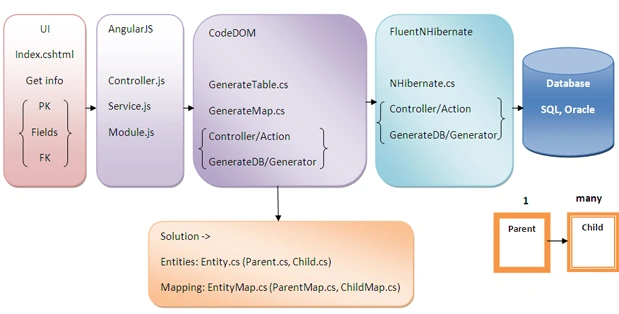
First of all I want to explain why I have selected NHibernate, or in a better words Fluent NHibernate, to do this. I have provided some of the most popular advantages and disadvantages of NHibernate.
NHibernate
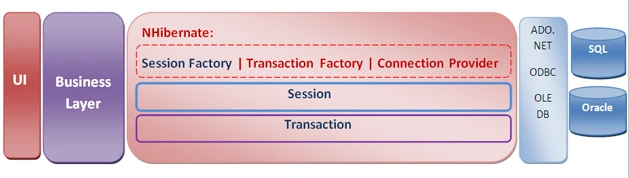
NHibernate is an Object Relational Mapping ORM framework. NHibernate resides between the database and business layer and provides powerful mapping. It inherits from Hibernate of the Java world. It uses mapping files or attributes besides properties.
NHibernate Advantages
NHibernate provides an ORM as a free XML configuration. It depends on a session factory that creates a session to bind to the database. You need a class to define your specific configuration that introduces a connection string for the specific database. Then whenever you call the session you are able to connect to your db. You can either write a code as traditional SQL query or LINQ query using NHibernate. LINQ as your namespace. The session totally encapsulates the unit of work pattern too. You need to produce XML files to work with NHibenate but I have used Fluent NHibernate to prevent any cumbersome something during implementation.
CodeDOM
With Fluent NHibernate you need to write two classes per entity of your table, one is simple and the other is for mapping and introduces a relation to the outer table. It is a bit difficult if you use many tables in your project to write two classes per entity. Therefore I decided to use the Code Document Object Model, CodeDOM, as a generation tool for generating these classes and I get table names, field names and their data types for the parent table from the UI and for the children I get its parent table to build the foreign key.
As a simplest explanation about CodeDOM: You need to generate many classes with the same structures but some parts have a different expression so to save your time and energy it is better to write one class instead of many classes and those classes are a good template for generating all your classes.
The following namespaces enable you to use CodeDOM:
Using CodeDOM you can either write source code for ASP.NET, XML web services client proxies and so on or compile. Its structure is a tree graph with codecompileunit as its root. Then you should define your namespace and import them. Determine your class name and fields and properties and add them as members to the class.
CodeDOM Advantages
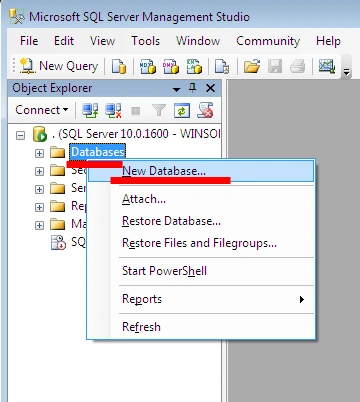
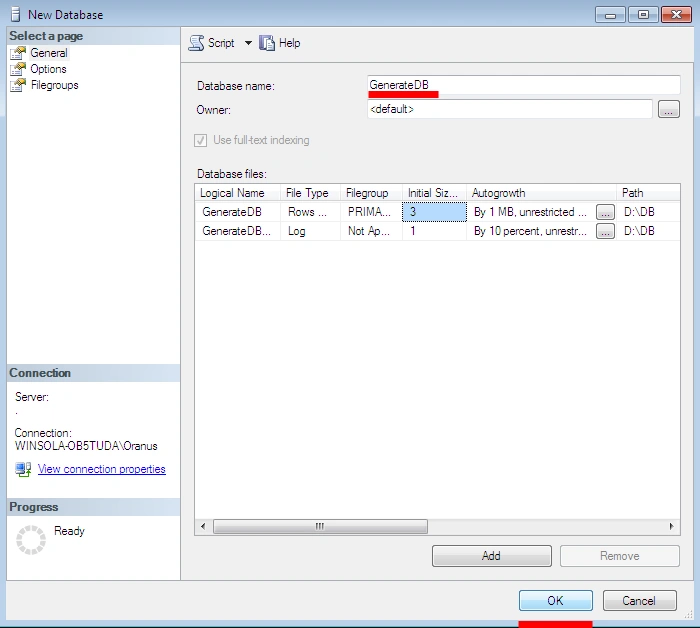
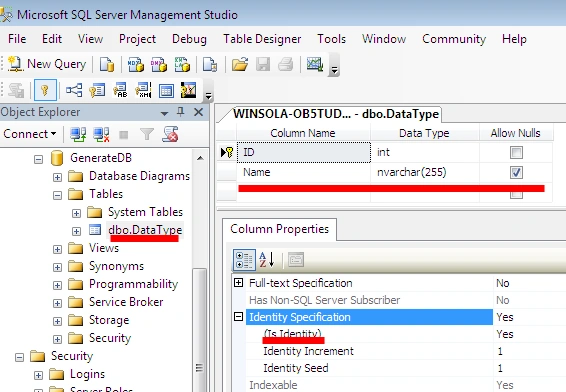
I have defined the table "DataType" with the two columns, ID and Name, for the data type of entities. You can assign your datat type name to the "Name" field such as int, string and and so on. Be careful that CodeDOM pays attention to your application language data type. For instance I used C# so I used int and string. That is a bit different than the VB language. In VB we use "integer" instead of "int".
Eventually I used AngularJS for the frontend and UI sections, you can get more information about Angularjs implementation at http://www.codeproject.com/Articles/869433/AngularJS-MVC-Repository-Dispose and about MVC ASP.NET implementation at http://technical.cosmicverse.info/article/index/3.
File -> New Project -> ASP.NET MVC 4 Project then select "Internet Application".
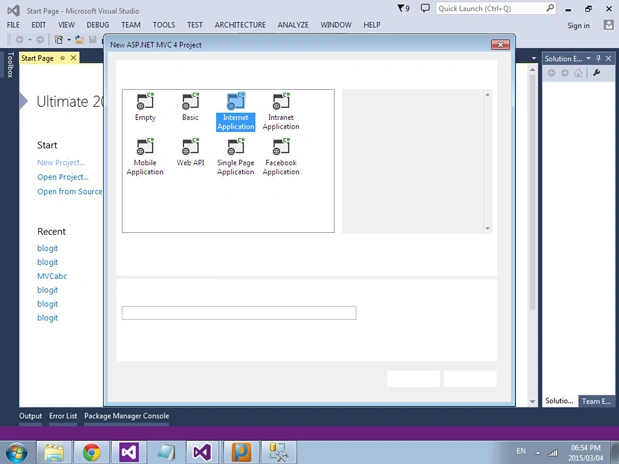
Select "Empty".

Install Fluent NHibernate
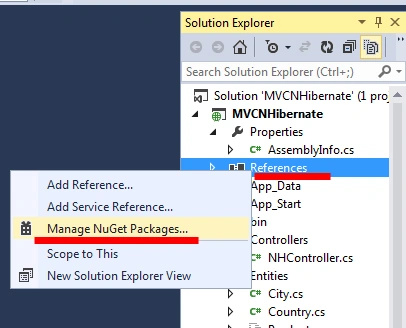
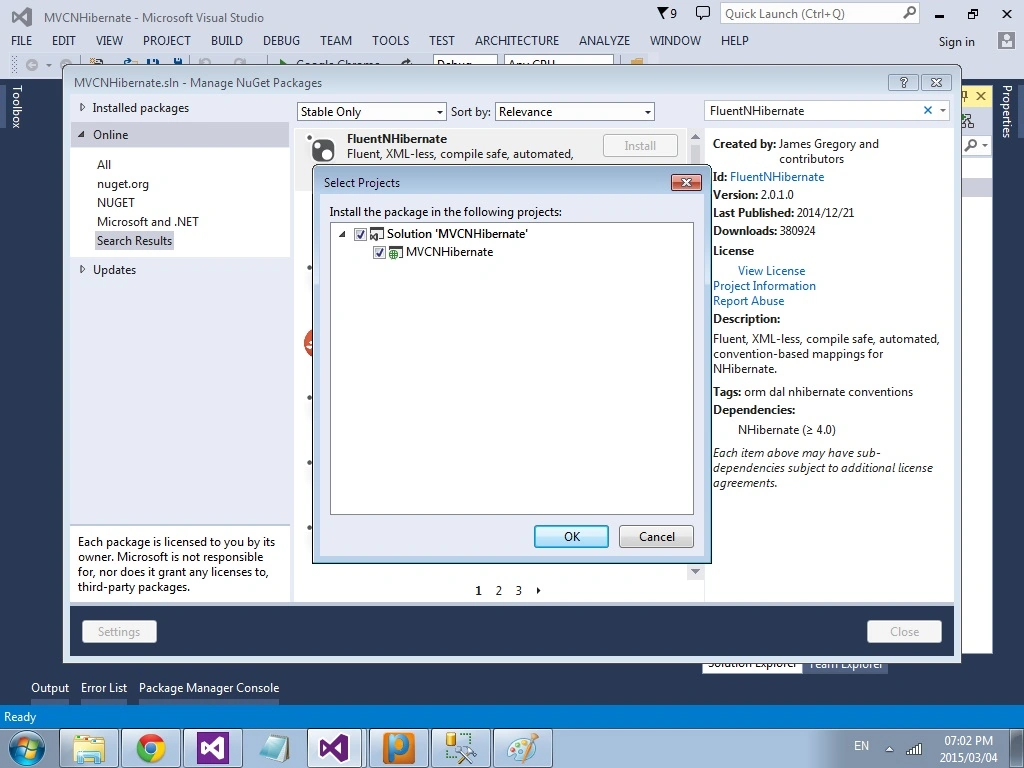
Go to the project in the Solution Exlorer then right-click on "References" then select "Manage Nuget Packages".
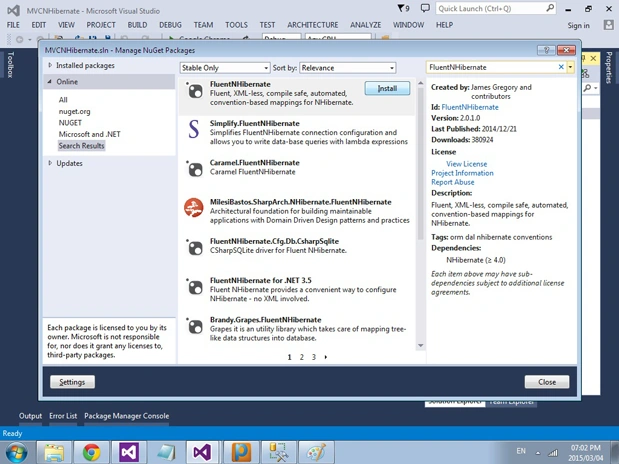
Search "FluentNHibernate" then click on "Install" to add its references.

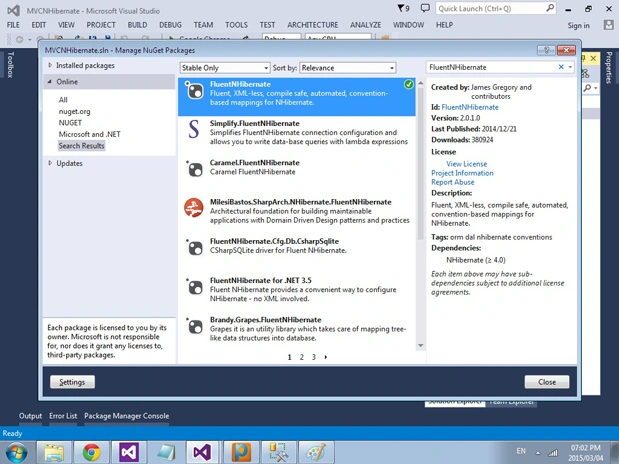
Look at the References for the project. There are the following three new references:

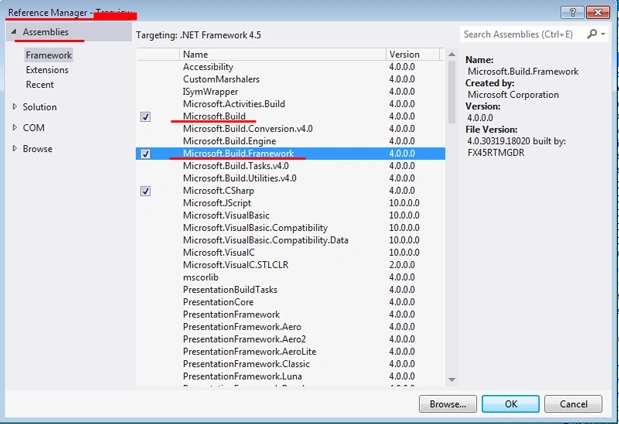
In order to use CodeDOM you should add "Microsoft.Build" and "Microsoft.Build.Framework".
- Powerful mapping facilities.
- Execute multiple queries in one go to the database instead of going to the DB for each query.
- Lazy Loading works for NHibernate and it means that you just fetch your necessary data in memory instead of the entire collection in memory and it reduces the memory overhead.
- Decoupling from the database means you can use various database types instead of just using SQL such as Oracle and so on.
- Writing code for NHibernate makes developers feel better in the aspect of readability and documentation.
- Caching and second level caching.
- Its session factory is a thread-safe object in NHibernate.
- Learning and mastering in NHibernate takes time and it seems cumbersome to be professional.
- NHibernate needs complicated XML configuration per entities.
- It takes a long time when you initiate it for the first time because of the preparation operation in the metadata is heavy.
NHibernate provides an ORM as a free XML configuration. It depends on a session factory that creates a session to bind to the database. You need a class to define your specific configuration that introduces a connection string for the specific database. Then whenever you call the session you are able to connect to your db. You can either write a code as traditional SQL query or LINQ query using NHibernate. LINQ as your namespace. The session totally encapsulates the unit of work pattern too. You need to produce XML files to work with NHibenate but I have used Fluent NHibernate to prevent any cumbersome something during implementation.
CodeDOM
With Fluent NHibernate you need to write two classes per entity of your table, one is simple and the other is for mapping and introduces a relation to the outer table. It is a bit difficult if you use many tables in your project to write two classes per entity. Therefore I decided to use the Code Document Object Model, CodeDOM, as a generation tool for generating these classes and I get table names, field names and their data types for the parent table from the UI and for the children I get its parent table to build the foreign key.
As a simplest explanation about CodeDOM: You need to generate many classes with the same structures but some parts have a different expression so to save your time and energy it is better to write one class instead of many classes and those classes are a good template for generating all your classes.
The following namespaces enable you to use CodeDOM:
- using System.IO;
- using System.CodeDom;
- using System.CodeDom.Compiler;
- using Microsoft.CSharp;
CodeDOM Advantages
- CodeDOM lets you create, compile and execute your source code for the application at run time, without writing many lines or when your parameter should be determined at run time.
- CodeDOM uses a single model to generate source code, so any languages that support CodeDOM can work with it.
- It is possible to translate VB to C# or inverse.
- There are limitations to defining expressions using CodeDOM such that you need to use Snippet classes.
- Snippet classes cannot satisfy any expression so you should not use a heavy function on that.
- Creating Database
I have defined the table "DataType" with the two columns, ID and Name, for the data type of entities. You can assign your datat type name to the "Name" field such as int, string and and so on. Be careful that CodeDOM pays attention to your application language data type. For instance I used C# so I used int and string. That is a bit different than the VB language. In VB we use "integer" instead of "int".
- Create MVC Project with Fluent NHibernate + Microsoft.Build for CodeDOM + AngularJS for Frontend
Eventually I used AngularJS for the frontend and UI sections, you can get more information about Angularjs implementation at http://www.codeproject.com/Articles/869433/AngularJS-MVC-Repository-Dispose and about MVC ASP.NET implementation at http://technical.cosmicverse.info/article/index/3.
File -> New Project -> ASP.NET MVC 4 Project then select "Internet Application".
Select "Empty".
Install Fluent NHibernate
Go to the project in the Solution Exlorer then right-click on "References" then select "Manage Nuget Packages".
Search "FluentNHibernate" then click on "Install" to add its references.
Look at the References for the project. There are the following three new references:
- FluentNHibernate
- Iesi.Collections
- NHibernate
In order to use CodeDOM you should add "Microsoft.Build" and "Microsoft.Build.Framework".
Install AngularJS
Go to the project in the Solution Explorer and right-click on "References" then select "Manage Nuget Packages".
Search: "AngularJS" then click on "Install".

- Review on Scenario and Testing

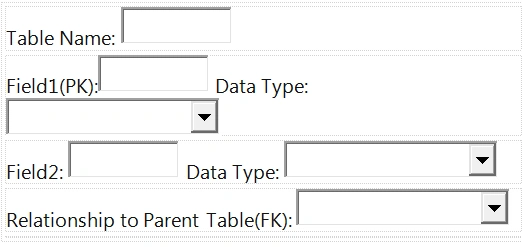
I create a parent table and child table that have a one-to-many relation to each other. In the following picture the parent table has no parent so the last combo box should be empty.

But the child table has a relationship with the parent by calling its parent table and finally the combo box.

Look at the solution and you will see that new classes have been generated by CodeDOM inside "Entities" and "Mapping". For each entitiy there are two classes, one in the "Entities" folder such as "Parent.cs" and another is in the "Mapping" folder as "ChildMap.cs".
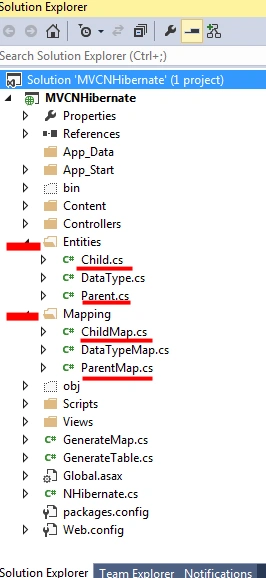
After generation look at your database too. There is no difference, whether there your database is SQL, Oracle or whatever. Your tables have been generated here too by FluentNHibernate.


In a nutshell
You determine your table spesification on the UI and then Angular sends info to the controller and there by using "GenerateTable.cs" and "GenerateMap.cs" with a GenerateDBController/Generate Action all the classes will be created on the "Entities" and "Mapping" folders. These classes, such as "Parent.cs" and "ParentMap.cs" by the FluentNHibernate utilities "NHibernate.cs" will create tables inside the database.
- Using Code
- using System;
- using System.Collections.Generic;
- using System.Linq;
- using System.Web;
- using FluentNHibernate.Cfg;
- using FluentNHibernate.Cfg.Db;
- using NHibernate;
- using NHibernate.Tool.hbm2ddl;
- using MVCNHibernate.Entities; //ProjectName.Entites
- using MVCNHibernate.Controllers; //ProjectName.Controllers
- namespace MVCNHibernate
- {
- public class NHibernate
- {
- private static ISessionFactory _sessionFactory;
- private static ISessionFactory SessionFactory
- {
- get {
- if (_sessionFactory == null) InitializeSessionFactory();
- return _sessionFactory;
- }
- }
- private static void InitializeSessionFactory()
- {
- _sessionFactory = Fluently.Configure()
- .Database(MsSqlConfiguration.MsSql2008.ConnectionString(@
- "Server=.;initial catalog=GenerateDB;integrated security=True")
- .ShowSql())
- .Mappings(m = > m.FluentMappings.AddFromAssemblyOf())
- .ExposeConfiguration(cfg = > new SchemaUpdate(cfg)
- .Execute(false, true))
- .BuildSessionFactory();
- }
- public static ISession OpenSession()
- {
- return SessionFactory.OpenSession();
- }
- }
- }
- using System;
- using System.Collections.Generic;
- using System.Linq;
- using System.Text;
- using System.Threading.Tasks;
- using System.Reflection;
- using System.IO;
- using System.CodeDom;
- using System.CodeDom.Compiler;
- using Microsoft.CSharp;
- using System.Reflection;
- using System.Web.Mvc;
- using System.Web;
- using System.Collections;
- using System.ComponentModel;
- using System.Data;
- using System.Diagnostics;
- namespace MVCNHibernate
- {
- public class GenerateTable
- {
- CodeCompileUnit targetUnit;
- CodeTypeDeclaration targetClass;
- public GenerateTable(string tableName)
- {
- targetUnit = new CodeCompileUnit();
- //Path
- CodeNamespace samples = new CodeNamespace("MVCNHibernate.Entities");
- //Namespace
- samples.Imports.Add(new CodeNamespaceImport("System"));
- samples.Imports.Add(new CodeNamespaceImport("System.Collections.Generic"));
- samples.Imports.Add(new CodeNamespaceImport("System.Linq"));
- samples.Imports.Add(new CodeNamespaceImport("System.Text"));
- samples.Imports.Add(new CodeNamespaceImport("MVCNHibernate.Entities"));
- targetClass = new CodeTypeDeclaration(tableName);
- targetClass.IsClass = true;
- targetClass.TypeAttributes = TypeAttributes.Public;
- samples.Types.Add(targetClass);
- targetUnit.Namespaces.Add(samples);
- }
- public void AddFields(string fld1, string dt1, string fld2, string dt2)
- {
- CodeMemberField field1 = new CodeMemberField();
- field1.Attributes = MemberAttributes.Private;
- if (dt1 == "int")
- {
- field1.Type = new CodeTypeReference(typeof(System.Int32));
- } else if (dt1 == "string")
- {
- field1.Type = new CodeTypeReference(typeof(System.String));
- }
- field1.Name = "_" + fld1;
- targetClass.Members.Add(field1);
- CodeMemberProperty property1 = new CodeMemberProperty();
- property1.GetStatements.Add(new CodeMethodReturnStatement(new CodeFieldReferenceExpression(new CodeThisReferenceExpression(), "_" + fld1)));
- property1.SetStatements.Add(new CodeAssignStatement(new CodeFieldReferenceExpression(new CodeThisReferenceExpression(), "_" + fld1), new CodePropertySetValueReferenceExpression()));
- property1.Attributes = MemberAttributes.Public;
- property1.Name = fld1;
- if (dt1 == "int")
- {
- property1.Type = new CodeTypeReference(typeof(System.Int32));
- } else if (dt1 == "string")
- {
- property1.Type = new CodeTypeReference(typeof(System.String));
- }
- targetClass.Members.Add(property1);
- CodeMemberField field2 = new CodeMemberField();
- field2.Attributes = MemberAttributes.Private;
- if (dt2 == "int")
- {
- field2.Type = new CodeTypeReference(typeof(System.Int32));
- } else if (dt2 == "string")
- {
- field2.Type = new CodeTypeReference(typeof(System.String));
- }
- field2.Name = "_" + fld2;
- targetClass.Members.Add(field2);
- CodeMemberProperty property2 = new CodeMemberProperty();
- property2.GetStatements.Add(new CodeMethodReturnStatement(new CodeFieldReferenceExpression(new CodeThisReferenceExpression(), "_" + fld2)));
- property2.SetStatements.Add(new CodeAssignStatement(new CodeFieldReferenceExpression(new CodeThisReferenceExpression(), "_" + fld2), new CodePropertySetValueReferenceExpression()));
- property2.Attributes = MemberAttributes.Public;
- property2.Name = fld2;
- if (dt2 == "int")
- {
- property2.Type = new CodeTypeReference(typeof(System.Int32));
- } else if (dt2 == "string")
- {
- property2.Type = new CodeTypeReference(typeof(System.String));
- }
- targetClass.Members.Add(property2);
- }
- public void RelationalAddFields(string tableName, string fld1, string dt1, string fld2, string dt2, string parent)
- {
- CodeMemberField field1 = new CodeMemberField();
- field1.Attributes = MemberAttributes.Private;
- if (dt1 == "int")
- {
- field1.Type = new CodeTypeReference(typeof(System.Int32));
- } else if (dt1 == "string")
- {
- field1.Type = new CodeTypeReference(typeof(System.String));
- }
- field1.Name = "_" + fld1;
- targetClass.Members.Add(field1);
- CodeMemberProperty property1 = new CodeMemberProperty();
- property1.GetStatements.Add(new CodeMethodReturnStatement(new CodeFieldReferenceExpression(new CodeThisReferenceExpression(), "_" + fld1)));
- property1.SetStatements.Add(new CodeAssignStatement(new CodeFieldReferenceExpression(new CodeThisReferenceExpression(), "_" + fld1), new CodePropertySetValueReferenceExpression()));
- property1.Attributes = MemberAttributes.Public;
- property1.Name = fld1;
- if (dt1 == "int")
- {
- property1.Type = new CodeTypeReference(typeof(System.Int32));
- } else if (dt1 == "string")
- {
- property1.Type = new CodeTypeReference(typeof(System.String));
- }
- targetClass.Members.Add(property1);
- CodeMemberField field2 = new CodeMemberField();
- field2.Attributes = MemberAttributes.Private;
- if (dt2 == "int")
- {
- field2.Type = new CodeTypeReference(typeof(System.Int32));
- } else if (dt2 == "string")
- {
- field2.Type = new CodeTypeReference(typeof(System.String));
- }
- field2.Name = "_" + fld2;
- targetClass.Members.Add(field2);
- CodeMemberProperty property2 = new CodeMemberProperty();
- property2.GetStatements.Add(new CodeMethodReturnStatement(new CodeFieldReferenceExpression(new CodeThisReferenceExpression(), "_" + fld2)));
- property2.SetStatements.Add(new CodeAssignStatement(new CodeFieldReferenceExpression(new CodeThisReferenceExpression(), "_" + fld2), new CodePropertySetValueReferenceExpression()));
- property2.Attributes = MemberAttributes.Public;
- property2.Name = fld2;
- if (dt2 == "int")
- {
- property2.Type = new CodeTypeReference(typeof(System.Int32));
- } else if (dt2 == "string")
- {
- property2.Type = new CodeTypeReference(typeof(System.String));
- }
- targetClass.Members.Add(property2);
- CodeMemberField field3 = new CodeMemberField();
- field3.Attributes = MemberAttributes.Private;
- // field3.Type = new CodeTypeReference(typeof(System.Int32));
- Type myType = Type.GetType("MVCNHibernate.Entities." + parent);
- //dynamic instance = Activator.CreateInstance(myType);
- field3.Type = new CodeTypeReference(myType);
- field3.Name = "_" + parent + tableName;
- targetClass.Members.Add(field3);
- CodeMemberProperty property3 = new CodeMemberProperty();
- property3.GetStatements.Add(new CodeMethodReturnStatement(new CodeFieldReferenceExpression(new CodeThisReferenceExpression(), "_" + parent + tableName)));
- property3.SetStatements.Add(new CodeAssignStatement(new CodeFieldReferenceExpression(new CodeThisReferenceExpression(), "_" + parent + tableName), new CodePropertySetValueReferenceExpression()));
- property3.Attributes = MemberAttributes.Public;
- property3.Name = parent + tableName;
- Type myType2 = Type.GetType("MVCNHibernate.Entities." + parent);
- // dynamic instance2 = Activator.CreateInstance(myType2);
- property3.Type = new CodeTypeReference(myType2);
- targetClass.Members.Add(property3);
- }
- CodeDomProvider provider;
- public void GenerateCSharpCode(string fileName)
- {
- provider = CodeDomProvider.CreateProvider("CSharp");
- CodeGeneratorOptions options = new CodeGeneratorOptions();
- options.BracingStyle = "C";
- using(StreamWriter sourceWriter = new StreamWriter(fileName))
- {
- provider.GenerateCodeFromCompileUnit(
- targetUnit, sourceWriter, options);
- }
- }
- }
- }
- using System;
- using System.Collections.Generic;
- using System.Linq;
- using System.Text;
- using System.Threading.Tasks;
- using System.Reflection;
- using System.IO;
- using System.CodeDom;
- using System.CodeDom.Compiler;
- using Microsoft.CSharp;
- using System.Linq.Expressions;
- namespace MVCNHibernate
- {
- public class GenerateMap
- {
- CodeCompileUnit targetUnit;
- CodeTypeDeclaration targetClass;
- public GenerateMap(string tableName)
- {
- targetUnit = new CodeCompileUnit();
- //Path
- CodeNamespace samples = new CodeNamespace("MVCNHibernate.Mapping");
- //Namespace
- samples.Imports.Add(new CodeNamespaceImport("System"));
- samples.Imports.Add(new CodeNamespaceImport("System.Collections.Generic"));
- samples.Imports.Add(new CodeNamespaceImport("System.Linq"));
- samples.Imports.Add(new CodeNamespaceImport("System.Web"));
- samples.Imports.Add(new CodeNamespaceImport("FluentNHibernate.Mapping"));
- samples.Imports.Add(new CodeNamespaceImport("MVCNHibernate.Entities"));
- targetClass = new CodeTypeDeclaration(tableName + "Map");
- targetClass.BaseTypes.Add(new CodeTypeReference
- {
- BaseType = "ClassMap`1[" + tableName + "]", Options = CodeTypeReferenceOptions.GenericTypeParameter
- });
- targetClass.IsClass = true;
- targetClass.TypeAttributes = TypeAttributes.Public;
- samples.Types.Add(targetClass);
- targetUnit.Namespaces.Add(samples);
- }
- public void AddConstructor(string fld1, string fld2, string tbl)
- {
- // Declare the constructor
- CodeConstructor constructor = new CodeConstructor();
- constructor.Attributes = MemberAttributes.Public | MemberAttributes.Final;
- CodeExpression newType = new CodeExpression();
- CodeSnippetExpression snippet = new CodeSnippetExpression();
- string hh = string.Format("Table(\"{0}\"", tbl);
- string lambda = @
- "Id(x => x." + fld1 + "); Map(x => x." + fld2 + ");" + hh + ")";
- var lambdaExpression = new CodeSnippetExpression(lambda);
- constructor.Statements.Add(lambdaExpression);
- targetClass.Members.Add(constructor);
- }
- public void RelationalAddConstructor(string fld1, string fld2, string tbl, string parent)
- {
- CodeConstructor constructor = new CodeConstructor();
- constructor.Attributes = MemberAttributes.Public | MemberAttributes.Final;
- CodeExpression newType = new CodeExpression();
- CodeSnippetExpression snippet = new CodeSnippetExpression();
- string parenttbl = parent + tbl;
- string fk = parent + "id";
- string cc = string.Format("\"{0}\"", fk);
- string hh = string.Format("Table(\"{0}\"", tbl);
- string lambda = @
- "Id(x => x." + fld1 + "); Map(x => x." + fld2 + "); References(x => x." + parenttbl + ").Column(" + cc + "); " + hh + ")";
- var lambdaExpression = new CodeSnippetExpression(lambda);
- constructor.Statements.Add(lambdaExpression);
- targetClass.Members.Add(constructor);
- }
- public void GenerateCSharpCode(string fileName)
- {
- CodeDomProvider provider = CodeDomProvider.CreateProvider("CSharp");
- CodeGeneratorOptions options = new CodeGeneratorOptions();
- options.BracingStyle = "C";
- using(StreamWriter sourceWriter = new StreamWriter(fileName))
- {
- provider.GenerateCodeFromCompileUnit(
- targetUnit, sourceWriter, options);
- }
- }
- }
- }
- using System;
- using System.Collections;
- using System.Collections.Generic;
- using System.Linq;
- using System.Web;
- using System.Web.Mvc;
- using MVCNHibernate.Entities;
- using Microsoft.Build;
- using Microsoft.Build.Construction;
- using Microsoft.Build.Evaluation;
- using Microsoft.Build.Execution;
- using NHibernate.Linq;
- using NHibernate;
- using System.Collections;
- namespace MVCNHibernate.Controllers
- {
- public class GenerateDBController: Controller
- {
- public ActionResult Index()
- {
- return View();
- }
- public JsonResult getDataType()
- {
- using(var session = NHibernate.OpenSession())
- {
- using(var transaction = session.BeginTransaction())
- {
- var query = session.CreateSQLQuery("select Name from DataType");
- var result = query.List();
- return Json(result, JsonRequestBehavior.AllowGet);
- }
- }
- }
- public JsonResult getTable()
- {
- using(var session = NHibernate.OpenSession())
- {
- using(var transaction = session.BeginTransaction())
- {
- var sql = String.Format("SELECT * FROM information_schema.tables");
- var query = session.CreateSQLQuery(sql);
- var result = query.List();
- List tableName = new List();
- object tableSpec;
- IList collection;
- for (int i = 0; i < result.Count; i++)
- {
- tableSpec = result[i];
- collection = (IList) tableSpec;
- tableName.Add(collection[2].ToString());
- }
- return Json(tableName, JsonRequestBehavior.AllowGet);
- }
- }
- }
- public string Generator(string tableName, string fieldName1, string dataType1, string fieldName2, string dataType2, string Paren {
- try
- {
- if (Parent == null) //=> No Relation
- {
- var projectCollection = ProjectCollection.GlobalProjectCollection;
- string projPath = "~/MVCNHibernate.csproj";
- var p = projectCollection.LoadProject(Server.MapPath(projPath));
- string projItem1 = "~/Entities/" + tableName + ".cs";
- GenerateTable genTable = new GenerateTable(tableName);
- genTable.AddFields(fieldName1, dataType1, fieldName2, dataType2);
- genTable.GenerateCSharpCode(Server.MapPath(projItem1));
- p.AddItem("Compile", Server.MapPath(projItem1));
- p.Save();
- string projItem2 = "~/Mapping/" + tableName + "Map.cs";
- GenerateMap genMap = new GenerateMap(tableName);
- genMap.AddConstructor(fieldName1, fieldName2, tableName);
- genMap.GenerateCSharpCode(Server.MapPath(projItem2));
- p.AddItem("Compile", Server.MapPath(projItem2));
- p.Save();
- ProjectCollection.GlobalProjectCollection.UnloadProject(p);
- p.Build();
- NHibernate.OpenSession();
- }
- else if (Parent != null) //=> Relation To Parent
- {
- var projectCollection = ProjectCollection.GlobalProjectCollection;
- string projPath = "~/MVCNHibernate.csproj";
- var p = projectCollection.LoadProject(Server.MapPath(projPath));
- string fileNameEn = "~/Entities/" + tableName + ".cs";
- GenerateTable genTable = new GenerateTable(tableName);
- genTable.RelationalAddFields(tableName, fieldName1, dataType1, fieldName2, dataType2, Parent);
- genTable.GenerateCSharpCode(Server.MapPath(fileNameEn));
- string projItem1 = "~/Entities/" + tableName + ".cs";
- p.AddItem("Compile", Server.MapPath(projItem1));
- p.Save();
- string fileNameMap = "~/Mapping/" + tableName + "Map.cs";
- GenerateMap genMap = new GenerateMap(tableName);
- genMap.RelationalAddConstructor(fieldName1, fieldName2, tableName, Parent);
- genMap.GenerateCSharpCode(Server.MapPath(fileNameMap));
- string projItem2 = "~/Mapping/" + tableName + "Map.cs";
- p.AddItem("Compile", Server.MapPath(projItem2));
- p.Save();
- //ProjectCollection.GlobalProjectCollection.UnloadProject(p);
- ProjectCollection.GlobalProjectCollection.UnloadAllProjects();
- p.Build();
- NHibernate.OpenSession();
- }
- return "Database generated Successfully ";
- }
- catch
- {
- return "Database did not generate Successfully ";
- }
- }
- }
- }
- using System;
- using System.Collections.Generic;
- using System.Linq;
- using System.Web;
- namespace MVCNHibernate.Entities
- {
- public class DataType
- {
- public virtual int ID
- {
- get;
- set;
- }
- public virtual string Name
- {
- get;
- set;
- }
- }
- }
- using System;
- using System.Collections.Generic;
- using System.Linq;
- using System.Web;
- using FluentNHibernate.Mapping;
- using MVCNHibernate.Entities;
- namespace MVCNHibernate.Mapping
- {
- public class DataTypeMap: ClassMap
- {
- public DataTypeMap()
- {
- Id(x = > x.ID);
- Map(x = > x.Name);
- Table("DataType");
- }
- }
- }
- var app = angular.module('MyApp', ['ngRoute']);
- app.controller("AngularCtrlCreateTable", function($scope, angularServiceCreateTable) {
- $scope.divGen = true;
- $scope.divNewGen = false;
- GetAllDataType1();
- GetAllTable();
- //To Get All Records
- function GetAllDataType1()
- {
- var Data = angularServiceCreateTable.getDataType();
- Data.then(function(data)
- {
- $scope.items1 = data.data;
- $scope.items2 = data.data;
- }, function()
- {
- alert('Error');
- });
- }
- //To Get All Records
- function GetAllTable()
- {
- var Data = angularServiceCreateTable.getTable();
- Data.then(function(tb)
- {
- $scope.itemsPT = tb.data;
- }, function()
- {
- alert('Error');
- });
- }
- $scope.Generator = function()
- {
- var dt1 = $scope.selectedItem1;
- var dt2 = $scope.selectedItem2;
- var dt3 = $scope.selectedItemParentTable;
- var getmsg = angularServiceCreateTable.Generator($scope.TableName, $scope.Field1, dt1, $scope.Field2, dt2, dt3);
- getmsg.then(function(messagefromcontroller)
- {
- $scope.divGen = false;
- $scope.divNewGen = true;
- alert(messagefromcontroller.data);
- }, function()
- {
- alert('There is error in database generation');
- });
- }
- $scope.GeneratorNew = function()
- {
- $scope.divGen = true;
- $scope.divNewGen = false;
- GetAllTable();
- GetAllDataType2();
- GetAllDataType1();
- $scope.TableName = "";
- $scope.Field1 = "";
- $scope.Field2 = "";
- }
- });
- app.service("angularServiceCreateTable", function($http) {
- this.getDataType = function()
- {
- return $http.get("/GenerateDB/getDataType");
- };
- this.getTable = function()
- {
- return $http.get("/GenerateDB/getTable");
- };
- //Database Generation
- this.Generator = function(tblName, fldName1, dType1, fldName2, dType2, prtTableName) {
- var response = $http({
- method: "post",
- url: "/GenerateDB/Generator",
- params:
- {
- tableName: tblName,
- fieldName1: fldName1,
- dataType1: dType1,
- fieldName2: fldName2,
- dataType2: dType2,
- Parent: prtTableName
- }
- });
- return response;
- }
- });
- @
- {
- ViewBag.Title = "Index";
- }
Views -> GenerateDB -> Shared -> _Layout.cshtml
- @System.Web.Optimization.Styles.Render("~/Content/css")
- @RenderBody() @System.Web.Optimization.Scripts.Render("~/bundles/jquery") @RenderSection("scripts", required: false)
http://nhibernate.info/doc/nh/en/
http://www.codeguru.com/vb/gen/article.php/c19573/Microsoft-NET-CodeDom-Technology.htm
http://ayende.com/blog/4351/nhibernate-vs-entity-framework-4-0
http://www.codeproject.com/Articles/148959/How-the-new-C-dynamic-type-can-simplify-access-to
http://technical.cosmicverse.info/article/index/3
http://www.codeproject.com/Articles/869433/AngularJS-MVC-Repository-Dispose?msg=5029301#xx5029301xx
History
First Version: 03/28/2015
Feedback
Feel free to leave any feedback on this article. It is a pleasure to see your comments and to get votes about this code. If you have any questions, please do not hesitate to ask me here.
JosephsPosted Feb 27, 2018, 7:10 AM
Database did not generate Successfully The tools version "12.0" is unrecognized. Available tools versions are "14.0", "2.0", "3.5", "4.0".
Vignesh ManiPosted Jul 8, 2016, 8:29 AM
Nice explanation maam
Shobana JPosted Jul 7, 2016, 7:09 AM
Good one
Shobana JPosted Jul 7, 2016, 7:09 AM
Nice explanation
Atul RawatPosted Aug 10, 2015, 8:07 AM
nice article....
Rahul Kumar SaxenaPosted Mar 29, 2015, 12:19 AM
Good Work
RakeshPosted Mar 28, 2015, 8:15 PM
Great start, Nice article, Thanks for sharing :)
Mahsa HassankashiPosted Mar 28, 2015, 12:42 PM
Thank you so much Dear Gowtham :)
Gowtham RajamanickamPosted Mar 28, 2015, 12:24 PM
easy way to undrstand/...
Gowtham RajamanickamPosted Mar 28, 2015, 12:24 PM
simply sooperb
Mahsa HassankashiPosted Mar 28, 2015, 11:29 AM
Thank you Dear Vithal :)
Vithal WadjePosted Mar 28, 2015, 9:33 AM
nice
Tom MohanPosted Mar 28, 2015, 5:54 AM
Good effort. Nice one.
Gaurav Kumar AroraPosted Mar 28, 2015, 4:32 AM
Mahsa Hassankashi - Its really a great article. The explanation of code is really appreciable. Keep posting good contents.