

Introduction
Ensuring the accuracy and reliability of AI models is a crucial step before deployment. However, manual validation processes can be time-consuming and prone to errors. Azure ML Pipelines offers a solution by automating AI model testing and validation, making it more efficient, repeatable, and scalable.
This article explores how Azure ML Pipelines streamlines AI model validation by integrating automated testing workflows, ensuring model robustness, and accelerating deployment.
Why Automate Model Testing & Validation?
AI models require rigorous validation to confirm they generalize well to unseen data and meet performance expectations. Automating this process in Azure ML Pipelines provides multiple advantages.
- Efficiency: Eliminates manual effort and speeds up testing cycles.
- Consistency: Ensures standardized validation methods across different models.
- Scalability: Handles large datasets and multiple models simultaneously.
- Reproducibility: This enables tracking and comparing results over time.
- Continuous Integration: Seamlessly integrates with CI/CD workflows for real-time evaluation.
Key Components of Automated AI Testing in Azure ML
Azure ML Pipelines include various components to facilitate testing and validation.
- Data Preprocessing Pipeline: Ensures clean, well-structured data for training and evaluation.
- Model Training Pipeline: Trains models using predefined configurations and hyperparameters.
- Evaluation Pipeline: Runs metrics-based validation (accuracy, precision, recall, F1-score, etc.).
- Drift Detection Pipeline: Monitors model performance against evolving data distributions.
- Automated Testing Pipeline: Validates models using real-world scenarios and test cases.
- Deployment Pipeline: Deploys models only after passing predefined quality thresholds.
Setting Up Automated AI Model Validation with Azure ML Pipelines
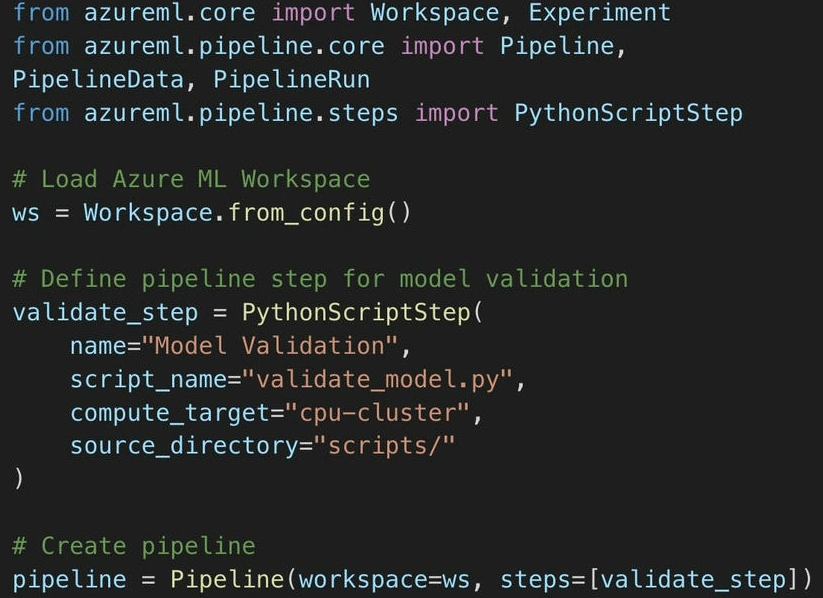
Step 1. Define the Azure ML Pipeline.
Start by creating an Azure ML Pipeline that includes model testing steps.
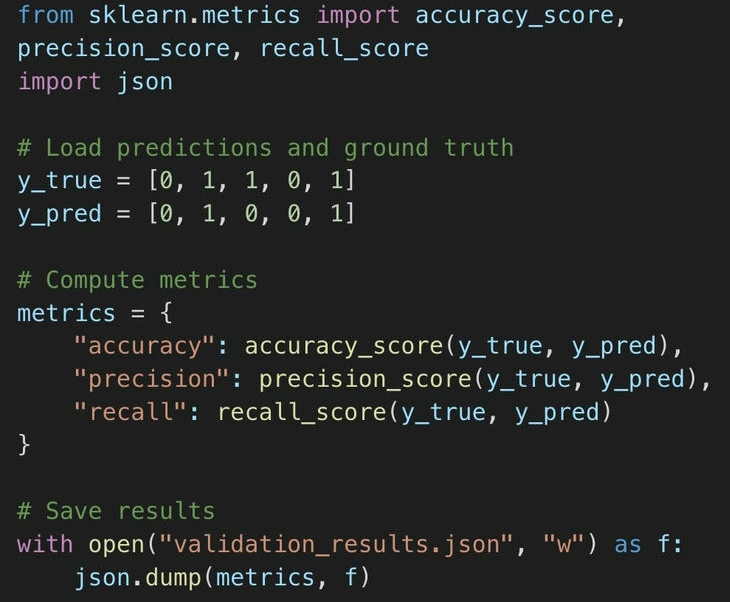
Step 2. Automate Model Testing with Evaluation Metrics.
A separate validation script, validate_model.py, can be used to compute performance metrics.
Step 3. Integrate with CI/CD for Continuous Validation.
Using Azure DevOps, you can schedule automatic validation runs each time a model is updated.
trigger:
  - main

jobs:
  - job: ModelValidation
    steps:
      - script: az ml run submit-pipeline --pipeline-name "Model Validation Pipeline"
        displayName: "Run Model Validation"
Best Practices for Automated AI Testing
- Use Multiple Evaluation Metrics: A single metric (e.g., accuracy) is often insufficient.
- Implement Data Drift Detection: Regularly assess changes in data distribution.
- Test with Diverse Datasets: Ensure robustness against edge cases and biases.
- Version Control Models: Maintain version history for reproducibility.
- Monitor Deployed Models: Continuously track performance post-deployment.
Conclusion
Automating AI model testing and validation with Azure ML Pipelines enhances efficiency, ensures model reliability, and accelerates deployment. By integrating continuous validation workflows, teams can detect performance issues early, reduce risks, and ensure AI models are production-ready.
Whether you are a data scientist or ML engineer, leveraging Azure ML Pipelines for automated testing is a best practice to maintain high-quality AI systems.
Next Steps
- Explore Azure Machine Learning Pipelines
- Implement automated model validation in your ML workflows.
Join the conversation! Your thoughts help the community grow.