

When you start building applications on Azure, two services often appear very quickly: Azure App Service and Azure Functions.
Both can run .NET applications. Both are managed services. Both can scale. And both can expose HTTP APIs.
So the obvious question is: If they can both run my code, when should I choose one over the other?
The answer becomes much clearer when you stop thinking about them as two ways of hosting the same application and instead think about the kind of workload you are building.
First, what problem does each service solve?
Microsoft Azure App Service is primarily a managed hosting platform for web applications and APIs. You deploy an application, Azure manages the underlying infrastructure, and your application remains continuously available according to the hosting plan you choose.
It supports .NET, Node.js, Java, Python, PHP and custom containers. (check more in Microsoft's official documentation Microsoft Learn)
Azure Functions takes a different approach.
Functions is designed around individual pieces of code that execute in response to something happening.
That "something" could be an HTTP request, a message arriving in Azure Service Bus, a file being uploaded to Blob Storage, a timer firing, or an event being published.
Microsoft describes Functions as an event-driven serverless compute service, with triggers and bindings designed to connect functions to other services.
A simple way to think about the difference is:
App Service hosts an application.
Azure Functions runs pieces of code in response to events.
That distinction is more useful than simply saying "App Service is for APIs and Functions is serverless."
Imagine you're building an e-commerce application
Let's say we're building an online store.
Customers can:
GET /products
GET /products/{productId}
POST /orders
GET /orders/{orderId}
POST /checkout
We have authentication, authorization, business logic, database access, logging, validation, middleware, dependency injection, and so on.
This is a typical web application.
For this kind of workload, Azure App Service is usually a natural fit.
You could build a standard ASP.NET Core application:
var builder = WebApplication.CreateBuilder(args);

builder.Services.AddControllers();

var app = builder.Build();

app.UseAuthentication();
app.UseAuthorization();

app.MapControllers();

app.Run();
Then deploy it to App Service.
Azure takes care of the underlying infrastructure while your application remains a normal ASP.NET Core application.
Now imagine something different
After an order is created, we want to send a confirmation email.
Do we really need our web application to continuously run an email-processing component?
Not necessarily.
Instead, the application could publish an event:
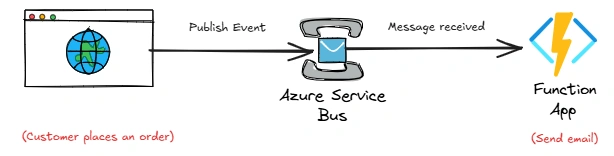
Our Function could look conceptually like:
[Function("SendOrderConfirmation")]
public async Task Run([ServiceBusTrigger("orders", Connection = "ServiceBus")]  string message)
{
    var order = JsonSerializer.Deserialize<OrderCreated>(message);

    await emailService.SendAsync(order.CustomerEmail, "Order confirmation");
}
What does "serverless" actually mean?
One common misunderstanding is:
"Serverless means there are no servers."
There are obviously servers 😅. The difference is who manages them.
With Azure Functions, you focus primarily on the code and its triggers. Azure manages the infrastructure required to execute that code.
Depending on the hosting plan, Functions can dynamically scale based on workload. For new serverless applications, Microsoft currently recommends the Flex Consumption plan (Microsoft Learn Documentation)
So serverless is really about the operational model, not the absence of servers.
But can't Azure Functions build APIs too?
Yes.
This is where the comparison can become confusing.
You can absolutely create an HTTP-triggered Azure Function:
[Function("GetProduct")]
public async Task<HttpResponseData> Run(
    [HttpTrigger(AuthorizationLevel.Function, "get",
        Route = "products/{id}")]
    HttpRequestData request,
    int id)
{
    // etc
}
If your application is fundamentally a large web API with many endpoints and complex application infrastructure, App Service often gives you a more natural hosting model.
If your HTTP endpoint is essentially:
"Receive this request, perform this small piece of work, return the result."
then an HTTP-triggered Function can make sense.
Scaling is another important difference
Suppose your e-commerce API receives 10 requests/sec during normal hours and 5,000 requests/sec during a major sale.
App Service can scale your application horizontally by running multiple instances.
Conceptually:
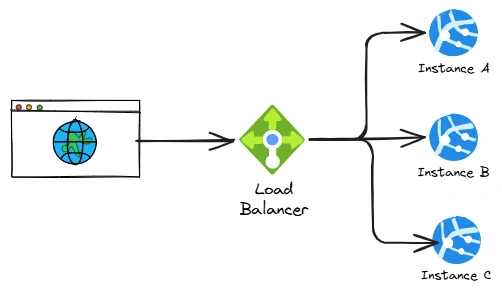
Your application continues running on those instances.
Functions approaches scaling from the event side.
If thousands of messages arrive in a queue, Functions can create additional execution capacity according to the selected hosting plan and workload.
With the current Flex Consumption model, Functions supports event-driven scaling and can scale out rapidly.
This makes Functions particularly attractive for workloads where traffic is highly variable.
What about cold starts?
This is another topic you will often hear when discussing Functions.
If a function hasn't been running and Azure needs to initialize an instance before executing your code, the first execution can experience additional startup latency.
This is commonly referred to as a cold start.
Whether this matters depends heavily on your workload.
For an asynchronous background process:
Message arrives ---> Function starts ---> Process message
a small startup delay may be acceptable.
For an API where a user is sitting in front of a screen waiting for:
GET /checkoutyou may care much more about predictable latency.
They can also work together
This is probably the most important point. You don't necessarily have to choose one.
A real application might look like this:
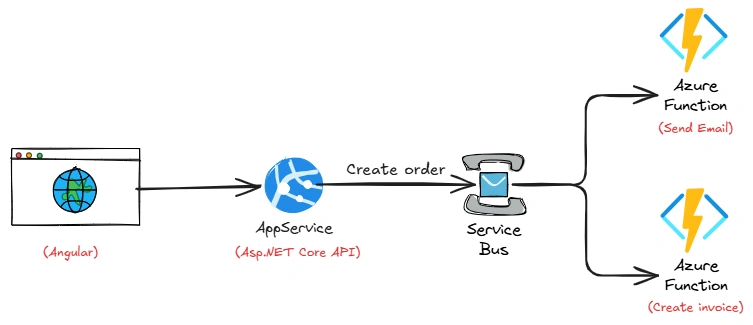
The ASP.NET Core API handles the application.
Functions handle background, event-driven workloads.
This separation can be much cleaner than trying to put everything inside the API.
Join the conversation! Your thoughts help the community grow.