

Prerequisite Knowledge
Before we start with the understanding of Azure CLI, we should know,
- Basic knowledge of cloud computing and its services
- Basic knowledge of Microsoft Azure
- Resource – Every object/item inside the Azure like web app, logic app, azure functions etc. in Azure are considered as resources.
- Resource Group – Resources are logically grouped under the resource group. Meaning, every resource should have a resource group.
- Resource Provider – Every resource in the Microsoft Azure is supplied through the Azure provider.
- Resource Manager Template – It is template a template in declarative syntax JSON format. This template consists of the defined resource(s) to deploy under resource group or subscription. This template can be reused.
Introduction
- Azure resources are grouped in resource group.
- We need to manage these resources in efficient practices.
- There are multiple ways to manage the resource hosted within Azure like using Azure portal, cloud shell, Power Shell etc.
- The Azure command-line interface (CLI) is Microsoft's cross-platform command-line experience for managing Azure resources.
- We can manage the resources present in different platforms like macOS, Linux, and Windows.
- We can easily start the learning of command line by running the Azure cloud shell. Azure cloud shell is a browser based command line tool, hence it doesn't require any additional installation to execute the commands.
- Log into the Azure Portal.
- Click the on CloudShell icon.

- It has a few benefits over PowerShell commands as it is quickly installed on multiple platforms.
- Commands in the Azure CLI are grouped by command group; like virtual machine comes under group ‘az vm’, resource group comes under group ‘az group’, for Cosmos DB it is ‘az cosmosdb’ etc.
- To create resource group named as ‘myTutorialslinkResourceGroup’ type and execute the command as,
az group create --name myTutorialslinkResourceGroup --location eastus
Azure CLI Help
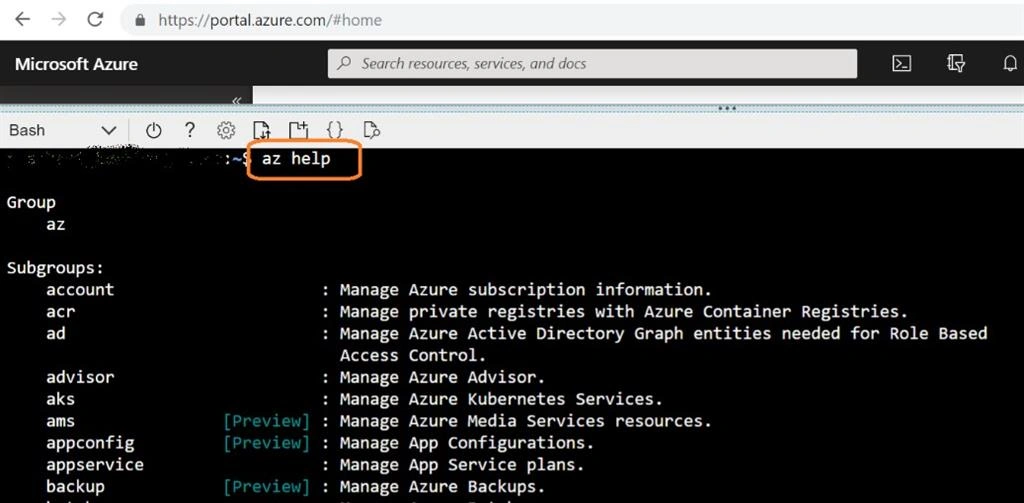
Get help in Azure CLI type command as ‘az help’ in the cloud shell.
What next?
Start learning the common commands and execute them - link
Reference Links
- https://docs.microsoft.com/en-us/cli/azure/get-started-with-azure-cli?view=azure-cli-latest
- https://docs.microsoft.com/en-us/azure/virtual-machines/linux/cli-manage
- https://jussiroine.com/2019/03/mastering-azure-cli/
- http://www.rebeladmin.com/2017/08/step-step-guide-start-azure-cli-2-0/
Conclusion
In this article we have learned the overview of Microsoft Azure CLI. Keep learning!
Join the conversation! Your thoughts help the community grow.