

Understanding the Azure Document DB
Azure Document DB is a Document No SQL subset of CosmosDb, so if you’re not familiar with it, I request you to go through my following articles,
Azure DB is a subset of Azure DocumentDB and a schema-free database that combines rich and familiar SQL query capabilities with consistently low latencies on JSON-based data models, targeting solutions for web, mobile, gaming, and IoT. Since DocumentDB is schema-agnostic, this makes it extremely easy to adjust and adapt data models on the fly as business logic and application scenarios change.
Since DocumentDB is a JSON-based storage mechanism, accessing and interacting with data can be accomplished through most standards-based interfaces, as well as robust toolsets and SDKs. Although native Universal Windows Platform support is not currently available, support for virtually any other development scenario is available. Deeper-level features are currently exposed via JavaScript, such as stored procedures, triggers, and user-defined functions (UDFs) making it easy for developers to write application logic that can be packaged and executed directly on database storage partitions.
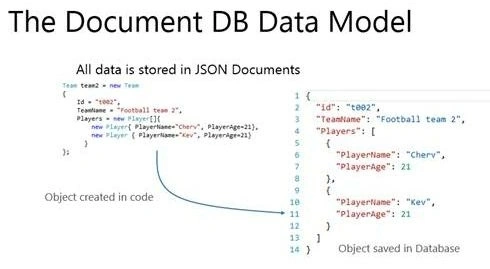
Terminologies related to DocumentDb
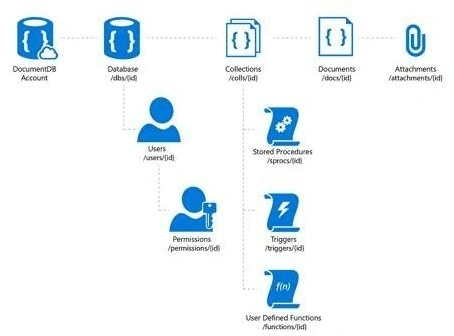
- Database: A database is a logical container of document storage partitioned across collections. It is also a user's container.
- User: The logical namespace for scoping permissions.
- Permission: An authorization token associated with a user for access to a specific resource.
- Collection: A collection is a container of JSON documents and the associated JavaScript application logic.
- Stored Procedure: Application logic written in JavaScript which is registered with a collection and transactionally executed within the database engine.
- Trigger: Application logic written in JavaScript executed before or after either an insert, replace or delete operation.
- UDF: Application logic written in JavaScript. UDFs enable you to model a custom query operator and thereby extend the core DocumentDB query language.
- Document: Arbitrary user-defined JSON content. By default, no schema needs to be defined nor do secondary indices need to be provided for all the documents added to a collection.
- Hands-On Demo: We are trying to create an MVC application and showcase the simple CRUD operations with Cosmos DB.
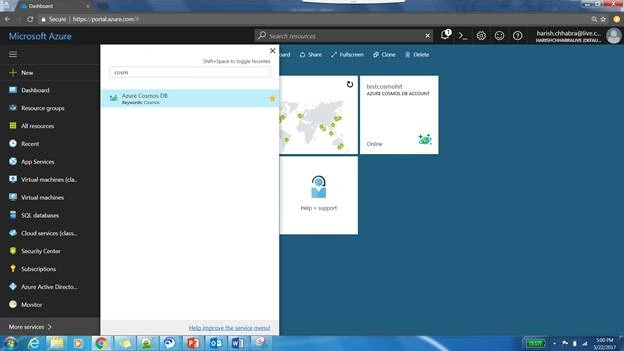
- Go to Azure Portal and search for cosmos db.
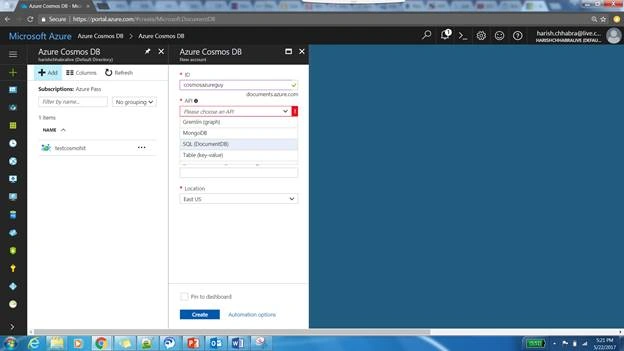
- You will get four options: Gremlin, MongoDB, SQL (DocumentDB), and Table (keyValue Pair). As we are working with DocumentDb we are going to select the documentdb option and supply the necessary information like the resource group and where you want to host your db.
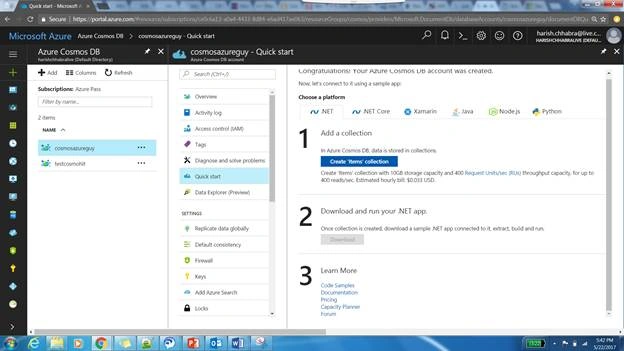
- Once the account is created, go to the quick start option in the properties menu and then click on the Create Items Collection Button. This will create a Collection in the database and then download the sample application.
Please note that you can either use the sample application or create your own application and add the documented client SDK via Nugget. For this demo, we are going to continue with the sample application.
- Open your project in Visual Studio and go to the web. config. You can see that the endpoint, the authKey, Database, and Collections are prefilled with the information from your cosmosdb. If you’re developing your application from scratch then you need to pass on this information to your web. config.

- The Item Collection that we have created has a corresponding controller in our MVC application sample and it contains most of the common CRUD scenarios covered and it's calling the document repository in its actions Items.
public class ItemController : Controller
{
    [ActionName("Index")]
    public async Task<ActionResult> IndexAsync()
    {
        var items = await DocumentDBRepository<Item>.GetItemsAsync(d => !d.Completed);
        return View(items);
    }

#pragma warning disable 1998
    [ActionName("Create")]
    public async Task<ActionResult> CreateAsync()
    {
        return View();
    }
#pragma warning restore 1998

    [HttpPost]
    [ActionName("Create")]
    [ValidateAntiForgeryToken]
    public async Task<ActionResult> CreateAsync([Bind(Include = "Id,Name,Description,Completed")] Item item)
    {
        if (ModelState.IsValid)
        {
            await DocumentDBRepository<Item>.CreateItemAsync(item);
            return RedirectToAction("Index");
        }

        return View(item);
    }

    [HttpPost]
    [ActionName("Edit")]
    [ValidateAntiForgeryToken]
    public async Task<ActionResult> EditAsync([Bind(Include = "Id,Name,Description,Completed")] Item item)
    {
        if (ModelState.IsValid)
        {
            await DocumentDBRepository<Item>.UpdateItemAsync(item.Id, item);
            return RedirectToAction("Index");
        }

        return View(item);
    }

    [ActionName("Edit")]
    public async Task<ActionResult> EditAsync(string id)
    {
        if (id == null)
        {
            return new HttpStatusCodeResult(HttpStatusCode.BadRequest);
        }

        Item item = await DocumentDBRepository<Item>.GetItemAsync(id);
        if (item == null)
        {
            return HttpNotFound();
        }

        return View(item);
    }

    [ActionName("Delete")]
    public async Task<ActionResult> DeleteAsync(string id)
    {
        if (id == null)
        {
            return new HttpStatusCodeResult(HttpStatusCode.BadRequest);
        }

        Item item = await DocumentDBRepository<Item>.GetItemAsync(id);
        if (item == null)
        {
            return HttpNotFound();
        }

        return View(item);
    }

    [HttpPost]
    [ActionName("Delete")]
    [ValidateAntiForgeryToken]
    public async Task<ActionResult> DeleteConfirmedAsync([Bind(Include = "Id")] string id)
    {
        await DocumentDBRepository<Item>.DeleteItemAsync(id);
        return RedirectToAction("Index");
    }

    [ActionName("Details")]
    public async Task<Ac
Fabio FreitasPosted Sep 10, 2018, 12:37 PM
Where can I find this this solution for download?