
Elastic pools provide a solution to manage multiple databases that have widely varying and unpredictable usage patterns.
Elastic database pools solve SaaS application problems for unpredictable resource requirements for memory, IO, and CPU. They ensure that databases get the needed performance resources whenever they need those, while providing a simple resource allocation mechanism within a defined budget.
Additional features of elastic pool are:
- Adding eDTUs to existing pool.
- Add or subtract databases to the pool.
- Add an existing database to the pool.
Pricing of Elastic Database Pool
Basic Pricing features are,
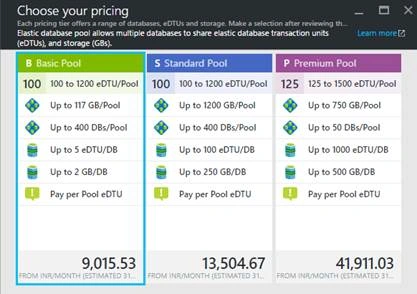
- Finalizing the eDTU price - There are basically three pricing tiers, as shown below.
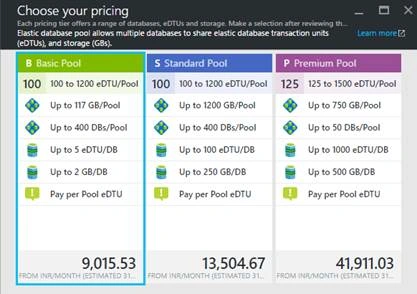
- “NO” to per-database fee - for example if you have selected standard database pool pricing tier which costs you Rs. 100/-, then it doesn’t matter how many databases ther are in your pool -- 10 or 100. The only fact that matters is that the data capacity of the pool should be capable of scaling all your databases.
Integrating with existing model
This is as easy as buying products online. All you need is to add the existing databases to the newly created database pool. Any Azure SQL database can be added to the newly created database pool. The only condition is that the pool should have enough data units to scale that database. For example, if the size of the database you wish to add to the pool is 1 GB, then your pool should be scaled for around 5GB or more, to scale your database.
Advantages
- For B2B SaaS apps where you need to store data for all customers separately, elastic database pool isolates the data for each customer separately.
- Each database can have different encryption schemes.
- Each database could be provided with predictable resource consumption (CPU/IO/Memory patterns).
- One can easily switch between the pricing tiers.
- You can add or remove any database at any point of time from the pool.
- Easily manage large collections of databases without you having to worry about the infrastructure that runs it.
Steps to Create a Database Pool
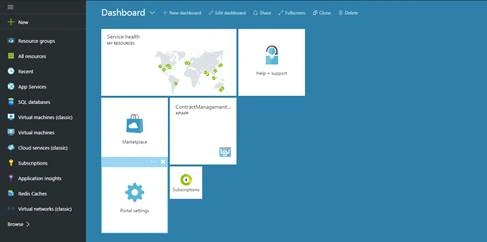
- Browse to Azure Portal. Login with your credentials. You will be redirected to your dashboard.
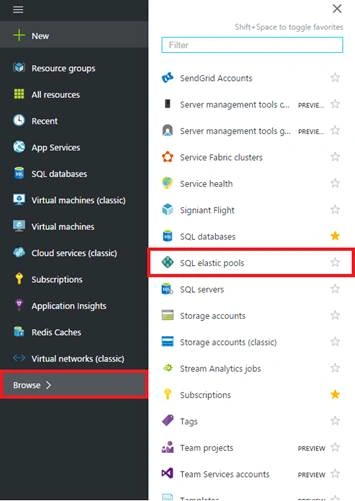
- Click on “Browse” on the left panel and select “SQL elastic pools” in "All resources" menu.
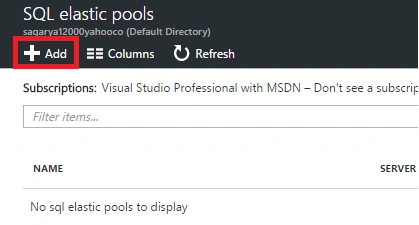
- Click on “Add” icon to create a new database pool.
- There are three pricing tiers and you can use one of them according to your requirement. To calculate the DTU, please refer DTU Calculator.
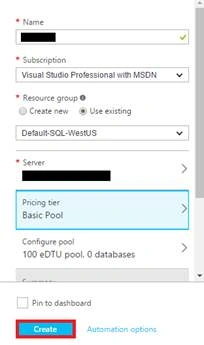
- Enter a unique name and select the server where you need to deploy your database pool. You can either create a new server or use an existing one for your database pool. Click create. Your database pool will be created.
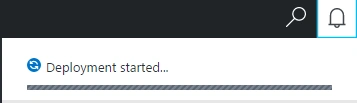
- You will see the below pop-up in notification section.
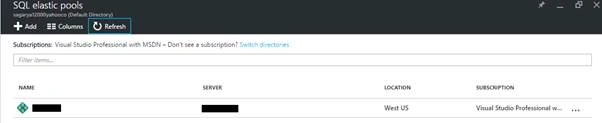
- Once deployment is completed, your database pool will get success notification. Also, the database pool that you have created will be visible in the “SQL Database Pool” blade.
References
- https://azure.microsoft.com/en-in/documentation/articles/sql-database-elastic-pool-guidance/
- http://weblogs.asp.net/scottgu/better-density-and-lower-prices-for-azure-s-sql-elastic-database-pools
Join the conversation! Your thoughts help the community grow.