Introduction
In today's world of data-driven technologies, dealing with huge amounts of data has become really important. Azure Event Hub, which is a key part of Microsoft Azure, is a strong solution for managing and processing lots of data in real-time. This article talks about what Azure Event Hub can do, how it helps, and where it's useful. It's like a tool that handles a lot of data quickly, and we'll explore what makes it special and how it helps different kinds of applications.
The Evolution of Data Handling
Traditional data processing systems often struggle to keep pace with the deluge of real-time data generated by applications, devices, and sensors. This is where Azure Event Hub steps in, offering a platform that can ingest and process vast amounts of data in real-time. However, Azure Event Hub brings a transformation to the landscape of data streaming.
Understanding Azure Event Hub
Azure Event Hub is a fully managed event ingestion service within the Azure cloud environment. At its core, it serves as a highly scalable and configurable stream-based platform that allows the collection, transformation, and analysis of large volumes of events, or data points, generated by applications, devices, and various sources. By providing a unified interface for event publishing and subscription, Event Hub enables applications to communicate in a decoupled and scalable manner.
Key Features and Concepts
- Event Publisher and Consumer: Azure Event Hub accommodates both event publishers, which are sources of data, and event consumers, which process and respond to the data. This separation of concerns allows applications to focus on their core functionalities without being tightly coupled to each other.
- Partitioning: Event Hub divides data streams into partitions, enabling parallel processing and scalability. Each partition serves as an independent unit, facilitating higher throughput and efficient data distribution.
- Throttling and Retention Policies: To prevent overwhelming downstream processes, Event Hub implements throttling mechanisms. Additionally, retention policies determine how long data remains accessible for consumption, ensuring efficient storage management.
- Capture: Event Hub's capture feature simplifies data archiving and analysis by automatically saving incoming event data to a designated Azure Blob Storage or Azure Data Lake Storage location. This aids in compliance, historical analysis, and data durability.
Creation of Azure Event Hub in Azure Portal
Login to Azure Portal
Sign in to your Azure account https://portal.azure.com.
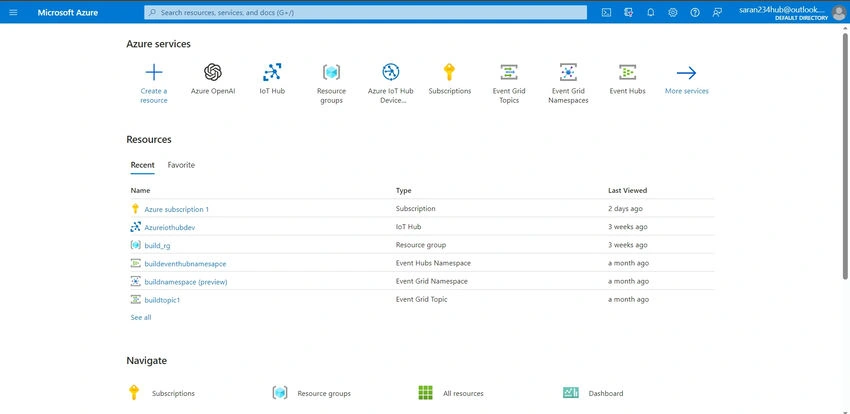
Create a Resource
a. Click on the "+ Create a resource" button on the left-hand side of the portal.

b. Search for "Event Hubs" in the search bar and select "Event Hubs" from the results.

Configure Event Hub
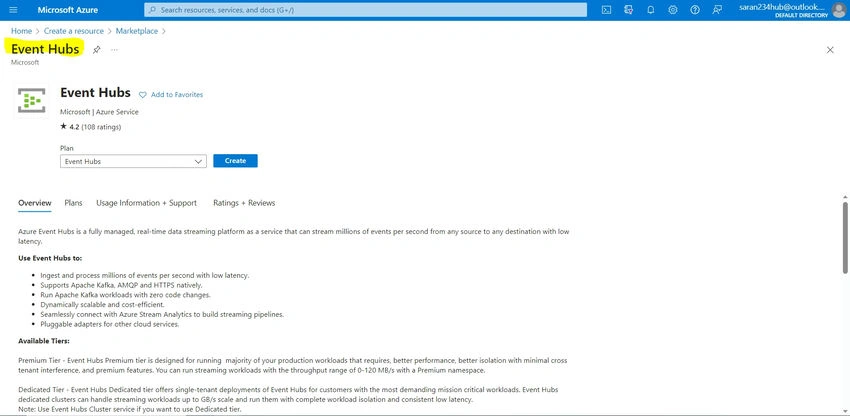
a. Click on the "Create" button to start configuring your Event Hub.
b. Choose your Subscription, Resource Group, and Region where you want to create the Event Hub.
c. Enter a unique name for your Event Hub.
d. Choose an existing Namespace or create a new one. A Namespace helps group related Event Hubs together for management purposes.
e. Choose a pricing tier based on your requirements.

Review and Create
a. Review your settings to ensure they are correct.
b. Click the "Review + Create" button.

Create
a. Once the validation is successful, click the "Create" button to start creating the Event Hub.

Accessing Event Hub
a. After creation, you can find your Event Hub in the chosen resource group.
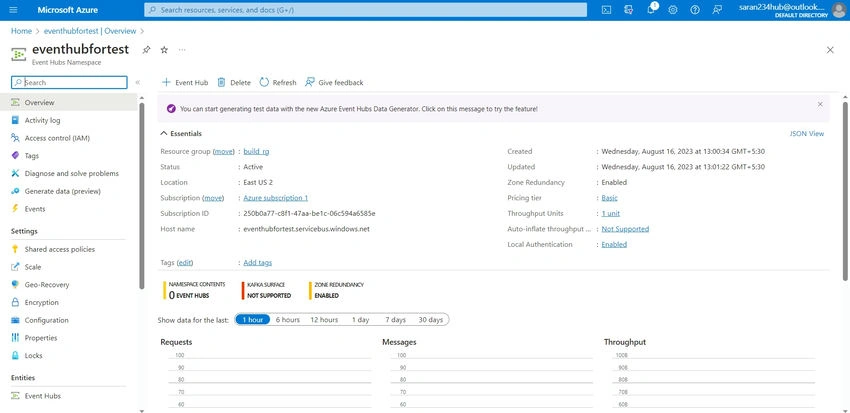
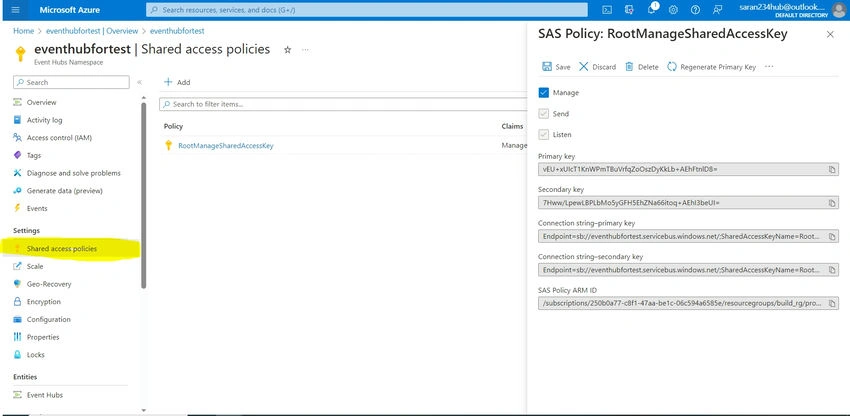
b. You can access it to configure additional settings, manage access policies, and monitor metrics.
Use Cases of Azure Event Hub
- IoT Data Ingestion: Azure Event Hub proves invaluable in IoT scenarios where devices generate continuous streams of sensor data. It enables real-time analysis, decision-making, and control over connected devices.
- Log and Event Processing: Applications dealing with log data and event tracing can leverage Event Hub to centralize logs from various sources, enabling real-time monitoring, troubleshooting, and anomaly detection.
- Telemetry and Monitoring: Real-time telemetry data from applications and services can be efficiently ingested and analyzed using Event Hub. This is particularly relevant in applications requiring instant insights into performance and user behavior.
- Advantages of Azure Event Hub
- Scalability: Azure Event Hub's partitioning mechanism enables effortless scaling of throughput based on demand, accommodating both small and large-scale data streams.
- Reliability: Event Hub guarantees high availability and fault tolerance through features like automatic load balancing and data replication across different availability zones.
- Real-time Processing: The platform's capability to process and analyze data as it arrives facilitates real-time decision-making, enhancing application responsiveness.
- Ecosystem Integration: Azure Event Hub seamlessly integrates with other Azure services, such as Azure Stream Analytics, Azure Functions, and Azure Databricks, enhancing its capabilities for data transformation and analysis.
Conclusion
In a data-driven world, the ability to harness real-time insights from vast streams of information is a competitive advantage. Azure Event Hub emerges as a cornerstone in achieving this capability. By seamlessly ingesting, processing, and distributing data, it empowers businesses to make informed decisions, drive operational efficiency, and create innovative applications that thrive in the era of real-time analytics. With its robust features, scalability, and integration capabilities, Azure Event Hub stands as a powerful tool in the arsenal of organizations seeking to unlock the potential of their data streams.


Janarthanan SPosted Aug 18, 2023, 2:19 PM
Appreciate your efforts Saravanan and learned a lot from this article
Gurpreet AroraPosted Aug 18, 2023, 6:41 AM
Thanks For Sharing