

Introduction
Azure Hub-and-Spoke network architecture is a proven enterprise design pattern that enables centralized control, strong security boundaries, and scalable connectivity. This article explains the architecture, its components, traffic flow, design considerations, and best practices from a real-world Azure architecture perspective.
Overview of Architecture
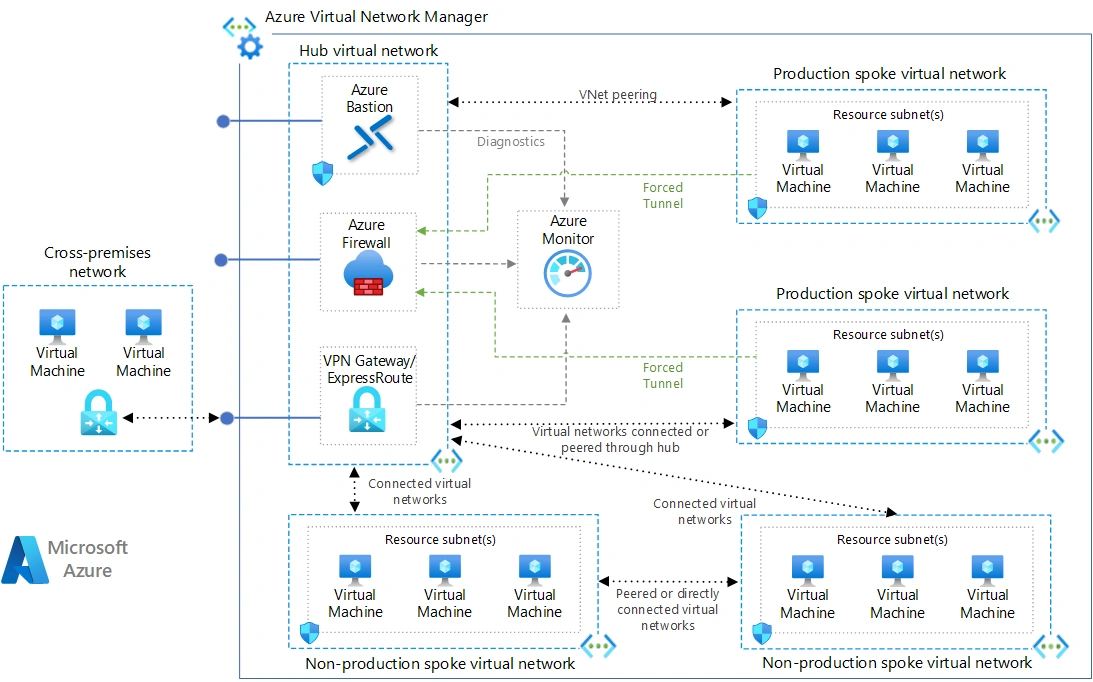
Why Hub-and-Spoke Architecture Is Needed
Flat or loosely structured network designs introduce several challenges as environments mature:
Lack of centralized security enforcement
Difficulty managing hybrid connectivity
Limited isolation between workloads
Increased risk of misconfiguration
Poor scalability as VNets multiply
Hub-and-Spoke architecture addresses these challenges by introducing clear separation of concerns, where shared services and security controls are centralized while workloads remain isolated.
What Is Azure Hub-and-Spoke Architecture?
Azure Hub-and-Spoke is a network topology consisting of:
A Hub VNet that acts as the central point of connectivity
Multiple Spoke VNets that host workloads
VNet peering between the hub and each spoke
Centralized routing and security enforcement through the hub
Spokes do not peer directly with each other. All inter-spoke communication flows through the hub, preserving centralized control and avoiding a mesh network.
Core Architectural Components
1. Hub Virtual Network
The hub VNet is designed for connectivity and control, not for application workloads. It typically hosts:
Azure VPN Gateway or ExpressRoute Gateway
Azure Firewall or third-party Network Virtual Appliance (NVA)
Azure Bastion
Shared DNS services
Domain Controllers or identity-related services (if required)
Azure Route Server (for advanced routing scenarios)
The hub is responsible for routing, traffic inspection, and hybrid connectivity.
2. Spoke Virtual Networks
Spoke VNets host isolated workloads such as:
Line-of-business applications
Web, application, and database tiers
Dev/Test or Production environments
Business unit–specific workloads
Each spoke connects only to the hub and remains isolated from other spokes unless explicitly routed through the hub.
3. VNet Peering
VNet peering enables private, high-performance connectivity between VNets.
Key configuration concepts:
Hub-to-spoke peering allows gateway transit
Spoke-to-hub peering uses the remote gateway
This setup allows spokes to consume centralized gateways without deploying their own.
4. Centralized Security and Routing
Traffic inspection and routing are enforced via:
Azure Firewall or third-party NVAs
User Defined Routes (UDRs)
Network Security Groups (NSGs)
This ensures consistent security policies across all spokes.
Traffic Flow in Hub-and-Spoke
Spoke-to-Hub
Workloads in spokes access shared services (DNS, AD, Bastion) in the hub.
Spoke-to-Spoke
Traffic is routed via the hub firewall/NVA
Requires UDRs pointing spoke address spaces to the hub appliance
This preserves the hub-and-spoke model, avoiding a mesh topology.
On-Premises Connectivity
On-premises networks connect to the hub via:
Site-to-Site VPN
Point-to-Site VPN
ExpressRoute
All spokes inherit this connectivity through the hub.
Why Not Peer Spokes Directly?
Direct spoke-to-spoke peering creates a mesh topology, which:
Increases management complexity
Makes security enforcement inconsistent
Scales poorly as VNets grow
Hub-based routing ensures central governance, auditing, and security inspection.
Use Cases:
Enterprise landing zones
Multi-environment (Dev/Test/Prod) isolation
Multi-subscription architectures
Hybrid connectivity (on-prem to Azure)
Centralized firewall and DNS services
Best Practices
Keep the hub lightweight
Only deploy shared and network-centric services.Use UDRs carefully
Route spoke-to-spoke and internet-bound traffic via the hub firewall.Enable transitive connectivity explicitly
Use gateway transit and remote gateway options correctly.Separate subscriptions where possible
Place hub and spokes in different subscriptions for governance.Plan IP addressing upfront
Avoid overlapping address spaces.Monitor traffic centrally
Use Azure Monitor, Network Watcher, and Firewall logs.
Hub-and-Spoke vs Mesh Architecture
| Aspect | Hub-and-Spoke | Mesh |
|---|---|---|
| Scalability | High | Low |
| Security | Centralized | Distributed |
| Management | Simplified | Complex |
| Cost Control | Optimized | Hard to manage |
| Enterprise Ready | Yes | No |
Conclusion
Hub-and-Spoke architecture, you will learn how Azure Landing Zones provide secure, scalable, and well-governed cloud environments, centralizing control while isolating workloads for enterprise-ready deployments.
Join the conversation! Your thoughts help the community grow.