

Introduction
One of the most important decisions when designing an Azure solution is selecting the correct location where workloads will be deployed.
Unlike traditional datacenters, where organizations typically operate from one or a few physical locations, Microsoft Azure provides a global cloud infrastructure consisting of hundreds of datacenters organized into geographical regions.
Selecting an Azure location impact:
Application performance
Data residency
Compliance requirements
Disaster recovery capability
Service availability
Cost
Network latency
A poorly planned Azure region strategy can create challenges such as:
High application latency
Compliance issues
Increased operational costs
Limited disaster recovery options
Difficulty meeting availability requirements
Understanding Azure Regions, Region Pairs, and Availability Zones is fundamental for every Azure architect and infrastructure engineer.
In this article, we will explore:
Azure Global Infrastructure
Azure Regions
Region selection strategy
Region Pairs
Availability Zones
High Availability architecture
Disaster Recovery design
Service availability considerations
Enterprise best practices
Azure Global Infrastructure Overview
Microsoft Azure operates one of the largest cloud infrastructures in the world.
Azure infrastructure is organized into multiple layers:
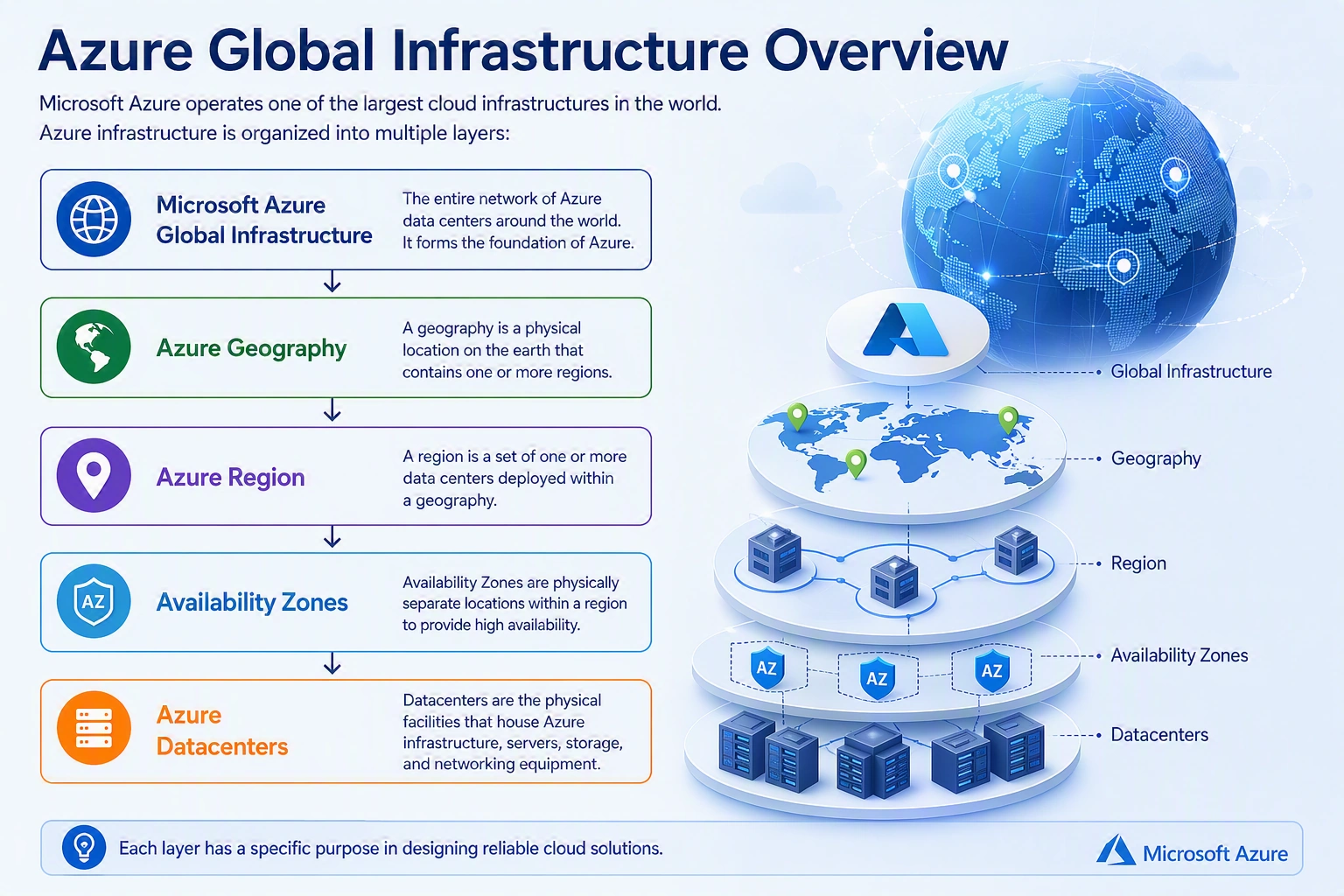
What is an Azure region?
An Azure region is a geographical area that contains one or more Microsoft datacenters connected through a dedicated low-latency network.
A region provides a location where customers can deploy Azure resources.
Examples of Azure regions:
Southeast Asia
East Asia
Japan East
Australia East
UK South
West Europe
East US
When you create an Azure resource such as:
Virtual Machine
Storage Account
Azure SQL Database
Application Gateway
You usually select the Azure region where that resource will be hosted.
Example:
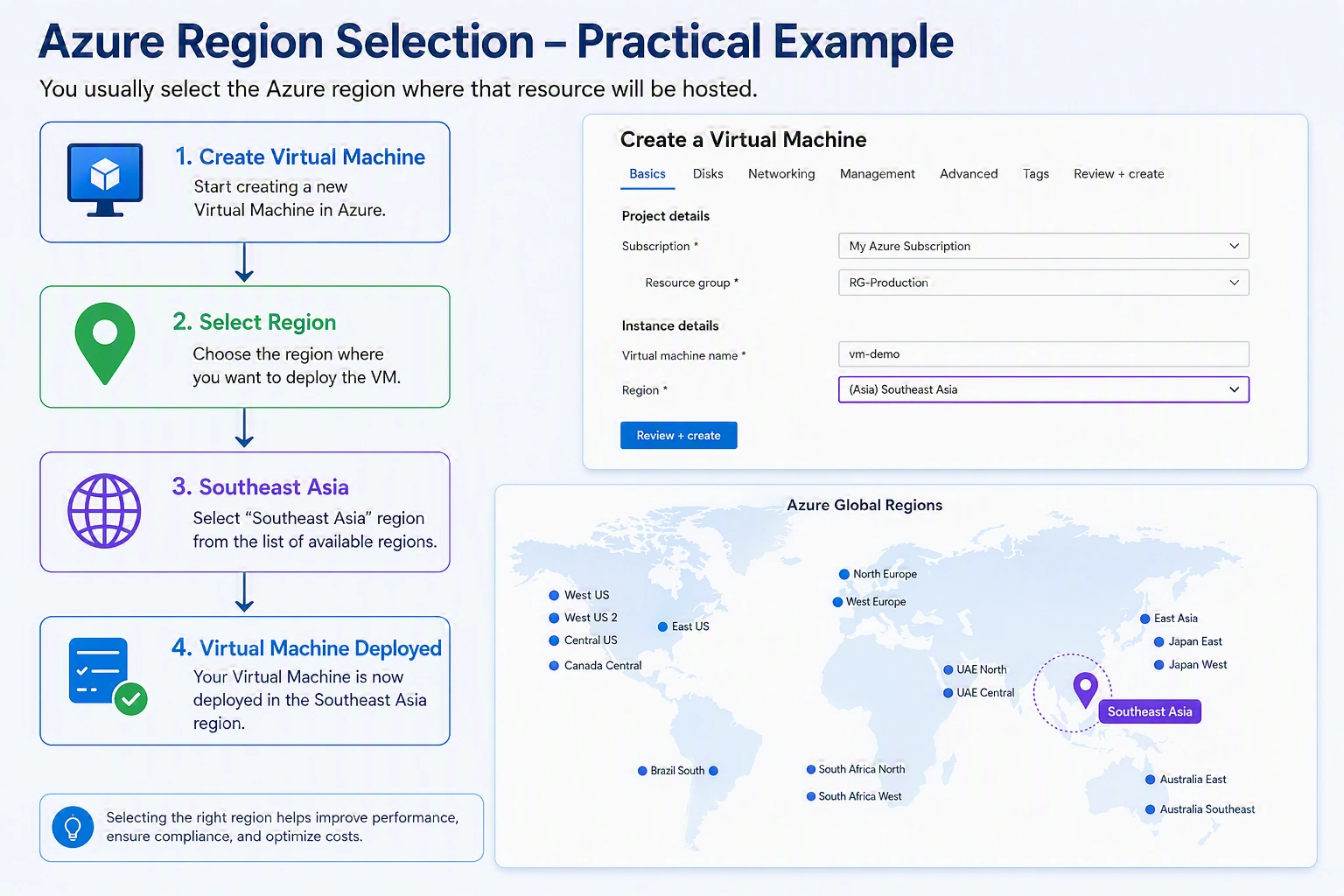
Why Azure Region Selection Matters
Choosing an Azure region is not only a technical decision. It is a business and architectural decision.
Several factors must be considered.
1. User Location and Latency
The physical distance between users and applications affects network latency.
Example:
A company operating in Sri Lanka:
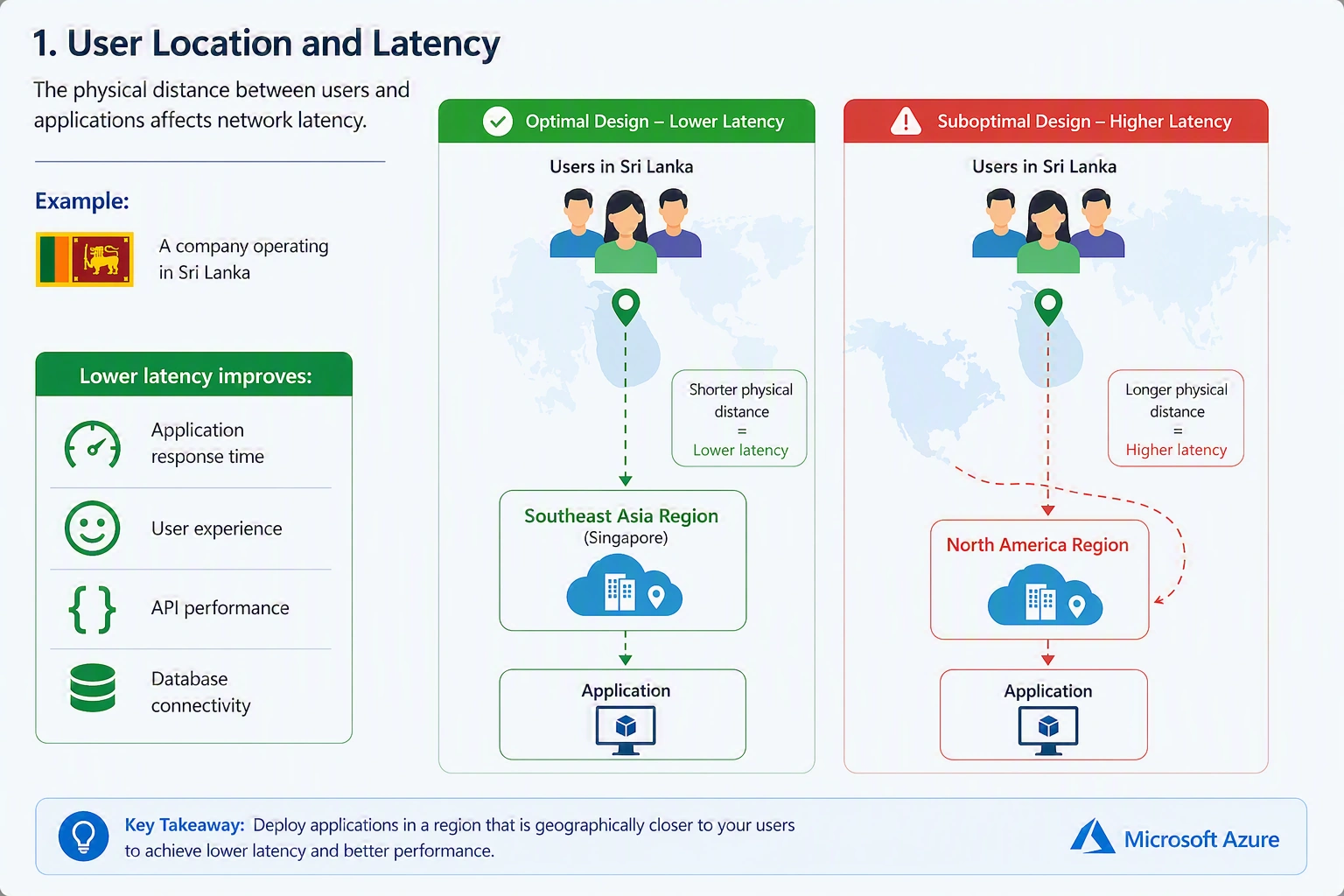
The second design introduces additional network latency.
Lower latency improves:
Application response time
User experience
API performance
Database connectivity
2. Data Residency Requirements
Many organizations have requirements about where data can be stored.
Examples:
Government organizations
Financial institutions
Healthcare organizations
Regulated industries
Before selecting a region, organizations should confirm:
Data storage location
Compliance requirements
Industry regulations
3. Azure Service Availability
Not every Azure service or feature is available in every region.
Before deploying workloads, verify:
VM SKU availability
Storage options
Database features
Availability Zones
Security services
Example:
A business may require:
Premium SSD v2
Specific VM generation
Availability Zones
These features may not exist in every region.
4. Cost Considerations
Azure pricing can vary between regions.
Factors include:
Compute pricing
Storage pricing
Data transfer costs
Network services
A region with lower latency may not always be the cheapest option.
Architects must balance the following:
Performance
Availability
Compliance
Cost
Azure Region Categories
Azure regions are grouped into geographical areas.
A geography represents a specific market containing one or more regions.
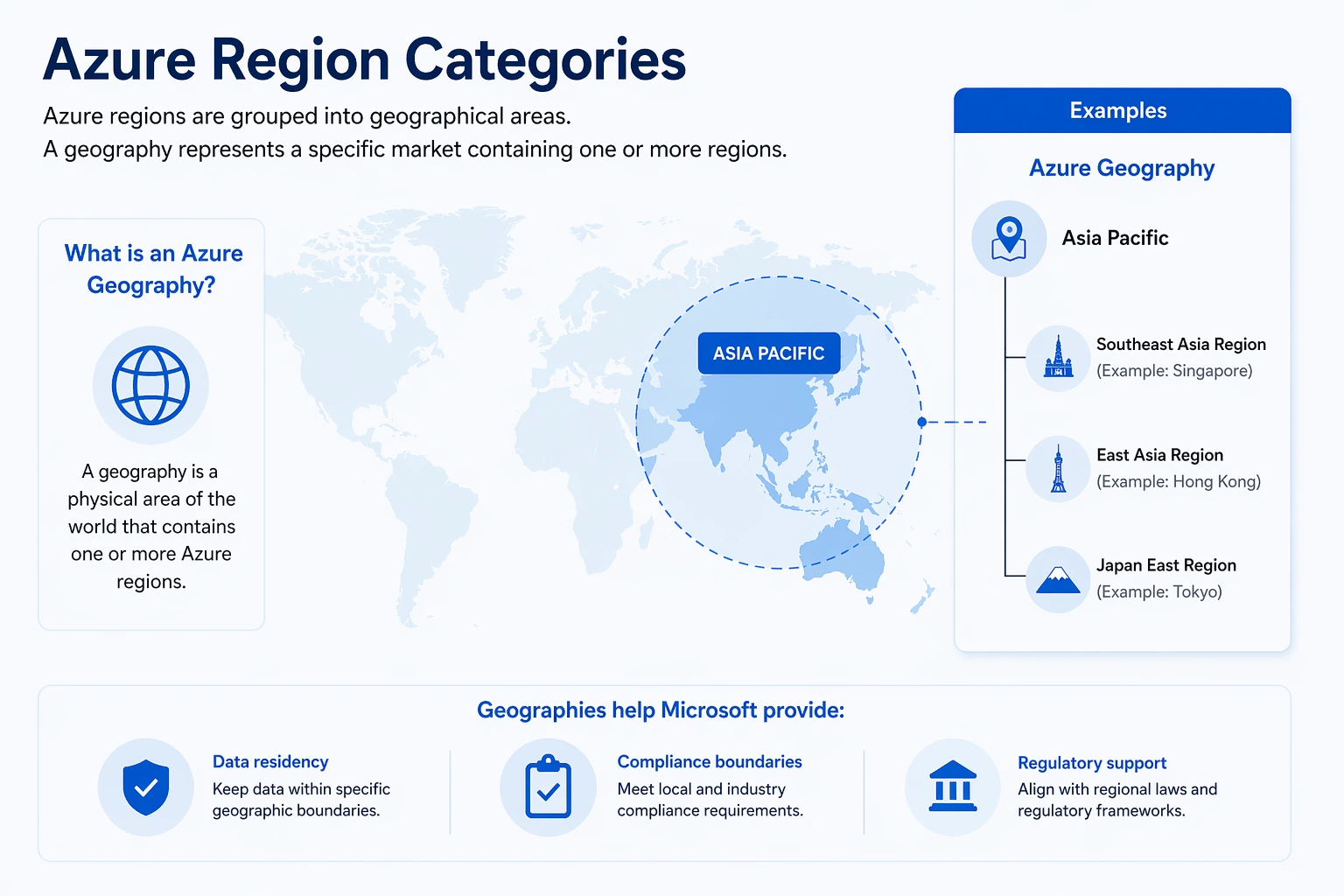
Geographies help Microsoft provide:
Data residency
Compliance boundaries
Regulatory support
Understanding Azure Datacenters
An Azure region contains one or more datacenters.
A datacenter contains the following:
Servers
Storage systems
Networking equipment
Power infrastructure
Cooling systems
Microsoft designs datacenters with the following:
Physical security
Redundant power
Redundant networking
Environmental controls
Customers do not directly select individual datacenters.
Azure automatically manages workload placement.
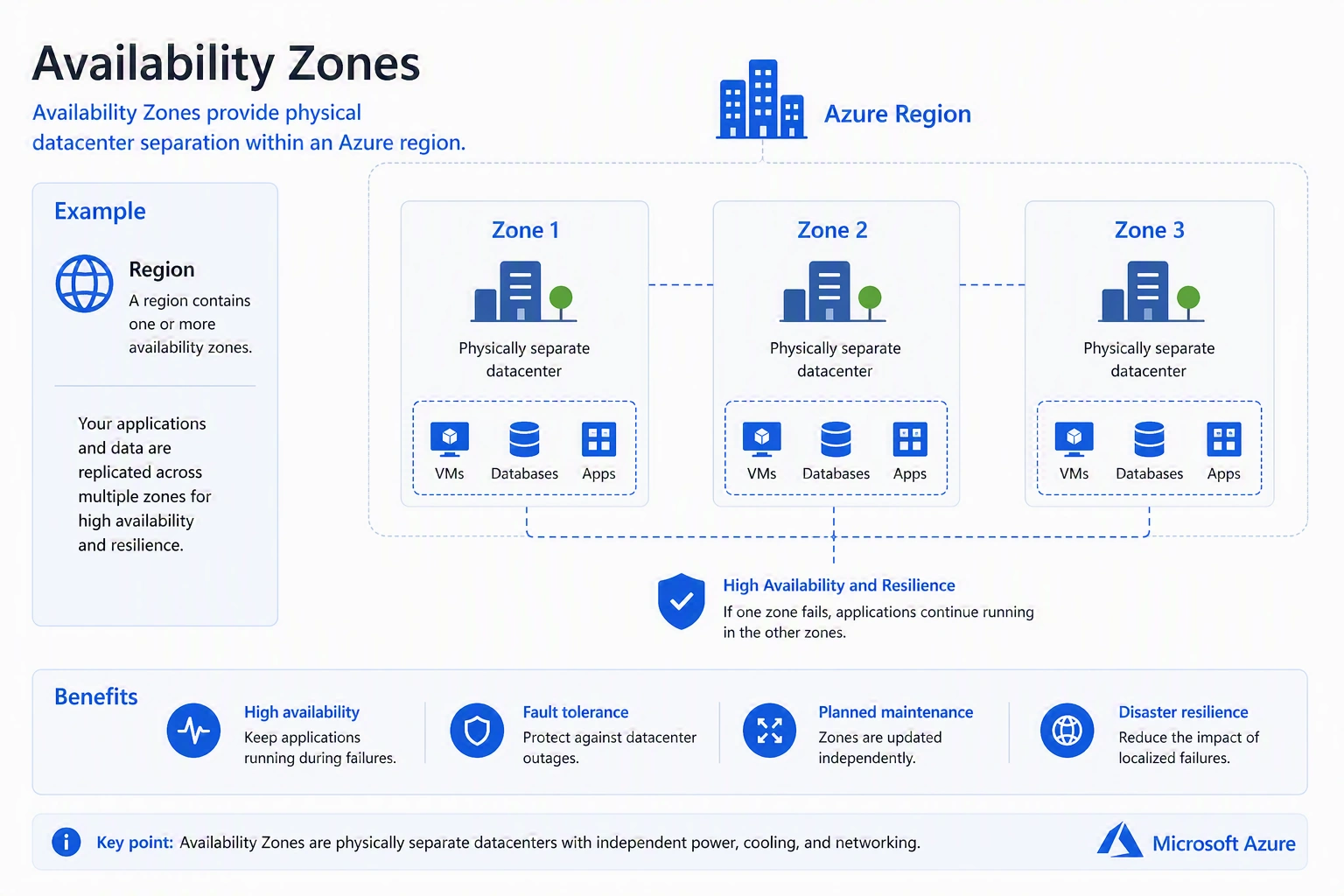
What Are Azure Availability Zones?
Availability Zones are physically separate datacenter locations within an Azure region.
They are designed to protect applications from data center failures.
A region with availability zones contains multiple independent locations.
Each zone has independent
Power
Cooling
Networking
Availability Zones vs Availability Sets
Many administrators confuse Availability Zones with Availability Sets.
They solve different problems.
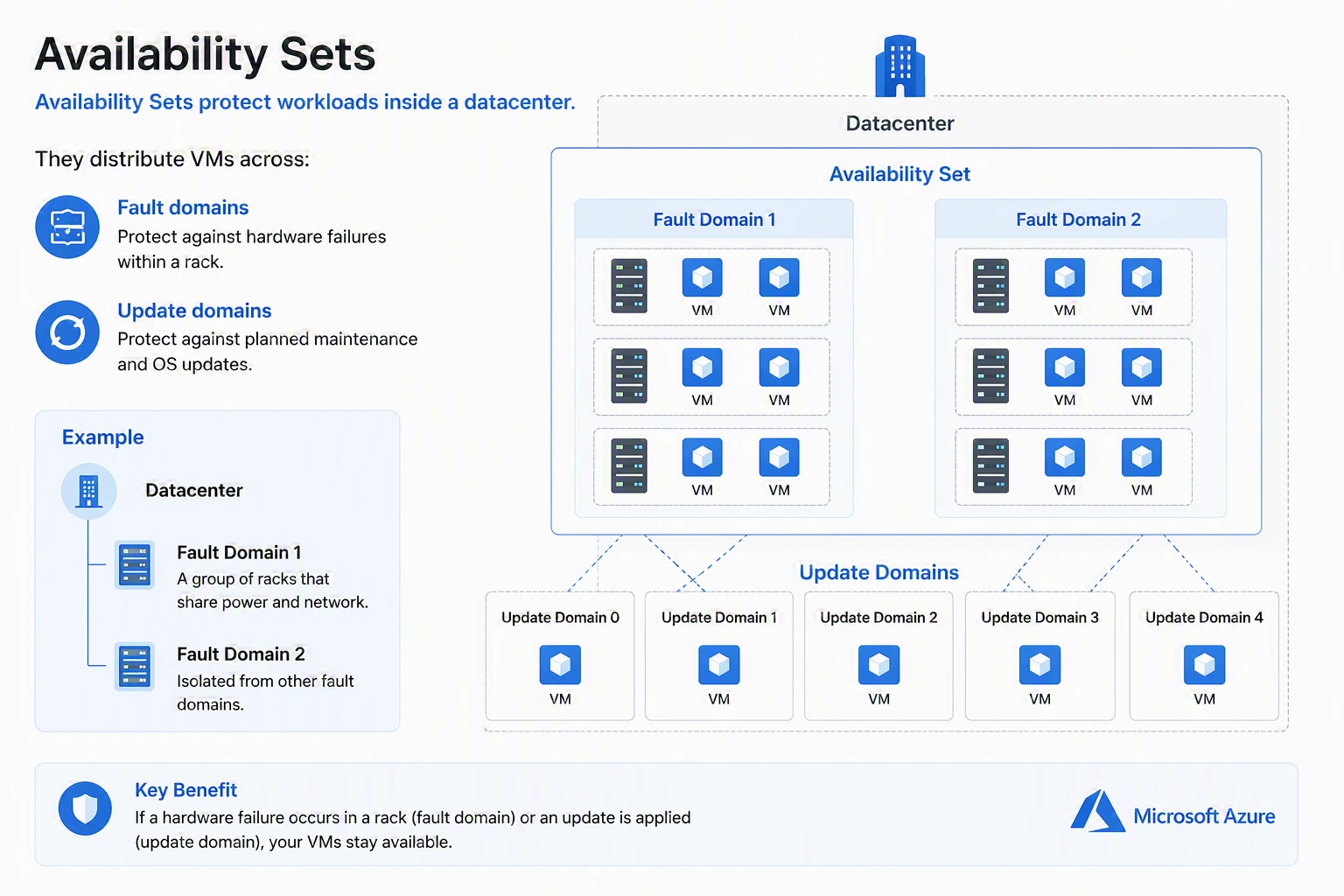
Availability Sets
Availability Sets protect workloads inside a datacenter.
They distribute VMs across:
Fault domains
Update domains
Availability Zones
Availability Zones provide physical datacenter separation.
Comparison
| Feature | Availability Set | Availability Zone |
|---|---|---|
| Scope | Single Datacenter | Multiple Datacenters |
| Protection | Hardware failure | Datacenter failure |
| SLA | Lower | Higher |
| Recommended for new designs | Limited | Preferred |
What Are Azure Region Pairs?
Azure Region Pairs are two Azure regions within the same geography that Microsoft connects for resilience.
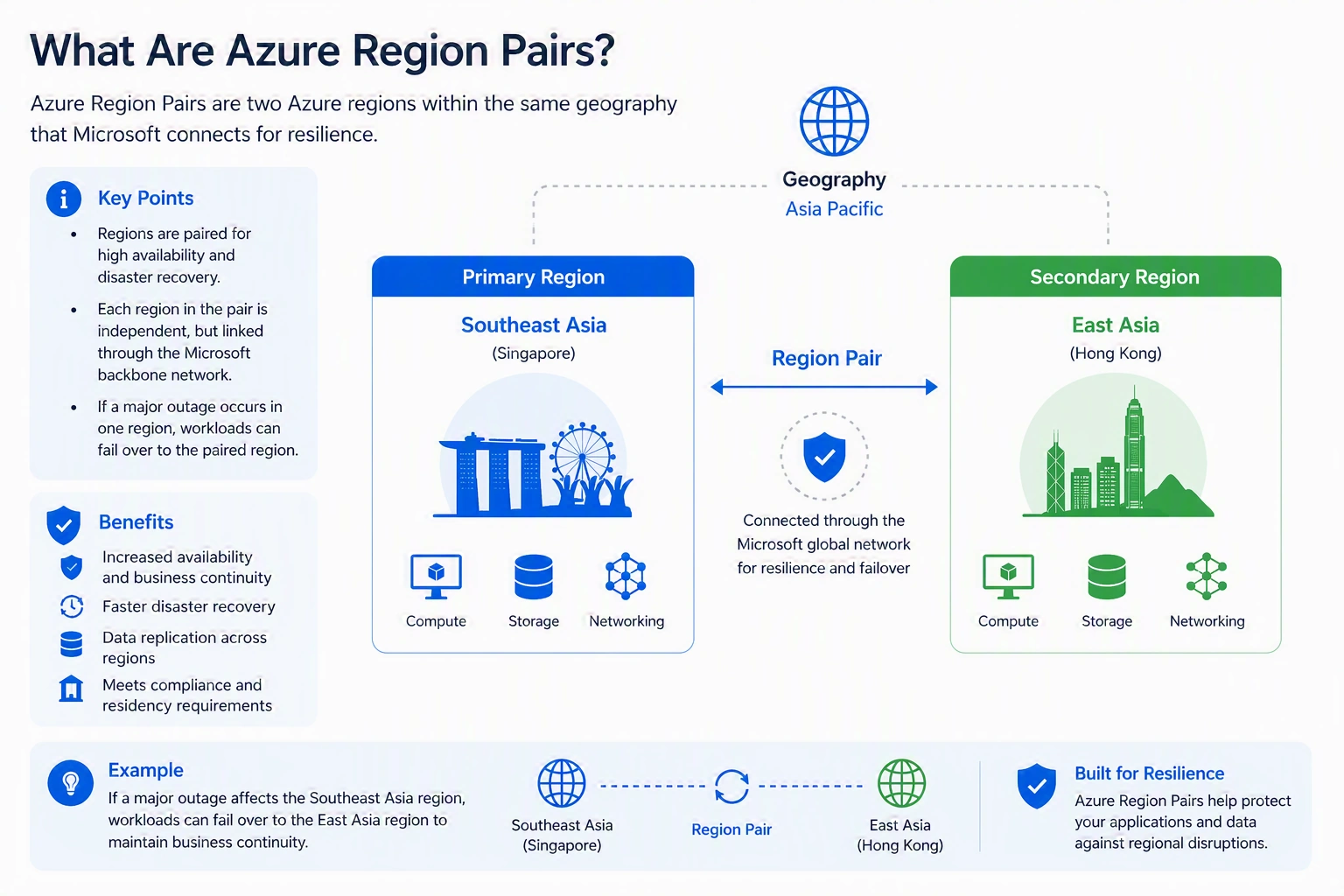
Region pairs help Microsoft manages:
Disaster recovery
Platform updates
Service continuity
Benefits of Region Pairs
1. Disaster Recovery Planning
Organizations can deploy workloads in paired regions.
2. Platform Update Protection
Azure performs maintenance activities carefully across paired regions.
This reduces the possibility of both regions being affected simultaneously.
3. Data Replication Support
Many Azure services provide replication capabilities between paired regions.
Examples:
Storage replication
Azure Site Recovery
Database replication
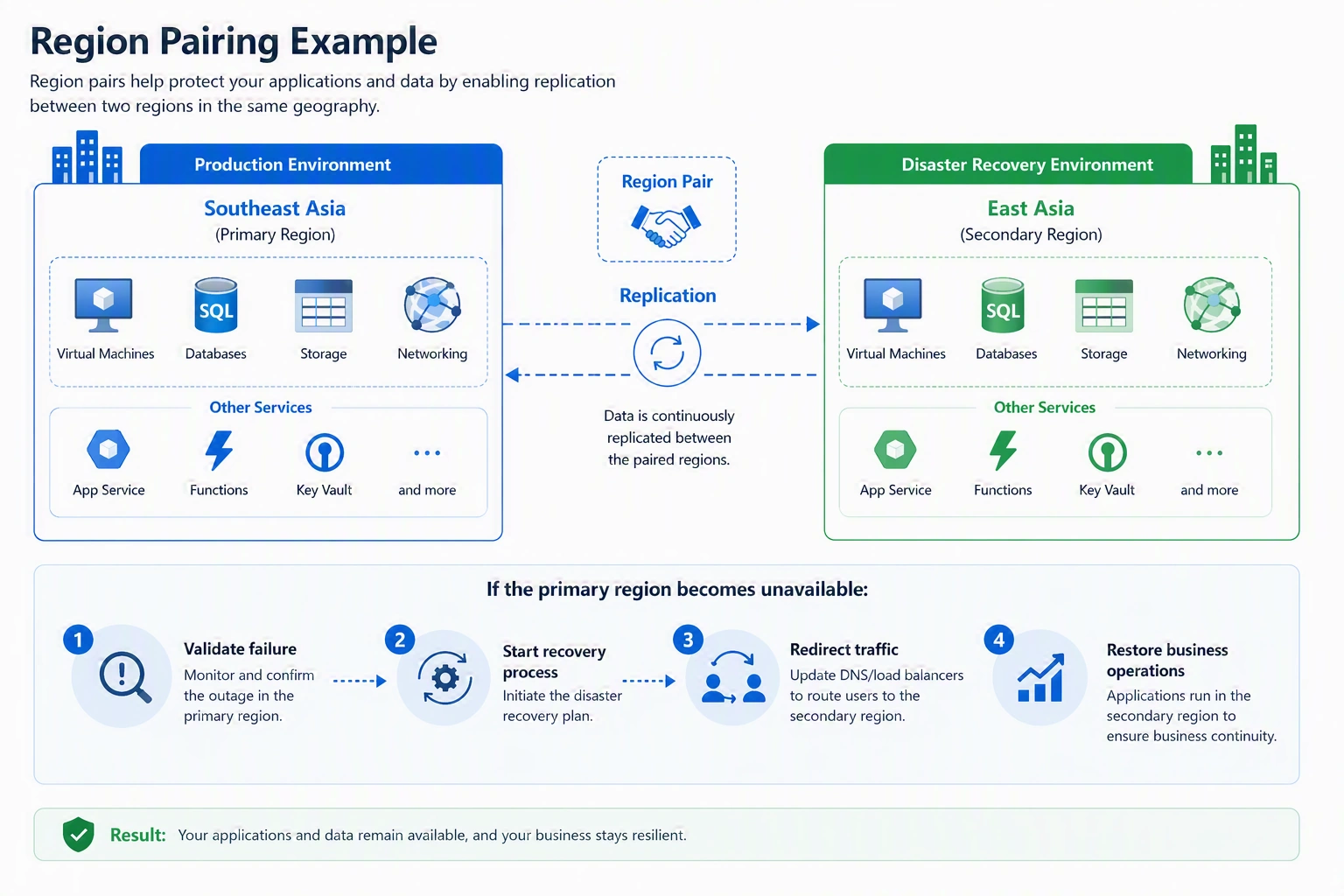
If the primary region becomes unavailable:
Validate failure
Start recovery process
Redirect traffic
Restore business operations
High Availability vs Disaster Recovery
These concepts are often misunderstood.
High Availability
Question
"How do we keep services running?"
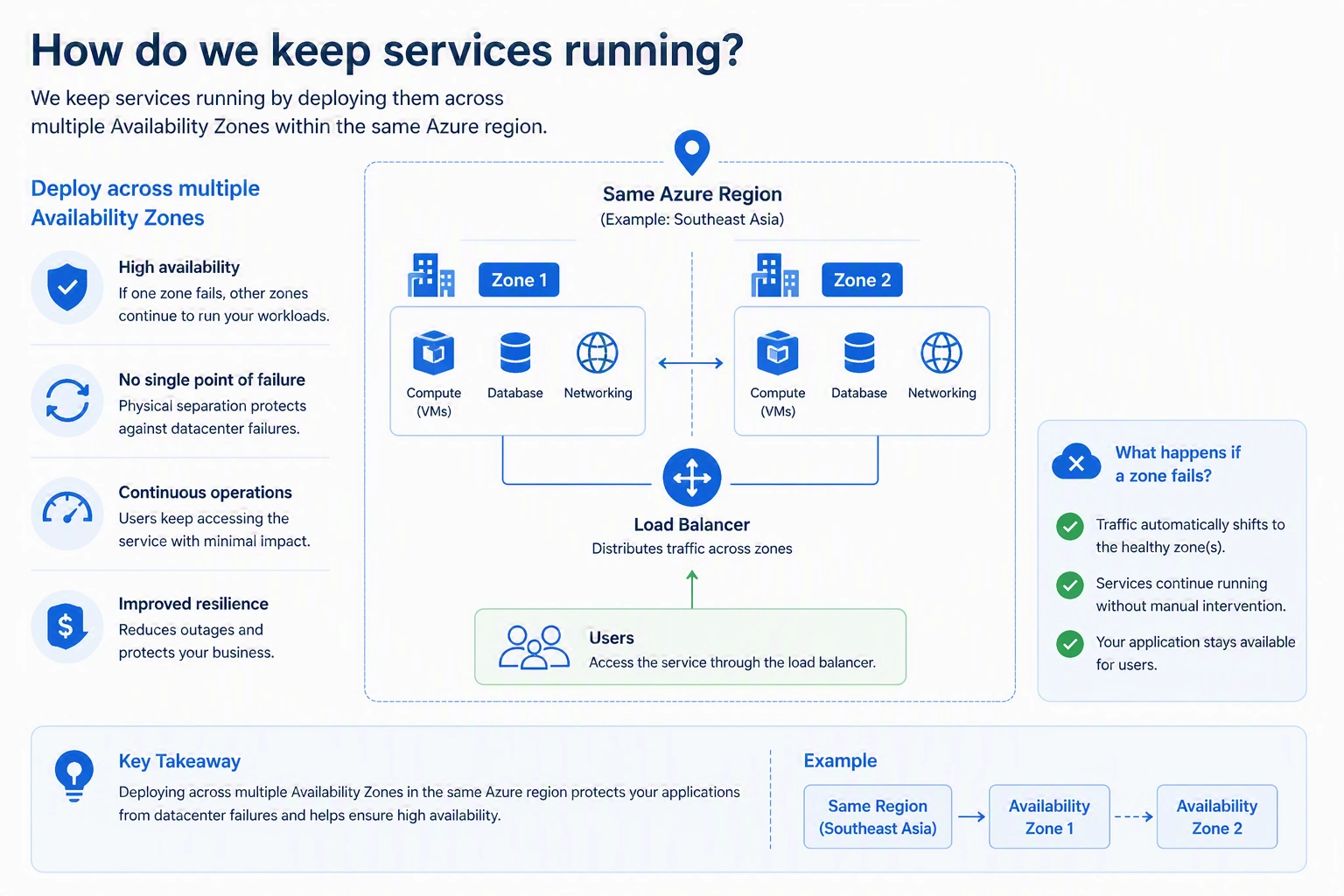
Protection
Hardware failure
Datacenter failure
Disaster Recovery
Question
"How do we recover after a major disaster?"
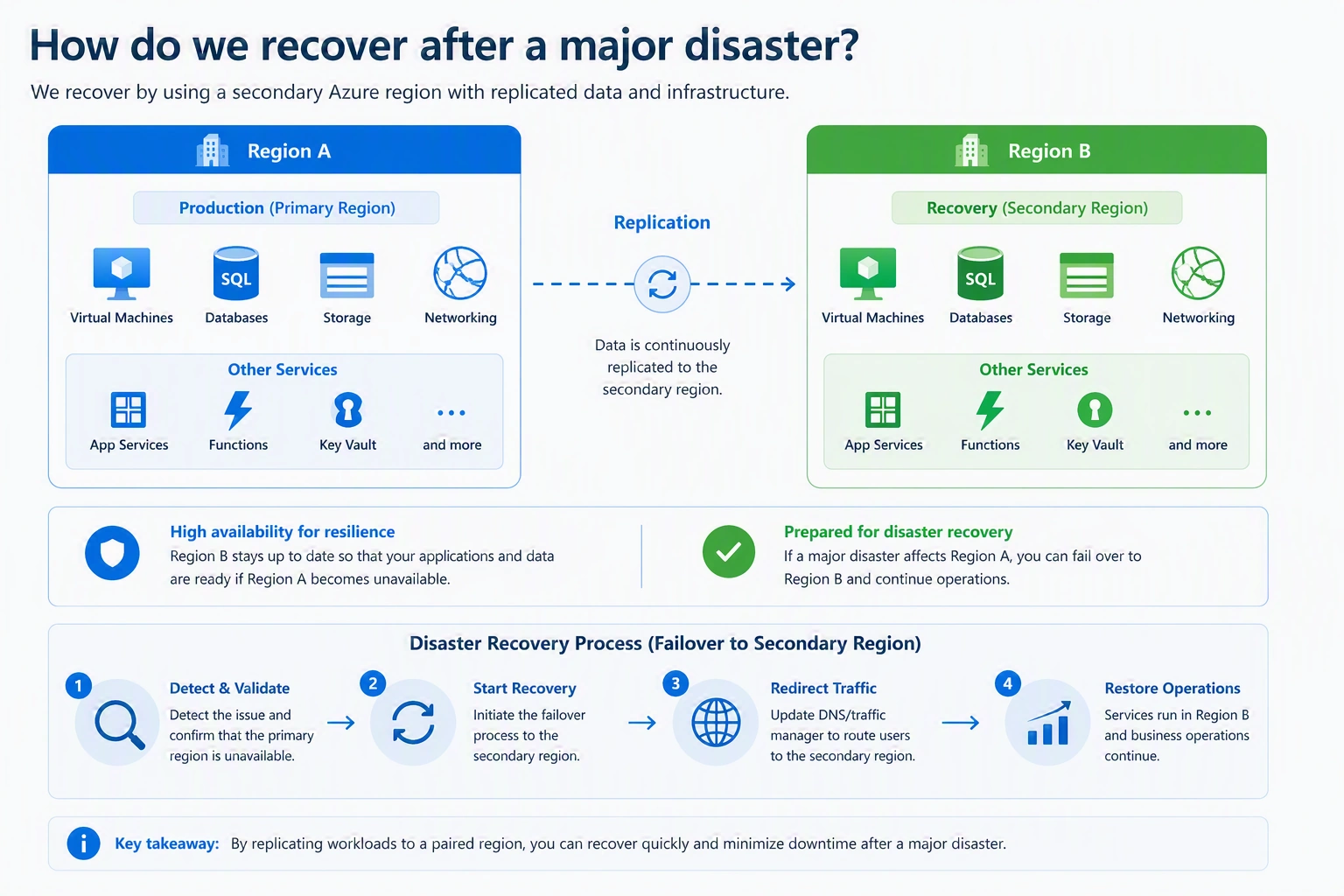
Protection
Regional outage
Large-scale failure
Cyber incidents
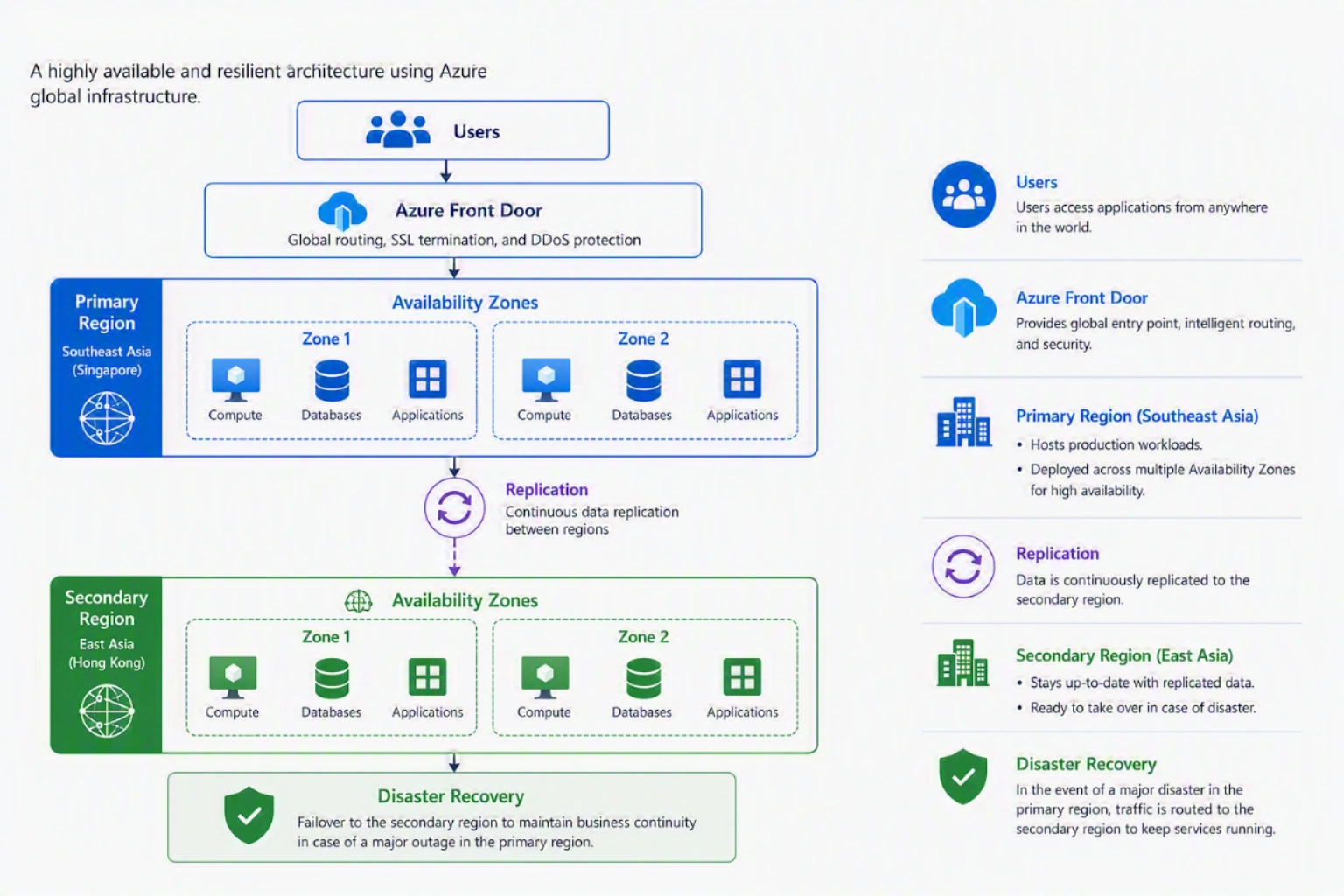
Designing Enterprise Azure Location Strategy
A good Azure location strategy normally includes the following:
Primary Region
Used for:
Production workloads
Customer-facing applications
Databases
Secondary Region
Used for:
Disaster recovery
Business continuity
Example Enterprise Design
Best Practices for Azure Region Design
1. Do Not Select Regions Only Based on Cost
The cheapest region may not satisfy the following:
Performance
Compliance
Availability
2. Validate Service Availability
Always check Azure service availability before deployment.
3. Use Availability Zones for Critical Workloads
Recommended for:
Production applications
Databases
Business-critical services
4. Plan Disaster Recovery Early
Do not wait until after deployment.
Define:
Recovery Time Objective (RTO)
Recovery Point Objective (RPO)
5. Test Recovery
A disaster recovery plan is incomplete without testing.
Perform:
Failover tests
Restore tests
Application validation
Common Mistakes
Deploying Production in a Single Zone
Risk: Datacenter failure can affect availability.
Selecting Region Without Compliance Review
Risk: Data residency issues.
Assuming Availability Zone Means Disaster Recovery
Risk: Regional failure can still impact workloads.
Not Testing Recovery
Risk: Recovery may fail during a real incident.
Conclusion
Azure Regions, Region Pairs, and Availability Zones are fundamental concepts for designing reliable cloud infrastructure.
A successful Azure architecture requires understanding where workloads should run, how they should remain available, and how they can recover from major failures.
Join the conversation! Your thoughts help the community grow.