

Introduction
In the previous articles of this series, we explored Azure fundamentals, Azure regions, availability zones, and resource groups. These concepts form the foundation of Microsoft Azure, but they also raise an important question:
What actually happens behind the scenes when you click "Create Virtual Machine" in the Azure Portal?
Does the Azure Portal directly create the virtual machine?
How does Azure CLI work?
What about PowerShell, Terraform, Bicep, or ARM Templates?
The answer is Azure Resource Manager (ARM).
Azure Resource Manager is the deployment and management service for Microsoft Azure. Every resource you create in Azure, whether it's a virtual machine, storage account, Azure SQL database, virtual network, or Kubernetes cluster, is provisioned through Azure Resource Manager.
Whether you're using the Azure Portal, Azure CLI, Azure PowerShell, REST APIs, ARM Templates, Bicep, or Terraform, every request ultimately passes through ARM before reaching the Azure service responsible for creating the resource.
Understanding ARM is one of the most important concepts in Azure Infrastructure because it sits at the heart of every Azure deployment. It provides a consistent management layer that handles authentication, authorization, policy enforcement, resource deployment, and lifecycle management across all Azure services.
In this article, we'll explore Azure Resource Manager in depth, understand its architecture, deployment process, and components, and learn why it is considered the "control center" of Microsoft Azure.
What is Azure Resource Manager?
Azure Resource Manager (ARM) is Microsoft's deployment and management layer for Azure.
It acts as the central management service that receives deployment requests, validates permissions, applies governance rules, and communicates with Azure Resource Providers to provision resources.
Instead of every Azure service exposing its own deployment interface, Microsoft created ARM as a unified management platform.
This means that regardless of how a resource is created, the process remains consistent.
For example, these commands all use ARM:
Azure Portal
Azure PowerShell
Azure CLI
Azure REST API
ARM Templates
Bicep
Terraform
Azure DevOps Pipelines
GitHub Actions
ARM provides a standardized way to deploy, update, and delete Azure resources.
Why Was Azure Resource Manager Introduced?
Before ARM, Azure used a deployment model called Azure Service Management (ASM), commonly referred to as the Classic Deployment Model.
Classic deployments had several limitations:
Limited access control
No Resource Groups
Limited automation capabilities
No tagging support
No Resource Locks
No Azure Policy
Poor dependency management
Managing large enterprise environments became increasingly difficult.
Microsoft introduced Azure Resource Manager to address these limitations by providing the following:
Centralized management
Role-Based Access Control (RBAC)
Resource Groups
Resource tagging
Infrastructure as Code
Resource Locks
Azure Policy integration
Consistent APIs
Today, almost every Azure service uses the ARM deployment model, and the Classic deployment model has been retired for most services.
Azure Management Hierarchy
To understand ARM, it's helpful to see where it fits within Azure's management hierarchy.
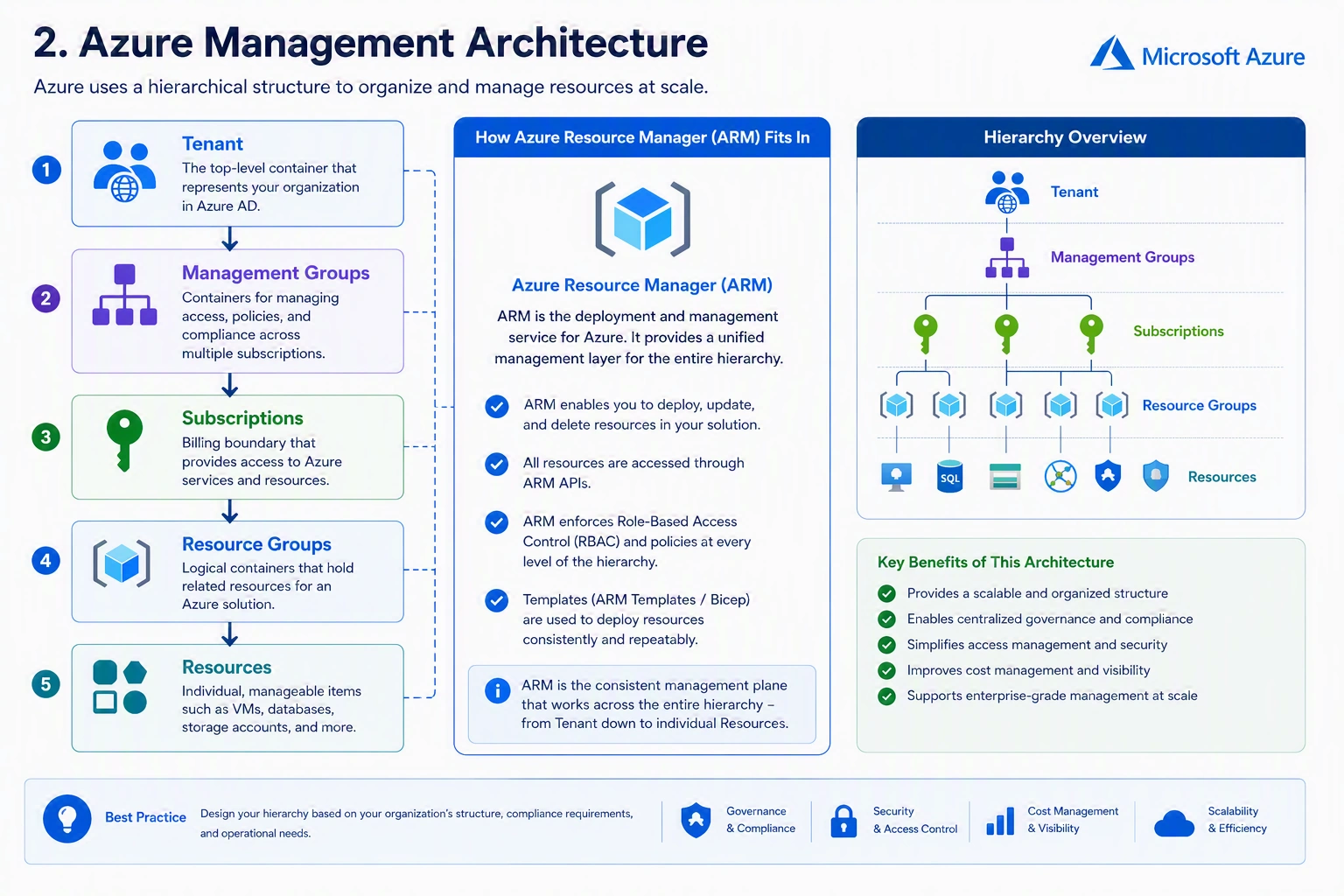
A Microsoft Entra tenant manages identities and directories.
Management Groups organize multiple subscriptions.
Subscriptions define billing and administrative boundaries.
Resource Groups organize related resources.
Resources are the individual Azure services.
Azure Resource Manager operates across this entire hierarchy, coordinating deployments and enforcing governance.
Azure Resource Manager Architecture
At a high level, Azure Resource Manager acts as the central orchestration engine.
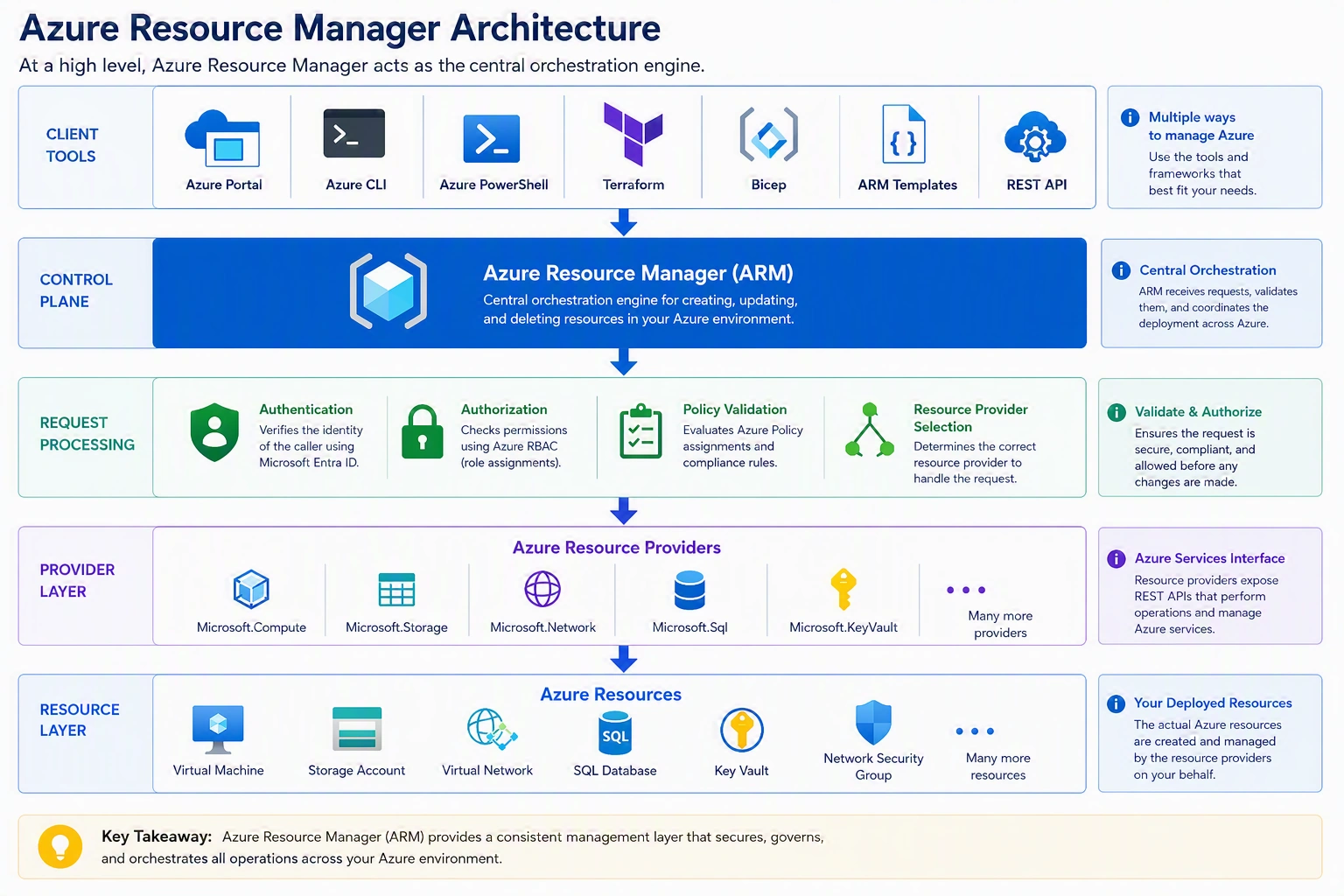
Regardless of which deployment tool you use, ARM processes every request before it reaches the target Azure service.
Azure Control Plane vs Data Plane
One of the most important concepts in Azure is understanding the difference between the control plane and the data plane.
Control Plane
The control plane is responsible for managing Azure resources.
Examples include:
Creating Virtual Machines
Deleting Storage Accounts
Creating Virtual Networks
Configuring NSGs
Changing VM sizes
Creating Azure SQL Databases
Assigning RBAC permissions
All of these operations pass through Azure Resource Manager.
Data Plane
The data plane handles the actual interaction with the service after it has been created.
Examples include:
Connecting to a VM using RDP
Connecting to Linux using SSH
Uploading files to Blob Storage
Reading SQL data
Accessing Key Vault secrets
Reading storage files
These operations communicate directly with the Azure service instead of ARM.
Control Plane vs Data Plane Comparison
| Control Plane | Data Plane |
|---|---|
| Managed by ARM | Managed by Azure Service |
| Creates resources | Uses resources |
| Deletes resources | Reads/Writes data |
| Applies RBAC | Service-specific permissions |
| Applies Azure Policy | Service-level authorization |
| Deploys infrastructure | Accesses workload |
Understanding this distinction is critical when designing secure Azure environments.
How ARM Processes a Request
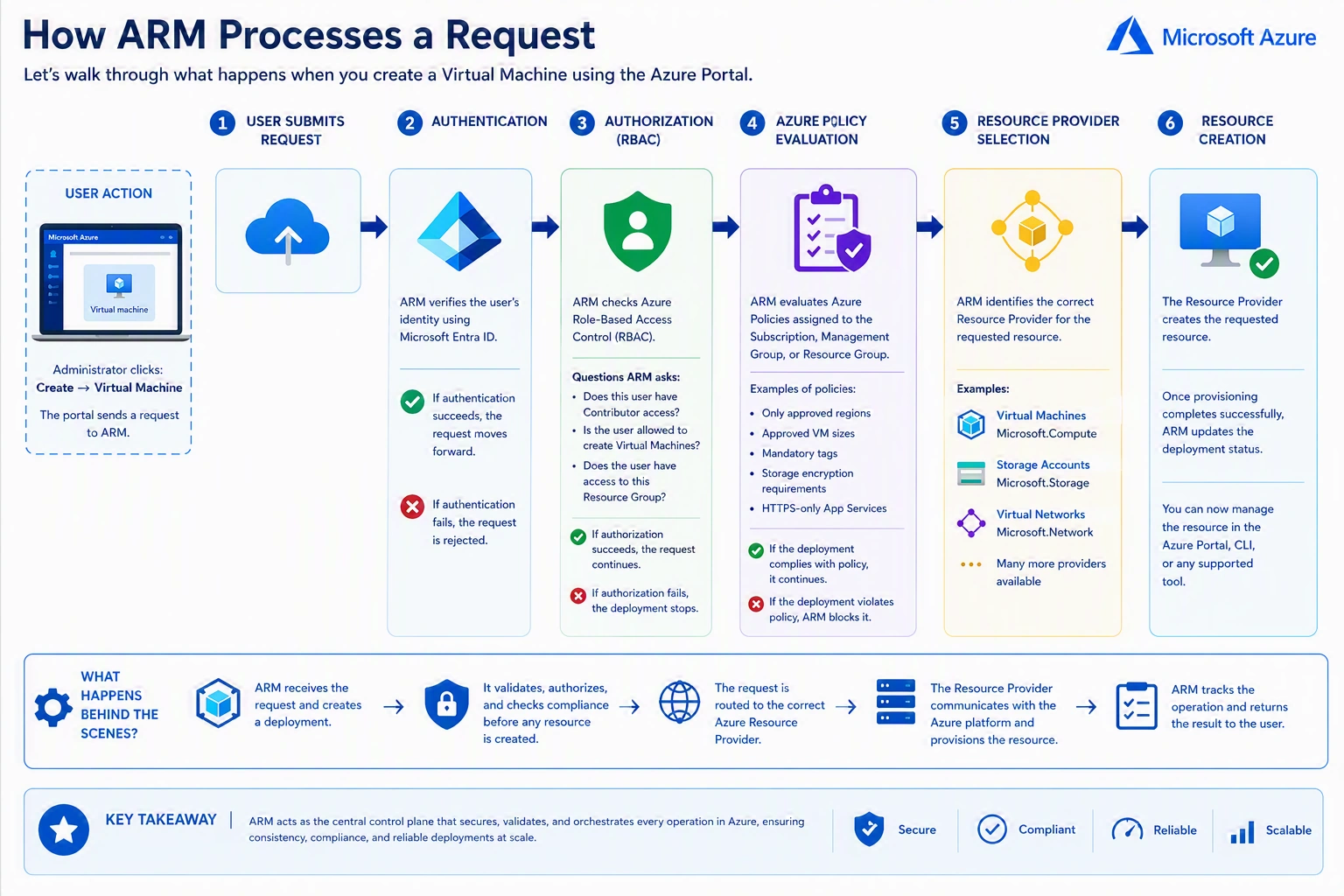
Let's walk through what happens when you create a virtual machine using the Azure Portal.
Step 1 – User Submits Request
The administrator clicks:
Create → Virtual Machine
The portal sends a request to ARM.
Step 2 – Authentication
ARM verifies the user's identity using Microsoft Entra ID.
If authentication fails, the request is rejected.
Step 3 – Authorization
ARM checks Azure Role-Based Access Control (RBAC).
Questions ARM asks include:
Does this user have Contributor access?
Is the user allowed to create virtual machines?
Does the user have access to this resource group?
If authorization fails, the deployment stops.
Step 4 – Azure Policy Evaluation
ARM evaluates Azure policies assigned to the subscription, management group, or resource group.
Examples include:
Only approved Azure regions
Approved VM sizes
Mandatory tags
Storage encryption requirements
HTTPS-only App Services
If the deployment violates policy, ARM blocks it.
Step 5 – Resource Provider Selection
ARM identifies the correct Resource Provider.
For Virtual Machines:
Microsoft.Compute
For Storage Accounts:
Microsoft.Storage
For Virtual Networks:
Microsoft.Network
Step 6 – Resource Creation
The Resource Provider creates the requested resource.
Once provisioning completes successfully, ARM updates the deployment status.
Resource Providers
Azure resource providers are services responsible for managing specific Azure resource types.
Every Azure service belongs to a Resource Provider namespace.
Examples include:
| Resource Provider | Azure Service |
|---|---|
| Microsoft.Compute | Virtual Machines |
| Microsoft.Storage | Storage Accounts |
| Microsoft.Network | Networking |
| Microsoft.Sql | Azure SQL |
| Microsoft.Web | App Service |
| Microsoft.KeyVault | Key Vault |
| Microsoft.ContainerService | AKS |
| Microsoft.Insights | Azure Monitor |
| Microsoft.RecoveryServices | Azure Backup |
When a subscription is created, some providers are registered automatically. Others are registered when you first deploy a resource from that provider.
Resource IDs
Every Azure resource has a globally unique Resource ID.
Example:
/subscriptions/xxxxxxxx-xxxx-xxxx-xxxx-xxxxxxxxxxxx
/resourceGroups/RG-Production
/providers/Microsoft.Compute
/virtualMachines/VM-Web01
Let's break it down:
| Section | Description |
|---|---|
| Subscription | Billing and management boundary |
| Resource Group | Logical container |
| Provider | Azure service namespace |
| Resource Type | Virtual Machine |
| Resource Name | VM-Web01 |
Resource IDs are commonly used in automation, scripting, and Azure APIs.
ARM Templates
Azure Resource Manager introduced Infrastructure as Code (IaC).
Instead of manually creating resources, infrastructure can be defined using JSON templates.
An ARM template describes the following:
Resources
Configuration
Dependencies
Parameters
Variables
Outputs
A simplified ARM template might define:
Virtual Network
Subnet
Network Interface
Virtual Machine
Public IP Address
Deploying the template creates the complete infrastructure consistently every time.
Bicep – The Modern Alternative
Although ARM templates remain fully supported, Microsoft now recommends Bicep for new deployments.
Benefits of Bicep include the following:
Simpler syntax
Easier to read
Modular architecture
Better developer experience
Native Azure support
Bicep compiles into ARM templates before deployment, meaning ARM still performs the actual deployment.
Deployment Modes
ARM supports two deployment modes.
Incremental Deployment
This is the default mode.
ARM:
Creates new resources
Updates existing resources
Leaves other resources unchanged
This is the recommended deployment mode for most scenarios.
Complete Deployment
Complete mode compares the template with the resource group.
Resources that are not included in the template may be deleted.
Because of this behavior, Complete mode should be used with caution, especially in production environments.
Dependency Management
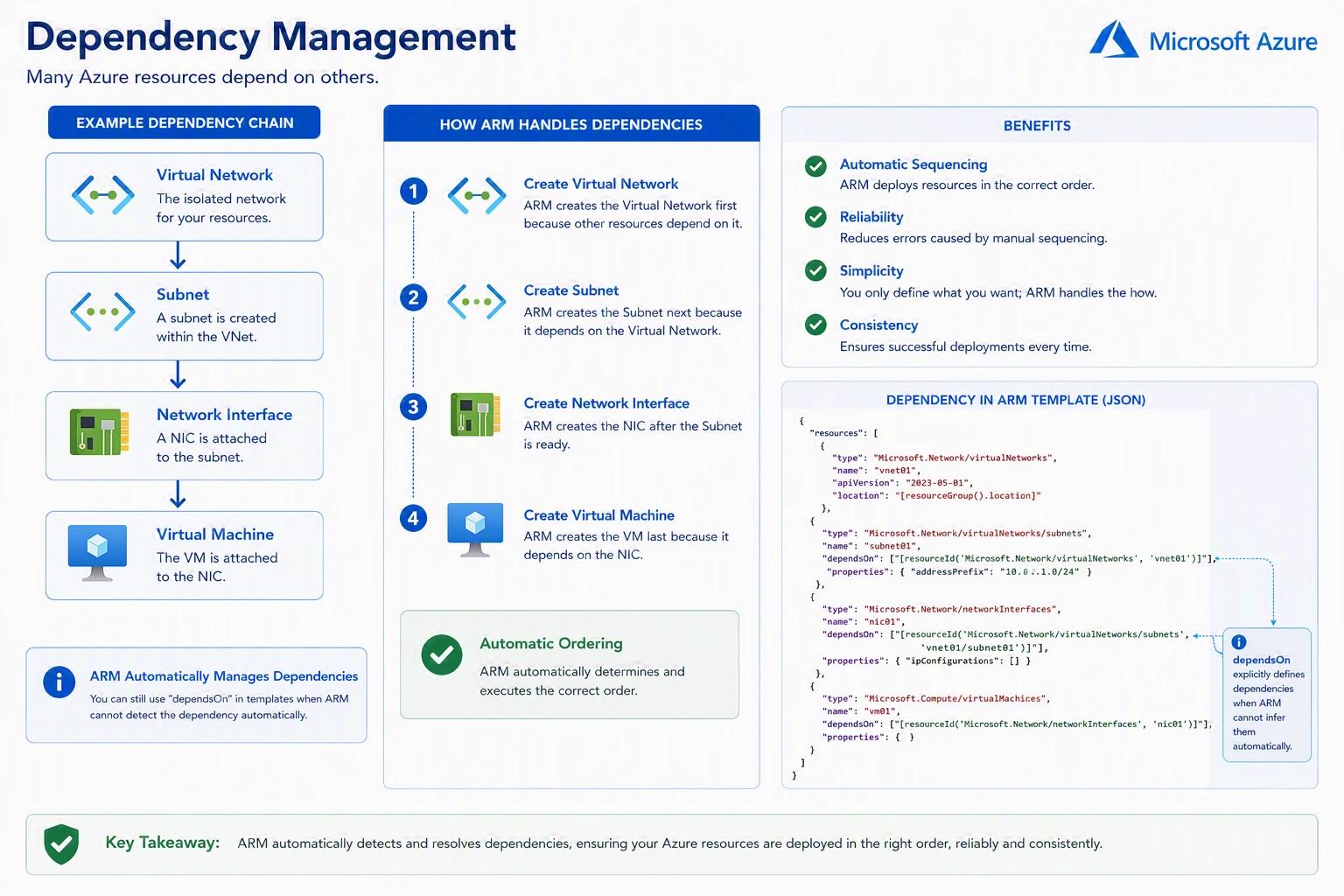
Many Azure resources depend on others.
ARM automatically deploys resources in the correct order based on their dependencies.
This eliminates manual sequencing during deployments.
ARM and Role-Based Access Control (RBAC)
Azure RBAC integrates directly with ARM.
Before creating or modifying a resource, ARM verifies:
User identity
Assigned roles
Scope of permissions
For example:
A user with Reader permissions can view resources but cannot create or modify them.
A Contributor can create and manage resources but cannot assign permissions.
An Owner has full management access, including the ability to assign RBAC roles.
This centralized authorization model ensures consistent access control across Azure.
ARM and Azure Policy
Azure Policy works closely with ARM to enforce governance.
Whenever a deployment request is submitted, ARM evaluates applicable policies before provisioning resources.
Examples include:
Only allow deployments in the East US and West Europe.
Require mandatory tags such as Environment and Cost Center.
Prevent creation of public IP addresses.
Restrict virtual machine sizes.
Enforce encryption settings.
If the deployment violates a policy, ARM blocks the request before any resources are created.
ARM and Resource Locks
ARM also enforces resource locks.
Two types are available:
CanNotDelete
Prevents accidental deletion while still allowing modifications.
ReadOnly
Prevents both modification and deletion.
Even users with Owner permissions cannot bypass these locks without first removing them.
Resource Locks provide an additional layer of protection for critical workloads.
Monitoring ARM Deployments
Azure Resource Manager records deployment activities.
Administrators can review:
Deployment history
Success and failure status
Deployment duration
Error messages
Resource changes
Azure Activity Log also records management operations performed through ARM, providing an audit trail for governance and troubleshooting.
Benefits of Azure Resource Manager
Organizations use ARM because it provides:
Consistent deployment experience
Centralized management
Infrastructure as Code support
Resource dependency management
Governance through Azure Policy
Fine-grained access control using RBAC
Resource tagging
Deployment validation
Activity logging
Scalability for enterprise environments
These capabilities make ARM the foundation of Azure infrastructure management.
Common Mistakes
Many Azure beginners make these common mistakes:
Confusing ARM with ARM Templates.
Assuming the Azure Portal creates resources directly.
Ignoring Resource Providers.
Using complete deployment mode without understanding its impact.
Hardcoding values in ARM templates.
Forgetting to define resource dependencies.
Not using parameter files for reusable deployments.
Assigning excessive RBAC permissions instead of following the principle of least privilege.
Avoiding these mistakes leads to more secure, maintainable, and scalable Azure environments.
Enterprise Best Practices
Microsoft recommends the following practices when working with Azure Resource Manager:
Organize resources using well-designed Resource Groups.
Use Bicep for new infrastructure as code projects.
Store templates in version control systems such as Git.
Apply RBAC using the principle of least privilege.
Use Azure Policy to enforce organizational standards.
Apply consistent naming conventions and tags.
Protect critical workloads with resource locks.
Validate deployments before production.
Use parameter files instead of hardcoded values.
Monitor deployments through Azure Activity Logs and deployment history.
Following these practices helps organizations maintain secure, repeatable, and well-governed Azure environments.
Summary
Azure Resource Manager (ARM) is the foundation of modern Azure infrastructure management. Every resource deployment—whether initiated through the Azure Portal, Azure CLI, PowerShell, REST API, ARM Templates, Bicep, or Terraform—flows through ARM before reaching the appropriate Azure service.
ARM does much more than create resources. It authenticates users with Microsoft Entra ID, verifies permissions through Azure RBAC, evaluates Azure policies, communicates with resource providers, manages dependencies, records deployment history, and enforces governance across the Azure platform.
By understanding how ARM works, administrators and architects gain deeper insight into the Azure deployment process and can design environments that are secure, scalable, automated, and compliant with organizational standards. As you continue your Azure journey, mastering ARM will also make it easier to adopt Infrastructure as Code, automate deployments, and build enterprise-ready cloud solutions.
Key Takeaways
Azure Resource Manager (ARM) is Azure's deployment and management service.
Every Azure resource deployment passes through ARM, regardless of the deployment tool used.
ARM is responsible for authentication, authorization, policy evaluation, and deployment orchestration.
Azure Resource Providers perform the actual provisioning of Azure services.
ARM distinguishes between the Control Plane (resource management) and the Data Plane (resource usage).
Infrastructure as Code solutions such as ARM Templates and Bicep rely on ARM for deployment.
ARM integrates with Azure RBAC, Azure Policy, Resource Locks, and Activity Logs to provide governance and security.
A solid understanding of ARM is essential for every Azure administrator, infrastructure engineer, and cloud architect.
Join the conversation! Your thoughts help the community grow.