

You will definitely have seen and used one of the most popular features of almost every application that helps us find the required information. It’s search. Below are a few examples where you would use Search.
- In a Blog Site or Mobile App You would search by entering some relevant keyword(s).
- Travel Site or Mobile App You might want to search for tourist spots around your area or within a specified region or within your budgets.
- E-Commerce sites You would search for different gadgets, books etc. depending on your needs.
- Reporting Sites You would search for different KPIs within the app to get refined results.
Though all the above examples provide the feature “Search” along with the relevant results, the complexity and functionality depends on different parameters. The complexity of searching the data would be as simple as pulling data using the ‘where’ condition in your Query on a SQL Table or it could be as complex as having NLP (Natural Language Processing) on your data available in your documents.
It would take lot of efforts and money in implementing complex search functionalities for your applications. Below are a few examples of the reasons.
- Your application might provide a search capability of data within millions of documents - For this, you might need to procure a separate server for running the custom Search Engines that indexes and stores all the results for quick retrieval.
- Your application might have heave traffic leads. In order to service those loads, you might have to scale-out (using Load Balancing) your Infra to provide high availability of your search service.
In order to solve all the above concerns, Microsoft Azure team has come up with a feature called Azure Search as a Service which provides lot of advantages over traditional approach of implementing and managing the search.
Let’s start discussing Azure Search service.
What is Azure Search?
Azure Search is a managed cloud search service that helps you build a powerful search experience into custom apps, and then monitor service, index, and query activity through portal views. Key capabilities include scalable full-text search over multiple languages, geo-spatial search, filtering and faceted navigation, type-ahead queries, hit highlighting, and custom analyzers.
(Ref: https://docs.microsoft.com/en-us/azure/search/ )
What are Azure Search advantages?
- We don’t need to manage the infra. Everything related to the required infrastructure for provisioning the search will be taken care of by Microsoft Azure.
- Reduced time and efforts both in terms of development and management of the functionalities.
What are Azure Search features?
Below are a few of the features available in the Azure Search function.
- Easily scalable in terms of availability and storage.
- Multi lingual support. As of this writing, Azure Search support 56 languages.
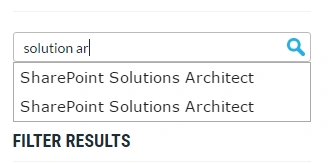
- Provide Search suggestions in the form of Auto Complete feature. Below is screen capture where the service is providing suggestions based on the keywords that the user is typing.
- Hit highlighting
You search keywords are highlighted in each of the search results.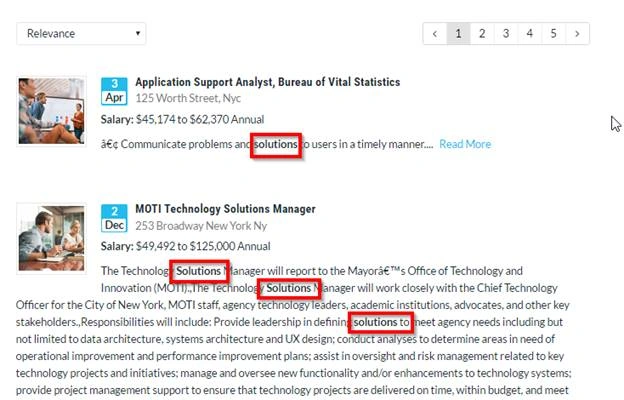
- Faced Navigation
Easily refine your search results based on different categories (ex: In e-commerce based applications, you can filter by different categories like Price Range, Model, Type, etc.). The information required for building these Facets (Categories) will be returned automatically by Azure search based on the keywords that user has searched.
- Analytics – Provides insights about the search keywords that users are typing.
Process of creating and using the Search function
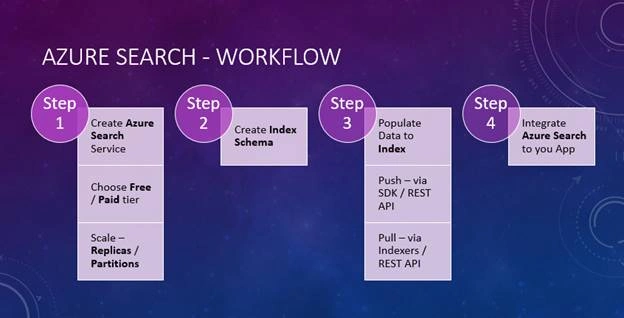
Below is the diagram that provides a basic idea on the workflow of creating an Azure Search function and using it.
What data sources are supports?
Below are a few of the major data sources that Azure Search is capable of searching.
- Azure SQL Database
- On-Premise SQL Server
- Azure DocumentDB
- Azure Blob Storage
Other important points about Azure Search - Only one Free Azure Search – In general, we can create multiple services for Free within a subscription. For example, you can create multiple App Services within a subscription. However, you can have ONLY one Search with the Free SKU per Subscription.
You can play around the websites to understand more about the Azure Search features in more details.
Summary
In this article, we have learned what Azure Search is and where you could use it along with features and advantages. We have also understood the steps required for provisioning the search. Below are the steps required.
- Create Search Service.
- Create Index schema.
- Populate the index with data.
- Integrate Azure Search to your application.
You can read the original article here.
Hope you enjoyed reading the article. Your feedback is much appreciated.
Praveen SreeramPosted Dec 4, 2016, 9:57 PM
Thank you. The price model is not based on the Queries. It's based on Search Units and other infra related factors. In Free tier, you can store upto 10k records. Please have a look at the following article for more details about different plans and fetures. http://www.c-sharpcorner.com/article/creating-azure-search-service-and-scaling-replicas-and-partitions/
Mahesh ChandPosted Dec 3, 2016, 10:20 AM
This is good. I would like to learn more about its pricing model. How much would it cost to use this model? How many queries included in free option.