

Users hate staring at a spinner. When an order takes a few seconds to process, they want to see what is happening, not refresh the page and hope.
In this guide, we build a live order tracker. A .NET 10 Minimal API puts each order on an Azure Service Bus queue, a background worker processes it, and SignalR pushes every status change to a React screen as it happens.
By the end, you will have: reliable background processing, instant UI updates, automatic retries, a dead-letter path for failed orders, and a UI that recovers after a dropped connection.
Two Tools, Two Different Promises
The most important idea in this design is that Service Bus and SignalR do very different jobs:
| Azure Service Bus | SignalR | |
|---|---|---|
| Job | Moves work reliably | Tells people what happened |
| Direction | Service to service | Server to browser |
| If the receiver is offline | The message waits in the queue | The update is missed |
| Failure handling | Retries and a dead-letter queue | Reconnects, but doesn't replay missed messages |
Golden rule: Service Bus carries the work, and SignalR only carries the news. Never treat a SignalR message as the source of truth. That is why this sample also keeps each order's latest status on the server.
How the Flow Works
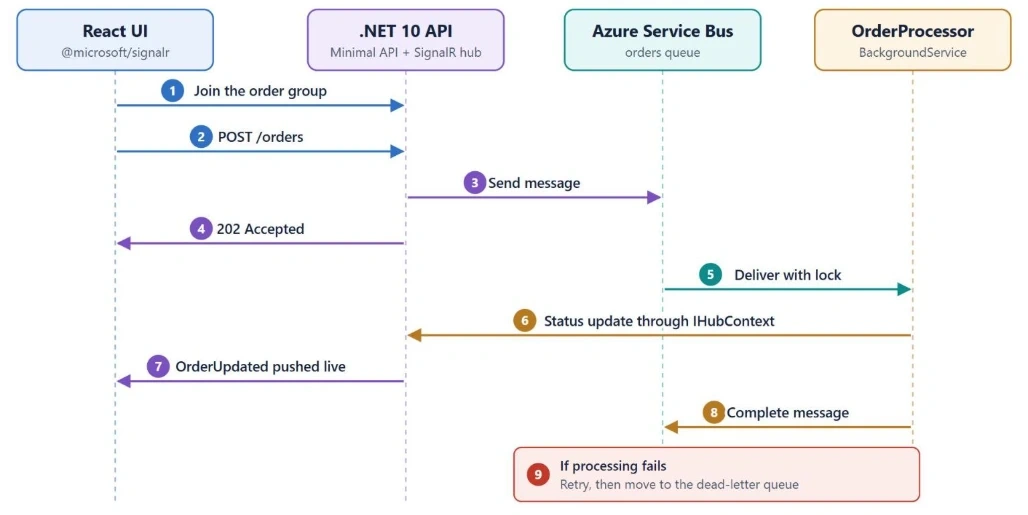
Notice that React joins the SignalR group before it sends the order. A fast worker could otherwise send the first update before the browser is listening, and that update would be lost.
Prerequisites
- .NET 10 SDK
- Node.js
- Docker Desktop, for the Service Bus emulator
This guide was written with these package versions:
| Package | Version |
|---|---|
| Azure.Messaging.ServiceBus | 7.21.0 |
| @microsoft/signalr | 10.0.11 |
SignalR's server side is already included in ASP.NET Core, so the API doesn't need an extra package for it.
Step 1: Run Service Bus Locally
You don't need an Azure subscription to start. Microsoft's Service Bus emulator runs in Docker and costs nothing.
Save this as config.json:
{
  "UserConfig": {
    "Namespaces": [
      {
        "Name": "sbemulatorns",
        "Queues": [
          {
            "Name": "orders",
            "Properties": {
              "DeadLetteringOnMessageExpiration": false,
              "DefaultMessageTimeToLive": "PT1H",
              "DuplicateDetectionHistoryTimeWindow": "PT20S",
              "ForwardDeadLetteredMessagesTo": "",
              "ForwardTo": "",
              "LockDuration": "PT1M",
              "MaxDeliveryCount": 3,
              "RequiresDuplicateDetection": false,
              "RequiresSession": false
            }
          }
        ],
        "Topics": []
      }
    ],
    "Logging": {
      "Type": "File"
    }
  }
}
Next, copy the docker-compose.yaml file from Microsoft's emulator guide and create a .env file beside it:
CONFIG_PATH="C:\\Projects\\emulator\\config.json"
ACCEPT_EULA="Y"
MSSQL_SA_PASSWORD="Choose-A-Strong-Password-1"
EMULATOR_HTTP_PORT=5300
Setting ACCEPT_EULA to Y accepts the license terms for the emulator and SQL Server on Linux, so read them first. Then start the containers:
docker compose up -dPort clash? The emulator uses port 5672, the same port as RabbitMQ. Stop any local RabbitMQ container first. Also note that the emulator doesn't keep data after a restart.
Step 2: Create the API
dotnet new web -n OrderTracker.Api
cd OrderTracker.Api
dotnet add package Azure.Messaging.ServiceBus --version 7.21.0
Add this to appsettings.Development.json. This is the emulator's fixed local connection string, not a real secret:
"ServiceBus": {
  "ConnectionString": "Endpoint=sb://localhost;SharedAccessKeyName=RootManageSharedAccessKey;SharedAccessKey=SAS_KEY_VALUE;UseDevelopmentEmulator=true;",
  "QueueName": "orders",
  "MaxDeliveryCount": 3
},
"Spa": {
  "Origin": "http://localhost:3000"
}
Create Contracts.cs:
using System.ComponentModel.DataAnnotations;

public sealed record PlaceOrderRequest(
    Guid OrderId,
    [Required, StringLength(100)] string Product,
    [Range(1, 100)] int Quantity);

public sealed record OrderMessage(Guid OrderId, string Product, int Quantity);

public sealed record OrderUpdate(
    Guid OrderId,
    string Status,
    string Detail,
    DateTimeOffset At);
Step 3: Add the SignalR Hub
We only want to send an order's updates to the people tracking that order, so each order gets its own SignalR group. A strongly typed hub also means a misspelled client method becomes a compile error.
Create OrderHub.cs:
using Microsoft.AspNetCore.SignalR;

public interface IOrderClient
{
    Task OrderUpdated(OrderUpdate update);
}

public sealed class OrderHub : Hub<IOrderClient>
{
    public Task TrackOrder(Guid orderId) =>
        Groups.AddToGroupAsync(Context.ConnectionId, GroupName(orderId));

    public static string GroupName(Guid orderId) => $"order-{orderId}";
}
Step 4: Save the Status, Then Notify
This small class protects the golden rule: every update is saved first and pushed second. If a browser misses the push, it can still fetch the latest status.
Create OrderNotifier.cs:
using System.Collections.Concurrent;
using Microsoft.AspNetCore.SignalR;

public sealed class OrderStatusStore
{
    private readonly ConcurrentDictionary<Guid, OrderUpdate> _latest = new();

    public void Save(OrderUpdate update) => _latest[update.OrderId] = update;

    public OrderUpdate? Find(Guid orderId) =>
        _latest.TryGetValue(orderId, out var update) ? update : null;
}

public sealed class OrderNotifier(
    OrderStatusStore store,
    IHubContext<OrderHub, IOrderClient> hub)
{
    public async Task PublishAsync(Guid orderId, string status, string detail)
    {
        var update = new OrderUpdate(orderId, status, detail, DateTimeOffset.UtcNow);

        store.Save(update);
        await hub.Clients.Group(OrderHub.GroupName(orderId)).OrderUpdated(update);
    }
}
IHubContext is what lets code outside a hub, like our background worker, send messages to connected clients. The in-memory store keeps this sample simple. Use a database in a real app.
Step 5: Process the Queue
ServiceBusProcessor is Microsoft's recommended starting point for receiving messages. It handles receiving, concurrency, and lock renewal for you.
We turn off automatic completion so that each message's outcome is explicit in our code:
| Outcome | Call | What happens |
|---|---|---|
| Success | CompleteMessageAsync | The message is removed |
| Temporary failure | AbandonMessageAsync | The lock is released and the message is delivered again |
| Permanent failure | DeadLetterMessageAsync | The message moves to the dead-letter queue |
Create OrderProcessor.cs:
using System.Text.Json;
using Azure.Messaging.ServiceBus;

public sealed class OrderProcessor(
    ServiceBusClient client,
    OrderNotifier notifier,
    IConfiguration configuration,
    ILogger<OrderProcessor> logger) : BackgroundService
{
    private readonly int _maxDeliveryCount =
        configuration.GetValue<int>("ServiceBus:MaxDeliveryCount");

    private ServiceBusProcessor? _processor;

    protected override async Task ExecuteAsync(CancellationToken stoppingToken)
    {
        _processor = client.CreateProcessor(
            configuration["ServiceBus:QueueName"],
            new ServiceBusProcessorOptions
            {
                AutoCompleteMessages = false,
                MaxConcurrentCalls = 4
            });

        _processor.ProcessMessageAsync += HandleMessageAsync;
        _processor.ProcessErrorAsync += HandleErrorAsync;

        await _processor.StartProcessingAsync(stoppingToken);
    }

    private async Task HandleMessageAsync(ProcessMessageEventArgs args)
    {
        var message = args.Message;
        OrderMessage order;

        try
        {
            order = message.Body.ToObjectFromJson<OrderMessage>()!;
        }
        catch (JsonException ex)
        {
            // A retry can't fix bad data, so dead-letter it immediately.
            await args.DeadLetterMessageAsync(
                message, "InvalidPayload", ex.Message, args.CancellationToken);
            return;
        }

        try
        {
            await RunOrderStagesAsync(order, args.CancellationToken);
            await args.CompleteMessageAsync(message, args.CancellationToken);
        }
        catch (OperationCanceledException) when (args.CancellationToken.IsCancellationRequested)
        {
            throw; // The app is stopping. The message will be delivered again.
        }
        catch (Exception ex) when (message.DeliveryCount >= _maxDeliveryCount)
        {
            logger.LogError(ex, "Order {OrderId} failed permanently.", order.OrderId);
            await notifier.PublishAsync(
                order.OrderId, "Failed", "We couldn't process this order.");
            await args.DeadLetterMessageAsync(
                message, "ProcessingFailed", ex.Message, args.CancellationToken);
        }
        catch (Exception ex)
        {
            logger.LogWarning(ex, "Attempt {Attempt} failed for {OrderId}.",
                message.DeliveryCount, order.OrderId);
            await notifier.PublishAsync(
                order.OrderId, "Retrying", $"Attempt {message.DeliveryCount} failed.");
            await args.AbandonMessageAsync(
                message, cancellationToken: args.CancellationToken);
        }
    }

    private async Task RunOrderStagesAsync(OrderMessage order, CancellationToken ct)
    {
        await notifier.PublishAsync(order.OrderId, "Processing", "Checking payment.");
        await Task.Delay(1500, ct);

        // Simulates a failing service so you can test the retry flow.
        if (order.Product.StartsWith("fail", StringComparison.OrdinalIgnoreCase))
        {
            throw new InvalidOperationException("The payment service is unavailable.");
        }

        await notifier.PublishAsync(order.OrderId, "Packing", "Preparing your items.");
        await Task.Delay(1500, ct);

        await notifier.PublishAsync(order.OrderId, "Completed", "Your order is ready.");
    }

    private Task HandleErrorAsync(ProcessErrorEventArgs args)
    {
        logger.LogError(args.Exception, "Service Bus error from {Source} on {Entity}.",
            args.ErrorSource, args.EntityPath);

        return Task.CompletedTask;
    }

    public override async Task StopAsync(CancellationToken cancellationToken)
    {
        if (_processor is not null)
        {
            await _processor.StopProcessingAsync(cancellationToken);
            await _processor.DisposeAsync();
        }

        await base.StopAsync(cancellationToken);
    }
}
Join the conversation! Your thoughts help the community grow.