Before reading this article, please go through the following articles:
This article explains about Host Appservice into the single process system, like Single Background process, as we have seen in the Background Task in Universal Windows Program - Part Four.
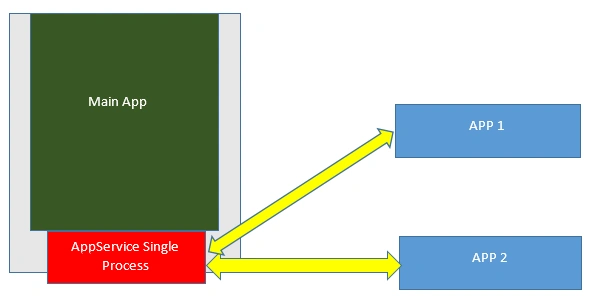
Appservice into a single process implementation diagram.
This feature is available in Windows 10 Anniversary Update (Version 1607). To implement this, two changes must be implemented.
- Entry point is not required because the default entry point handles this in the main application.
Package.appxmanifest file declares only the Appservice Name.
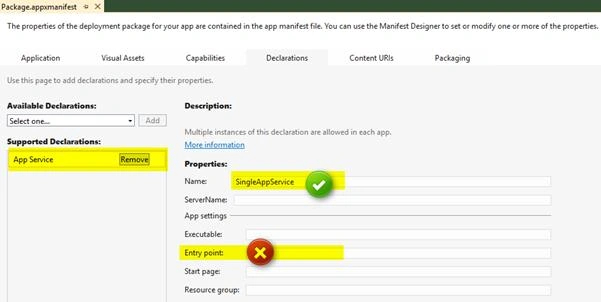
- Override the OnBackgroundActivated function and implement the Appservice code with the sample code.
- protected override void OnBackgroundActivated(BackgroundActivatedEventArgs args) {
- base.OnBackgroundActivated(args);
- RunBackGroundTask(args);
- }
- private void RunBackGroundTask(IBackgroundActivatedEventArgs args) {
- _taskInstance = args.TaskInstance;
- _taskInstance.Canceled += TaskInstance_Canceled;
- _bgTaskDeferral = _taskInstance.GetDeferral();
- var triggerAppService = _taskInstance.TriggerDetails as AppServiceTriggerDetails;
- if (triggerAppService == null) return;
- _appServiceConnection = triggerAppService.AppServiceConnection;
- _appServiceConnection.RequestReceived += AppServiceRequestReceived;
- _appServiceConnection.ServiceClosed += _appServiceConnection_ServiceClosed;
- }
- private async void AppServiceRequestReceived(AppServiceConnection sender, AppServiceRequestReceivedEventArgs args) {
- var serviceMsg = args.GetDeferral();
- serviceMsg.Complete();
- }
- private void _appServiceConnection_ServiceClosed(AppServiceConnection sender, AppServiceClosedEventArgs args) {
- _bgTaskDeferral.Complete();
- }
Build the application. That’s it. Now, Appservice has been hosted into the main Application.
Example: Will takethe same example in Background Task in Universal Windows Program - Part Six and host it into the main application.
Steps
Main Application changes
- Create a blank application & implement OnBackgroundActivated function like the above steps.
- Appservice RequestReceived function implements handling the command part and there's no need to implement the set command implementation because our main application never communicates to the Appservice. Only the outside of another application will communicate. So, only get the command that has to be implemented.
- private async void AppServiceRequestReceived(AppServiceConnection sender, AppServiceRequestReceivedEventArgs args) {
- var serviceMsg = args.GetDeferral();
- var storeData = args.Request.Message;
- string command = storeData["Command"] as string;
- ValueSet returnData = new ValueSet();
- if (command == "set")
- {
- string inventoryIndex = storeData["serverMsg"] as string;
- ApplicationData.Current.RoamingSettings.Values["set"] = inventoryIndex;
- returnData.Add("Result", "OK");
- await args.Request.SendResponseAsync(returnData);
- } else if (command == "get")
- {
- string inventoryIndex = (string) ApplicationData.Current.RoamingSettings.Values["set"];
- returnData.Add("Result", inventoryIndex);
- await args.Request.SendResponseAsync(returnData);
- }
- serviceMsg.Complete();
- }
- No need to implement Appservice communication part.
- Textbox enter key event directly assigns the values into the ApplicationData (in the Part 6 example using Appservice we assigned this data)
- private void TxtStatus_OnKeyDown(object sender, KeyRoutedEventArgs e) {
- if (e.Key != VirtualKey.Enter) return;
- TxtSendStatus.Text = "Send Msg";
- var sendMsg = TxtStatus.Text;
- ApplicationData.Current.RoamingSettings.Values["set"] = sendMsg;
- }
Client UI Communicate to Appservice
This application only changes, AppserviceName and PackageFamilyName. That’s it.
private const string AppServiceName = "SingleAppService";
private const string PackageFamilyName = "b6512b79-4bc1-4b5a-a8d7-86c0c74aa169_kz0gnaa3h8516";
Output
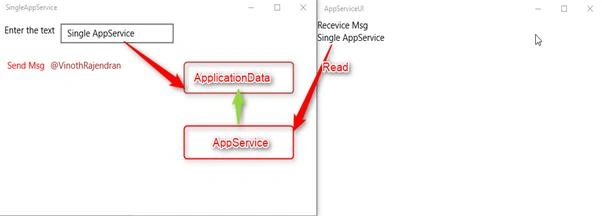
- In Main Application, on each enter key event, the data is assigned to the ApplicationData class.
- Whenever client requests the Appservice, Appservice reads the data from the ApplicationData class and sends it to the request UI.
Note:
- Main Application is running in the foreground and another client has requested to Appservice. Appservice is activated to handle the client request without affecting the main application task.
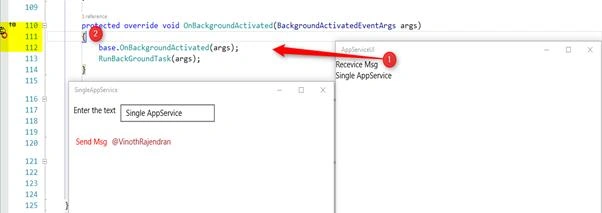
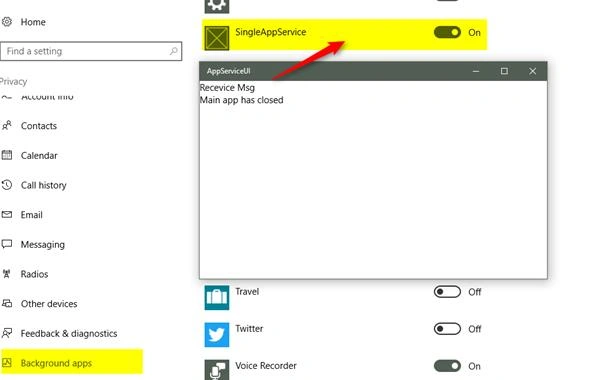
- Main Application is not running in the foreground, Run the client application. Now, the Appservice will start responding to the UI because Appservice is running into the System Background apps (Appservice is hosted intoa single process (Main application) and the system is automatically registered in System Background apps).
Complete Source code is available on GitHub.


Ramesh PalaniappanPosted Aug 22, 2016, 1:51 AM
Good One