

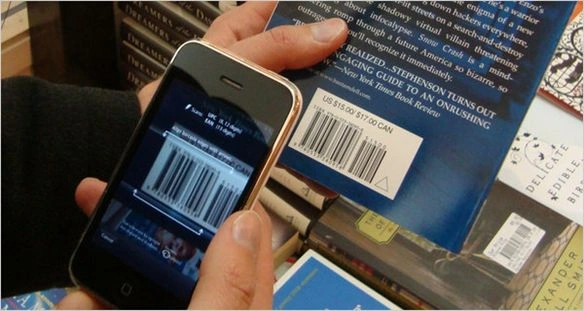
For creating a Barcode Scanner, I will use the NuGet package Arc.BarCodes, a cross-platform creator built on top of ZXing.Net.Mobile to allow for easy cross-platform access from Shared/PCL core libraries.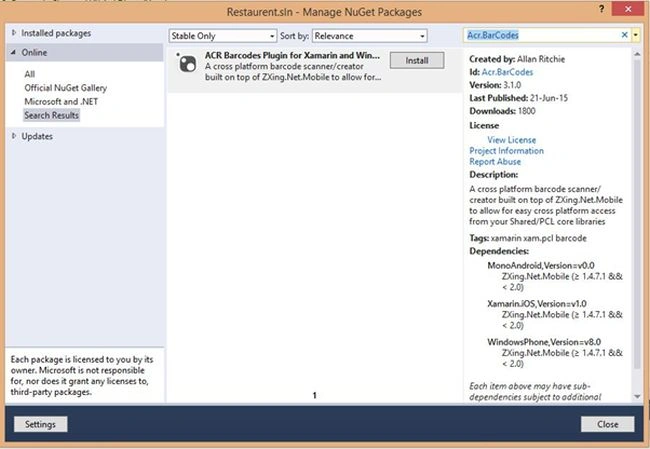
Now we can set some permissions for Android and Windows to get access to the camera. This is for taking the clear picture of the barcode that we want to scan.
For Android open the AndroidManifest.xml and select CAMERA from the Required Permissions.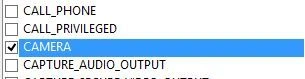
Now open WMAppManifest.xml for setting permissions to Windows Phone then select ID_CAP_ISV_CAMERA from Capabilities.
Now we want to initialize the corresponding NuGet package in each platform-specific startup classes. For example, AppDelegate.cs for iOS, MainActivity.cs for Android and MainPage.xaml.cs for Windows Phone by calling global::Acr.BarCodes.BarCodes.Init(); before calling LoadApplication();
Now create a button on the page for the Barcode Scanner. Write the following code in the click event of the button so that we can scan the barcode on that button click.
- Button scanBtn = new Button
- {
- Text = "Scan Barcode", HorizontalOptions = LayoutOptions.FillAndExpand,
- };
- scanBtn.Clicked += async(sender, args) = >
- {
- var scanResult = await Acr.BarCodes.BarCodes.Instance.Read();
- if (!scanResult.Success)
- {
- await this.DisplayAlert("Alert ! ", "Sorry ! \n Failed to read the Barcode !", "OK");
- }
- else
- {
- await this.DisplayAlert("Scan Successful !", String.Format("Barcode Format : {0} \n Barcode Value : {1}", scanResult.Format, scanResult.Code), "OK");
- }
- };
Balaji BalaPosted Oct 12, 2016, 9:05 AM
Can we implement the same for QR coding app?
keertana dapariPosted Aug 1, 2016, 2:27 AM
Your solution is only for android.. But I want it in crossplatform xaml app. Can u please tell me.
keertana dapariPosted Jul 30, 2016, 2:59 AM
How to display that scanner values in another page instead of showing it in display alert
Chintan RathodPosted Jul 27, 2016, 2:22 AM
This library is deprecated now. Better to use https://github.com/Redth/ZXing.Net.Mobile
Dwi HyugaPosted Mar 19, 2016, 1:41 AM
can you give me some tutorial, how to make android app with xamarin and saving into mysql database.. thank..
Asfend YarPosted Feb 19, 2016, 4:00 PM
great
John DoePosted Oct 23, 2015, 11:40 AM
This would have been a great opportunity for a tutorial walk through on how to create a barcode reader application using Xamarin I hate to see the opportunity missed by just shoving the code up here and saying here it is.
Harshad PansuriyaPosted Sep 10, 2015, 8:26 AM
Good one thanks for sharing.
Vaikesh K PPosted Aug 14, 2015, 1:18 AM
Here is the sample code :AVAuthorizationStatus authStatus = AVCaptureDevice.GetAuthorizationStatus(AVMediaType.Video);switch (authStatus) { case AVAuthorizationStatus.NotDetermined: break; case AVAuthorizationStatus.Restricted: break; case AVAuthorizationStatus.Denied: break; case AVAuthorizationStatus.Authorized: break; default: throw new ArgumentOutOfRangeException(); }
Vaikesh K PPosted Aug 14, 2015, 1:14 AM
Richard : Here you want to check 'AVAuthorizationStatus' and handle the cases properly.
Vaikesh K PPosted Aug 14, 2015, 1:13 AM
Richard : In iOS When the app does not have permission to access the camera, and if the user tries to access the camera from the app. Then at first you want to check the whether the app have the permission to access the camera and display a message accordingly.
Vaikesh K PPosted Aug 14, 2015, 12:50 AM
Richard : Are you sure that you had given permission to access Camera on your application !
RichardPosted Aug 13, 2015, 4:42 PM
I have tried running the code but my camera screen appears blank, I see the text "wait for the barcode to scan automatically" and the red line but no image from the camera; any ideas?
Vaikesh K PPosted Aug 12, 2015, 3:51 AM
Thanks to all for supporting me :)
Karthikeyan KPosted Aug 12, 2015, 3:15 AM
Good one...Thanks for sharing
Shridhar SharmaPosted Aug 4, 2015, 10:32 AM
good one !
Debasis SahaPosted Aug 4, 2015, 12:53 AM
Good One...
Chervine BhiwooPosted Aug 3, 2015, 11:23 PM
Looks great! Thanks!
Sam HobbsPosted Aug 3, 2015, 5:16 PM
Thank you, Vaikesh. That looks fun, easy and useful. The thing that would be very useful is the ability to scan a bar code and store the code somewhere for later use. The scanner application I use most will allow me to search the internet for the code but that is not good if I do not have a WiFi connection, such as in a store. I want to be able to store the code for use later when I can use WiFi.
Santhakumar MunuswamyPosted Aug 3, 2015, 2:37 PM
Nice article. Thanks for sharing
Gopi ChandPosted Aug 3, 2015, 10:54 AM
Good one
RakeshPosted Aug 3, 2015, 10:53 AM
Good one
Sibeesh VenuPosted Aug 3, 2015, 8:48 AM
Nice share
Neeraj KumarPosted Aug 3, 2015, 8:44 AM
Nice Work
Rajeesh MenothPosted Aug 3, 2015, 8:38 AM
Nice one