

Here is a procedure to create a basic calculator. In this section I will build a basic calculator that can perform the following operations:
- Addition
- Subtraction
- Multiplication
- Division
- Clear
Steps:
Open Microsoft Visual Studio 2010 then click on "File" -> "New" -> "Website".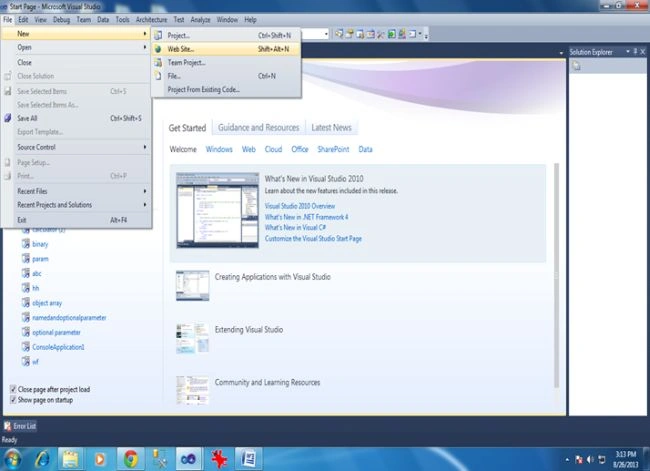
Then select "ASP.NET Empty Website".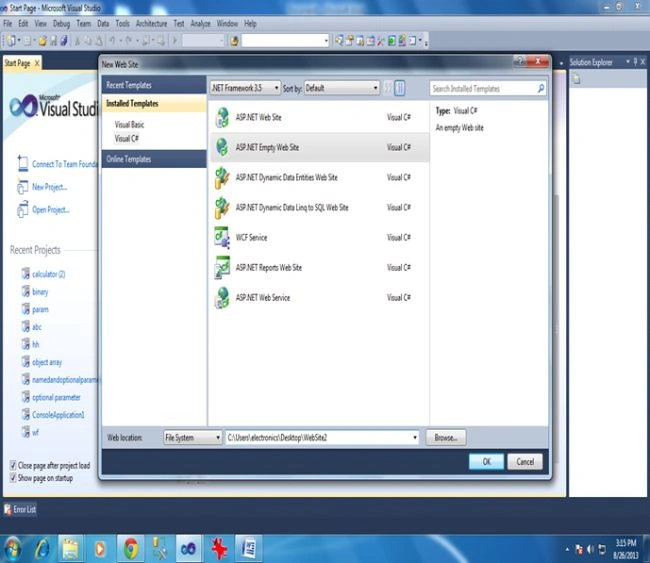
Then "Add New Item":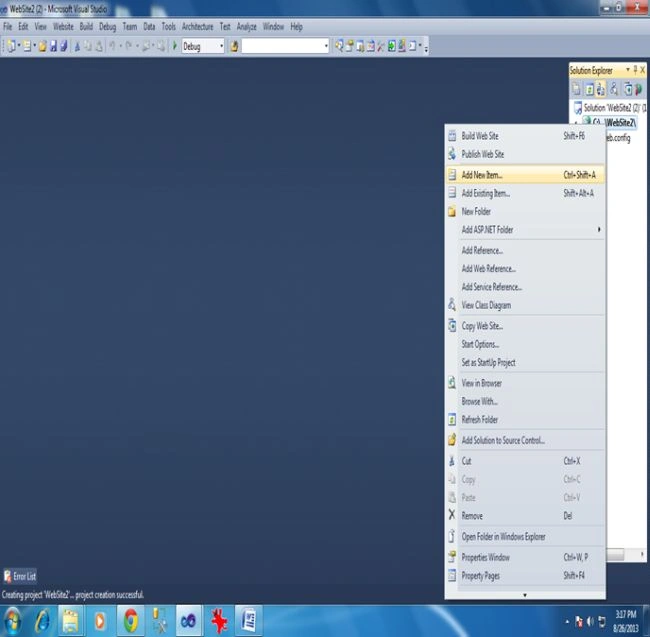
Then select "Web Form":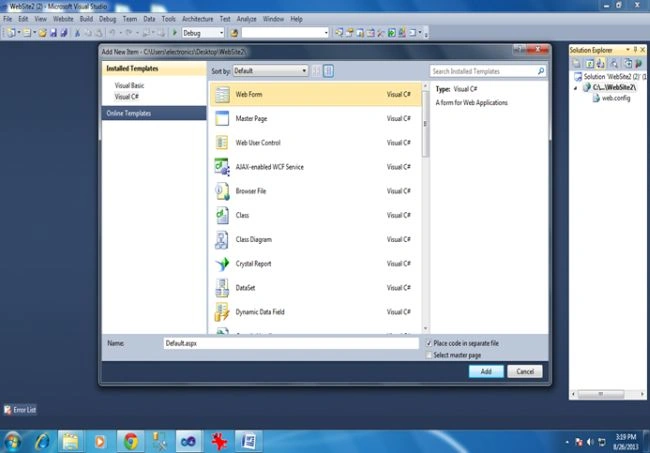
And click "Add". Now it will open the page as in the following: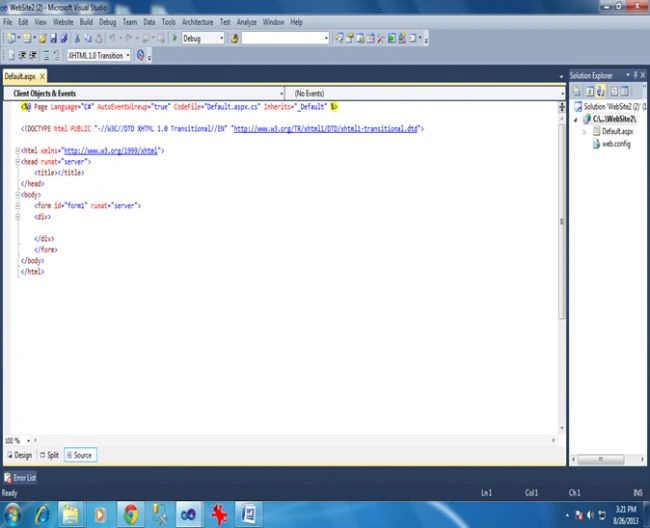
Here we will write our code:.
Process to create calculator
First we need to create a TextBox and 16 Buttons as in the following:
- 10 Buttons for numbers (0-9)
- 5 Buttons to perform operation (addition (+), Subtraction (-) , Multiplication (*), Division (/) ,Clear (CLR) )
- 1 Buttons for evaluation (=)
Here is the code for the "Default.aspx" page:
- <html xmlns="http://www.w3.org/1999/xhtml">
- <head id="Head1" runat="server">
- <title></title>
- <style type="text/css">
- .cal
- {
- position:absolute;
- top:50px;
- left:150px;
- right:400px;
- height:500px;
- bottom:100px;
- background-color:Teal;
- }
- </style>
- </head>
- <body>
- <form id="form1" runat="server">
- <div class="cal">
- <asp:Label ID="l" Text=" BASIC CALCULATOR" runat="server" Style="margin-left: 200px"
- Font-Bold="False" Font-Italic="False"></asp:Label>
- <asp:TextBox ID="t" runat="server" Style="margin-left: 100px; margin-top: 24px;"
- Width="335px" Height="41px"></asp:TextBox>
- <asp:Button ID="b1" Text="1" runat="server" Height="37px" Style="margin-left: 0px"
- Width="57px" OnClick="b1_Click" />
- <asp:Button ID="b2" Text="2" runat="server" Height="37px" Style="margin-left: 0px"
- Width="57px" OnClick="b2_Click" />
- <asp:Button ID="b3" Text="3" runat="server" Height="37px" Style="margin-left: 0px"
- Width="57px" OnClick="b3_Click" />
- <asp:Button ID="add" Text="+" runat="server" Height="37px" Style="margin-left: 0px;
- margin-top: 0px;" Width="57px" OnClick="add_Click" />
- <asp:Button ID="b4" Text="4" runat="server" Height="37px" Style="margin-left: 0px"
- Width="57px" OnClick="b4_Click" />
- <asp:Button ID="b5" Text="5" runat="server" Height="37px" Style="margin-left: 0px"
- Width="57px" OnClick="b5_Click" />
- <asp:Button ID="b6" Text="6" runat="server" Height="37px" Style="margin-left: 0px"
- Width="57px" OnClick="b6_Click" />
- <asp:Button ID="sub" Text="-" runat="server" Height="37px" Style="margin-left: 0px"
- Width="57px" OnClick="sub_Click" />
- <asp:Button ID="b7" Text="7" runat="server" Height="37px" Style="margin-left: 0px"
- Width="57px" OnClick="b7_Click" />
- <asp:Button ID="b8" Text="8" runat="server" Height="37px" Style="margin-left: 0px"
- Width="57px" OnClick="b8_Click" />
- <asp:Button ID="b9" Text="9" runat="server" Height="37px" Style="margin-left: 0px"
- Width="57px" OnClick="b9_Click" />
- <asp:Button ID="mul" Text="*" runat="server" Height="37px" Style="margin-left: 0px"
- Width="57px" OnClick="mul_Click" />
- <asp:Button ID="b0" runat="server" Text="0" Height="37px" Style="margin-left: 0px"
- Width="57px" OnClick="b0_Click" />
- <asp:Button ID="clr" runat="server" Text="CLR" Height="37px" Style="margin-left: 0px"
- Width="57px" OnClick="clr_Click" />
- <asp:Button ID="eql" runat="server" Text="=" Height="37px" Style="margin-left: 0px"
- Width="57px" OnClick="eql_Click" />
- <asp:Button ID="div" Text="/" runat="server" Height="37px" Style="margin-left: 0px"
- Width="57px" OnClick="div_Click" />
- </div>
- </form>
- </body>
- </html>
Here is the code for the "Default.aspx.cs" page (the code for all the buttons) :

Jaga ThotaPosted Mar 13, 2018, 2:49 AM
If i type sysmbols in keybord not working
dinesh kumarPosted Sep 1, 2017, 8:17 AM
Y r we using b='+' in add event can u explain
Ronak SutharPosted Mar 2, 2015, 2:41 AM
good site
siva vPosted Oct 31, 2014, 6:25 AM
Nice article for fresher like me. just a gentle reminder overflow was unhandled.
Sankar KPosted May 16, 2014, 6:58 AM
25 33 46 friend it is possible to do one short
Quwwat khanPosted Apr 7, 2014, 11:36 AM
good
Christian NwambaPosted Aug 27, 2013, 9:10 AM
Nice Start. Good Luck with C# corner
Kiran Kumar TalikotiPosted Aug 27, 2013, 5:20 AM
Nice Article:)
Sanjeeb LenkaPosted Aug 26, 2013, 9:42 AM
nice start..