

Introduction
In this article I will explain about FormFlow using bot builder SDK for .NET. Using Microsoft bot framework with FormFlow designing we can have a conversation with the user for getting the information from them. It means that the bot will ask the questions and gather the responses from the user. It automatically generates the dialogs that are necessary for managing the conversation based on the guidelines that we specify. The FormFlow is different from the LuisDialog. FormFlow guides for completing the form, whereas the LuisDialog evaluates the input.
Prerequisites
- Visual studio 2017
- Microsoft bot framework.
Creating the FormFlow project
Step 1
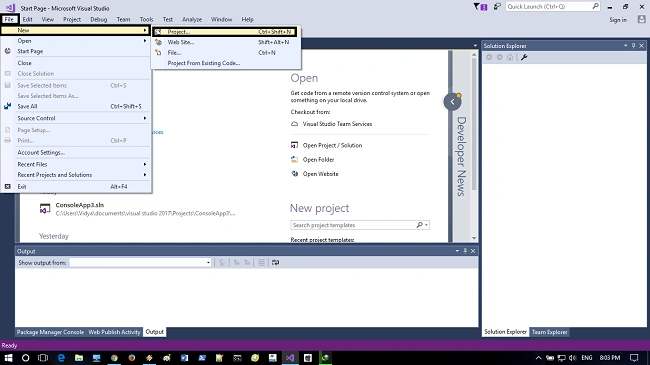
Open Visual Studio 2017, click->File->New->Project.
Step 2
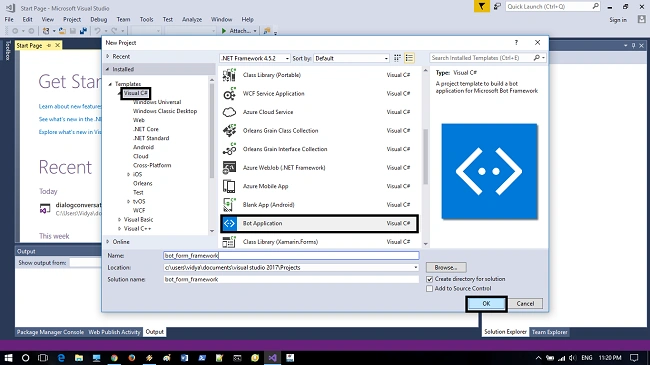
Select the bot template and provide a name for the project as per your desire and click->ok.
Step 3
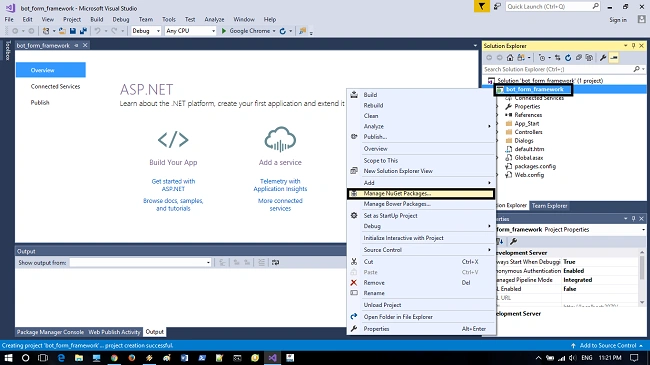
After the project is created, now we need to update the NuGetPackages, since the visual studio contains the basic NuGetPackages by default, we just need to update the packages. For updating the package, right click->project and select Manage NuGetPackages.
Step 4
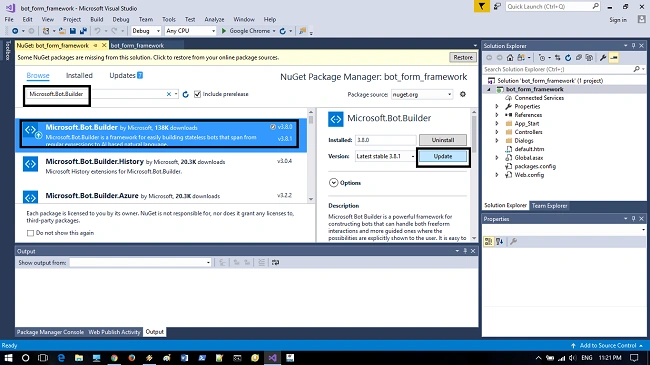
Browse for NuGetPackage named “Microsoft.Bot.Builder” and select the NuGetPackage and update the package to latest version for proceeding to further steps.
Step 5
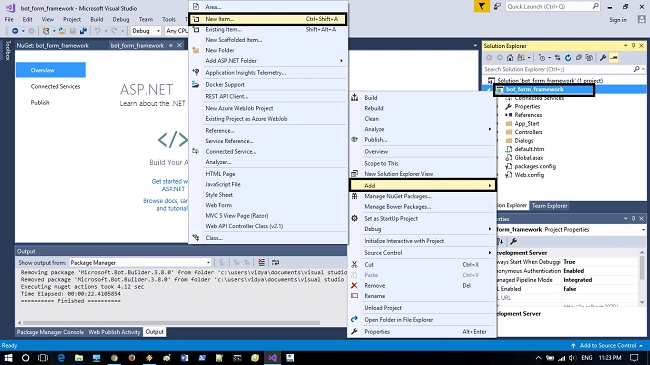
After updating the NuGetpackages, right click->project and select->Add->NewItem.
Step 6
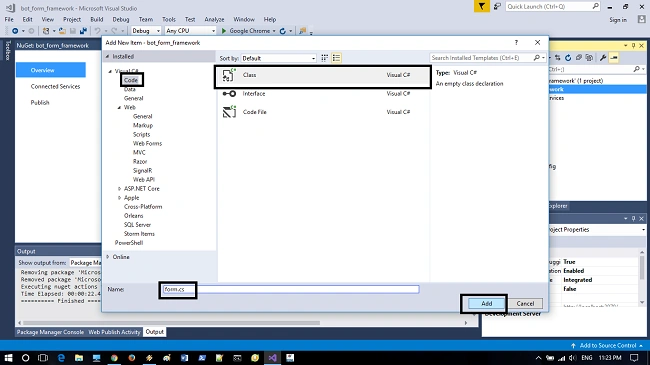
Now we will create a class that contains the logic of FormFlow and provide a name for the class and click->Add.
Step 7
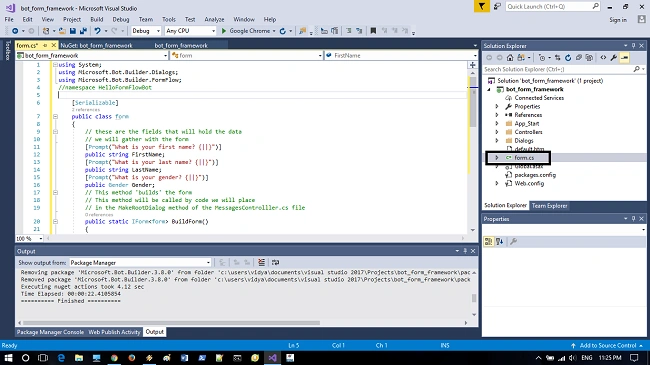
By creating a new class in the project, replace the c# class code in “form.cs” and save the file.
- using System;
- using Microsoft.Bot.Builder.Dialogs;
- using Microsoft.Bot.Builder.FormFlow;
- namespace HelloFormFlowBot {
- [Serializable]
- public class ProfileForm {
- [Prompt("What is your first name? {||}")]
- public string FirstName;
- [Prompt("What is your last name? {||}")]
- public string LastName;
- [Prompt("What is your gender? {||}")]
- public Gender Gender;
- public static IForm < ProfileForm > BuildForm() {
- return new FormBuilder < ProfileForm > ().Message("Welcome to the profile bot!").OnCompletion(async(context, profileForm) => {
- await context.PostAsync("Your profile is complete.");
- }).Build();
- }
- }
- [Serializable]
- public enum Gender {
- Male = 1, Female = 2
- };
- }
Step 8
So the code form.cs is indicated with the fields for gathering the FormFlow and the class in FormFlow and Gender enum states that it is serialized.
Step 9
Now open the MessagesController.cs file and add the following using statements for supporting the FormFlow file
- using Microsoft.Bot.Builder.Dialogs;
- using Microsoft.Bot.Builder.FormFlow;
Step 10
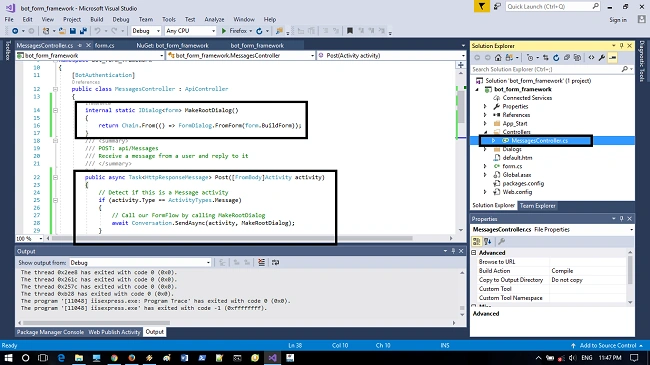
After adding the using statements, we need to add the following MakeRootDialog method to MessagesController class for calling the form method in class.
- internal static IDialog < ProfileForm > MakeRootDialog() {
- return Chain.From(() => FormDialog.FromForm(ProfileForm.BuildForm));
- }
Step 11
Now it involves slightly altering the post method in MessagesController class in the following and saving the file
- public async Task < HttpResponseMessage > Post([FromBody] Activity activity) {
- // Detect if this is a Message activity
- if (activity.Type == ActivityTypes.Message) {
- // Call our FormFlow by calling MakeRootDialog
- await Conversation.SendAsync(activity, MakeRootDialog);
- } else {
- // This was not a Message activity
- HandleSystemMessage(activity);
- }
- // Return response
- var response = Request.CreateResponse(HttpStatusCode.OK);
- return response;
- }
Step 12
Debug the application using F5 and the port number with web address will be opened in browser.
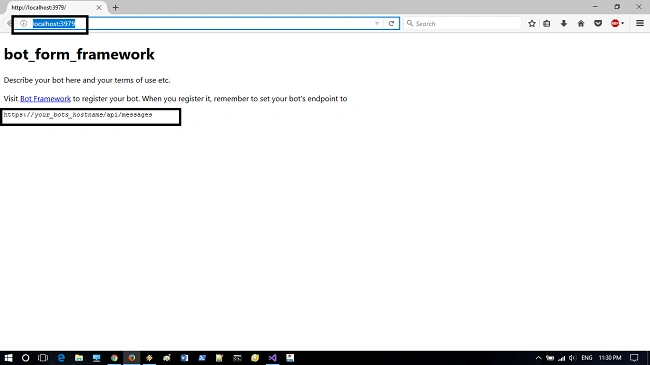
Step 13
Start the BotFramework emulator and connect to the bot by adding the address with port number as indicated in web browser and don’t forget to add /api/messages at the end.
For example :http://your_bot name/api/messages. And click->connect.
Step 14
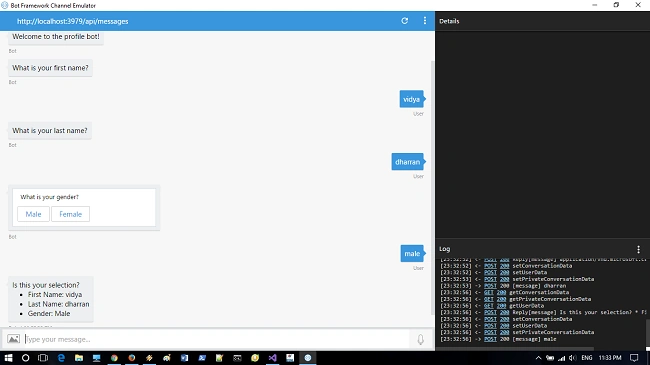
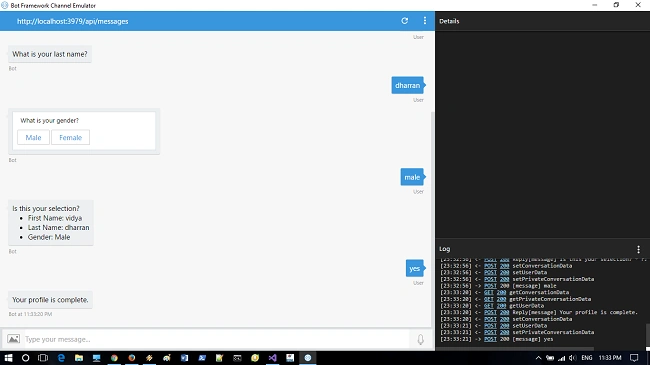
The bot will be connected and now we can type a message and hit “enter” for conversation with bot for filling the FormFlow. This article just explains about a basic converse with bot and filling the FormFlow this doesn’t mean this can save the responses from the user. I mean you need to fill again the FormFlow again and again.
In my next article I will explain about the FormFlow application that ask to fill the form for one time and displays the values received using bot state service, Thanks for reading and have a nice day.
Sairam Sekhar PoluruPosted Jun 29, 2018, 4:56 AM
I need a speech enabled form in C#