

Topics to be Covered
- SQL Basics
- Introduction
- What a database is
- What Relational means
- A small example
- SQL Statement
- Naming Things
- Creating Things
- Everything about SELECT Statement
- Introduction
- FROM Clause
- Limiting Result Set
- WHERE Clause
- WHERE Clause
- AND OR
- MORE Operators
- BETWEEN
- LIKE
- IN
- IS and ISNOT
SQL Basics
Introduction
Before I begin, this article is intended to each and every beginner, whether a Software Developer or a Quality Analyst, this is a must know for every software engineer. Some might say we have Database Administrators, so why should we understand? I feel however that as developers we should have a thorough understanding of what is going on and be able to handle everything. This article will explain each and every concept in details to get started with the Structured Query Language (SQL). First of all, the question going on your mind now would be, what is SQL? As said previously, SQL stands for Structured Query Language. It is a special-purpose programming language. Its purpose is to manipulate relational databases. Relational databases are one that have detailed information about all the tables in a formally organized manner. The best part here is it contains both the data-definition syntax as well as data-manipulation syntax.What a Database is
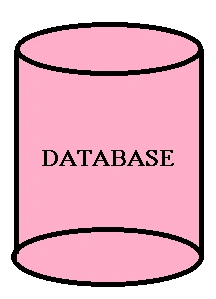
Now the diagram describes what it is! A database is simply a container that helps organize data in a format or constructive manner. In a database data is stored in a rational way. Now, let's take an example to help understand it better. For instance, our contact list in cell phones. If we think a bit into it we can understand that the contact list is a database with data in it in an organized manner. Then we sort by the letters to search the names from the list. Thus we perform a query execution on the list to retrieve the records we want. This is the flexibility a simple database provides. It makes it easier to:
- Query Data
- Update Data
- Insert New Data
- Delete Data
- Relational Database
- Object-Oriented: Link to refer
- Document Based: Link to refer
What Relational is
The dictionary meaning of this is "Things that relate each other in a way". Here the meaning does keeps it consistency. The Relational Model is the database model on which SQL is based. It is thus a way to describe data and the relationship among those data entities. In a relational database, data is stored in a construct called a table. Now what is a table?- A table is a collection of columns that define the table properties with a specific datatype associated with it, with specific size, thus restricting the size of each record to be inserted into the table.
- Every column can be made required or not required (using the check box available for Null values).
- Rows can be retrieved by asking questions about the data. Like "You would need all the rows of data that have a column (surname) value as having the value 'Ray'"
- An essential part of a table is a "Key". Every table must have a key associated with any column to uniquely identify the records of the table. Usually a table has an associated key called the Primary Key. (We will be discussing keys in the upcoming modules).
- If more than one table uses the same primary key (in one table it is the primary key and the other table it is the foreign key), then the tables can be merged or joined to give different set of records set.
A small Example
Before starting with the rest, I hope the readers have a view of the SQL Server Management Studio (SSMS). Here is how the SSMS looks: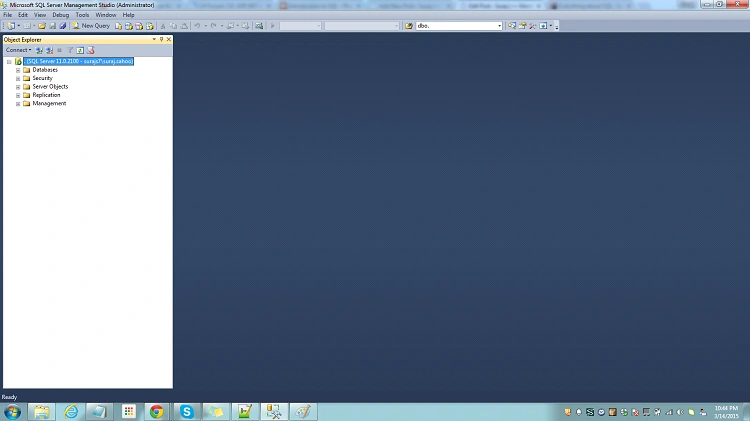
Now let's ask questions of ourselves. Why do we need databases with multiple tables at all, why not a single table? Let's see with an example why. Suppose we have a User table that would have columns named UserID, FName, LName, Email and PhNo. Now suppose we have only this table and there is a requirement in the future for a user to (optionally) have more than one Phone number or more than one Email. Just think how we would approch this, since we cannot store multiple values into a column. Thus, that does not provide us an indication to have another table!
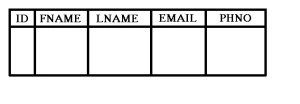
Just see the difference below:
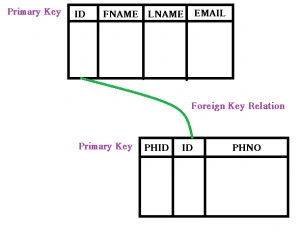
In the preceding figures, you can see the difference clearly, using the first table will cause a real problem and a lot of redundant data/records in the table that anyway violates the Normalization rules (Normalization Rules). Thus creating the secod table that would be having a foreign key relationship with the User table, can now store as many phone numbers as a user can have.
SQL Statement
- A SQL statement is framed from the combination of an actionable set of valid words out of which some are SSMS defined and others are user-defined.
- A valid SQL statement would be if an statement/query that ends with a semicolon (;), it is not like it is mandatory to add semicolon at the end. But it is a part of the ANSI standard, so it is advisable to use the semicolon at the end of the statement.
- SQL is not case-sensitive. Usually the queries/statements are written in upper case. Sometimes the user-defined functions are in the lower case. But oviously the standard needs to be followed for better maintenance and to maintain consistency.
- We can use comments in SQL statements. For single-line comments, "--" is used as the predecessor for the query whereas "/**/", is used for the query for multiple-line comments.
- SQL statements start with commands. Compared to the English language, the commands here are similar to the verbs. For example, SELECT (command/keyword in SQL) In generic terms, SELECT would go as in the following:
SELECT VALUES FROM TABLE NAME;
After the command comes the part that is highly dependent on the commands that define the set of results or records we can expect from the query like a list of all the values of the columns (genrally the wildcard symbol "*" (asterick) selects all the columns in the table). Then is the FROM clause to fetch records / column values from which table (as it explains itself).
Naming Things
This might be a bit controversial since there is nothing called the best way to do it. So we follow what is followed the most, or follow the conventions already used. This would differ from person to person. But the most important factor to keep in mind is to have consistency throughout. So that when we see the database the names of the tables define themselves. Some of the rules I am listing below:- A table name should be singular. A table name describes what the values would be in a row. It is not a hard bound rule, but a rule. :)
- Column names in a table should not repeat themselves and the same applies at the database level. The repeatation is only allowed when there is a relationship among tables.
- Names are "scoped" in SQL. What this means is a database would have a name. Tables inside a database should have a name. Thus when accessing the table, it should be accessed with its "full" name which would include the database name, separated by periods. Like TableName: DatabaseName.Table ColumnName: Table.Column
Creating Things
There is an entire set of SQL commands that are required to create and modify the structures/records in the database.CREATE DATABASE DemoDatabase; USE DemoDatabase; CREATE Table DemoDatabase.DemoTable(...);
Here I have only shown the structures, we will be discussing more of that ahead. Datatypes are very vital when we will be creating the tables in a database. Each column in a database has a restriction on the datatype of the data that can be stored in the table. Let's have a look at the datatypes.
| Data Type | Value/Space |
|---|---|
| CHARACTER | Can hold "N" number of characters that are specified implicitly, to be exact statically that is the number of characters to be accepted in the vallue is set during column creation |
| VARYING CHARACTER | Can hold "N" characters that is set dynamically, that is if MAX is set then it would accept any number of characters sent from the server into the column. |
| BINARY | Stores Hexadecimal data, fixed length with a length of n bytes, where n varies from 1 through 8,000. Used for images and other sort of blobs. |
| VAR BINARY | As the name suggests, it accepts value of varying length. When size is not specified, then default value is taken as 1. |
| SMALLINT | Its length is 2 bytes and ranges from -2^15 (-32,768) to 2^15-1 (32,767) |
| INT | Its length is 4 bytes and ranges from -2^31 (-2,147,483,648) to 2^31-1 (2,147,483,647) |
| BIGINT | Its length is 8 bytes and ranges from -2^63 (-9,223,372,036,854,775,808) to 2^63-1 (9,223,372,036,854,775,807) |
| TINYINT | Its length is 1 byte and ranges from 0-255. Can be used for values with Yes/No or the enumeration types that are limited to fewer values |
| BOOLEAN | Stores TRUE FALSE values. When NOT NULLABLE, then default value is False, else it also accept NULL values. |
| DATE | Stores only Date values, only YEAR MONTH and DAY values in the format YYYY--MM--DD |
| TIME | Stores only time values, only HOUR MINUTE and SECONDS values of a day in the format HH--MM--SS |
| TIMESTAMP | Stores both date and time. This is for when the date is combined with a time of a day with the seconds. The format is just concating both the date format and the time format |
These are some of the datatypes, I have listed. The important thing here to keep in mind is, when creating the table, we never actually keep in mind. Thus the datatype plays a very important role if we consider the future. Suppose we use the number of users or the userid in a table datatype as a smallint or only an int even, then sometimes in the future maybe the number of users increases to a large extent and overflows the range of the datatypes. Then here the problem develops. You might have heard about the YouTube crash for the Gangnam song. The reason behind it was this the issue with the datatype for the number of views. It increased to such an extent that it crashed. The Relational Database Management System is based on the relational model. In simple terms, it is a type of database management that stores data in realated tables.
Everything about the SELECT statement
Introduction
As we have already discussed about the SSMS where we will be demonstrating our queries. After you read through this part of the article, you will be able to understand the details of using the SELECT statement, asking various types of questions to the select query. First of all, we store the data in a database to reuse it at some later point of time. Querying data is all about asking questions when retrieving data. Understanding the combination of English and the SQL helps us postulate the queries very easily. Let's create a database first. Look below at the query. - CREATE DATABASE DemoDatabase;
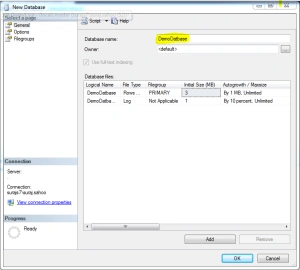
Database using the SSMS UI. See the following images.
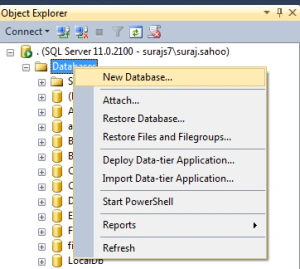
When in the first image as you see, the New Database is clicked, another window pops up as shown in the second image. Add the database name and there and it creates the database for you with a maxsize of unlimited. Then we create a Table for the storage of records.
CREATING A TABLE
- USE DemoDatabase
- CREATE TABLE [dbo].[User](
- [UserId] [int] IDENTITY(1,1) NOT NULL,
- [UserName] [nvarchar](50) NULL,
- [word] [nvarchar](50) NULL,
- [UserEmail] [nvarchar](50) NULL,
- CONSTRAINT [PK_User] PRIMARY KEY CLUSTERED
- (
- [UserId]
- )WITH (PAD_INDEX = OFF, STATISTICS_NORECOMPUTE = OFF, IGNORE_DUP_KEY = OFF, ALLOW_ROW_LOCKS = ON, ALLOW_PAGE_LOCKS = ON) ON [PRIMARY]
- ) ON [PRIMARY]
Now the preceding query creates a table for you, but we need to understand the commands used in the query since some seem understandable whereas some are not.
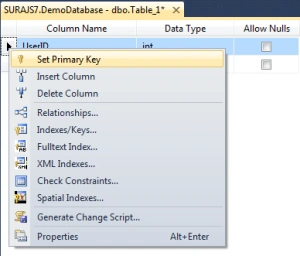
Then we need to set the column as an identity column that will be auto-incremented by 1 everytime a new row is added. The developer need not bother about incrementing or setting the primary key. Set it as in the following:

Then we add all the columns with the datatypes mentioned previously and save the table with a proper table name. Now here the checkbox for the Nullable column plays a vital role. Think and specify the value here. Finally the UI looks as in the following:
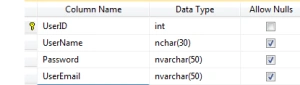
Thus, now we have created a table also. Now it is time to add records/rows into it. We will be writing queries to insert the values into the table. Let's see how:
INSERT ROWS INTO TABLE
- INSERT INTO dbo.[User] (UserName,word,UserEmail) VALUES ('Suraj','abc123','[email protected]');

Here we add the values in the row containing NULL values. The Primary key column is not editable since it will increment itself. The other columns are populated with the values to set the table records. Now let's return to our topic of discussion Select.
- SELECT * FROM dbo.[User]
- SELECT users.UserName as Name, users.word as PWD FROM dbo.[User] as users;
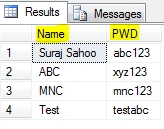
Similarly you can use shorter Table alias names and use it throughout your query for convinence and select as many and the specific columns you need from the table. There are various ways for limiting the result sets we get. By default all the rows that match the From clause query are retrieved in the result set. There are two ways to limit the result set of the Select statement. One is to add conditions to the Query after the From clause. Another is to add the DISTINCT qualifier to the Select statement. Distinct is a result set qualifier. Also TOP (number) can be used to limit the result set. We will see the second type here and move to the condition type consequently.
- SELECT DISTINCT users.UserName as Name FROM dbo.[User] as users;
- SELECT TOP 500 users.UserName as Name FROM dbo.[User] as users;
WHERE Clause
This is used after the FROM clause and can be thought of as a search from the records using the conditions based on which we would be doing the result search. Searching with much more precision. The body of the where clause will be one or more expressions with return value as True/False. If the response is true based on the conditions for a specific row coming under the check, then the row is added to the result set that is retrieved finally from the query. A simple example here would be a get of a list of records/users whose name is "Suraj".- SELECT * FROM dbo.[User] as users WHERE users.UserName = 'Suraj' ;
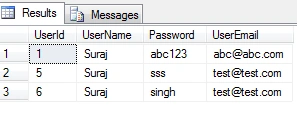
To master the WHERE clause in SQL we need to master how all the operators available behave. Let's have a look at the operators available with the WHERE clause in SQL and how they would behave:
| Datatype | Behaviour |
|---|---|
| Eqals '=' | Returns true if both the conditions on left and right hand side matches |
| Not Equals to '<>' | Returns true if both the conditions on left and right hand side do not match |
| Greater than '>' | Returns true is the value on the left hand side is larger than the right hand side value |
| Less than '<' | Returns true is the value on the left hand side is smaller than the right hand side value |
| Greater than or equal to '>=' | Returns true is the value on the left hand side is larger than or same as the right hand side value |
| Less than or equal to '<=' | Returns true is the value on the left hand side is smaller than or same as the right hand side value |
Now let's have a look at the queries and how they behave when the operators are applied. Here I will be applying operators on the string values.
6. Select the users with UserName greater than "Suraj"
- SELECT * FROM dbo.[User] as users WHERE users.UserName > 'Suraj' ;
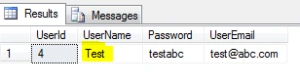
Thus the name starting with "T" is displayed in the result. Similarly less than and the other operators would work out.
- SELECT * FROM dbo.[User] as users WHERE users.UserName < 'Suraj' ;
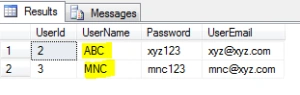
- SELECT * FROM dbo.[User] as users
- WHERE users.UserName <> 'Suraj' ;
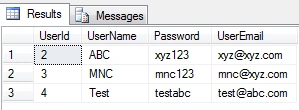
Then let's peep into the AND OR operators. As we all know each boolean expression can be combined with other boolean expressions. These are combined by using the AND OR operator. AND means that both of the boolean expressions are combined using AND, both must evaluate to True for the row to satisfy to be a part of the result set. Like for example a list of the users with a first name of Suraj and email as a specific value. Here as in the simple something is the English language and it is to be used here to evaluate and produce the result set.
9. Select the users with UserName "Suraj" and UserEmail "[email protected]"
- SELECT * FROM dbo.[User] as users WHERE users.UserName ='Suraj' AND users.UserEmail = '[email protected]';
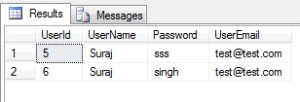
Thus here in the result set, we can check that both of the expressions on the sides of the AND operator turn out to be true for both of the rows in the result set. The OR keyword means that any of the expressions on the either side of OR operator can be true, then the row becomes a part of the result set. That is when any of the expression satisfies then the row is a part. Just keep in mind that if the first expression turns out to be true then the second expression is not evaluated. If the first expression turns to be false, then the second expression is evaluated to be checked.
- SELECT * FROM dbo.[User] as users WHERE users.UserName ='Suraj' OR users.UserEmail = '[email protected]';
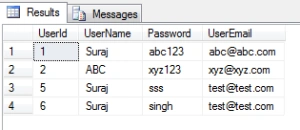
As we see first when the first expression, UserName as Suraj, is a part of the result set and also the rows with the UserEmail as "[email protected]". The BETWEEN operator acts on any column and taking two values checking the range. If a row value lies in the range specified in the BETWEEN condition, then the expression evaluates to True.
- SELECT * FROM dbo.[User] as users WHERE users.Age BETWEEN 25 AND 50 ;
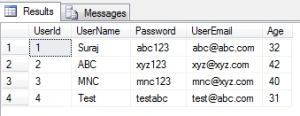
Thus the result set includes only those rows where the Age lies between 25 and 50, others are neglected. Between in inclusive of the values being checked. The LIKE operator is a special one that is used with strings. When we give a LIKE operator to the strings then it looks and search for those values of the string that matches the pattern specified in the LIKE condition. For LIKE '%' is used that is otherwise called wild card symbol. The % can be used anywhere in the string. Like for example, who are all the users with names starting with "S".
- SELECT * FROM dbo.[User] as users WHERE users.UserName LIKE 'S%' ;
- SELECT * FROM dbo.[User] as users WHERE users.UserName LIKE '%C' ;
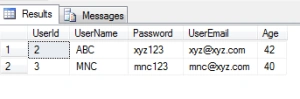
- SELECT * FROM dbo.[User] as users WHERE users.UserName IN ('Suraj' , 'test') ;
Prakash TripathiPosted Apr 24, 2015, 1:40 AM
Good article for beginners
Upendra Pratap ShahiPosted Apr 20, 2015, 8:30 AM
nice sir...
Sibeesh VenuPosted Mar 21, 2015, 10:59 AM
Good effort buddy.
Sourabh SomaniPosted Mar 20, 2015, 1:38 AM
Very Nice sir :)
TwostepdevelopersPosted Mar 19, 2015, 9:32 AM
thanks
Harpreet SinghPosted Mar 18, 2015, 11:57 PM
very nice and very helpful for the beginners
Vithal WadjePosted Mar 18, 2015, 2:13 PM
nice
Dinesh BeniwalPosted Mar 18, 2015, 1:06 PM
Great work thanks for sharing ;)
Pankaj Kumar ChoudharyPosted Mar 18, 2015, 11:18 AM
Very Nice Article Sir.....................
Yogendra YadavPosted Mar 18, 2015, 3:04 AM
nice article sir...
Manish Kumar ChoudharyPosted Mar 18, 2015, 12:53 AM
Good one.
Tom MohanPosted Mar 17, 2015, 10:58 PM
Good explanation