

I will also describe how and where to use Nlog. I hope this article will really help those who have never used Nlog. Let’s start digging into this.
What is Nlog?
Nlog is an open source log platform. Through this platform, we can log an activity of an application. This makes an application's code easy to handle. Nlog provides a cross platform support.
Things we can log
By using Nlog in an Application, we can log the things given below.
- Trace - Detailed Log
- Debug - Debugging Information
- Info - Info Message
- Warning - Warning Messages
- Error - Error Messages
- Fatal - Big Errors, which needs attention
Basic Targets
- Files- We can log our messages into a file.
- Database can also work with SQL Server, using Nlog.
- Console displays messages in a C# Console Application.
- Email- We can email log message.
Today, we will create a console Application and will use Nlog for the things given below.
- To display log messages in a console application.
- Log messages in a file at a specified location.
- Also, we will email a logged message.
Let's start.
Step 1
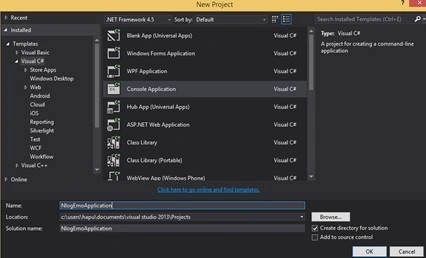
Create a C# console Application and name it NlogDemoApplication.
Step 2
Install Nlog package in the Application. You can use NuGet Package Manager for this. Use the command given below.
Install-Package NLog.Config
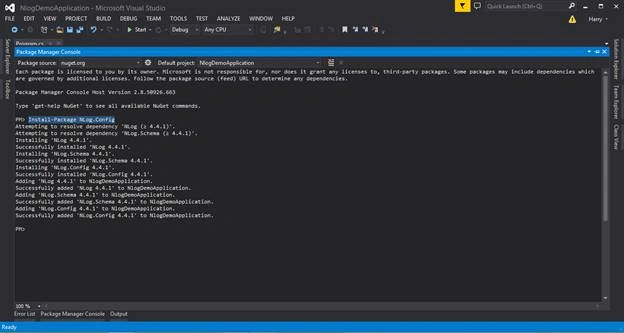
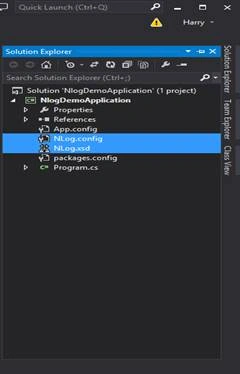
Two files will be added, as shown below.
- Config
- xsd
Step 3
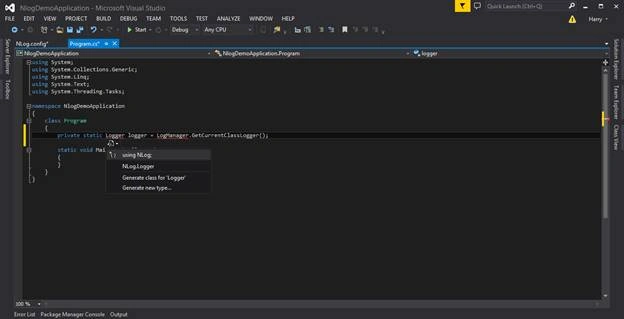
Open Program.cs file and create a private static Logger per class. We also need to use LogManager to create Logger instances. Do not forget to add namespace as well.
private static Logger logger = LogManager.GetCurrentClassLogger();
Step 4
Replace the main function with the code given below. In this method, we just call Nlog error function to log a static error message.
static void Main(string[] args)
{
    logger.Error("This is an error message");
    Console.Read();
}
Step 5
Now, open Nlog.Confile and replace code given below as well.
<targets>
    <target name="console" xsi:type="Console" layout="${longdate}|${message}"/>
</targets>

<rules>
    <logger name="*" minlevel="Error" writeTo="console" />
</rules>
Under targets tag, we add keys as targets; i.e. where we want the results and under rules tag and we add key (rules), when we write our log. In the meantime, we are going to target a console Application and we are going to write a log whenever an error will occur.
Note
- xsitype Type of target for log
- Layout Output
- Name name of the target
Step 6
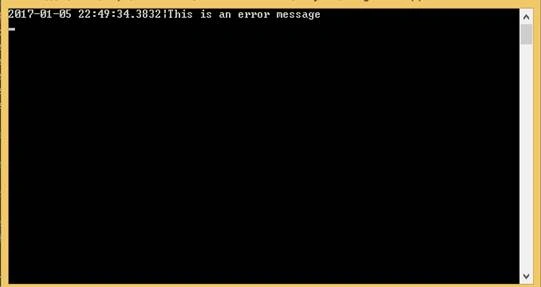
Run the Console Application and you will see the output given below. This is how we display a log message to a console output Window
Step 7
Now, we going to target a file to log an error message. Again, open Nlog.Config file and add line given below under targets tag.
<target name="file" xsitype="File" fileName="D\logs\NLog.log" layout="${longdate}|${message}"/>
In the existing rule, add the file (name of the target) with the console. Now, your code will look like, as shown below.
<targets>
    <target name="console" xsitype="Console" layout="${longdate}|${message}"/>
    <target name="file" xsitype="File" fileName="D\logs\NLog.log" layout="${longdate}|${message}"/>
</targets>

<rules>
    <logger name="*" minlevel="Error" writeTo="console,file" />
</rules>
Step 8
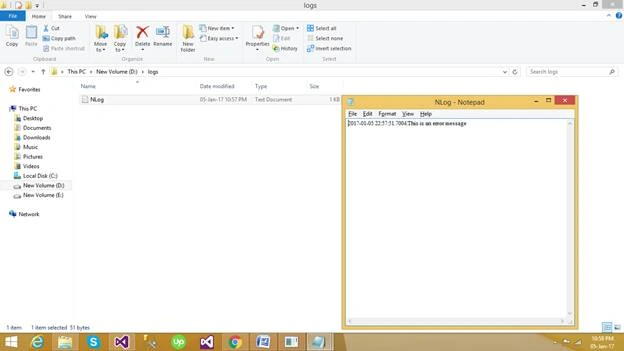
Run the code. Now, you will see the output in two places, where one is in console Window and the second is in the target file. Check the path specified in the file target. See the image given below for the reference.
Step 9
We are going to target an email now. Again, add one more target (as shown below) under targets tag.
| Type | |
| Subject | Could be whatever you want |
| To | To whom you will send email |
| From | Sending of email |
| Body | layout (Message you want to display in email) |
| enableSSl | For secure email |
| SmtpAuthentication | (None, Basic, Ntlm) |
| SmtpUserName | Username (from email) |
| SmtpPassword | Password (From email) |
| SmtpServer | Server from which you want to send the email. |
| Smptport | As per servers |
We are using basic authentication, so we have to mention smtpusername and password.
<target name="sendMail" xsitype="Mail"
    subject="Application Error Log"
    to="XXXXXXXXXXXXXXXXXXXXXXXXXXX"
    from="XXXXXXXXXXXXXXXXXXXXXXXXX"
    body="${longdate}|${message}"
    enableSsl="true"
    smtpAuthentication="Basic"
    smtpServer="smtp.gmail.com"
    smtpUserName="XXXXXXXXXXXXXXXXXXXX"
    smtpPassword="XXXXXXXXXXXXXXXXXXXX"
    smtpPort="587"/>
</targets>
The name of the target, which is sendEmail and the existing rule is shown below.
<logger name="*" minlevel="Error" writeTo="console,file,sendMail" />
Step 10
Run the application. In my case, I see the output, as shown below. You can check the result on your specified email address, when you try this code.
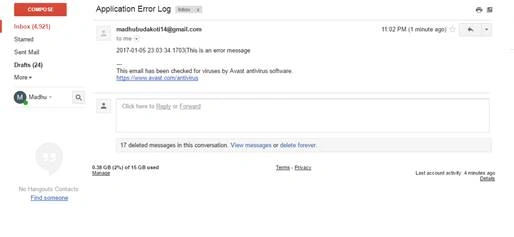
Thus, you can check the log messages now at three places
- Console
- File
In this example, I made it simple, so that the basic concept could be clear to all. I just used an error message. Similarly, you can log an info message, fatal error, trace and so on. You may also do many more things with Nlog, as it all depends on your creativity and effort. There are lots of things which we can do using Nlog. I just showed here how to use it. I hope you liked the article.
Markus RissmannPosted Sep 14, 2023, 2:35 PM
Was the article date modified? A .net 4.5 app in 2023?
sai jamesPosted Aug 11, 2023, 12:29 AM
Can you please share the code how to save the logs in the database table
Ashton TanPosted Apr 15, 2021, 7:48 AM
For those could NOT able to change your NLog.config due to the tiny lock (read-only). Hover over it and get the file path. For mine example is C:\Users\<your_name>\.nuget\packages\nlog.config\4.7.9\contentFiles\any\any. Open the NLog.config file using the Notepad++ and change the value. Next, get your xsd file from "https://nlog-project.org/schemas/NLog.xsd?r=redirect"
Vladislav KubalekPosted Jun 4, 2020, 1:26 AM
In your examples is 'xsitype' instead of 'xsi:type'
eyal bPosted Aug 3, 2019, 10:10 AM
I am not able to write to C:\logs\NLog.log i also tried C:\logs\logfile.txt not writing i also removed the read only attribute not working
Asif RazaPosted Dec 18, 2018, 12:53 AM
Please change path to 'D:\logs\logfile.txt'
pooja pandyaPosted May 2, 2018, 4:01 AM
This steps is not working plase help me
Nigel FernandesPosted Jan 9, 2017, 11:00 PM
Thanks Thiruppathi and Harpreet ......
Harpreet SinghPosted Jan 9, 2017, 5:16 AM
Thanks thiruppathi, answering for Nigel's question.
Thiruppathi RPosted Jan 9, 2017, 12:31 AM
Nice Article..Compare to Log4net it's better and more feature
Humayun Kabir MamunPosted Jan 8, 2017, 11:01 PM
Nice article about NLog...
Nigel FernandesPosted Jan 8, 2017, 5:52 PM
Good to know... which is better Nlog or Log4Net ?