

AngularJS
I have planned to start writing about AngularJS. I have begun to learn AngularJS a few months back, it's a great feature for website UI developers. It is also easy to learn with interesting features available in this tutorial.
I have prepared a tutorial designed for the beginners wanting to learn the basics of AngularJS and its programming concepts in a simple and easy procedure. I will describe the components of AngularJS with suitable examples.
Angular is open source, completely free and used by thousands of developers around the world. It is licensed under the Apache license version 2.0.
AngularJS version 1.0 was released in 2012.
Miško Hevery, a Google employee, begun to work with AngularJS in 2009.
The idea turned out very well and the project is now officially supported by Google.
Reference for Angular js Tutorial:W3Schools,Tutorialspoint and C# Corner Member DJ for Angular Js.
What AngularJS is
Angular is a very powerful JavaScript library. It is used in Single Page Application (SPA) projects. It extends the HTML DOM with additional attributes and makes it more responsive to user actions. AngularJS is open source, completely free and used by thousands of developers around the world. It is licensed under the Apache License version 2.0.
Features
- AngularJS is a powerful JavaScript based development framework to create RICH Internet Application (RIA).
- Applications written in AngularJS is cross-browser compliant. AngularJS automatically handles JavaScript code suitable for each browser and it is a clean Model View Controller (MVC)
- Basic understanding of JavaScript and any text editor.
- Web technologies such as HTML, CSS, AJAX and so on.
- First, you will learn the basics of AngularJS: directives, expressions, filters, modules and controllers.
- Then you will learn everything else you need to be familiar with Angular.
- Events, DOM, Forms, Input, Validation, HTTP.
- Any other editor like JsFiddle or W3 Schools editor to test the output.
- ng-app: This directive defines and links an AngularJS application to HTML.
- ng-model: This directive binds the values of AngularJS application data to HTML input controls (input, select, text area).
- ng-bind: This directive binds the AngularJS application data to HTML tags and views.
AngularJS is a JavaScript framework. It is a library written in JavaScript. Within the script tag use an Angular js reference file.
- <script src="http://ajax.googleapis.com/ajax/libs/angularjs/1.3.14/angular.min.js"></script>
Example
Step 1
The ng-app directive tells AngularJS that the <div> element is the "owner" of an AngularJS application.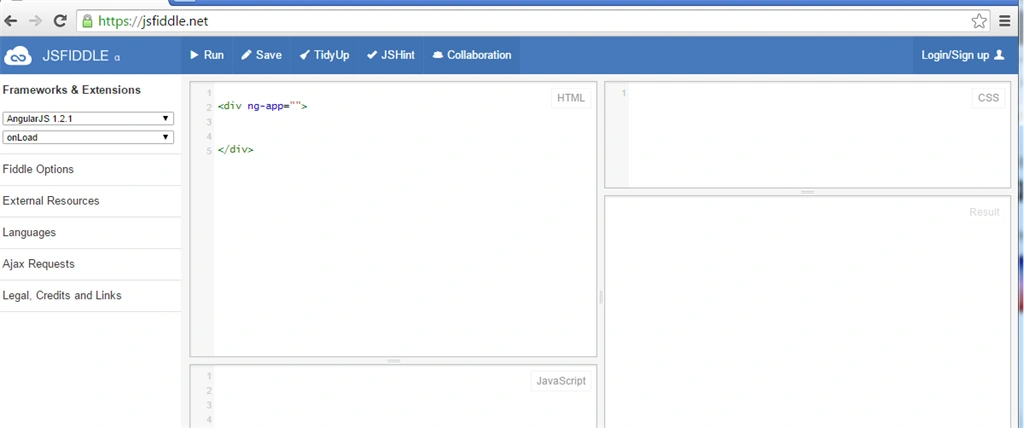
Step 2
The ng-model directive binds the value of the input field to the application variable name.
Step 3
The ng-bind directive binds the innerHTML of the <p> element to the application variable name.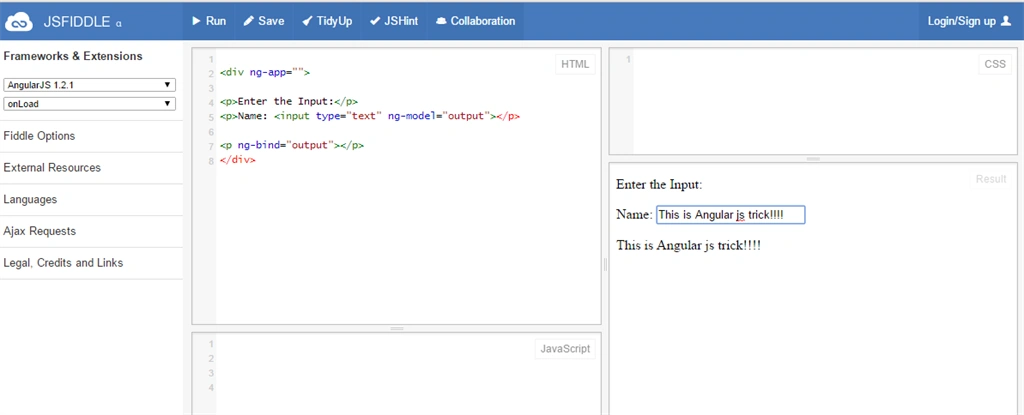
ng-init: The ng-init directive initializes AngularJS application variables.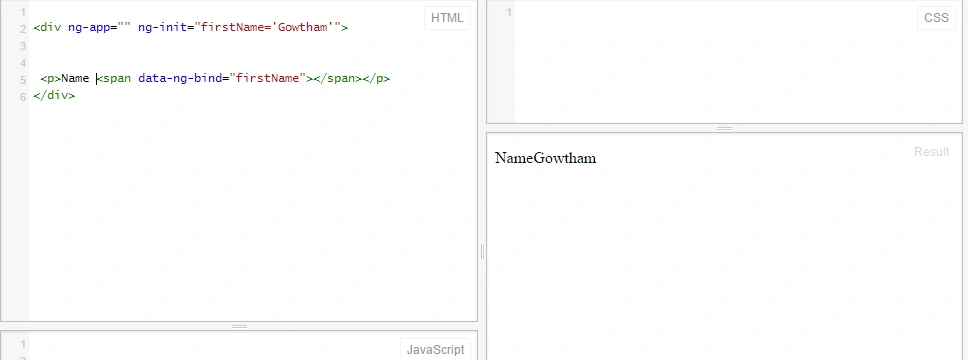
Expressions: AngularJS expressions are written inside double braces: {{ expression }}. Sample: if you want to add a two digit use , {{4+5}}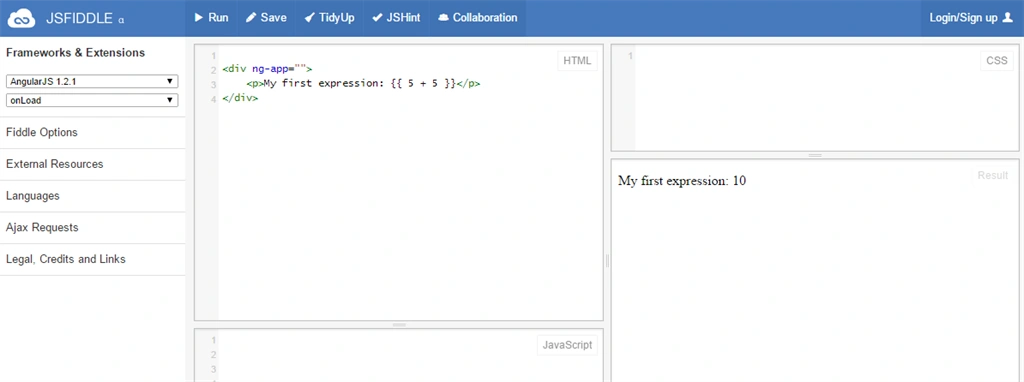
AngularJS expressions bind AngularJS data to HTML the same way as the ng-bind directive.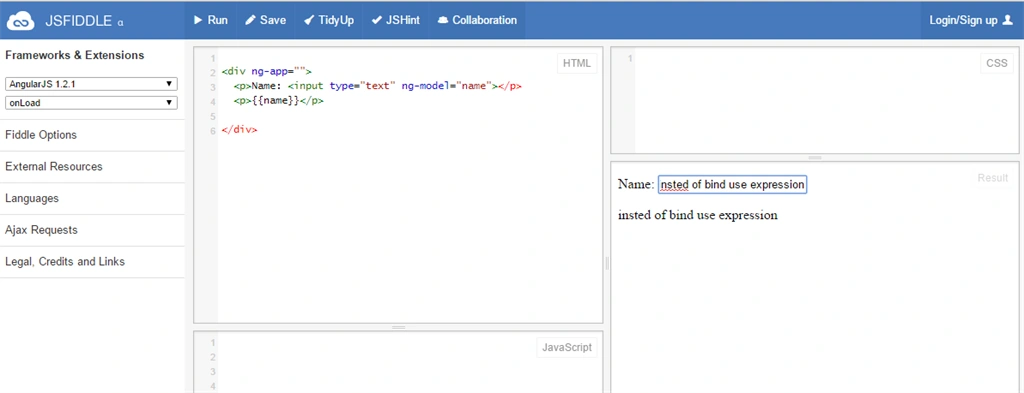
You will learn about models and controllers later in this tutorial.
Thanks for reading my article.
Hemu KumarPosted Feb 5, 2019, 10:14 AM
Am just looking for some other stuff.., i found this in that.. now i Learned some AngularJs.. thank you Gowtham..
kalu singh raoPosted Jul 4, 2016, 2:04 AM
Nice...
Debasis SahaPosted May 26, 2016, 8:11 AM
Nice sharing..
Gowtham RajamanickamPosted Apr 26, 2016, 9:10 AM
thank u so much all
Gowtham RajamanickamPosted Apr 26, 2016, 9:09 AM
thank u so much sakthivel
Gowtham RajamanickamPosted Apr 26, 2016, 9:09 AM
thank u so much Deepak
Gowtham RajamanickamPosted Apr 26, 2016, 9:09 AM
thank u so much
Sr KarthigaPosted Apr 26, 2016, 8:51 AM
good one sir
Former memberPosted Feb 2, 2016, 10:07 AM
Copied and pasted content from here: http://www.tutorialspoint.com/angularjs/index.htm
Deepak RawatPosted May 6, 2015, 1:26 PM
Hello Mr. Gowtham could you please arrange complete video tutorial for Angular.
sakthivel panchatcharamPosted May 6, 2015, 3:51 AM
Good Article
Deepak RawatPosted May 3, 2015, 12:58 PM
What is the difference between Angular and Knockout
Deepak RawatPosted May 3, 2015, 12:58 PM
Why should I go with AngularJs When already we have Knocout
Deepak RawatPosted May 3, 2015, 12:56 PM
Useful for beginner.
Vijay SPosted Apr 29, 2015, 3:07 AM
Nice Article
Satish Kumar VadlavalliPosted Apr 28, 2015, 12:19 AM
great article for beginners :)
Aditya KumarPosted Apr 23, 2015, 12:45 PM
nice
Ratnesh SinghPosted Apr 16, 2015, 8:21 AM
nice
Alaa MasalmehPosted Apr 15, 2015, 6:23 AM
nice
Sibeesh VenuPosted Apr 13, 2015, 8:11 AM
Good...
BK GPosted Apr 13, 2015, 8:05 AM
great one..easy for all beginners
Upendra Pratap ShahiPosted Apr 13, 2015, 7:13 AM
nice article sir..
Gowtham RajamanickamPosted Apr 10, 2015, 1:43 PM
thank u...
Gowtham RajamanickamPosted Apr 10, 2015, 12:41 PM
thank u dhanasekar
Gowtham RajamanickamPosted Apr 10, 2015, 12:41 PM
thank i abhisek
Gowtham RajamanickamPosted Apr 10, 2015, 12:40 PM
thank u sibeesh
Gowtham RajamanickamPosted Apr 10, 2015, 12:40 PM
thank u nitin
Gowtham RajamanickamPosted Apr 10, 2015, 12:40 PM
thank u santhakumar
DhanasekarPosted Apr 10, 2015, 4:34 AM
Good one
Abhishek JaiswalPosted Apr 10, 2015, 1:46 AM
Nice series.. Make it lagre! ;)
Sibeesh VenuPosted Apr 10, 2015, 1:34 AM
Good one.
NitinPosted Apr 10, 2015, 1:11 AM
nice
Santhakumar MunuswamyPosted Apr 9, 2015, 10:56 PM
Good