Introduction
Spinners may be defined as the tools of programs that enable users to select from a set of items or any other dialog from the list mainly in an application. It is a quick way to select and touch a phone that makes it very impressive and swift. It is a type of drop-down list touching the spinner that displays a dropdown menu with all other available values and from that list the user can select only one.
It is a part of
Input Controls and a subclass of widgets. Extending the widget's class in our spinner class is a very simple way to create a spinner. To create a spinner type object just add an attribute in the layout file in the res directory.
Creating a spinner
Just create an attribute specifying a Spinner object in the XML file and try to apply the following procedure and the code as well just for illustration.
- <Spinner
- android:id="@+id/planets_spinner"
- android:layout_width="fill_parent"
- android:layout_height="wrap_content" />
To place the spinner or make a choice more available to the user we must specifiy a spinnerAdapter in the activity or fragments source code.
Populate the spinner with user choice
The choice is providing using the SpinnerAdapter such as an ArrayAdapter class and if choices are available in a database then its object will do something. Let us see how we are doing that.
String.xml
- <?xml version="1.0" encoding="utf-8"?>
- <resources>
-
- <string name="app_name">MyAndroidApp</string>
- <string name="country_prompt">Choose a country</string>
-
- <string-array name="country_arrays">
- <item>Malaysia</item>
- <item>United States</item>
- <item>Indonesia</item>
- <item>France</item>
- <item>Italy</item>
- <item>Singapore</item>
- <item>New Zealand</item>
- <item>India</item>
- </string-array>
-
- </resources>
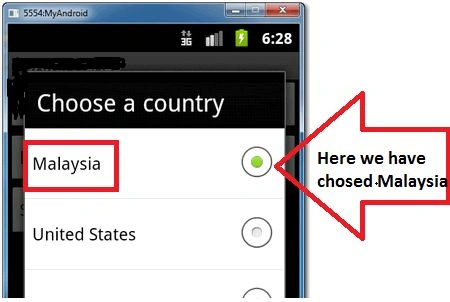
This code might produce the following output as a design, in other words it contains a list from which the user will choose.
Spinner Dropdown list
The preceding code is just for adding resources to the String.xml file. Now to add attributes to the layout.xml file (res/layout/main.xml).
- <?xml version="1.0" encoding="utf-8"?>
- <LinearLayout xmlns:android="http://schemas.android.com/apk/res/android"
- android:layout_width="fill_parent"
- android:layout_height="fill_parent"
- android:orientation="vertical" >
-
- <Spinner
- android:id="@+id/spinner1"
- android:layout_width="match_parent"
- android:layout_height="wrap_content"
- android:entries="@array/country_arrays"
- android:prompt="@string/country_prompt" />
-
- <Spinner
- android:id="@+id/spinner2"
- android:layout_width="match_parent"
- android:layout_height="wrap_content" />
-
- <Button
- android:id="@+id/btnSubmit"
- android:layout_width="wrap_content"
- android:layout_height="wrap_content"
- android:text="Submit" />
-
- </LinearLayout>
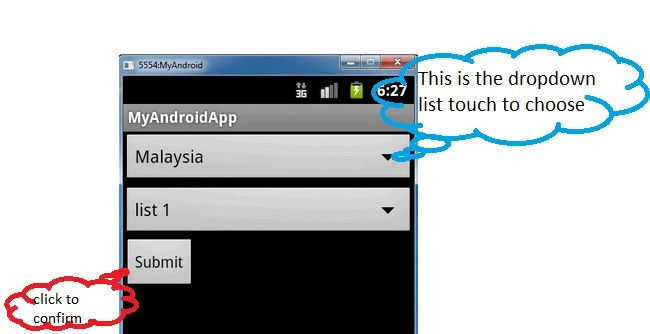
The XML design of the preceding code produces the following output as only the design.
Java code MainActivity.java
Corresponding to the layout file we must write the Java code and add the references to the Java file and complete the code using the ArrayAdapter class. We are defining the attributes and relevant references.
- package com.First.android;
-
- import java.util.ArrayList;
- import java.util.List;
- import android.app.Activity;
- import android.os.Bundle;
- import android.view.View;
- import android.view.View.OnClickListener;
- import android.widget.ArrayAdapter;
- import android.widget.Button;
- import android.widget.Spinner;
- import android.widget.Toast;
-
- public class MyAndroidAppActivity extends Activity {
-
- private Spinner spinner1, spinner2;
- private Button btnSubmit;
-
- @Override
- public void onCreate(Bundle savedInstanceState) {
- super.onCreate(savedInstanceState);
- setContentView(R.layout.main);
-
- addItemsOnSpinner2();
- addListenerOnButton();
- addListenerOnSpinnerItemSelection();
- }
-
-
- public void addItemsOnSpinner2() {
-
- spinner2 = (Spinner) findViewById(R.id.spinner2);
- List<String> list = new ArrayList<String>();
- list.add("list 1");
- list.add("list 2");
- list.add("list 3");
- ArrayAdapter<String> dataAdapter = new ArrayAdapter<String>(this,
- android.R.layout.simple_spinner_item, list);
- dataAdapter.setDropDownViewResource(android.R.layout.simple_spinner_dropdown_item);
- spinner2.setAdapter(dataAdapter);
- }
-
- public void addListenerOnSpinnerItemSelection() {
- spinner1 = (Spinner) findViewById(R.id.spinner1);
- spinner1.setOnItemSelectedListener(new CustomOnItemSelectedListener());
- }
-
-
- public void addListenerOnButton() {
-
- spinner1 = (Spinner) findViewById(R.id.spinner1);
- spinner2 = (Spinner) findViewById(R.id.spinner2);
- btnSubmit = (Button) findViewById(R.id.btnSubmit);
-
- btnSubmit.setOnClickListener(new OnClickListener() {
-
- @Override
- public void onClick(View v) {
-
- Toast.makeText(MyAndroidAppActivity.this,
- "OnClickListener : " +
- "\nSpinner 1 : "+ String.valueOf(spinner1.getSelectedItem()) +
- "\nSpinner 2 : "+ String.valueOf(spinner2.getSelectedItem()),
- Toast.LENGTH_SHORT).show();
- }
-
- });
- }
- }
Now we have completed the Java source code and in this activity we just created a list references and a button that is the submit button and a drop down list in this activity. Now another activity is required to show the data selected from the Dropdown list.
- package com.First.android;
-
- import android.view.View;
- import android.widget.AdapterView;
- import android.widget.AdapterView.OnItemSelectedListener;
- import android.widget.Toast;
-
- public class CustomOnItemSelectedListener implements OnItemSelectedListener {
-
- public void onItemSelected(AdapterView<?> parent, View view, int pos,long id) {
- Toast.makeText(parent.getContext(),
- "OnItemSelectedListener : " + parent.getItemAtPosition(pos).toString(),
- Toast.LENGTH_SHORT).show();
- }
-
- @Override
- public void onNothingSelected(AdapterView<?> arg0) {
-
- }
-
- }
Some Key Methods
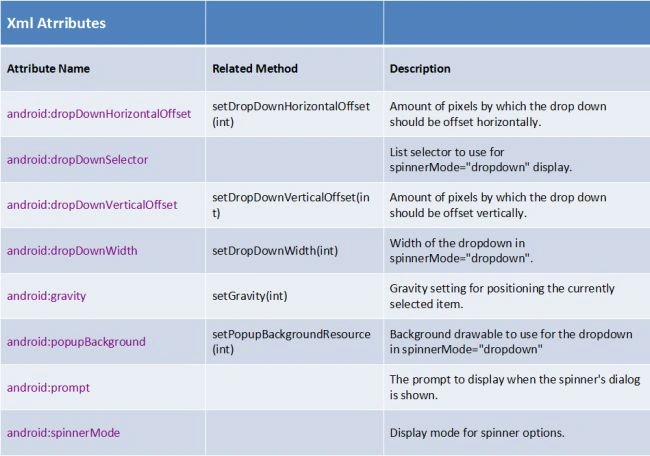
Let us analyze some key methods and XML attributes as given below. Using this table we might be able to understand the XML attributes.
Figure: XML attributes with key methods and their description
Summary
This article illustrates the basics of spinners, a part of Input controls as we have learned in the previous article. The previous article was all about Input controls. Now we have made a drop-down list using spinners and some XML attributes as shown above.


Gowtham RajamanickamPosted Apr 21, 2015, 2:49 AM
great