Introduction
An Intent is a messaging object to request an action from another application component. Basically Intents are used to maintain or set up communication between two activities and certain broadcast receivers for performing an action given by the user.
How Intents can be used?
-
To start an activity
An Activity is a user interface that a user is seeing on the phone's screen that is user intractable. A new instance of an Activity could be created by ing an Intent to startActivity(). The Intent describes the Activity to start and carries any necessary data to any type of activity.
If we want to receive a result from an activity when it is finished then we have a method startActivityForResult(). Then the result stored is in the form of an intent object in onActivityResult() callbacks.
-
To start a service
A service is another component that performs an operation in the background without a user interface. A service can be started to do a one-time operation, for example, download a file by ing an intent to the startService() method of the program. The intent describes the service to start and carries any necessary and useful data and other messages.
If a service is designed with the basic client-server architecture interface then we can bind to the service from another Activity or we can say any component by ing an intent to bindService().
-
To Deliver a broadcast
A broadcast is a message that any app can receive during the execution of an application or its part. The system delivers various broadcasts for system events such as when the system boots up or the device starts charging and when a text is received and so on. We can deliver a broadcast to other applications as well by ing, as usual, an Intent to a method named sendBroadcast(), sendOrderedBroadcast() or sendStickyBroadcast().
Intent Types
-
Explicit Intents
-
Implicit Intents
Explicit intents
These types of intents specify the component to start by name, in other words, the fully qualified class name must be called. We can use an explicit intent to start a component in our application. This can be understood as the fact that we are the developer of our own application and we already know the name of the activity and the service we want to start. For example, start a new activity in response to a user action or start a service to download a file in the background.
Implicit intents
Implicit intents do not specify the name of the component but instead declare a general action to do that allows a component from another application to handle it. For example, if we want to show a specific location to the user then we can use an implicit type intent to request that another capable application would show a specified location on a map.
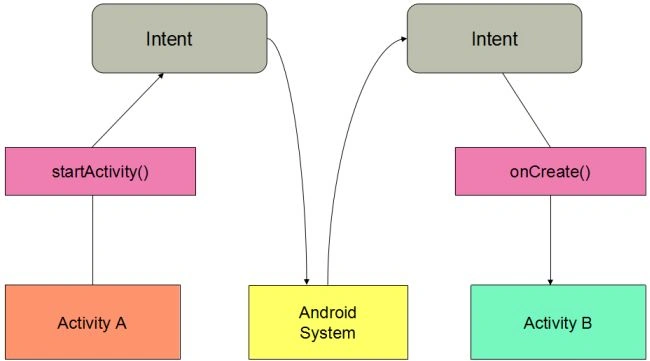
Figure: creation and start with the processing of an Intent and Receiving another Activity, B (child activity)
Using this image one thing reflects implicit intents better by these arrows. When we create an implicit intent the Android system finds the appropriate component to start by comparing the contents of the intent to the intent filters declared in the manifest file of other applications on a device.
Here we can see that there is an Activity A (MainActivity.java) and Activity B (ChilldActivity.java) and in the middle, there is an Android System I have made, in other words, all the processing is done here.
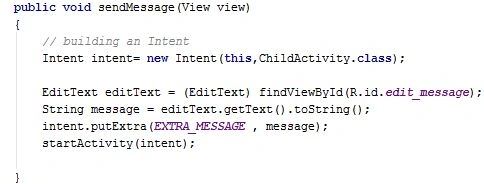
A simple Intent is defined in the MainActivity.java file in which a startActivity() method is also defined that is taking an intent object as a signature. This line of code is just to set an intent and action is initiated.
Now intent goes for processing as shown in the figure and from there, an intent seeks another activity file. For receiving this intent another activity file must be there and in the onCreate() method of the second activity, we must define any receiver to get that intent.
Creating a Simple Intent in Activity A (MainActivity.java)
After seeing in the figure let us do it programmatically which classes we use and how many variables we will use:
However, this illustrates that an Intent is created and startActivity(intent) method is called so as to start an activity having an intent as a signature that is quite helpful and is implicitly created and seeks another activity to do some action.
Receiving an Intent
In the onCreate() method of the second activity below is the small code snapshot. Let us see and analyze it.
Now in this code, we can see how we are receiving the intent by calling the getIntent() method followed by the getStringExtra() method. This receiving is done in the onCreate() method of the child activity that is Activity B.
Summary
This article explains the basics and processing of intents and their function as well and how they are created explicitly and implicitly. However, the picture renders the good use and cycle of the intent from an activity to another activity.



Chethan KumarPosted Jan 11, 2017, 5:28 AM
Hello gaurav.can you tell me if there is any method to import word(s) and its meaning(s) to sqlitebrowser instead of typing each one of them manually? // to import from a notepad file
Gowtham RajamanickamPosted Apr 7, 2016, 4:28 AM
Good Show.
Neeraj KumarPosted Jul 30, 2015, 4:54 PM
Nice
Praveen KumarPosted Jan 16, 2015, 6:29 AM
very nice Gaurav Kumar