Introduction
An Action Bar is a type of layout or animated graphic. It is a design element to be implemented in an Activity of any application. It is very certain and practical that when an Activity is launched by the user then it must contain the title of that Activity (a basic component of an application) not in the text form but also in the animated or symbolic form.
While activity is loading the user must become bored. However, it provides several user interface features that make your application immediately familiar to the user by offering consistency among other Android applications in the device.
Key Functions of an Action Bar
Setting up the Action Bar
As in the most basic form, the Action Bar displays the title for the activity and the app icon on the left of the Action Bar strip as we can see. Even in this simple form, the Action Bar is useful for all activities to inform users about where they are and to maintain a consistent identity for your application.
Basically for setting up an Action Bar, it is necessary for our application to use an Activity theme that enables the Action Bar feature because these themes will define the look of the Action Bar strip. The selection of the themes depends upon which version of Android is the lowest supported by our application.
Support Android 3.0 and Above Only
When it comes to the Action Bars in the Android then one thing that one should know is that an Action Bar is supported beginning with version 3.0 of API level 11 in all activities. The Action Bar is included in all activities that use the Theme. Holo theme and one of its descendants is the default theme when either the targetSdkVersion or minSdkVersion attribute is set to "11" or "greater".
Adding Action Bar
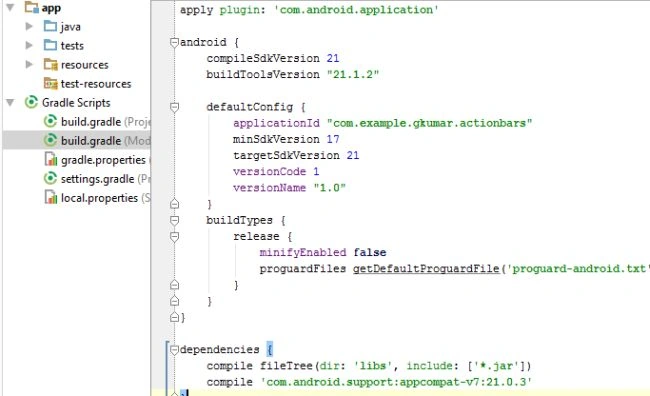
First we must set the attribute to 11 or higher in the Android manifest.xml file if you are using any other IDE than Android Studio and in
Android Studio 1.0 it is set to be in
the build.Gradle as shown in the figure.
However, we are using Android Studio that's why I am
not showing the Manifest file. This is taken over by
Gradle in this IDE.
You can choose any theme. Basically
Theme. Holo is the default and
parent theme of all the themes. If you want to set a custom theme then the Holo theme must be the parent theme.
Support Version Below 3.0
- public class MainActivity extends ActionBarActivity {.....}
We must update the <application> element or individual <activity> elements to use one of the Theme.AppCompat themes. For example let us look at the following line of code:
- <activity android : theme="@styles/theme.AppCompat.Light"...>
And remember to set the API level to 7 or higher.
Adding Action to Action Bar
The Action Bar allows programmers to add buttons and animatory titles as well for the most important action and convenient items relating to the application's current context. Those appear directly in the Action Bar with an icon or text and is known as action buttons. Actions that can't fit in the Action Bar are hidden in most cases.
For example, in some Action Bars, there is a search symbol, a magnificent glass symbol that is more precise, that the user must click on to begin a search,
First specify the Actions in XML by adding an <item> element for each item that we want to include in an Action Bar.
- <menu xmlns:android="http://schemas.android.com/apk/res/android"
- xmlns:app="http://schemas.android.com/apk/res-auto"
- xmlns:tools="http://schemas.android.com/tools" tools:context=".ActionActivity">
- <item android:id="@+id/action_search"
- android:icon="@drawable/ic_action_search"
- android:title="@string/action_search"
- android:showAsAction="ifRoom" />
- // Settings, should always be in the overflow
- <item android:id="@+id/action_settings"
- android:title="@string/action_settings"
- android:showAsAction="never" />
-
- </menu>
The icon attribute requires a resource id for an image. The name
@drawable must be the name of
the
bitmap image in the application.
If one is using a Support library
If a programmer is building an application for a version lower than 3.0 then the activity_actionbar.xml will look like this.
- <item android:id="@+id/action_search"
- android:icon="@drawable/ic_action_search"
- android:title="@string/action_search"
- myapp:showAsAction="ifRoom" />
- ...
Add the Action Button to the Response
- package com.example.gkumar.actionbars;
-
- import android.support.v7.app.ActionBarActivity;
- import android.os.Bundle;
- import android.view.Menu;
- import android.view.MenuItem;
-
- public class ActionActivity extends ActionBarActivity {
-
- @Override
- protected void onCreate(Bundle savedInstanceState) {
- super.onCreate(savedInstanceState);
- setContentView(R.layout.activity_action);
- }
-
- @Override
- public boolean onCreateOptionsMenu(Menu menu) {
-
- getMenuInflater().inflate(R.menu.menu_action, menu);
- return true;
- }
-
- @Override
- public boolean onOptionsItemSelected(MenuItem item) {
-
-
-
- switch (item.getItemId()) {
- case R.id.action_search:
- openSearch();
- return true;
- case R.id.action_settings:
- openSettings();
- return true;
- default:
-
- return super.onOptionsItemSelected(item);
- }
- }
- }
Summary
This article explained the basics of Action Bars. However, we have written some parts of the entire code that will be a clue for beginners. Think of your Android phone without an Action Bar. That would be boring. Styling and customizing the Action Bars will be shown in the next article.


Praveen KumarPosted Jan 16, 2015, 11:26 PM
Very Nice Gaurav Kumar